A HubSpot Elite Solutions Partner built to help organizations unify strategy, systems, and execution. We design HubSpot systems that scale.

See how we've solved complex HubSpot challenges across migrations, integrations, CMS, automation, and optimization.

Join a team building smarter HubSpot systems. We value strategic thinkers who move proactively, care about quality, and want to do meaningful work.

8 min read

How Healthcare Organizations Build Patient Acquisition Funnels Using HubSpot

How Healthcare Organizations Build Patient Acquisition Funnels Using HubSpot

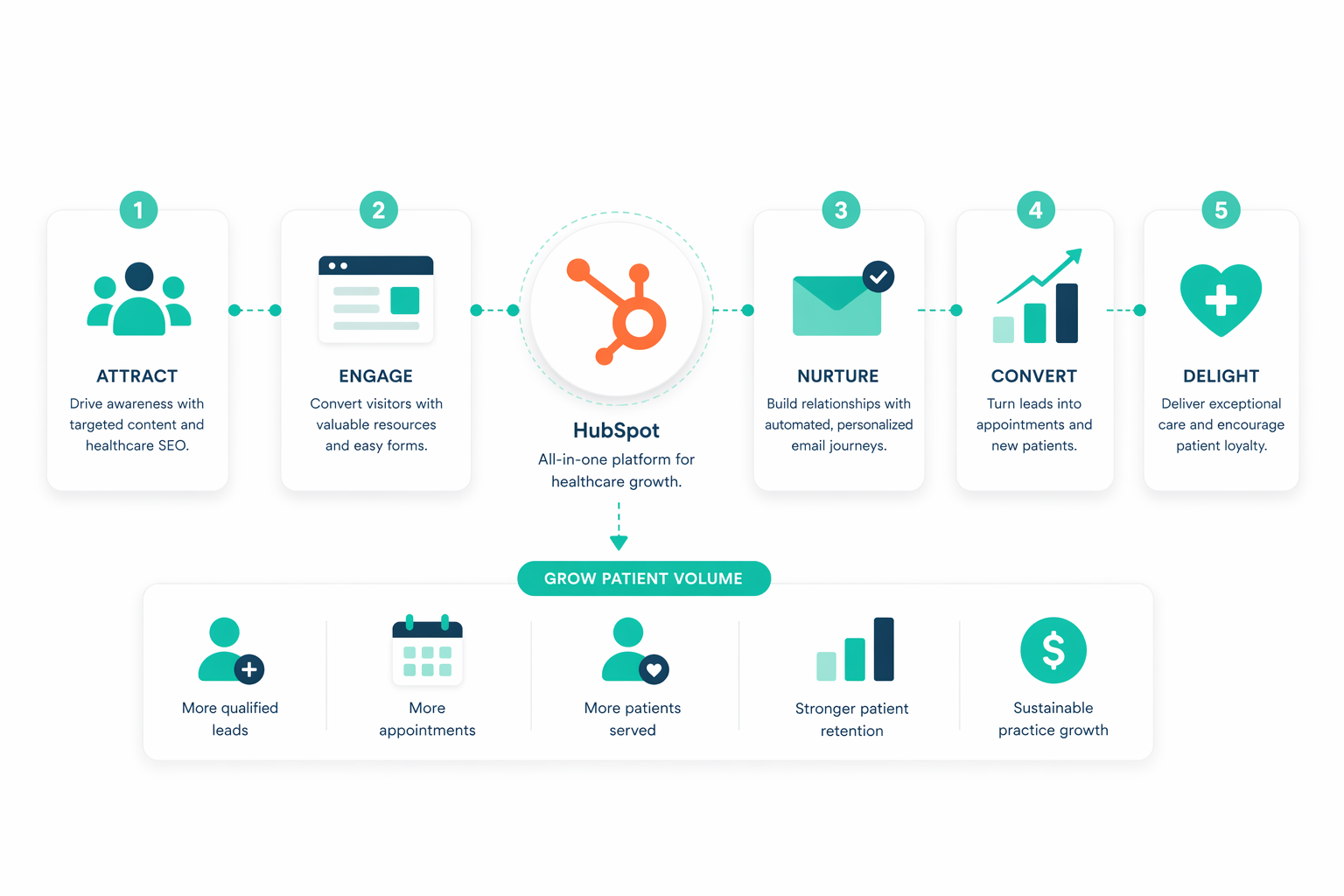
Healthcare organizations build patient acquisition funnels using HubSpot by connecting marketing, patient communications, referrals, CRM data, and automation into one platform. This creates a journey that helps attract prospective patients, guide them toward scheduling an appointment, and maintain engagement after care begins.

HubSpot also supports every stage of the funnel with specific tools for content marketing, lead capture, workflow automation, patient nurturing, referral management, reporting, and AI. This guide explains how to plan a patient acquisition funnel, which HubSpot tools support each stage, how to optimize conversions, and the HIPAA considerations to address during implementation.

Key Takeaways

  • A patient acquisition funnel connects marketing, CRM, referrals, automation, and reporting so every stage of the patient journey runs on the same data.
  • Build a patient acquisition funnel by defining patient personas, mapping the journey, and setting a success metric for each stage before building a single workflow.
  • Marketing Hub, Content Hub, Smart CRM, Sales Hub, and Service Hub each carry a specific stage, from discovery through retention.
  • HIPAA applies to any part of the funnel that touches Protected Health Information, including forms, CRM records, workflows, and integrations.

What Is a Patient Acquisition Funnel?

A patient acquisition funnel is a structured process that guides prospective patients from their first interaction with a healthcare organization to becoming active patients. Marketing, referrals, scheduling, and patient communication stop operating as separate activities and become connected stages in one journey.

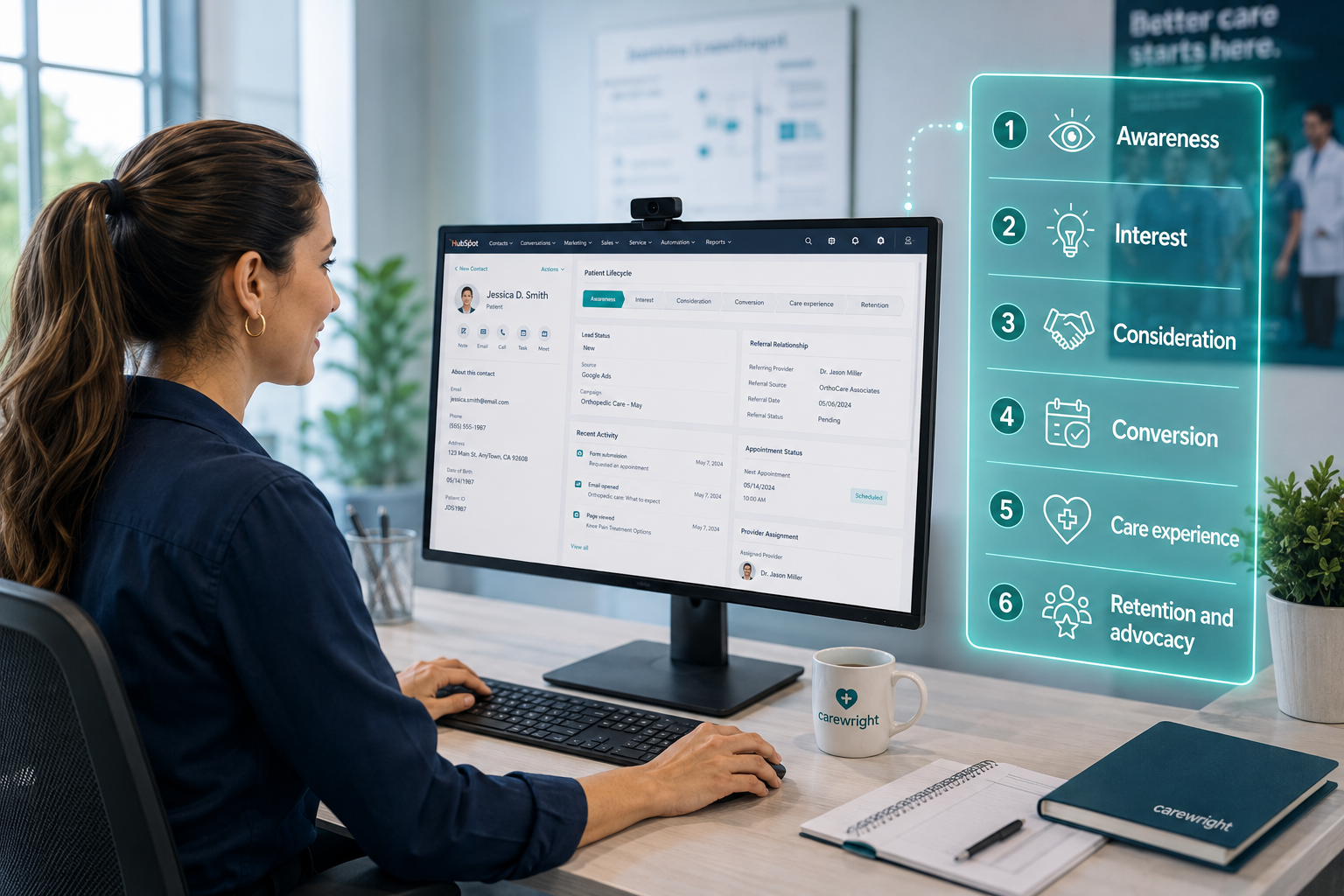
In HubSpot, that journey lives in a single CRM record. Marketing engagement, referral activity, form submissions, and service conversations attach to the same contact. That gives marketing, patient access, and service teams a shared view of how someone discovered the organization and what influenced the decision to book.

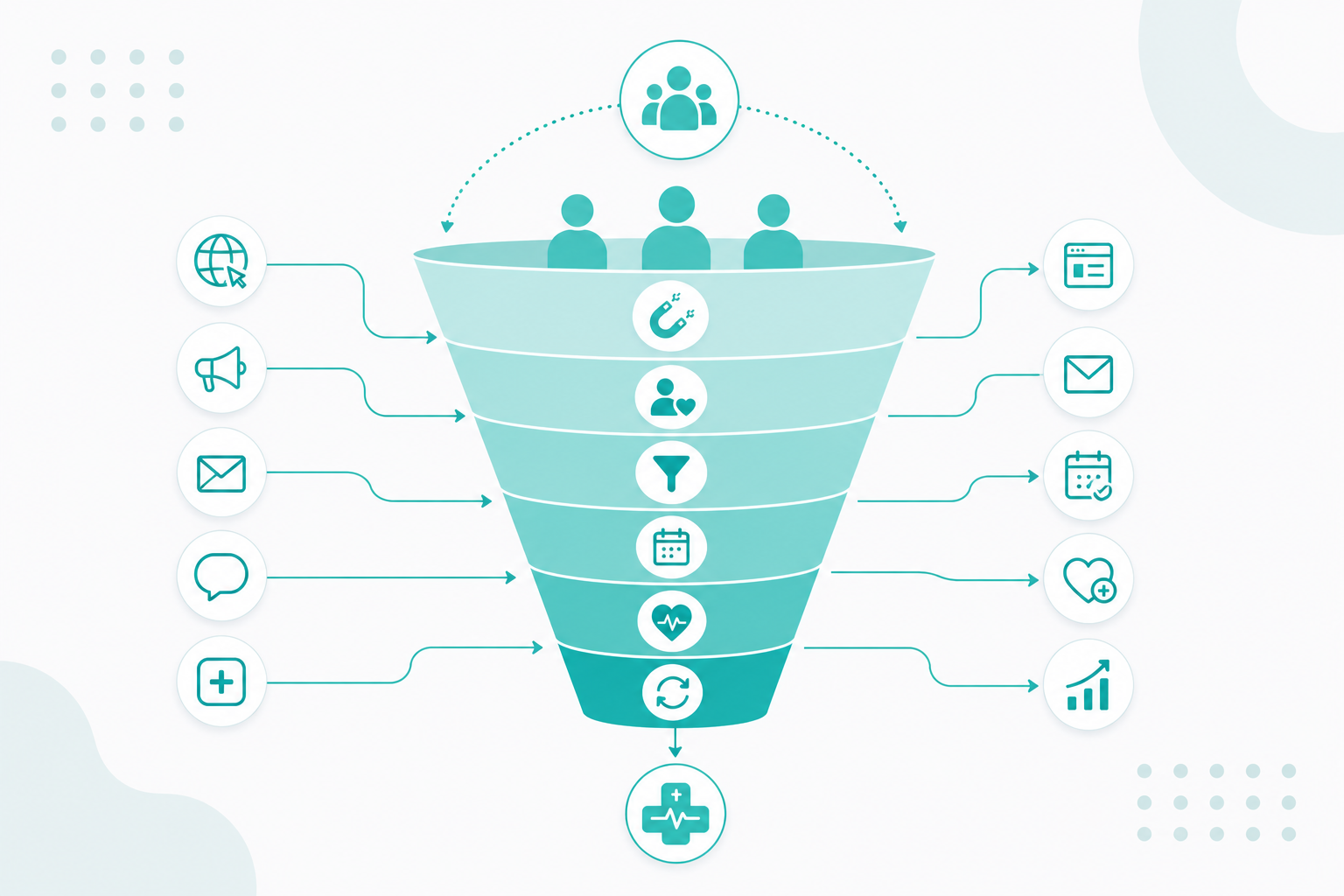
The Six Stages of the Patient Acquisition Funnel

six-stages-of-the-patient-acquisition-funnel

How It Differs From a Standard Marketing Funnel

A standard marketing funnel converts prospects into customers in any industry. A patient acquisition funnel keeps the same shape and adds healthcare-specific requirements: patient education, provider trust, physician referral relationships, insurance verification, appointment scheduling, and privacy obligations.

The buying behavior differs too. Patients rarely book on first contact. They research symptoms, compare providers, read reviews, confirm coverage, and talk with family before choosing. Acquisition also arrives through channels that paid advertising cannot cover on its own, including physician referrals, insurance directories, and community outreach. The funnel exists to support those moments with relevant information and timely follow-up, which is why traffic volume is a weak measure of performance.

How Do You Plan the Funnel Before Building It?

Plan by defining ideal patients, mapping the journey, choosing acquisition channels, setting a goal for each stage, and deciding what information to collect at first contact. These five decisions shape every workflow, email, form, and report built afterward, so settling them early prevents disconnected automation and reporting gaps that are expensive to unwind.

1. Define the Patients You Want to Reach

Different patient groups have different needs, concerns, and communication preferences. Document personas around:

  • Demographics
  • Geographic service area
  • Accepted insurance
  • Typical referral sources
  • Preferred communication channels

2. Map the Journey

List every interaction that happens before someone schedules care, across digital and offline channels:

  1. Discovery through search, referral, advertising, or community outreach
  2. Research into services, providers, and treatment options
  3. Comparison against other organizations using reviews and credentials
  4. First contact through a form, call, or referral submission
  5. Appointment scheduling
  6. Follow-up communication before and after the visit

Mapping surfaces the points where patients drop out and the gaps where added communication would keep them moving.

3. Choose the Channels that Feed the Funnel

A diversified mix keeps inquiry volume stable when one source softens. Most healthcare organizations pull from organic search, paid search, social media, educational content, email, physician referrals, healthcare directories, community events, and patient referrals. HubSpot tracks all of these against the same CRM records, so channel contribution stays comparable.

4. Set One Success Metric Per Stage

A single metric per stage keeps reporting readable and gives every workflow a purpose:

  • Awareness: new visitors from target service areas
  • Interest: resource downloads and email engagement
  • Consideration: provider page views and consultation requests
  • Conversion: appointment requests and confirmed bookings
  • Care experience: first response time and satisfaction scores
  • Retention and advocacy: repeat visits, patient referrals, review volume

5. Decide What to Collect at First Contact

Most organizations need contact details, service or specialty of interest, preferred location, referral source, communication preferences, and the appointment request itself. Collect what personalizes the next message and nothing more. Every extra field adds friction, and unnecessary clinical detail adds compliance exposure.

Related readings:

Which HubSpot Tools Support Each Stage?

HubSpot covers the funnel through Marketing Hub, Content Hub, Smart CRM, Sales Hub, Service Hub, Data Hub, Breeze AI, and Agent Hub. Mapping products to stages before configuration keeps the build tied to the journey you documented.


Awareness: Getting Found

Tool

Purpose

Content Hub

Publish healthcare blogs, service pages, landing pages, and resource centers

Marketing Hub

Manage SEO recommendations, email, social publishing, advertising, and campaigns

AEO (Beta)

Measure brand visibility inside AI search experiences and find answer-visibility gaps

Breeze AI

Draft content ideas, FAQs, meta descriptions, and copy improvements


Interest and Consideration: Capturing and Qualifying Inquiries

Tool

Purpose

Marketing Hub forms

Capture appointment requests, consultation inquiries, and resource registrations

Smart CRM

Hold every interaction on one contact record

Breeze Intelligence

Enrich contact data where applicable and shorten forms for known contacts

Lists and segmentation

Group contacts by specialty interest, referral source, service line, or engagement


Conversion: Booking the Appointment

Tool

Purpose

Workflows

Automate confirmation emails, internal notifications, and task assignment

Meetings scheduler

Offer scheduling options where appropriate for the service line

Smart CRM

Track appointment requests and lifecycle stage progression

Sales Hub

Manage physician outreach and business development activity


Care Experience and Retention: Keeping the Relationship

Tool

Purpose

Service Hub

Handle patient inquiries through Help Desk, conversations, and tickets

Feedback surveys

Collect patient input after appointments

Knowledge base

Publish answers to recurring patient questions

Customer Agent

Respond to common inquiries with AI when configured for your policies


Platform-wide: Data, AI, and Reporting

  • Smart CRM centralizes marketing engagement, referral activity, and communication history.
  • Data Hub syncs and governs data across connected systems.
  • Breeze AI assists with content creation, workflow building, and campaign execution.
  • Agent Hub provides one workspace for deploying agents such as Customer Agent and Prospecting Agent.
  • Reporting dashboards show acquisition performance by campaign, channel, and service line.

How Does HubSpot Nurture Prospective Patients Into Appointments?

HubSpot nurtures prospective patients by delivering personalized communication based on what each person has already done. Workflows, email, content, and CRM data work together so a patient who downloaded a cardiology guide hears about cardiology, and a patient referred by a physician gets follow-up that reflects it.

Personalize using CRM Data

Smart CRM records website visits, form submissions, email engagement, referral activity, and past conversations on one contact. That history supports personalization by service interest, referral source, content viewed, location, and prior inquiries, which keeps messaging relevant to where someone sits in the decision.

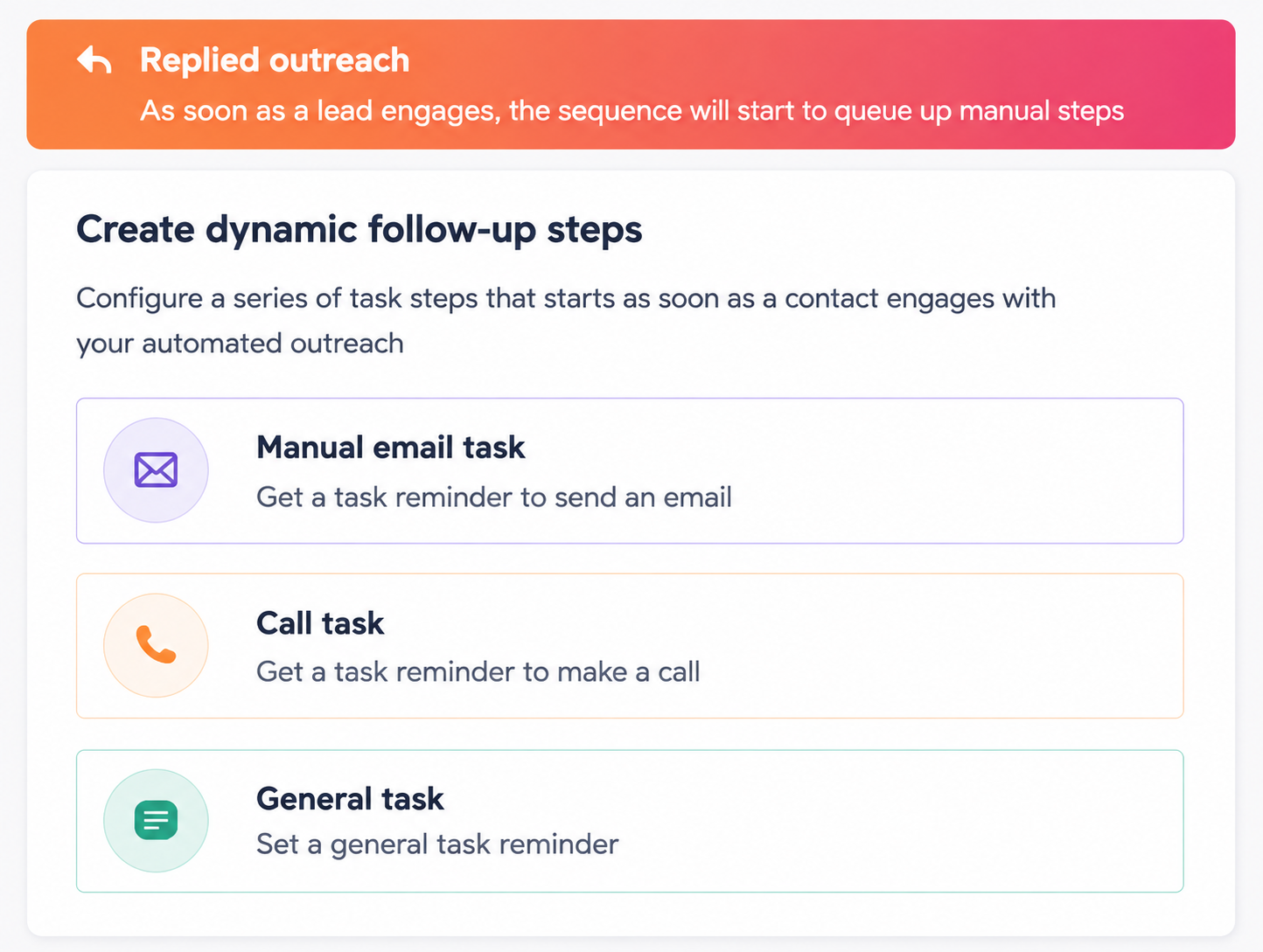
Automate Follow-up with Workflows

dynamic-follow-up-hubspot

Workflows carry the repetitive follow-up that manual processes drop. Common builds include:

  • A confirmation email sent immediately after form submission
  • Educational resources matched to a specific condition or service line
  • Follow-up tasks assigned to patient access or referral coordinators
  • Appointment reminders before the visit
  • Internal alerts when a prospective patient returns to the site
  • Escalation when an inquiry sits unanswered past a set threshold

Teams can build these from templates, AI assistance, or custom logic.

Publish Content that Answers Pre-appointment Questions

Trust decides most healthcare conversions, and content carries the trust. Content Hub and Marketing Hub support the resources patients look for before they call: provider biographies, insurance and payment details, FAQ pages, patient success stories, and service comparisons. Each asset also gives nurturing workflows something specific to send.

Use Email to Move Patients Toward Scheduling

Marketing Hub email handles the sequences between first contact and confirmed appointment, including educational follow-up, appointment preparation details, post-consultation messages, invitations to schedule, and announcements about new providers or services. Because engagement writes back to Smart CRM, teams can see which prospects are warming and adjust outreach accordingly.

Use Breeze AI to Move Faster

Breeze AI reduces the manual load on nurturing work. Healthcare teams use it to draft personalized emails, produce educational content, build workflows more quickly, summarize CRM activity, and generate follow-up recommendations. Keep clinical and identifying details out of AI prompts, since AI features sit outside Sensitive Data functionality.

Hand off When a Patient is Ready to Book

Once engagement signals strong intent, workflows can notify the right team member, send scheduling information, update the lifecycle stage, and continue communication until the appointment is confirmed. Staff open the record and see the full history before the first conversation, so the patient never repeats themselves.

How Does HubSpot Support Physician Referrals?

Referrals account for a large share of patient volume at most healthcare organizations, and they usually live in spreadsheets and inboxes. Sales Hub and Smart CRM bring that activity into the same system as marketing and patient access work.

Use them to:

  • Record every referral source and referring provider
  • Assign clear ownership for referral follow-up
  • Track referral status from submission through completed appointment
  • Schedule relationship-building activity with referring practices
  • Document communication history for each partner organization
  • Report on which physicians and organizations send qualified patients

Referral reporting shows business development teams where the partnership investment is paying off, and it gives marketing visibility into a channel that digital analytics cannot see.

What HIPAA Considerations Apply?

HIPAA applies to every part of the funnel that collects, stores, uses, or shares PHI, which includes forms, CRM records, workflows, integrations, and patient communications. Build compliance in from the start and treat it as ongoing operational work.

  • Collect only what you need. Request the minimum information required for an appointment request, consultation, or service inquiry. Extra clinical detail raises risk with no acquisition benefit.
  • Identify where PHI enters. Contact forms, appointment requests, referral submissions, inbound messages, and uploaded documents can all carry PHI. Review and secure each entry point.
  • Use HIPAA-supported CRM features. Organizations storing PHI in HubSpot should use Sensitive Data properties, execute a Business Associate Agreement (BAA) when eligible, and configure the portal according to HubSpot's HIPAA guidance.
  • Restrict access. Apply role-based permissions, field-level controls, multi-factor authentication, and audit logging so only authorized staff view or edit PHI.
  • Review marketing communications. HIPAA limits marketing that uses PHI, and some activities require written patient authorization first. Run campaign plans past compliance and legal before launch.
  • Secure integrations. Scheduling platforms, EHR systems, patient portals, and communication tools should meet the same security requirements as the CRM, with data sharing documented and governed.
  • Set AI usage policies. Define what staff can and cannot enter into AI prompts, and keep sensitive data out.
  • Train staff. Technology does not create compliance on its own. People handling PHI need to recognize risks, follow internal policy, and know how to report an incident.
  • Audit on a schedule. Periodic review of forms, workflows, permissions, integrations, and collection practices catches gaps before they become breaches.

For more information about HIPAA, explore the resources below:

How to Optimize the Patient Acquisition Funnel Over Time

steps-on-how-to-optimize-patient-acquisition-funnel

1. Fix High-traffic, Low-conversion Pages

Start with pages that draw the most visitors and produce the fewest appointment requests. In Content Hub and Marketing Hub, review page analytics, then move the appointment form above the fold, replace generic calls to action with service-specific ones such as "Schedule a cardiology consultation," and add provider credentials, testimonials, accepted insurance plans, and FAQs. A/B test headlines, layouts, images, and calls to action to confirm which version produces more inquiries.

2. Reduce Form Abandonment

Long first-contact forms cost inquiries. Keep the initial form to what a coordinator needs to start the conversation and gather the rest later using conditional fields, progressive profiling on return submissions, and Breeze Intelligence form shortening for known contacts.

3. Shorten Response Time

Patients contact several providers at once, and the first useful reply usually wins the appointment. Set workflows to send immediate confirmation, route the inquiry to the correct patient access representative, create a follow-up task with a deadline, alert referral coordinators on physician referrals, and escalate anything still open past your service standard.

4. Connect HubSpot to Clinical and Scheduling Systems

Disconnected systems produce duplicate records, conflicting messages, and incomplete histories. Data Hub and HubSpot integrations connect EHR systems, appointment scheduling software, patient portals, contact center platforms, and analytics tools so staff work from consistent data.

5. Close AI Search Visibility Gaps

Prospective patients now ask ChatGPT, Gemini, and Perplexity the questions they used to type into search engines. HubSpot AEO identifies prompts where your content has low visibility, compares performance against competitors, and points to the pages worth updating first.

6. Report on the Full Funnel

Single-channel reporting hides the real problem. Review stage-to-stage conversion across the whole journey each month so you can tell the difference between a traffic issue, a form issue, a response-time issue, and a referral follow-up issue. Fix the constraint you find, then measure again.

You don't need to rebuild your entire patient acquisition funnel at once. Start with the area that has the biggest impact, measure the results, then move on to the next opportunity for improvement.

Your Next Step Toward a Better Patient Acquisition Funnel

The strongest patient acquisition funnels are designed before they are built. A documented strategy gives every campaign, form, workflow, and report a defined job, and it keeps marketing, patient access, referral management, and service teams working from the same journey.

Campaign Creators helps healthcare organizations plan, implement, and optimize HubSpot patient acquisition funnels, from CRM implementation and automation through content strategy and performance reporting.

Talk with our team about the funnel you need to build!


Frequently Asked Questions

Which HubSpot Hubs Are Most Important for Patient Acquisition?

Marketing Hub, Smart CRM, Sales Hub, Service Hub, and Content Hub provide the core capabilities needed to attract, engage, nurture, and manage prospective patients throughout the acquisition journey.

Can HubSpot Replace an Electronic Health Record?

No. HubSpot is a CRM platform that manages patient relationships, communications, and engagement, while an EHR stores clinical records, diagnoses, treatments, and other medical documentation.

Can HubSpot Integrate With EHR Systems?

Yes. HubSpot supports integrations through APIs and third-party connectors.

Can HubSpot Automate Appointment Reminders?

Yes. HubSpot Workflows can automate appointment reminders, follow-up messages, and internal notifications to help maintain timely and consistent patient communication.

How Does HubSpot Improve Referral Management?

HubSpot records referral sources, tracks referral activity, automates follow-up, and provides reporting that helps healthcare organizations strengthen relationships with referring providers.

How Healthcare Organizations Use HubSpot to Grow Patient Volume

How Healthcare Organizations Use HubSpot to Grow Patient Volume

Healthcare has reached a point where strong clinical care is expected. Patients now expect the same digital convenience they get from banking or...
Read More
How to Use EHR Data for Patient Segmentation in HubSpot

How to Use EHR Data for Patient Segmentation in HubSpot

Healthcare organizations use patient segmentation to create more relevant communication, improve engagement, and support care coordination throughout...

Read More
HubSpot vs Traditional Healthcare CRM Systems

HubSpot vs Traditional Healthcare CRM Systems

Healthcare is shifting toward a full patient experience, where you’re expected to deliver the same smooth digital interactions found in retail and...

Read More