A healthcare landing page converts when a visitor recognizes their own situation in the first few seconds and finds one obvious next step. Six things get you there. One audience, one conversion action, a headline that continues the promise from the ad or search result, language a patient can follow without a dictionary, proof they can verify, and a form short enough to finish on a phone.
You can build that landing page on HubSpot with its content editor, connect it to a form that creates or updates a CRM record, fire the internal notification that puts a scheduler on the phone, then use SEO recommendations, device previews, and A/B testing to improve what you launched.
Campaign Creators can help you put that workflow together. We build healthcare landing pages that turn traffic into qualified patient inquiries without adding unnecessary friction to the patient journey.
Key Takeaways
- One landing page should serve one audience and drive one conversion action.
- The page has to continue the promise made by the ad, email, or search result that sent the visitor there.
- Plain language and supportable claims convert better in healthcare than broad marketing statements.
- Short forms with specific button copy reduce friction at the moment of highest anxiety.
- HubSpot ties the page to forms, CTAs, automation, and CRM records, which turns a landing page into an operational process.
1. Set Your Goal and Know Your Audience

A healthcare landing page performs when it is built for one audience taking one action. Name both before you start any copy or design work. Start by defining the single outcome you want the page to drive.
What should this visitor do after reading the page? You can choose one primary conversion action below:
- Book an appointment
- Request a consultation
- Schedule a screening
- Request a callback
- Register for a program or event
- Download a patient guide
- Request an insurance or benefits consultation
Define A Specific Audience
"Patients" is too broad to write from. "Adults with chronic knee pain who are considering non-surgical treatment" tells you what to say.
Five questions get you there.
- Who are they, as patients, caregivers, parents, employers, or referring physicians?
- What problem are they trying to solve?
- What stage are they in, from researching symptoms to choosing a provider?
- What do they weigh most, such as location, availability, credentials, insurance, cost, or outcomes?
- What could stop them, such as fear, cost, privacy concerns, medical jargon, or a long form?
Write the answers into one short profile before the build starts.
- Audience: Adults 40+ with persistent knee pain looking for an orthopedic specialist nearby.
- Primary concern: Pain limiting daily activity.
- Main objection: Unsure if surgery is the only option.
- Trust need: Specialist credentials and patient reviews.
- Primary CTA: Schedule a consultation.
This level of audience research should guide the page and not design preference alone. For example, when we redesigned the HubSpot site for Caring Senior Service, an in-home senior care provider, persona research led to two immediate changes.
- The homepage highlighted two core services instead of the full service menu that helped visitors find the right path faster.
- The business phone number also moved into the header after the data showed that these buyers preferred to call.
These resulted in an increase in organic traffic by 300%, 5,485 new contacts, and a 60% increase in homepage traffic.
Keep One Audience Per Page
An orthopedic page that tries to serve joint pain patients, youth athletes, parents, referring physicians, and insurers speaks clearly to none of them. Build separate pages when the needs diverge, such as one for sports injury treatment, one for knee replacement consultations, and one for pediatric orthopedics. Each page can then answer the questions that group is asking.
2. Build a Clear Landing Page Structure
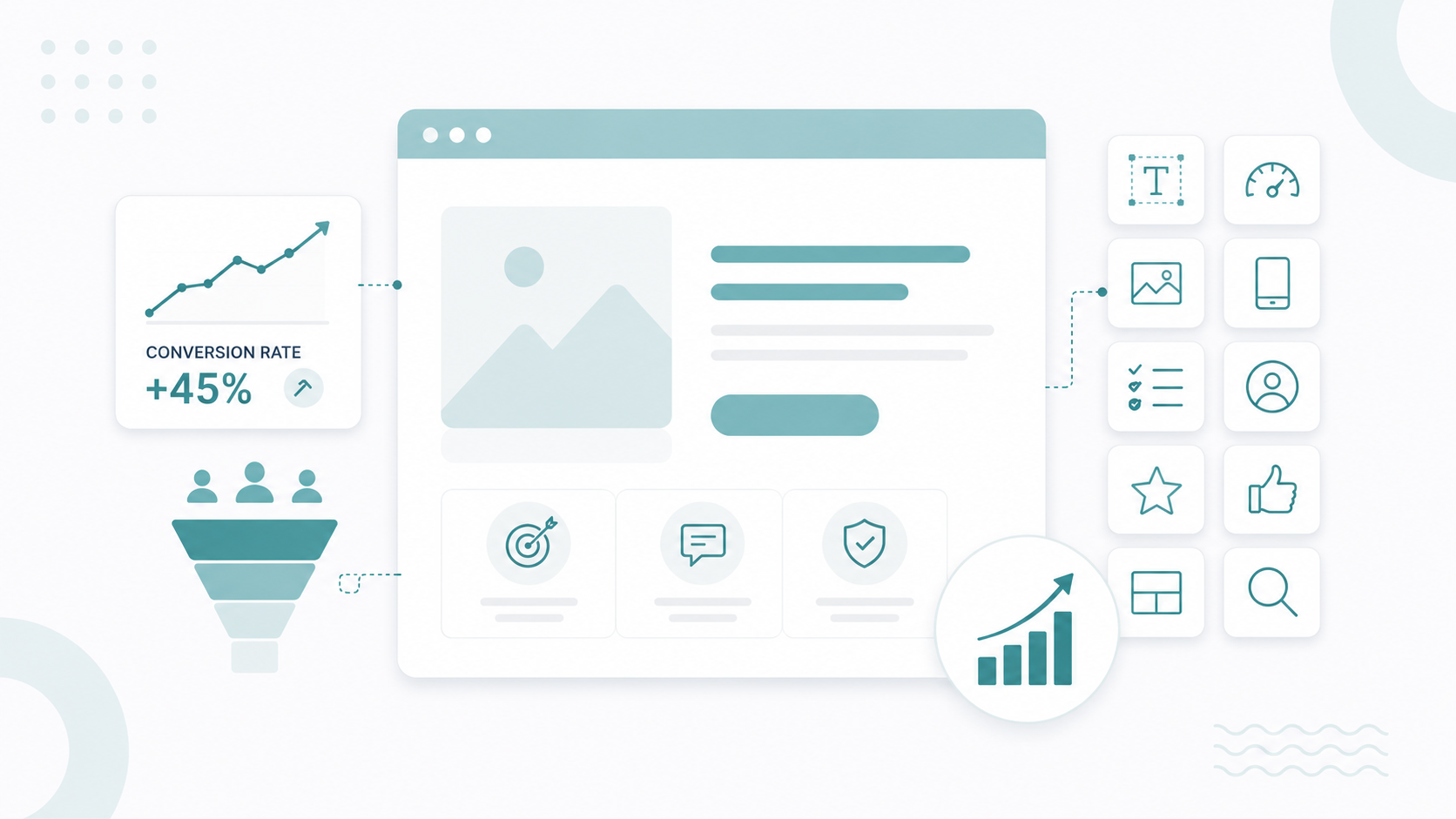
Think of the page as a conversation with someone interested but cautious. Each section should address a concern, build confidence, or move the visitor toward the primary action.
- Hero. H1, one or two supporting sentences, and the primary CTA. Answers "Am I in the right place?"
- Value statement. Why the service fits this person's situation.
- Key benefits. What they get from taking the next step.
- What to expect. The process before and after the appointment.
- Trust signals. Credentials, affiliations, testimonials, and accepted insurance.
- Form or conversion section. The next step, kept short.
- FAQs. The practical questions that stall a decision.
- Final CTA. One more clear opportunity to convert.
Not every page needs all eight. A free patient guide can work with four sections. A page asking someone to book a specialist consultation usually needs the full set, because the commitment is higher.
Write a Headline That Names the Offer
A specific headline should connect the offer to the audience, service, or outcome.
- Get Expert Care for Chronic Back Pain
- Schedule a Same-Week Dermatology Consultation
- Find the Right Treatment for Your Knee Pain
Follow the headline with two or three sentences explaining what the service is, who provides it, and what happens next. Keep the introduction concise so the main message and CTA remain visible without requiring a long read.
Place Trust Where Doubt Appears
Healthcare requires a high level of confidence before someone takes action. A survey found that 84% of patients check online reviews before choosing a new provider, with 51% reading at least six of them. Use trust signals throughout the page so reassurance appears when visitors are most likely to need it.
- Near the hero: Add a credential or accreditation.
- After the service explanation: Include a relevant patient testimonial.
- Beside the form: Provide privacy and consent information.
- Near the final CTA: Show accepted insurance or availability.
Remove the Exits
A campaign landing page should keep visitors focused on one primary action. Full navigation menus, promotional banners, and secondary links can pull attention away from that action.
If someone arrives to book an appointment, give them a focused path to booking. Remove unnecessary navigation and links that lead visitors away from the conversion goal. The page should make the intended next step obvious.
Design for Scanning and for Phones
Few visitors read a landing page from top to bottom. Most scan headings, short paragraphs, bullet points, images, and buttons to find the information they need.
Give visitors a clear visual path through the page with:
- One clear H1
- Descriptive H2s
- Short paragraphs
- Bullet points
- Generous whitespace
- Visible, easy-to-identify buttons
Mobile usability matters just as much. Healthcare visitors may search from waiting rooms, parking lots, or home, so the page needs to work well on smaller screens.
Check that:
- The headline does not wrap into five lines.
- Buttons are easy to tap.
- The form fits comfortably on the screen.
- Images do not push the CTA several screens down.
- Key information remains easy to find without excessive scrolling.
You can preview the page at multiple screen sizes in HubSpot before publishing.
3. Write Copy That Builds Trust and Drives Action
Healthcare copy has to make a worried person feel understood, then give them a reason to act. People weigh these decisions more carefully than an ordinary purchase, so the writing has to reduce uncertainty while also selling the next step.

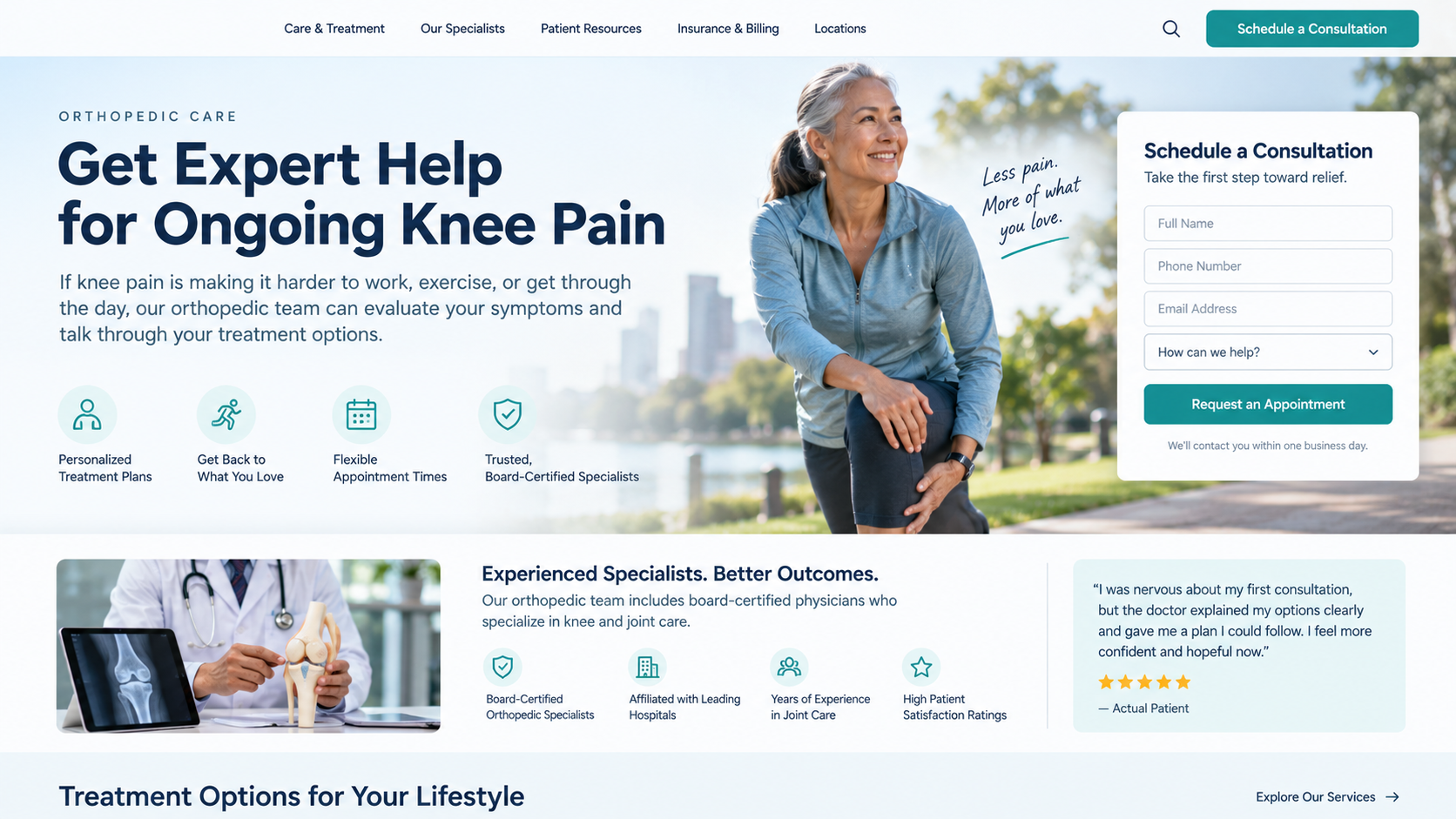
Do not open with your organization. "ABC Medical Center provides comprehensive orthopedic services throughout the region" answers a question nobody asked. Try this.
Get Expert Help for Ongoing Knee Pain
If knee pain is making it harder to work, exercise, or get through the day, our orthopedic team can evaluate your symptoms and talk through your treatment options.
That version answers "why is this page relevant to me?" in the first two lines, which is exactly what a visitor from Google Ads or search needs.
Make The Value Proposition Specific
"World-class healthcare" and "your health is our top priority" sound fine and say nothing. A working formula is what you offer, who it is for, and the benefit they get.
Talk With a Board-Certified Cardiologist About Your Heart Health
Discuss your symptoms, risk factors, and treatment options in a personalized consultation.
Use Plain, Patient-Friendly Language
"Our multidisciplinary team provides comprehensive management of musculoskeletal pathologies" is a sentence written for a colleague and not a patient. "Our specialists diagnose and treat conditions affecting your bones, joints, and muscles" carries the same meaning and lands immediately.
Lead With Benefits
A feature explains what you provide. A benefit explains why the visitor should care. "Our consultations are 45 minutes" becomes "you get a dedicated 45 minutes to raise your concerns, ask questions, and understand your options." Use both when the feature supports the benefit.
Use Proof A Patient Can Check
"Our doctors are highly experienced" is a claim. "Our orthopedic team includes board-certified physicians treating joint and musculoskeletal conditions" is evidence. Specific proof includes board certifications, hospital affiliations, accreditations, years in practice, review ratings, published outcomes where supportable, and accepted insurance plans.
Testimonials carry weight when they sound like a person. "I was nervous about my first consultation, but the doctor explained my options clearly and gave me a plan I could follow" does more than "Amazing service, highly recommend." Present testimonials accurately and never edit them in a way that changes the patient's meaning.
Learn how to get customer testimonials right in this guide.
4. Add Strong Calls to Action and Simple Forms
Choose the action tied to your conversion goal and use consistent wording throughout the page. If the goal is to schedule a consultation, the hero, mid-page section, and final CTA should all point toward scheduling.
Competing buttons such as Contact Us, Learn More, View Services, and Meet Our Doctors force visitors to figure out which action matters most. A focused landing page makes that decision clear.
Keep the primary CTA visible near the top, then repeat it after you have given visitors enough information to make a decision.
Keep The Form Short
Every field is another small task. HubSpot's research on form fields found that asking for age, phone numbers, and street-level address information all pulled conversion rates down, and its analysis of field types showed that dropdowns and open text areas cost more conversions than simple single-line fields. In HubSpot's landing page survey, 30.7% of marketers put the sweet spot at four questions.
Healthcare complicates this guideline because a scheduling team may need a phone number to follow up. If you need one, explain why in a short line beneath the field.
Add Microcopy That Answers Hesitation
Small lines of text near the form can answer concerns before they become reasons to leave.
Useful examples include:
- We will use your phone number to contact you about appointment availability.
- Takes less than two minutes to complete.
- No obligation to schedule treatment.
- Your information will be handled according to our privacy practices.
Only make claims that accurately describe what your organization does. A privacy statement should reflect your actual practices, and response-time promises should match what your team can consistently deliver.
Confirm What Happens Next
The conversion does not end at the click. Replace a generic thank-you with a confirmation that repeats the process.
Your Request Has Been Received
Our scheduling team will review your request and contact you about available appointment times within one business day.
If some visitors prefer a phone call, offer the number as a secondary option below the form, so the primary path stays obvious.
Learn more on how to craft killer CTAs for your inbound marketing funnel in this guide.
5. Build and Optimize the Page in HubSpot
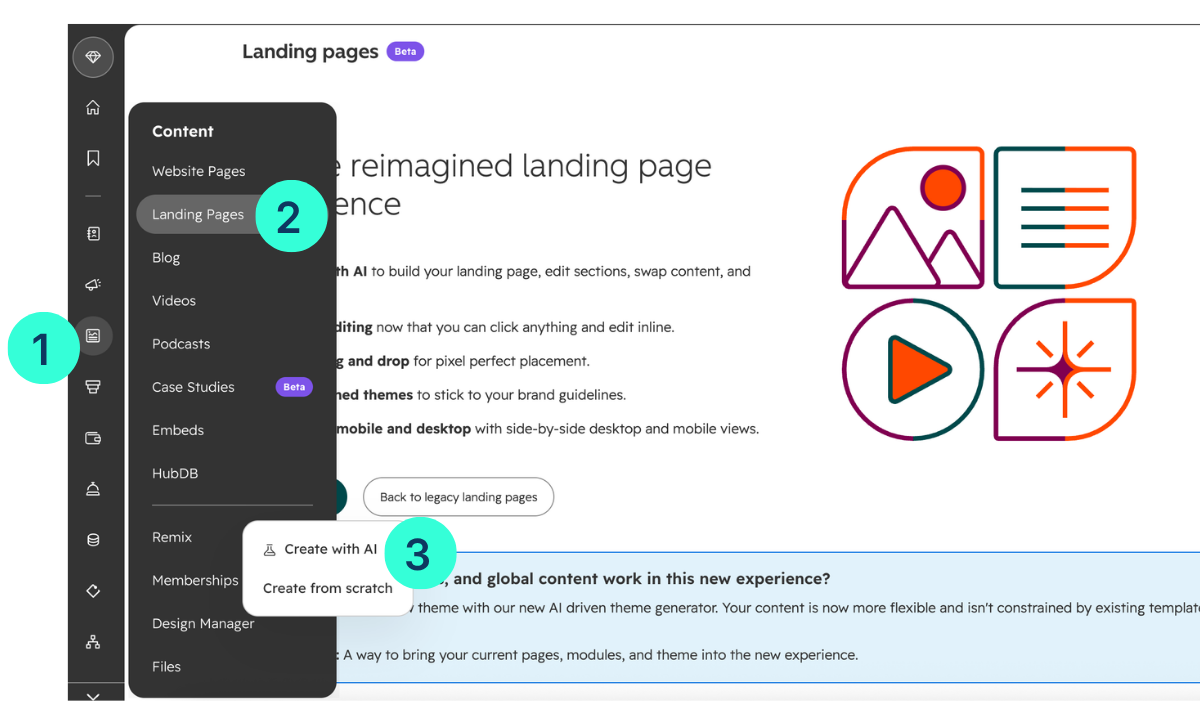
In your HubSpot account, go to Content > Landing Pages > Create.

You can start from a template or use HubSpot's newer content editor, which supports inline editing, drag-and-drop positioning, brand styles, and device previews. That editor is available with Marketing Hub Professional and Enterprise, and Content Hub Starter, Professional, and Enterprise.
Generate A First Draft With AI
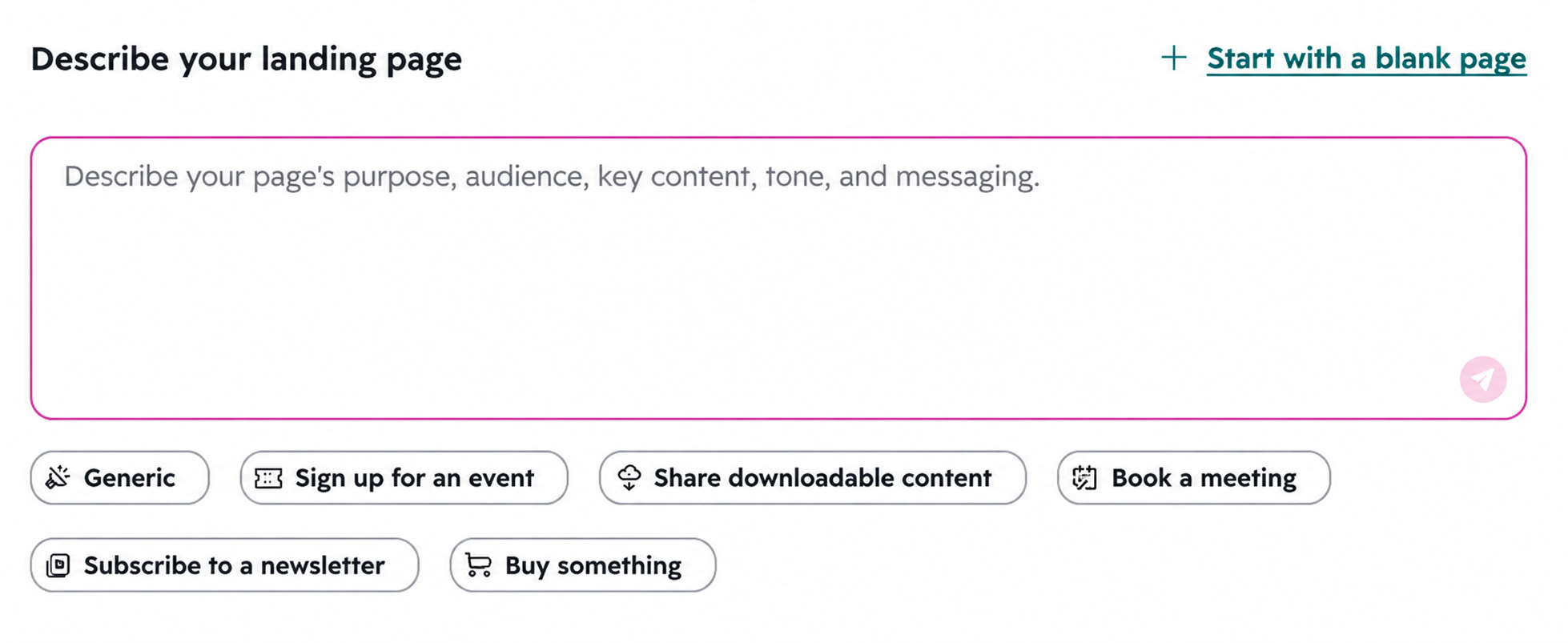
HubSpot can generate a landing page from a prompt using Breeze, which requires a Content Hub Professional or Enterprise subscription.

HubSpot also documents a Claude connector that drafts a page from a written brief and opens it directly in the HubSpot editor.
A prompt for a healthcare page should carry the strategy you already defined.
Create a healthcare landing page for adults seeking a cardiology consultation. The primary conversion is a consultation request. Use a professional, reassuring tone, and include a hero, benefits, provider credentials, how the consultation works, FAQs, and an appointment request form.
Never publish that draft as written. Review the medical claims, terminology, brand voice, privacy language, and conversion flow first. AI-generated healthcare copy tends toward broad promises, which is exactly the thing your compliance team will flag.
Build The Hero And Connect The CTA
Use your text and CTA modules to give the visitor three answers at a glance. What is this, why does it apply to me, and what do I do next?
HubSpot's current CTA tool supports buttons, banners, and pop-ups, and each one can point to a form, a meeting link, a thank-you page, or another URL. Make sure the destination matches the promise. One note for anyone following older tutorials: accounts created after March 17, 2025 have no access to the legacy CTA tool, so build with the current one.
Create The Form And Automate The Follow-Up
Build the form under Marketing > Forms, then add it to the page through the form module. HubSpot forms create or update CRM records on submission and can trigger follow-up actions, including internal notifications, contact assignment, list membership, tasks, confirmation emails, and webhooks. More advanced sequences run through workflows, depending on your subscription.
Test The Whole Path Before Publishing
Complete your own conversion before anyone else does.
- Click the primary CTA
- Fill out the form with test information
- Confirm the thank-you message or redirect fires
- Check that the automation runs
- Confirm the right team receives the notification
- Verify the contact record looks correct
- Repeat the entire path on a phone
This one habit prevents the most common launch failure, which is a finished-looking page with a broken conversion path behind it.
6. Make Your Page Easy to Find, Use, and Trust
Three things decide if a healthcare landing page earns conversions. The right people find it, they can use it without friction, and they feel safe enough to act.
Set The Title, URL, And Meta Description
Give search engines and patients a clear signal about the page.
Title: “Orthopedic Consultation | ABC Health”
URL: /orthopedic-consultation
Meta description: “Schedule an orthopedic consultation to discuss knee pain, treatment options, and your next steps with an experienced specialist.”
Google may still create its own title or description based on the page and search query.
In the page editor, open the Optimize panel to review HubSpot's SEO recommendations. The recommendations flag issues such as missing metadata, broken links, missing alt text, oversized images, small tap targets, and pages without HTTPS.
Add Landing Pages To Your Sitemap
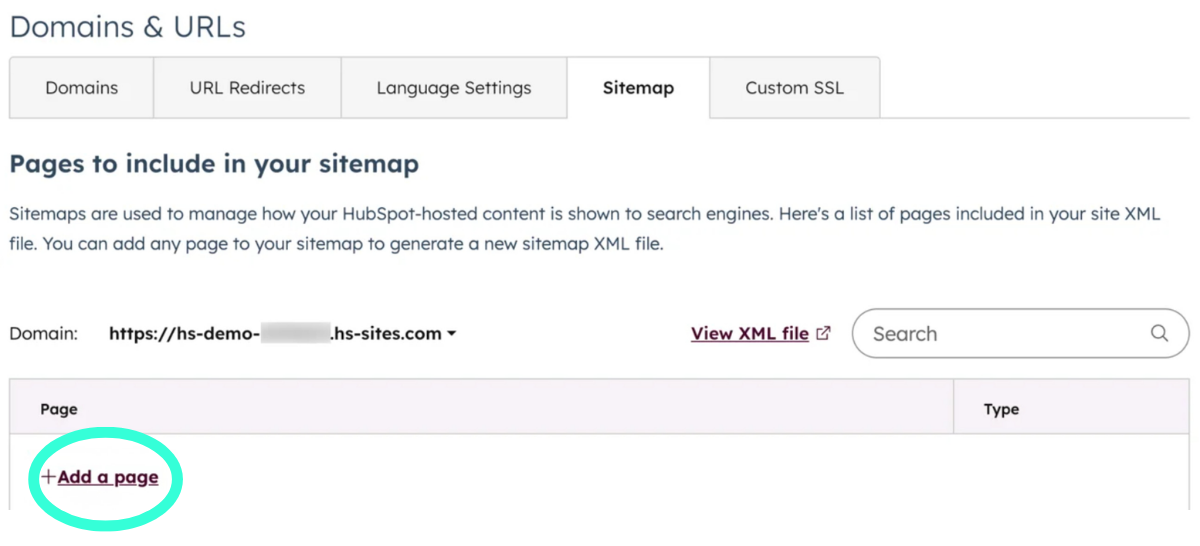
This one catches experienced HubSpot users. HubSpot adds live website pages and blog posts to your sitemap automatically, but landing pages have to be added manually under Settings > Content > Domains & URLs > Sitemap. Click + Add a page, select the page, and save. Changes can take up to 30 minutes to appear.

Before you do that, decide if the page should rank at all. A page built for a paid campaign may never need organic visibility, while a page targeting "how to find a cardiologist" depends on it. That single decision tells you how much to invest in content depth, internal linking, and indexability.
Check Mobile Usability
HubSpot's SEO recommendations flag interactive elements that are too small or too close together. The guidance recommends at least 48 × 48 pixels for tappable elements.
Check your CTA buttons, form fields, FAQ controls, phone links, and spacing between clickable elements. Then test the published page on a real phone.
Cover Accessibility, Speed, And Security
Review heading hierarchy, color contrast, text readability, form labels, keyboard navigation, and image alt text. Alt text should describe useful visual information, such as “Cardiologist discussing test results with a patient.” Decorative images should use blank alt text.
Keep page weight under control by resizing and compressing images before uploading. Autoplay video, animations, and third-party widgets can also slow the page. Confirm that the page loads over HTTPS and test every important link before launch, including the CTA, privacy policy, and phone number.
Configure Privacy And Consent
Make data collection clear. HubSpot supports notice and consent options on forms through Settings > Privacy & Consent. Cookie consent banners can also prevent tracking cookies from being placed until visitors provide consent, and HubSpot supports Google Consent Mode for advertising and analytics tools.
Make sure the consent language reflects your actual data practices. Do not claim a form is HIPAA compliant simply because it was built in HubSpot. Compliance depends on your subscription, configuration, data, and contractual arrangements.
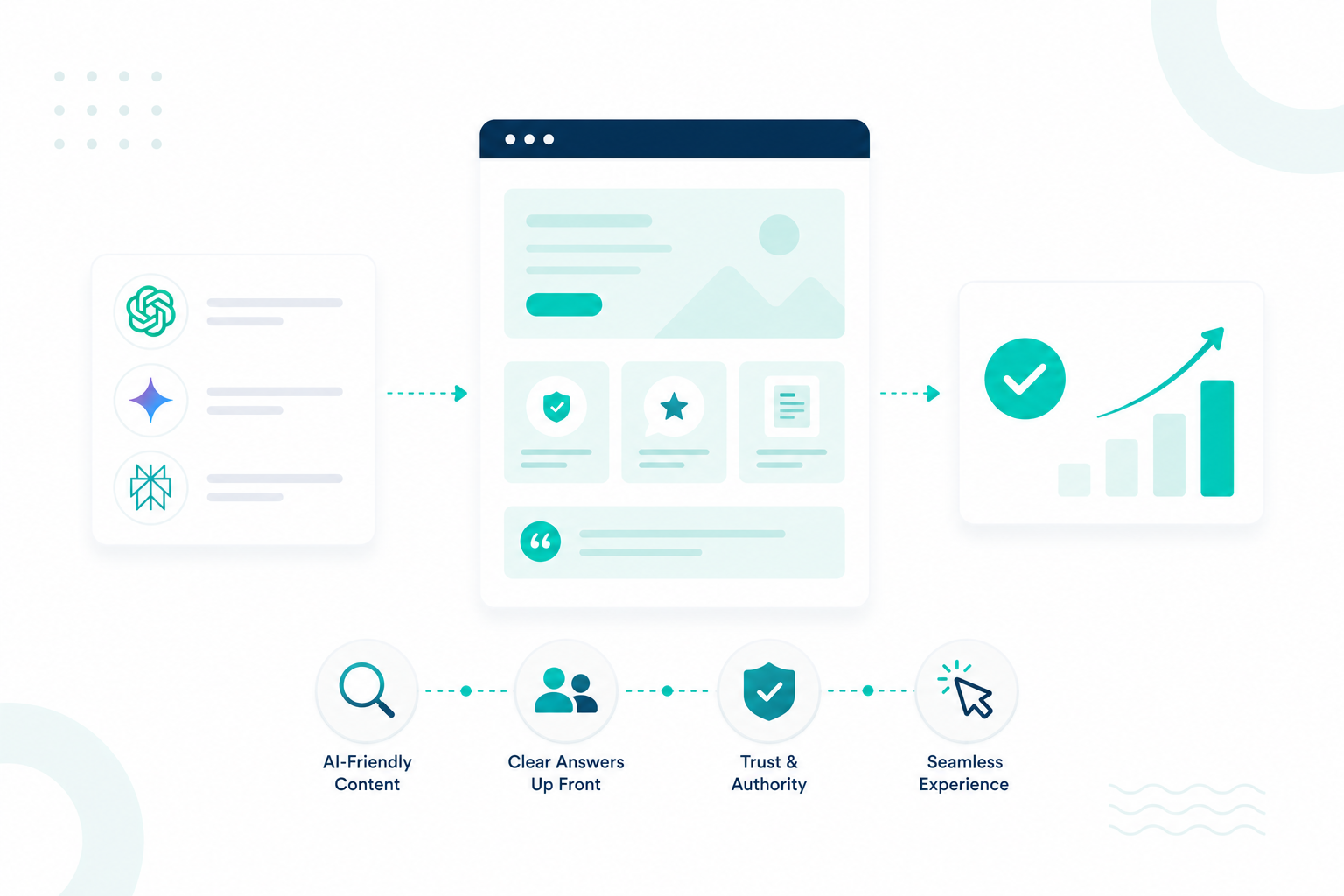
Write For AI Search
Patients increasingly use AI tools when researching healthcare providers. KFF polling found that about one in three US adults sought health information from an AI tool in the past year.
Make the page easy for answer engines to understand. Use patient questions as H2s, H3s, and FAQs, then answer each question directly in the first two sentences.
Do I Need a Referral to See an Orthopedic Specialist?
It depends on your insurance plan. Many PPO plans let you book directly, while HMO plans usually require a referral from your primary care physician. Our scheduling team can check your plan before you book.
HubSpot recommends schema markup, predictable heading structures, numbered steps, bullets, comparison tables, and specific image alt text. Marketing Hub Professional and Enterprise accounts can track brand citations and prompt coverage through HubSpot's AEO tool, while the free AEO Grader provides a starting assessment.
Learn how AI search is changing the way buyers research, compare, and choose solutions with this guide.
7. Test, Track, and Improve Your Results
Publishing the page is the starting point. Keep measuring its performance, identify where visitors drop off, and make focused improvements. HubSpot updates individual page analytics every 20 to 30 minutes, so you can monitor campaign performance without waiting for a monthly report.
Find the Biggest Drop-Off
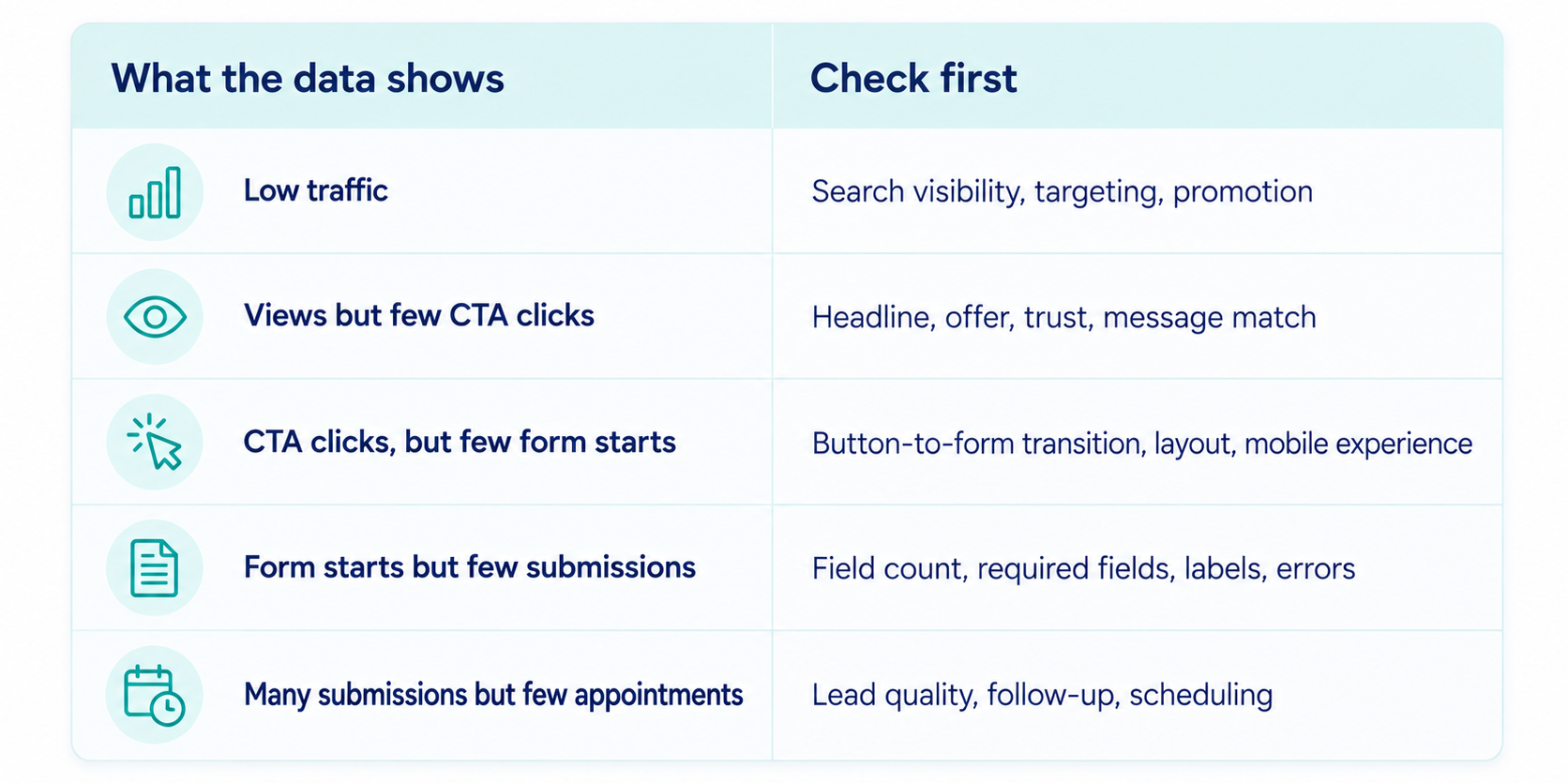
Track the journey from page view → CTA click → form start → form submission → qualified lead → booked appointment.

Test One Variable at a Time
HubSpot supports A/B testing two versions of a page at the same URL for eligible Content Hub Professional and Enterprise accounts. The CTA tool also supports A/B testing for eligible accounts.
Test one meaningful change at a time, such as:
- Hero headline
- CTA wording
- Form length
- Form placement
- Testimonial placement
Start with a hypothesis and give the test enough traffic to produce useful evidence. Changing several elements at once makes the result difficult to interpret.
Measure What Happens After the Form
A high number of submissions does not necessarily mean a successful healthcare campaign. Compare inquiries → qualified leads → booked appointments and review performance by traffic source.
For organic pages, connect Google Search Console and use HubSpot's SEO performance reporting to review impressions, clicks, click-through rate, average position, and the queries bringing visitors to the page.
Review, Improve, Repeat
Check technical issues and broken elements weekly. Review conversion and lead-quality data monthly. Run meaningful tests and refresh outdated content quarterly, adjusting the cadence when a campaign has enough traffic to support faster decisions.
One rule should never change: do not compromise medical accuracy for conversion gains. Optimize clarity, relevance, trust, and usability while keeping every clinical claim accurate and supportable.
Interesting read: 10 PHI Mistakes Healthcare Organizations Should Avoid
Start With One Page and One Action
The healthcare landing pages that convert focus on one audience, one action, and the questions a cautious patient needs answered before taking that action. They also connect smoothly to the team responsible for follow-up.
HubSpot handles the connection between the page, form, CRM, and reporting, giving your team more time to focus on what drives conversions: clarity.
Campaign Creators builds healthcare landing pages, forms, and automation inside HubSpot, from strategy through launch and ongoing optimization. Talk to our team about the page you are working on.
Frequently Asked Questions
How Long Should A Healthcare Landing Page Be?
Long enough to answer the questions standing between the visitor and the action, which usually means a short page for a guide download and a longer one for a specialist consultation.
Can Patients Book Appointments Directly From A HubSpot Landing Page?
Yes, a CTA can point to a HubSpot meeting link or an embedded scheduling tool, which removes a step between the form and the calendar.
Is A Standard HubSpot Form Safe For Protected Health Information?
Do not use a standard HubSpot marketing form to collect protected health information unless your specific HubSpot setup and contractual arrangements support it. Keep marketing forms limited to basic contact and scheduling information, and collect clinical details through your approved intake system
How Fast Should Someone Follow Up After A Form Submission?
Same business day is the working standard in healthcare, because a patient who filled out your form has usually filled out two others.
Can One Landing Page Serve Both Paid And Organic Traffic?
It can when the intent behind both sources is similar, but paid campaigns tied to a specific ad promise usually perform better on a dedicated page.
Campaign Creators