Vibe-Coded Tools and Customer Data: Why Centralization Matters More Than Ever
A vibe-coded CRM tool becomes a liability the moment it starts keeping its own version of the customer. Your marketing team builds a lead...
9 min read
Campaign Creators
:
10/29/26
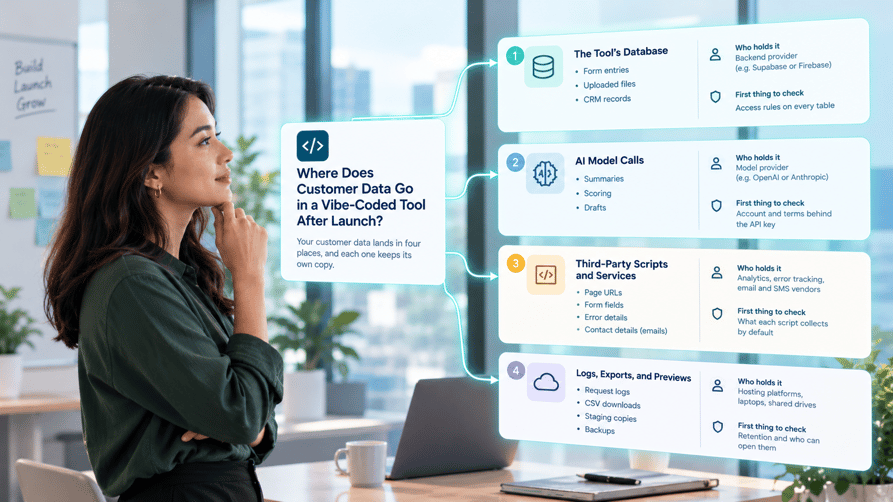
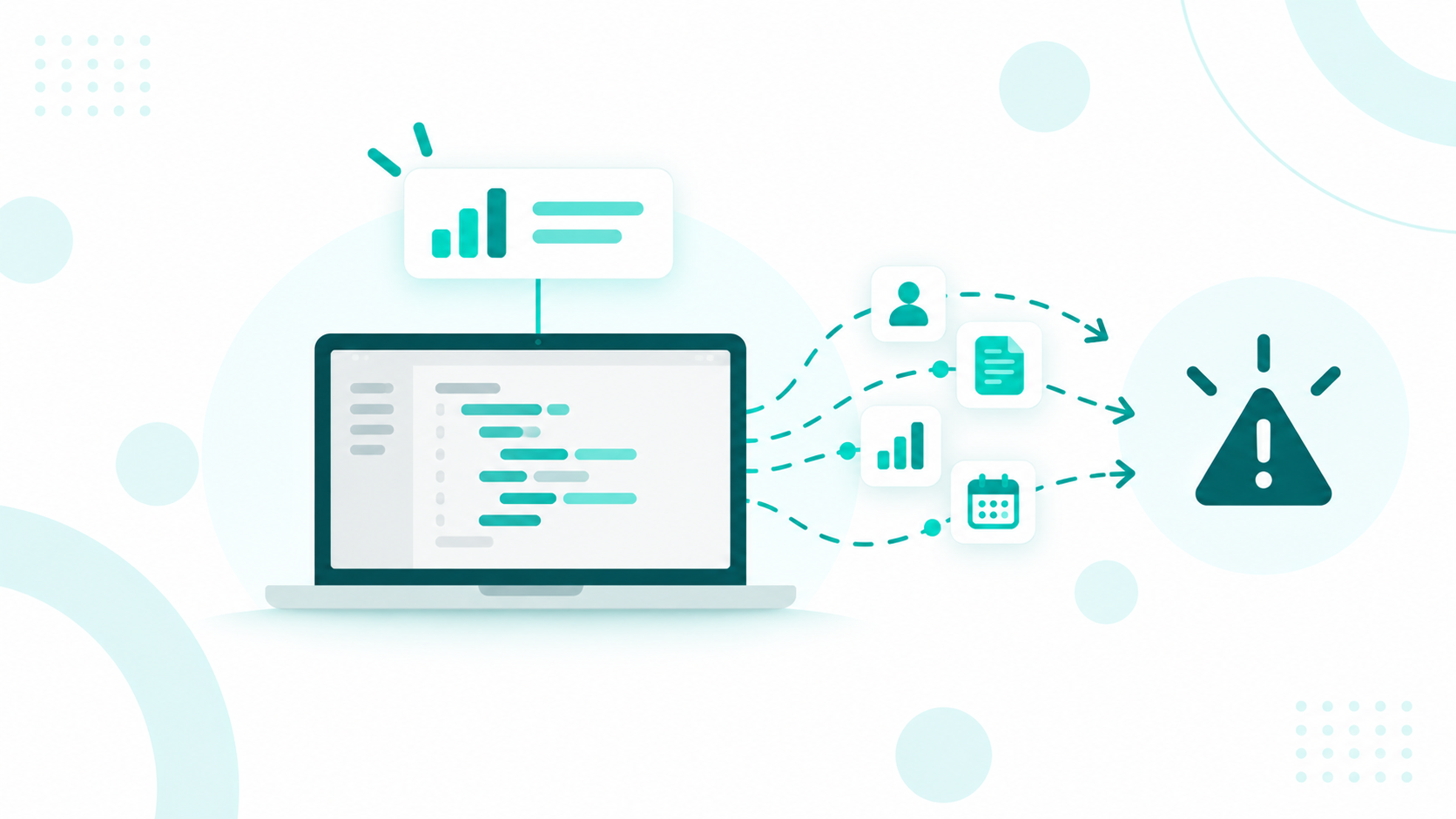
A vibe-coded tool sends customer data to four places after launch. These are its own database, the AI model it calls to process records, the third-party scripts and services added during the build, and its logs, exports, and preview copies. Each destination holds a separate copy with its own access rules and retention, so all four belong in your data map and privacy records.
Most teams check a vibe-coded tool for who can log in. Fewer ask where records travel once the tool is live, and a deletion request, customer security review, or breach notice will force you to answer fast. If you're connecting AI-built tools to your CRM, our HubSpot integration development team builds connections that keep customer records in one governed place.

Customer data in a live vibe-coded tool lands in four places, and each one keeps its own copy. The person who built the tool usually sees the app and not the services behind it, so most of these copies never get written down.
|
Destination |
What lands there |
Who holds it |
First thing to check |
|
The tool's database |
Form entries, uploaded files, records synced from your CRM |
The backend provider, such as Supabase or Firebase |
Access rules on every table |
|
AI model calls |
Records the tool sends for summaries, scoring, or drafts |
The model provider, such as OpenAI or Anthropic |
The account and terms behind the API key |
|
Third-party scripts and services |
Page URLs, form fields, error details, contact details for emails |
Analytics, error tracking, email, and SMS vendors |
What each script collects by default |
|
Logs, exports, and previews |
Request logs, CSV downloads, staging copies, backups |
Hosting platforms, laptops, shared drives |
Retention and who can open them |
These copies end up public more often than teams expect. In May 2026, researchers found 380,000 publicly accessible assets built with Lovable, Base44, Replit, and Netlify, and about 5,000 of them held sensitive corporate data. An earlier scan of 5,600 vibe-coded apps turned up 175 instances of exposed personal data, including medical records, phone numbers, and bank account numbers.
Untracked copies also add to breach risk. Incidents involving shadow AI, meaning AI tools employees use without approval, more than doubled to 43% of breaches in IBM's 2026 research, up from 20% in 2025.
A data map complements a security review of access and API keys, and it starts with these four destinations.
Yes. A vibe-coded tool almost always stores what it collects in its own database, and that copy has its own access rules, its own retention, and no connection to the deletion tools in your CRM.
Many AI app builders run on Supabase. Row Level Security is on by default only for tables created in the Supabase dashboard, and tables created with SQL or a migration script need it turned on by hand. Supabase also stopped exposing new tables to its public API automatically on new projects from May 30, 2026, and applies the same default to existing projects on October 30, 2026. Tables created before the change keep their old access, so a tool built earlier can still have tables anyone with the public key can read. Open the Security Advisor in Supabase and check every table that holds personal data.
Platform visibility is the second layer. Some vibe coding tools set apps to public unless the user switches them to private, so a working link can also be a working door to the data.
Decide how long the tool keeps each record, and set an automatic purge. A lead qualification tool rarely needs raw form entries once the answers sync to your CRM, so 30 to 90 days is usually plenty.
GDPR gives people the right to erasure without undue delay when a valid request comes in. If nobody knows the tool's database exists, the record stays there after you delete the contact in HubSpot. The cleanest fix is keeping one customer record in your CRM and letting the tool read from it, so a deletion in one place reaches every copy.
The record leaves your systems and lands with the model provider, under the terms of the account that owns the API key. That happens every time the tool summarizes a ticket, scores a lead, or drafts a reply, long after the build is finished.
Those terms depend on the account. Data sent to the OpenAI API isn't used for training unless you opt in, but abuse monitoring logs keep it for up to 30 days by default. Eligible organizations can apply for Zero Data Retention. A key created on a builder's personal account puts your customer data under a contract the company never reviewed.
Create the key in a company account with billing, admin access, and data controls your team manages. Rotate any key that was created on a personal login.
Most model providers offer a data processing agreement (DPA) for business accounts. Make sure one is in place before real customer records go through the tool, and add the provider to your list of vendors that process personal data.
A lead scoring prompt needs company size, industry, and timeline. It doesn't need an email address or phone number, so strip those fields out before the call.
When a HIPAA covered entity uses a cloud service to create, receive, maintain, or transmit electronic protected health information on its behalf, that service is a business associate and needs a signed business associate agreement (BAA). Using one without a BAA is a violation, even if the data is encrypted.
If a tool can't work without sending full customer records to a model, the logic usually belongs closer to your CRM, where access and consent are already tracked.
Analytics tags, error trackers, email and SMS senders, and embedded widgets all receive some customer data. AI builders often add them on their own because a prompt asked for "tracking," "error alerts," or "send a confirmation email."
Google Analytics prohibits sending personally identifiable information, and PII often slips in through page URLs and form fields. A vibe-coded results page with an address like /results?email=jane@acme.com sends that email address to Google on every visit.
Error trackers capture what was happening when something broke. Sentry's browser SDK always sends the page URL, sends the query string and the user's IP address by default, and lets you turn both off in its data collection settings. Check those settings in the tool's code before launch, especially if any page puts an email address or record ID in the URL.
Email and SMS services store recipient lists, message content, and delivery logs. Scheduling, payment, and form widgets keep their own copy of what customers type into them. Each one is a vendor processing personal data on your behalf.
Ask the builder for every package and script tag the tool loads, and list each vendor next to the data it receives. A vendor nobody can name is a vendor nobody has a contract with.
Logs, exports, and preview copies end up on hosting platforms, team laptops, shared drives, and staging environments. They often stay around longer and with looser access than the live app.
Hosting platforms log incoming requests, so any customer data in a URL lands in those logs. Debug logging added during the build can also print full form submissions, and it usually stays in the code after launch. Search the code for logging statements that print request bodies, and remove them.
A "Download as CSV" button is one of the first features people ask an AI builder for. Every download is a new copy on a laptop, in an email thread, or in a Slack channel, outside every access rule the tool has.
Defaults vary by platform and plan. Netlify deploy previews stay private by default unless someone changes preview visibility, but older projects and other platforms can behave differently. Staging copies seeded with real customer records carry the same risk as production with less monitoring, so use test data there.
Backups keep records you already deleted. Write down how long backups last and how a deletion request reaches them, or note the documented exception.
These copies are the easiest to forget because nobody uses them every day. Give each one a retention period and an owner.
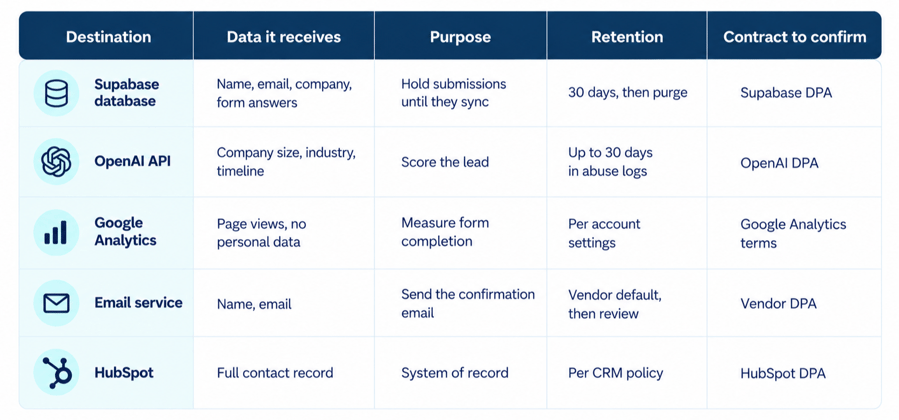
Map a vibe-coded tool's data flow by tracing one test record through every system it touches, then writing down each copy with its purpose, retention, and contract.
Here’s an example of what a completed data flow map might look like for a simple lead qualification tool.

We see the same pattern in CRM projects. Equisoft's CRM data was split across HubSpot in Canada, Zoho in the UK, and Highrise at Altus Consulting, and that blocked global reporting and GDPR-safe governance. Our team consolidated 2 legacy CRMs, migrated 700,000+ records into HubSpot with Business Units, and fixed 86 workflow issues before go-live.
A practical launch test is to find a test record in every copy within one working day. If you can't, the tool isn't ready for real customer data.
Customer data should live in HubSpot once more than one person or system relies on it, or once deletion and consent requests need to reach it. At that point, the tool keeps its interface and logic, and it reads and writes customer records through a scoped integration.
HubSpot already handles the controls a vibe-coded tool lacks. Every account can permanently delete a contact and its associated content to meet privacy laws, and the full purge can take up to 30 days. In Enterprise accounts, admins can restrict who views or edits specific properties, such as contract values or health details.
Not every tool belongs inside the CRM. A calculator with no personal data can stay where it is, and deciding when HubSpot should be your system of record comes down to who depends on the data. For regulated records, pair the move with HubSpot permissions, consent, and sensitive data settings your IT team can audit.
Tools that each keep their own copy of the customer make deletion requests, consent, and reporting harder to manage. Our integration team connects those tools to HubSpot with scoped access, so records live in one place, and every tool reads from it.
When our client Fire Aside had data spread across nine platforms, we consolidated its operations into a single HubSpot CRM in just 20 days, integrating more than 10 business systems.
A vibe-coded tool copies customer data to its database, the AI models it calls, third-party services, and its logs, exports, and previews. Each copy needs an owner, a retention period, and a contract, and the fastest way to find them is to trace one test record end to end.
Need HubSpot to talk to a tool without a native integration? Learn how we build custom ones.
Only if your policy and notices describe what the tool collects and who receives it. A new tool that sends data to new vendors usually needs an update to your privacy notice and vendor list before launch.
Avoid it. Use made-up records until the tool passes an access check and has a data map, because test environments rarely get the same protection as production.
Your company is, as the business that decided to collect and use the data. A platform or vendor may share liability under its contract, but regulators and customers will look to you first.
No. Hosting location affects data transfer rules, but you still need a lawful basis, a privacy notice, vendor contracts, security measures, and a way to handle access and deletion requests.
Yes. A short approval step that covers what data the tool uses, where it goes, and who owns it catches most problems before customers ever touch the tool.
A vibe-coded CRM tool becomes a liability the moment it starts keeping its own version of the customer. Your marketing team builds a lead...
Sales reps have started building their own tools. With an AI coding assistant and a few plain-language prompts, a rep can spin up a lead-scoring...
No, a vibe-coded CRM can't reliably serve as a second source of truth. It's a CRM built by describing what you want to an AI coding tool, which then...