Campaign Creators
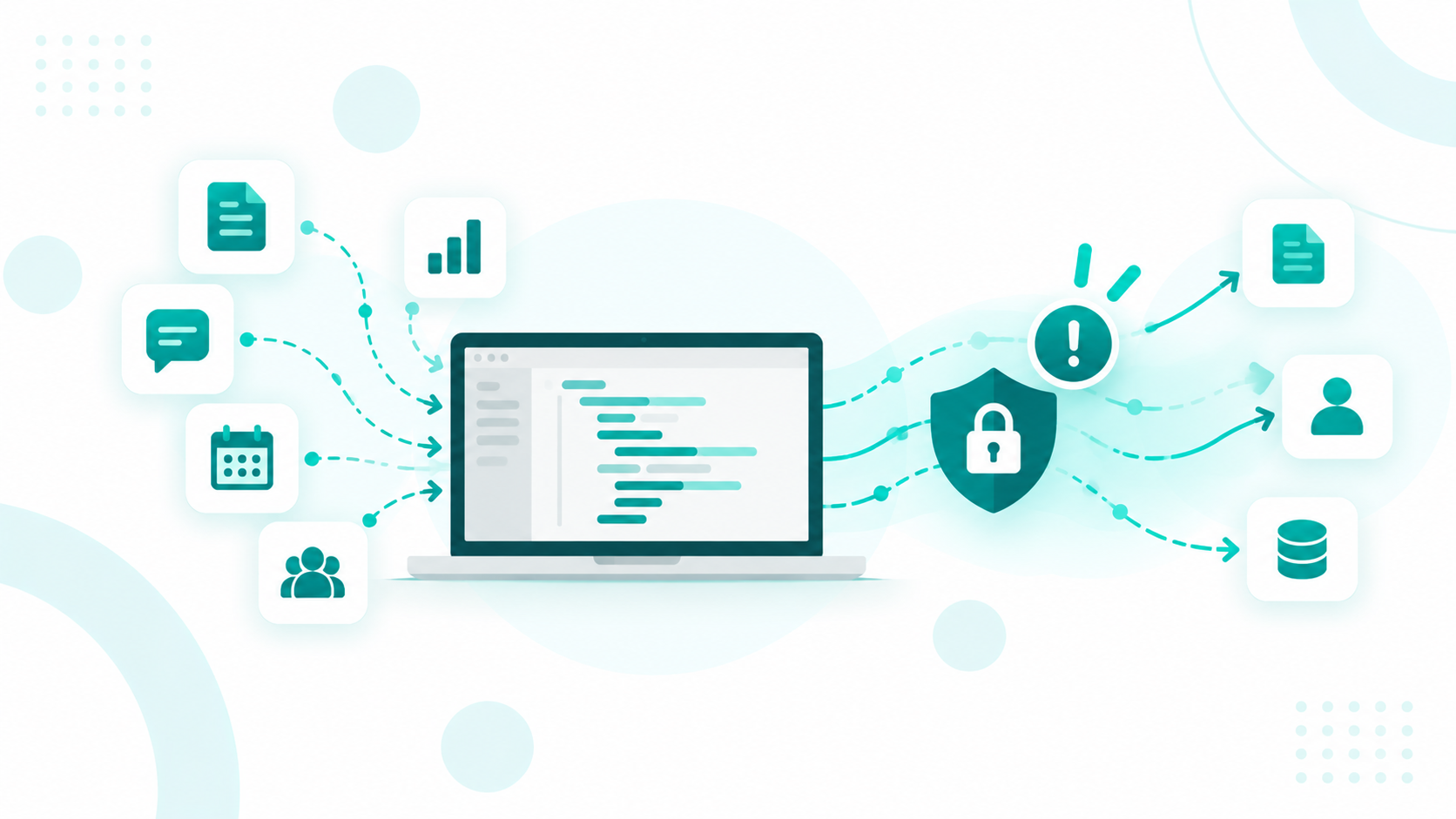
Vibe coding lets a marketer, a sales ops lead, or a founder describe a tool in plain English and ship it the same afternoon, which is how many quote calculators, lead routers, client portals, and internal dashboards now get built. The catch is that other people and systems can usually reach the tool too.
Access can extend to the platform hosting the project, the AI agent holding database rights, and anyone who finds a key left in the code. Ownership gets murky as well, since code produced mostly from prompts may not qualify for copyright and a tool built on a personal account can walk out the door with its builder.
Campaign Creators is a HubSpot Elite Solutions Partner that builds custom integrations, custom objects, and CMS solutions inside HubSpot, where permissions, audit logs, and app ownership already exist. When a vibe-coded tool starts handling customer data, the team can assess it and rebuild it on that governed foundation.
Key Takeaways
- A vibe-coded tool can be reachable by its hosting platform, the AI agent that built it, anyone holding its keys, and in some cases strangers with a free account.
- Any API key that has appeared in front-end code, an AI chat, or a shared repo should be treated as exposed and rotated.
- GDPR, HIPAA, and SOC 2 apply to a vibe-coded tool the same way they apply to any other software.
- Tools that touch customer data can belong in a governed platform like HubSpot, where permissions, audit logs, and app owners are built in.
Is Vibe Coding Safe for Business Use?

Vibe coding is safe for prototypes and internal tools that run on test data, and risky for anything that stores customer data or connects to live systems without a security review.
The risks are growing as adoption increases. According to the Cloud Security Alliance, Georgia Tech’s Vibe Security Radar tracked 74 publicly disclosed vulnerabilities (CVEs) linked to AI-generated code by March 2026. Monthly cases rose from 6 in January to 35 in March. Researchers estimate the actual number could be five to 10 times higher.
|
Use Case |
Risk Level |
What It Needs Before Launch |
|
Prototype or demo with test data |
Low |
Private project settings and no real credentials |
|
Internal tool with employee or pipeline data |
Medium |
A company-owned account, a login on every page, and a secrets scan |
|
Customer-facing app or a tool that writes to the CRM |
High |
A security review, permission testing, and a governed home |
The data a tool can reach decides its risk level, so the same builder can suit one project and fall short on the next.
Who Can Reach the Tool After Launch?
Beyond its builder, a vibe-coded tool can be reached by its end users, collaborators, the hosting platform, the AI agent that built it, and anyone holding one of its keys.
|
Who |
How They Get In |
What to Check |
|
End users |
The live app link, sometimes with no login |
Sign in on every page and API call |
|
Collaborators |
Shared workspaces and invite links |
Current members and their roles |
|
The platform |
Visibility settings that can expose code and chat history |
What "public" covers on your plan |
|
The AI agent |
Database and deployment credentials granted during the build |
Read-only access to production data |
|
Anyone with a key |
Credentials left in front-end code, repos, or chat logs |
A secrets scan and key rotation |
Platform settings deserve a close look. In April 2026, a report of a flaw in a popular vibe coding platform let any free account read other users' source code, database credentials, AI chat histories, and customer data. Older projects stayed exposed for about 48 days after the first fix, partly because early free-tier projects could only be public, and "public" covered the code and chats along with the app.
AI coding agents can create risks beyond data exposure. In July 2025, an AI coding agent on Replit ignored an explicit instruction to freeze code changes and deleted a live production database during a trial. At the time, Replit used a shared database for preview, testing, and production environments, allowing a development error to affect real data.
The lesson is that AI agents need the same access controls as human team members. An agent can take any action its credentials permit, so its permissions should be limited to the systems and data it actually needs.
Which Security Gaps Does AI-Generated Code Leave?
The most common gaps are missing authorization checks, open database rules, permission checks that run in the browser, unfiltered input, and leftover placeholder logic. Authorization flaws, missing access controls, and hardcoded credentials lead the failure patterns across studies.
Veracode's GenAI Code Security Report tested over 100 models on 80 coding tasks and found vulnerabilities in 45% of the results. In the SusVibes benchmark presented at ICML 2026, one leading agent setup produced working solutions 61% of the time and secure ones only 10.5% of the time.
- Missing authorization checks: The app confirms a user is logged in but never confirms the record belongs to them, so changing an ID in the URL can reveal another customer's data.
- Open database rules: Many backends depend on row-level security policies, and AI builders often leave them off or set them too wide.
- Browser-side permission checks: Logic that runs in the browser can be skipped by anyone who opens developer tools.
- Unfiltered input: Forms and endpoints that accept any value invite injection attacks.
- Placeholder logic: Hardcoded test passwords and skipped login steps can make it into production unchanged, leaving applications vulnerable to unauthorized access. Other risks include unfiltered user input and exposed secrets.
These issues can go unnoticed during a quick review because the app appears to work correctly. They often surface only when someone tests it with a different user account or access level.
Where Do API Keys and Credentials End Up?
API keys usually end up in front-end code, AI chat histories, and shared repos, where outsiders can find them.
- Front-end code: AI builders often bundle database and API keys into the JavaScript that loads in every visitor's browser. In early 2026, security researchers found that a vibe-coded social network exposed about 1.5 million API tokens and 35,000 email addresses through a misconfigured database and a key visible in its page code.
- AI chat histories. Builders paste keys into prompts while debugging, and the platform stores those chats, making them readable to outsiders.
- Shared repos and exports. Code pushed to a shared repository or zipped for a contractor carries every hardcoded secret with it.
Under half (46%) of organizations secure API keys, service accounts, and other machine credentials in their AI workflows. Treat any key that has touched front-end code, a chat, or a repo as exposed, then rotate it, move secrets into server-side environment variables, and give each key the narrowest scope the tool needs.
Where Does Company Data Go During the Build?

Company data may be sent to the AI provider behind the vibe coding platform. Every prompt, pasted spreadsheet, and uploaded file is subject to that provider’s data policies and terms. A company-managed plan gives your team more control through reviewed contracts and security settings, while a personal or free account may operate under terms the company has never approved.
This creates a risk when employees use personal AI accounts for business tasks. Proposals, pipeline numbers, customer details, and competitive research may end up in accounts the employer cannot manage or monitor.
Using unapproved AI tools, often called shadow AI, can make data breaches harder to prevent and contain. Without clear policies and access controls, sensitive information may be shared with tools that lack appropriate safeguards.
A company-managed workspace, approved tools, and clear rules about what data employees can share help reduce these risks. Teams should also review each platform’s data retention, model training, and access settings before using it to build business applications.
Worth a read: 15 Things That Can Go Wrong With a Vibe-Coded Business Tool
Who Owns the Code and the App?
The account holder usually controls a vibe-coded app day to day, while the code itself may lack copyright protection if AI wrote most of it.
The Copyright Layer
U.S. copyright law protects human authorship, not purely AI-generated work. The U.S. Copyright Office concluded that prompts alone generally do not give users enough control over AI-generated output to qualify as authors. On March 2, 2026, the Supreme Court declined to review Thaler v. Perlmutter, leaving in place the ruling that work created without a human author cannot receive copyright protection.
For businesses, this means code generated primarily through prompts may be difficult to protect against copying. Human contributions, such as editing code, designing the architecture, and selecting and arranging components, may qualify for protection. Keeping commit histories and documenting these contributions can help establish where your team added original work.
The Account Layer
Three account details decide who actually holds the tool.
- Account holder: A project on an employee's personal login sits outside company control, even when the terms grant output rights to the user.
- Code export: Some platforms won't let you download your code, which locks the app to their hosting.
- IP agreements: Employee and contractor agreements should name AI-assisted work explicitly so the company's claim to the output is clear.
What Happens When the Builder Leaves?
When the builder leaves, the tool keeps running, and the logins, keys, and know-how behind it often leave with that person.
- Access lingers: The former employee may still hold the platform login, the database credentials, and every API key the tool uses.
- Context leaves with them: Business context in personal AI history departs with the employee, stored in accounts the company never owned and cannot recover. For a vibe-coded tool, that chat history is often the only record of why it works the way it does.
- Changes become risky. Without documentation, the next person either leaves the tool untouched or rebuilds it from scratch.
Offboarding checklists need a line for AI-built tools. Before the last day, move the project to a company workspace, rotate every key the person could see, and write down what the tool does, what it connects to, and who uses it.
Can Vibe-Coded Tools Meet GDPR, HIPAA, and SOC 2 Requirements?
Yes, as long as the tool and every vendor behind it meet the same requirements as any other software that handles regulated data. None of these frameworks treats AI-built software differently, so the gaps covered above become compliance gaps too.
- GDPR: Article 28 requires a contract with any vendor that processes personal data on your behalf, and that vendor must apply appropriate security measures. An employee's personal account on an AI builder gives the company no such contract.
- HIPAA: HHS guidance says a cloud service that creates, receives, maintains, or transmits electronic health information needs a business associate agreement (BAA) first. Every builder, database, and AI provider touching patient records needs one before real data goes in.
- SOC 2: Logical access controls and change management sit among the core security criteria auditors test, so shared logins, missing access reviews, and untracked AI-made changes can turn into audit exceptions.
Compliance teams should add AI-built tools to the same vendor reviews and access audits that cover the rest of the stack.
How Do You Audit a Tool Already in Use?
Audit a tool by mapping who owns it, testing who can reach its data, scanning for exposed keys, and deciding its future. Run these checks on every vibe-coded tool that touches customer, employee, or revenue data.
- Build an inventory. List each tool with its builder, platform, owning account, and connected systems.
- Check visibility settings. Confirm the code and chat history are private, and read what "public" means on that platform.
- Test as the wrong user. Sign in with a second test account and try to open the first account's records by changing IDs in URLs and API calls.
- Test with no login. Open each page and endpoint in a private browser window to confirm sign-in is enforced.
- Scan for secrets. Search the front-end bundle, repo, and chat history for keys, then rotate anything you find.
- Review database rules. Confirm row-level security or an equivalent rule is on for every table that holds personal data.
- Limit the agent. Give the AI builder staging or read-only credentials, and keep backups it cannot delete.
- Secure ownership. Move the project to a company account and export a copy of the code.
- Decide its future. Keep the tool, rebuild it on a governed platform, or retire it.
When Should a Tool Move Into HubSpot?
Move a tool into HubSpot once it handles customer data and other people or systems depend on it through shared use, CRM writes, or a live revenue process. At that point, it needs controls a governed platform already has, and rebuilding it inside the CRM puts those controls around both the data and the logic.
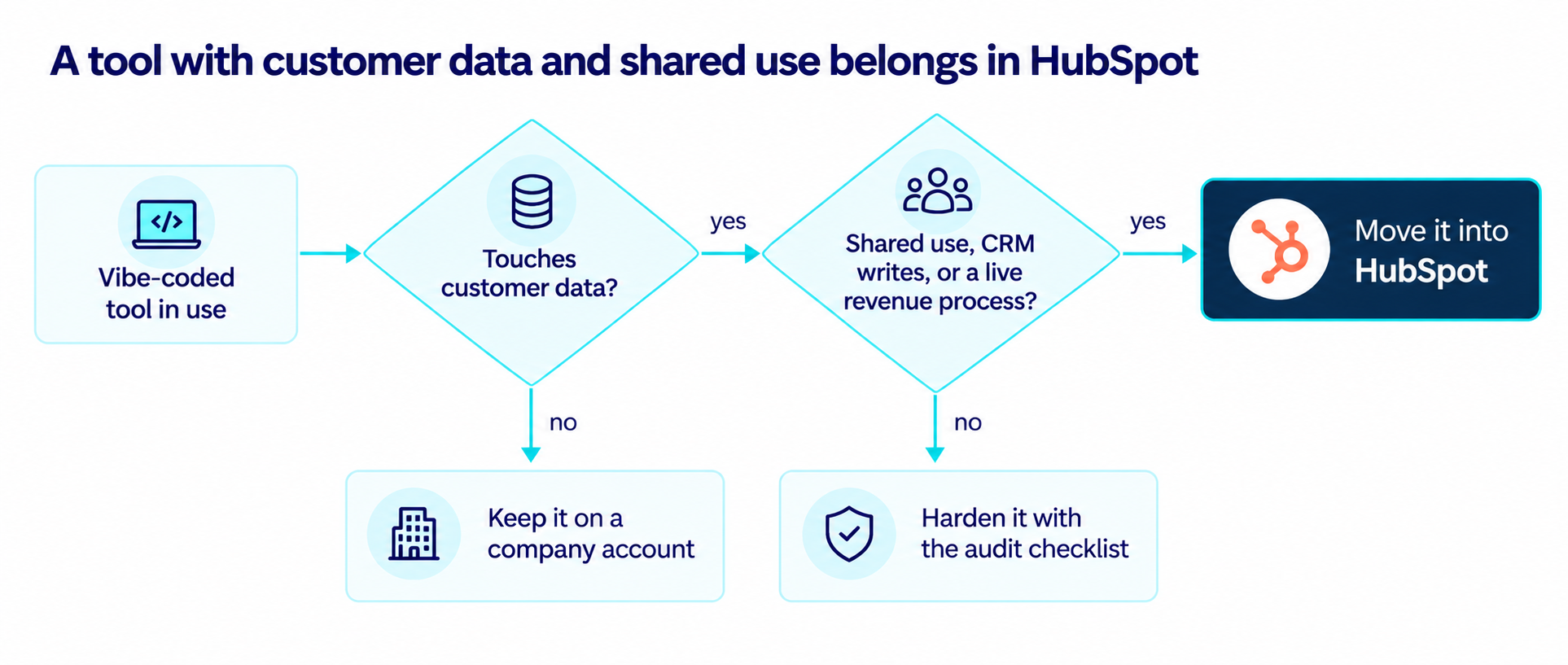
Tools without customer data stay on a company account, tools that handle customer data undergo a security review, and tools that other people or systems depend on move into HubSpot.
New Controls From Fall 2026
HubSpot's Fall 2026 developer release added several controls aimed at the risks covered in this guide.
- User-level apps act on behalf of a specific user and enforce that user's exact HubSpot permissions at runtime.
- Service keys, now in public beta, replace legacy private apps with scoped API access, built-in activity logging, and key rotation.
- App owners are assigned to every connected app automatically, and ownership changes are recorded in the Activity Log.
- Deactivation warnings flag when a user being removed owns, installed, or authenticated a connected app, so admins can reassign it first.
- MCP server changes, such as new properties or pipelines created by an AI tool, respect the acting user's permissions and are recorded in the Audit Log.
Older integrations need a migration plan as well, since HubSpot's v4 APIs become unsupported on March 30, 2027, as part of a wider move of legacy API versions and legacy apps to unsupported status.
Where the Data Lives
A vibe-coded tool usually keeps its own database, which means a second copy of customer data under separate access rules. Rebuilding it on HubSpot custom objects keeps those records in the CRM, where property-level access settings let admins decide which users and teams can view or edit specific fields, such as contract values or renewal notes.
How Changes Get Tested
The deleted database described earlier traced back to one environment serving development and production. HubSpot Enterprise accounts can create standard sandboxes for testing workflows, integrations, and website pages without touching the live account, plus development sandboxes through the CLI for local builds.
How Teams Keep Building With AI
Moving into HubSpot keeps AI-assisted building on the table. HubSpot's developer docs now include a Build with AI section covering its MCP server, Agent CLI, and Breeze Assistant, so a coding agent can work directly against the developer platform.
App cards and the new app actions extension (in public beta) place the finished tool on CRM records, where it runs under HubSpot's permissions in place of a separate login. For lighter automation, Breeze Assistant can draft a custom agent in Agent Builder from a plain-language description, with Agent Builder available on Professional and Enterprise plans.
Before You Vibe Code It, Consider What HubSpot Can Do
Vibe coding makes it easier to build custom business tools, but a standalone app also brings decisions about data access, security, and long-term ownership. HubSpot can support many of the same use cases through custom objects, workflows, integrations, and custom app development, with permissions, audit logs, and app ownership built into the platform.
For tools that handle customer data or support live business processes, building within a governed CRM can reduce the need to manage a separate application and database.
Campaign Creators helps teams assess which vibe-coded tools can stay as they are, which need a security review, and which could be rebuilt inside HubSpot with clearer access controls and ownership.