Vibe-Coded Tools and Customer Data: Why Centralization Matters More Than Ever
A vibe-coded CRM tool becomes a liability the moment it starts keeping its own version of the customer. Your marketing team builds a lead...
12 min read
Campaign Creators
:
10/15/26
Sales reps have started building their own tools. With an AI coding assistant and a few plain-language prompts, a rep can spin up a lead-scoring calculator, a meeting-prep dashboard, or an account-research app without writing a line of code. It's fast, it fits the way they sell, and it skips the wait for a developer.
The risk shows up when the research, qualification notes, and deal updates those tools produce stay inside them. The CRM stops reflecting what's happening in the pipeline, so managers forecast from stale deal stages, marketing loses attribution, and the next account owner starts without the context the last rep gathered. Add customer data sitting in apps nobody has reviewed, and a quick productivity win becomes a visibility and security problem.
At Campaign Creators, we help sales and RevOps teams keep that context in one place. As a HubSpot Elite Solutions Partner accredited in Custom Integration, CRM Implementation, Data Migration, and Solutions Architecture Design, we connect the tools reps rely on to HubSpot through custom API integrations and set up the properties, permissions, and workflows that keep sales activity on the record.

Vibe-coded sales tools are custom apps, dashboards, and automations that reps or RevOps teams build by describing what they want to an AI coding assistant in plain language. Teams build them to cut admin work, cover workflows their CRM doesn't handle well, and get a working tool without waiting for a developer.
Google Cloud defines the practice as using AI to generate functional code from natural language prompts. It also describes "vibe deploying," where an app goes live in a production environment with a single click or prompt.
In sales, that could be a lead qualification calculator built on your own criteria, an account research dashboard, a proposal generator, or a call prep tool that puts prospect research, qualification gaps, and suggested next steps on one screen. Some of these tools read from the CRM. Others run on spreadsheets, exported records, or their own databases, so the work they support never lands on a contact, company, or deal record.
In a June 2026 survey of 1,000 US sales and marketing professionals published via Business Wire, 42% said non-revenue tasks take up at least 40% of their day. Another 38% said they spend most of their week logging calls, emails, and meetings, while only 11% named closing deals among their most frequent weekly activities. A tool that automates one repetitive step looks like an easy fix.
A CRM gives everyone a shared structure for contacts, companies, deals, and activities. Teams still run into custom scoring models, internal approval screens, and reports that are awkward to build in a standard setup. With vibe coding, a RevOps manager can prototype that logic in a day and test it with a few reps before anyone commits to a larger project.
Gartner's survey of 1,026 B2B sellers found that 50% feel overwhelmed by the amount of technology their job requires, and overwhelmed sellers are 45% less likely to reach quota. A homegrown app that combines research, notes, and next steps on one screen feels like relief, even though it adds one more place where work happens.
One-click deployment is a big part of the appeal. It's also how a tool one rep built for meeting prep gets shared with the team, becomes part of pipeline reviews, and starts handling customer data before anyone checks its integrations, security, or ownership.
Managers lose sight of real deal progress, forecasts drift, attribution breaks down, handoffs lose context, and AI tools work from an incomplete picture. The work still happens, but nobody outside the rep's own tools can see it.
Many teams already start from a shaky baseline. 76% of CRM users said under half of their organization's CRM data is accurate and complete, and 37% said poor data quality has directly cost them revenue. Another Gartner survey of 303 sales leaders found 84% felt sales analytics fell short of leadership's expectations, with poor data quality and limited cross-functional collaboration among the top barriers. Vibe-coded tools that keep their outputs to themselves widen both gaps.
A rep can hold two meetings, get an informal buying signal, and prep a proposal in a custom app while the CRM shows the deal untouched for weeks. It works the other way too. A deal looks healthy because its stage and close date haven't changed, even though the prospect went quiet. Managers end up chasing reps for updates and spotting stalled deals late.
When an AI deal review tool flags a missing decision-maker, a competitor joining the evaluation, or a delayed budget approval, and none of it reaches the opportunity record, the deal keeps its old close date and forecast category. Leadership then plans revenue, hiring, and spend around numbers the reps already know are off.
A prospect might find you through search, download an ebook, attend a webinar, and then get outreach drafted in a rep's custom app, with replies tracked in a spreadsheet. If those touches aren't tied to the same contact, company, and deal, marketing channels look weaker in reports, ROI calculations miss part of the journey, and budget shifts toward whatever the CRM happens to record.
A rep might log a prospect's implementation concern, a new decision-maker, and a promised outcome in a custom discovery app, while the CRM holds a generic meeting note. When the account moves to customer success, the team repeats discovery questions and can miss commitments made during the sale.
AI sales assistants, scoring models, and automations read from the CRM. If recent objections and stakeholders live in a separate app, the AI misses them and may suggest a follow-up that no longer fits the deal.
The gap runs in both directions. A sharp insight trapped in a custom app can't feed the forecasting models, workflows, or agents connected to the CRM. Closing it starts with deciding which outputs have to reach the CRM, such as stage changes, qualification decisions, buying signals, customer commitments, and handoff notes, and giving each one a clear destination and owner.
The biggest risks are exposed customer data, CRM integrations with excess access, customer information flowing through AI services nobody reviewed, and apps that lose their owner once they become business-critical. An app can work perfectly and still be unsafe.
In May 2026, WIRED reported that security firm RedAccess found over 5,000 apps built on Lovable, Replit, Base44, and Netlify with virtually no security or authentication. Around 40% exposed sensitive data, including sales records, customer chatbot logs, financial information, and strategy documents, and the researchers located them with basic Google and Bing searches. The sample only covers public apps hosted on those platforms' domains, so it doesn't represent every vibe-coded tool, but it shows how quickly a convenience app can leak.
A hidden URL offers no real protection. An account research tool that pulls CRM records, call summaries, and internal docs can expose all of it through a missing login, a misconfigured database, or an unsecured API. IBM's analysis of vibe coding security adds that credentials exposed through vibe coding are less likely to get fixed compared with issues from traditional development, and that the risks are piling up at a pace standard remediation programs weren't built for.
A prospecting assistant may only need to read a handful of contact and company fields, yet get connected with a token that can also edit deals or read every record in the portal. One bug or leaked credential then affects data the tool was never meant to touch. The OWASP Secure Coding with AI Cheat Sheet recommends least privilege, credentials scoped to the task at hand, and keeping production credentials out of AI coding environments.
A homegrown app might send account data to a model provider, store it in a separate database, and lean on third-party services for login and hosting. IT may know which coding platform built it and nothing about where the data goes next. Before an app touches proposals, pricing, or personal data, someone needs to map its data flows, providers, retention settings, and model-training terms.
A meeting prep app built by one rep spreads to the team, and months later that rep changes roles. Nobody knows who fixes it when an API changes, who rotates its credentials, or who decides when to retire it. Every tool in regular use needs a named person who answers for its security and maintenance, approves changes, and keeps a record of who signed off.
One app stores prospect research, another tracks qualification scores, a third sends follow-ups, and a fourth keeps its own copy of the pipeline. Each one solves a real problem. Added up, they form a shadow sales stack that IT can't inventory, secure, or support, with customer data spread across services that never went through review.
HubSpot already handles lead scoring, workflows, sequences, pipelines, playbooks, lead rotation, quotes, products, and sales reporting natively. Each one keeps its activity on contact, company, and deal records by default, which removes the sync problem a vibe-coded version would create.
|
What a rep might vibe-code |
HubSpot capability |
What it already does |
|
A lead qualification calculator |
Scores contacts, companies, and deals on fit and engagement using property values and tracked events, and feeds those scores into segments, workflows, and reports |
|
|
A script that updates fields or creates tasks when something changes |
Automates processes from enrollment triggers, with templates and AI-generated workflows to start from |
|
|
A follow-up email tool |
Sends a timed series of one-to-one emails from the rep's connected inbox and creates call, email, and task reminders along the way |
|
|
A deal tracker spreadsheet |
Tracks deals through custom stages with win probabilities, stage-based automation, pipeline rules, and properties reps fill in as deals move |
|
|
A call prep or discovery checklist app |
Puts interactive call scripts and question guides on contact, company, deal, and ticket records, and logs the answers to the record |
|
|
A lead assignment script |
Rotates records to selected owners or teams through a workflow action, with round robin and load-balanced options for some record types |
|
|
A proposal or pricing generator |
Builds branded quotes from deal data with cover letters and line items, sends them for the buyer to review, accept, and pay, and keeps the deal amount matched to the primary quote |
|
|
A pricing or catalog spreadsheet |
Stores a product library that reps add to deals, quotes, invoices, payment links, and subscriptions as line items |
|
|
A pipeline dashboard |
Offers prebuilt sales analytics reports such as deal funnels, pipeline waterfalls, forecast movement, and deal push rate |
Feature access depends on your HubSpot subscription and seat types, so check what your portal includes before building around a gap that may not exist.
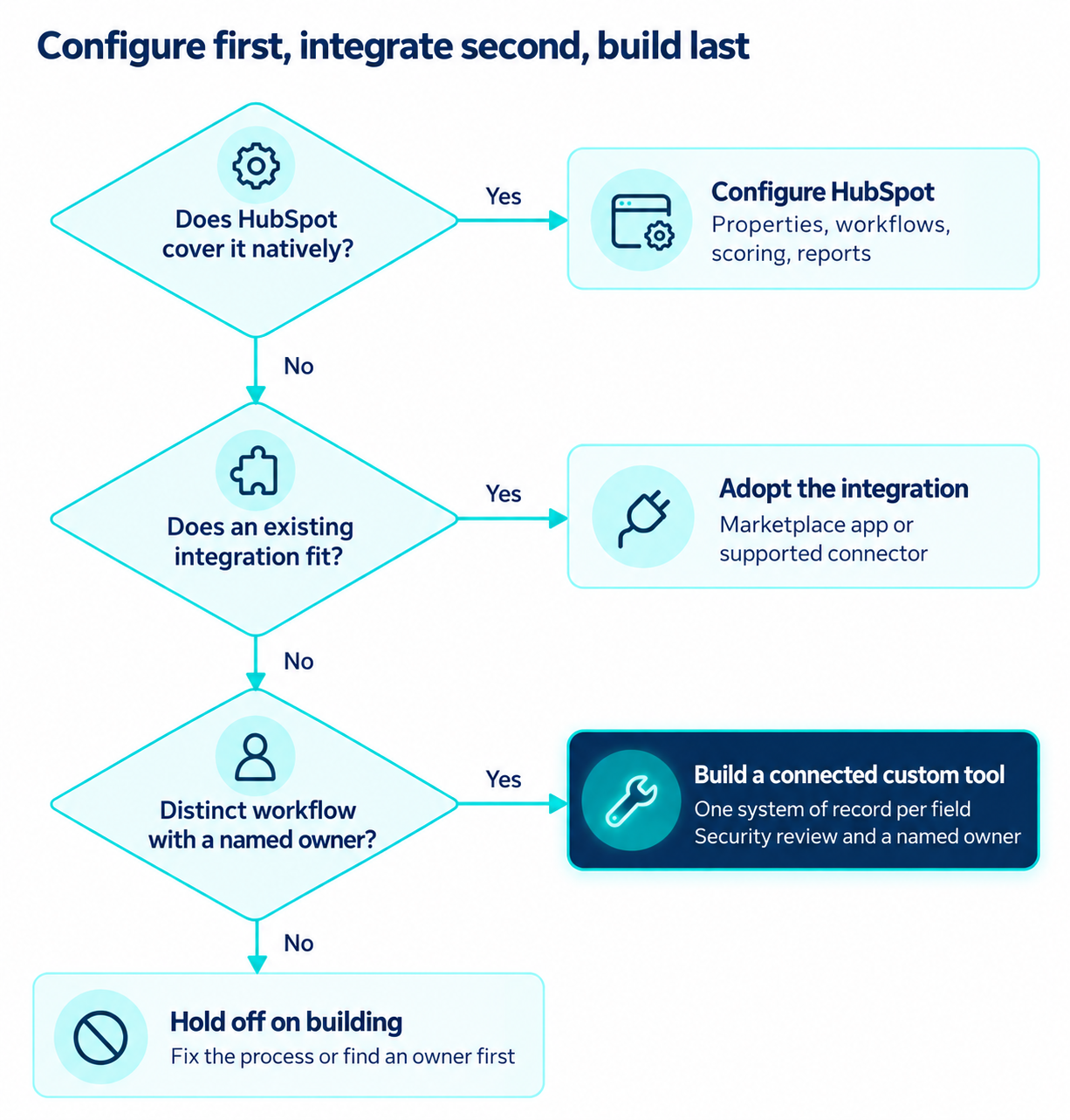
Build a custom tool when the workflow is specific to how your team sells, the CRM can't support it through configuration or an existing integration, and someone can own the tool after launch. If any of those three is missing, configure the CRM or adopt an integration.
If a native HubSpot tool or a marketplace app already covers the need, skip the build. A one-off task, such as pulling a few fields into a brief for one meeting, doesn't justify an app with its own database, login, and maintenance plan. Skip it too when the tool would duplicate something another team maintains, create an isolated database that needs manual syncing, or depend on a creator with no time to support it. The clearest warning sign is a tool that makes one rep faster while making customer information harder for everyone else to find.
Custom builds earn their keep when the process runs on your own business rules or data. Examples include a qualification model that weighs industry fit, product usage, buying intent, implementation complexity, and specific decision-makers, a proposal configurator with company-specific pricing logic, or a deal review that applies internal criteria before pipeline meetings. Ask one question first. Would improving this workflow visibly change productivity, customer experience, or the quality of sales decisions?
The most durable pattern is a custom layer on top of the CRM. HubSpot UI extensions let developers build app cards that sit in the middle column, sidebar, or preview panel of a CRM record, with the record's ID and object type passed in as context. An account prep card could combine CRM history with approved external research while contacts, companies, and deals stay in HubSpot. When the workflow needs its own workspace, a separate app connected through the HubSpot API works too, as long as HubSpot remains the record for shared customer and deal data.
Vibe coding makes the first version cheap. Hosting, database management, integration upkeep, testing, access controls, monitoring, documentation, and fixes when connected systems change all come after. A tool that saves one rep a few minutes and needs constant support isn't worth keeping, while one that removes a recurring bottleneck across several teams can justify real investment. Pilot it on live workflows, measure the effect, and estimate the support load before rolling it out.

Each no moves the decision one step down, and only a distinct workflow with a named owner earns a custom build.
The CRM is the natural home for shared customer and pipeline data. Product analytics, billing, and the custom tool itself can own their own domains, as long as every important field has one clear owner.
|
Information |
System of record |
What the custom tool does |
|
Contact and company records |
CRM |
Reads and references existing records |
|
Deal stage and forecast category |
CRM |
Evaluates deals and recommends changes |
|
Product usage |
Product analytics platform |
Pulls usage signals into account analysis |
|
AI-generated account research |
Custom tool first |
Stores the output and publishes approved insights to the CRM |
|
Processing status and technical logs |
Custom tool |
Manages them internally |
When reps mostly need extra functionality while working on contacts, companies, or deals, build it inside the CRM. A HubSpot app card puts research, scoring, or guided steps right on the record, so reps never leave it. When the workflow needs its own workspace or serves several systems, a separate web app connected through the HubSpot CRM API can exchange only the data its job requires.
Either way, connect through an app with only the scopes it needs. HubSpot private apps have each scope selected individually and support token rotation, so a research assistant can get read access to contacts and companies with no ability to edit deals. Keep tokens out of browser-side code and public repositories.
An integration should never copy every field and activity in both directions. For a lead qualification tool, a deliberate mapping might look like this.
|
Data from the custom tool |
CRM destination |
Sync rule |
|
Qualification score |
Contact or company property |
Update when a new assessment is approved |
|
Qualification explanation |
Associated note or designated property |
Store the reasoning behind the score |
|
Recommended next action |
Task or next-step field |
Create or update the matching action |
|
Assessment timestamp |
Dedicated date property |
Record when the assessment ran |
|
Technical processing logs |
App monitoring system |
Keep out of CRM fields |
Notes and tasks should be associated with the right contacts, companies, and deals so the context shows up wherever someone opens the record.
Webhooks tell your app when something changes in the CRM, such as a deal moving stages, so it can refresh its analysis without constant polling. HubSpot batches up to 100 events per webhook request and retries failed notifications up to 10 times over 24 hours, so your app will see delayed and repeated events. Design every write to be idempotent, meaning a repeated event never creates a second note, task, or record.
Store the CRM record ID whenever the tool reads or creates a record, and match on it. Email addresses help with matching but aren't foolproof. Check a record's current state before writing to it, keep AI recommendations separate from approved changes, and log when and why key fields change. That way a tool never silently overwrites a rep who updated the deal a minute earlier.
A prototype that works on one record can break across a whole team. Test what happens when a contact already exists, a required field is empty, an API call fails, an event arrives twice, or a rep edits a record mid-process. Confirm the right data lands on the right record, check that reports and workflows still behave, and set up monitoring for failed syncs and stale data that someone besides the builder can investigate.
Give reps an approved path to build, test, and promote their tools, with review that scales to each tool's data access and impact. The CRM keeps ownership of customer and deal records, and every tool in production has a named owner.
Reps start with sample or non-sensitive data. Once a tool proves useful, the team reviews its functionality, data needs, integration design, and security before it touches production CRM records. Settling the CRM connection at this stage saves a painful retrofit later, once the app has its own database, field names, and customer IDs.
Review effort should scale with risk.
|
Tool profile |
Example |
What it needs before use |
|
Sample data, runs locally |
A deal-size calculator |
A quick check by the builder's manager |
|
Reads live CRM data |
An account research card |
Read-only scopes, a security review, and a named owner |
|
Writes to the CRM or sends messages |
A follow-up tool that updates deals |
Full testing, an approval gate, and ongoing monitoring |
Record each tool's purpose, builder, business owner, hosting platform, integrations, CRM scopes, and the types of data it handles. Review the list on a regular cadence so tools that no longer earn their place get retired and their credentials get revoked.
Start each tool at the lowest level that works and expand only with a clear business reason. An AI deal risk score, for example, can live in its own property while the official forecast category stays under the rep's or manager's control.
Judge each tool by what it does for the team. Check that it cuts steps, improves qualification decisions, keeps relevant activity in the CRM, and avoids adding support or security work. A popular tool that leaves customer information scattered still weakens the sales operation, so periodic reviews should decide which tools to keep, improve, integrate more deeply, or retire.
Campaign Creators can help, starting with the HubSpot capabilities you already have. HubSpot covers a large part of the sales process out of the box, from lead scoring and sequences to quotes and sales reporting.
When your team needs something it doesn't do natively, we can work out a custom integration that keeps your data connected. Talk to a HubSpot specialist to map out what your team needs.
No, low-code and no-code platforms use visual builders with predefined components, while vibe coding generates actual source code from natural language prompts.
A system of record is the authoritative source for data like contacts and deals, while a system of engagement is where people do the work, such as a custom research app or an email tool.
They can, because any tool that stores personal data or sends it to an AI provider becomes part of your data processing and needs the same assessments, agreements, and retention controls as your other software.
A working prototype can take a few hours, but a production-ready version with authentication, CRM integration, testing, and monitoring often takes several weeks.
Yes, HubSpot can log emails, calls, and meetings through its native integrations, and custom AI tools can write approved activities through the CRM API using scoped permissions.
A vibe-coded CRM tool becomes a liability the moment it starts keeping its own version of the customer. Your marketing team builds a lead...
No, a vibe-coded CRM can't reliably serve as a second source of truth. It's a CRM built by describing what you want to an AI coding tool, which then...
Automate the sales work that repeats, follows clear rules, and needs no human judgment. That includes lead capture, qualification and routing, CRM...