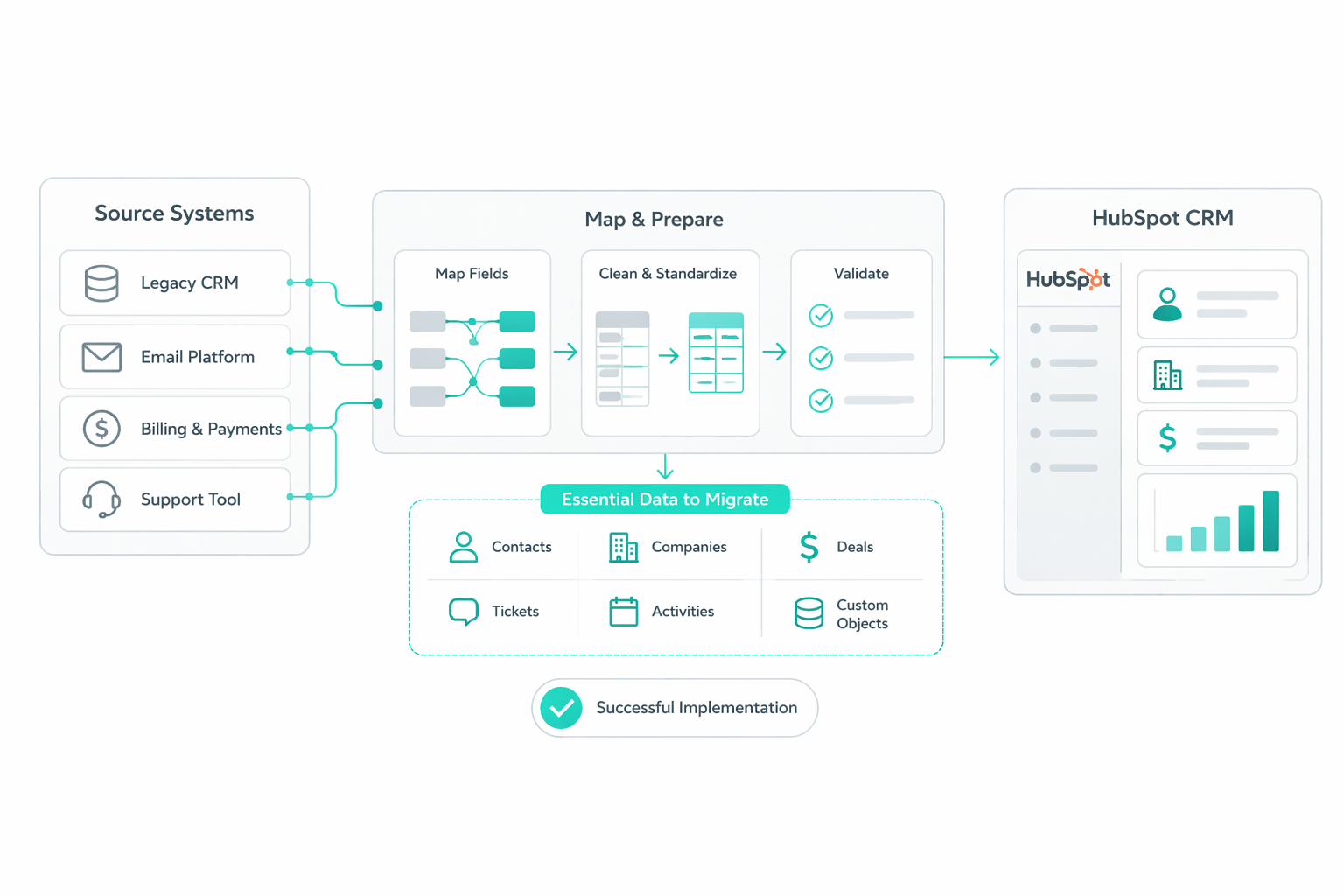
A HubSpot migration involves much more than moving records from one CRM to another. For software companies, it affects customer data, subscription information, customer success processes, support workflows, and the integrations that connect those systems.
Many organizations treat migration as a data transfer project and run into problems after launch. HubSpot research found that 34% of organizations have experienced revenue loss due to fragmented customer data, while only 9% fully trust their data for reporting. These findings reinforce the need for strong data quality, governance, and validation throughout the migration process.
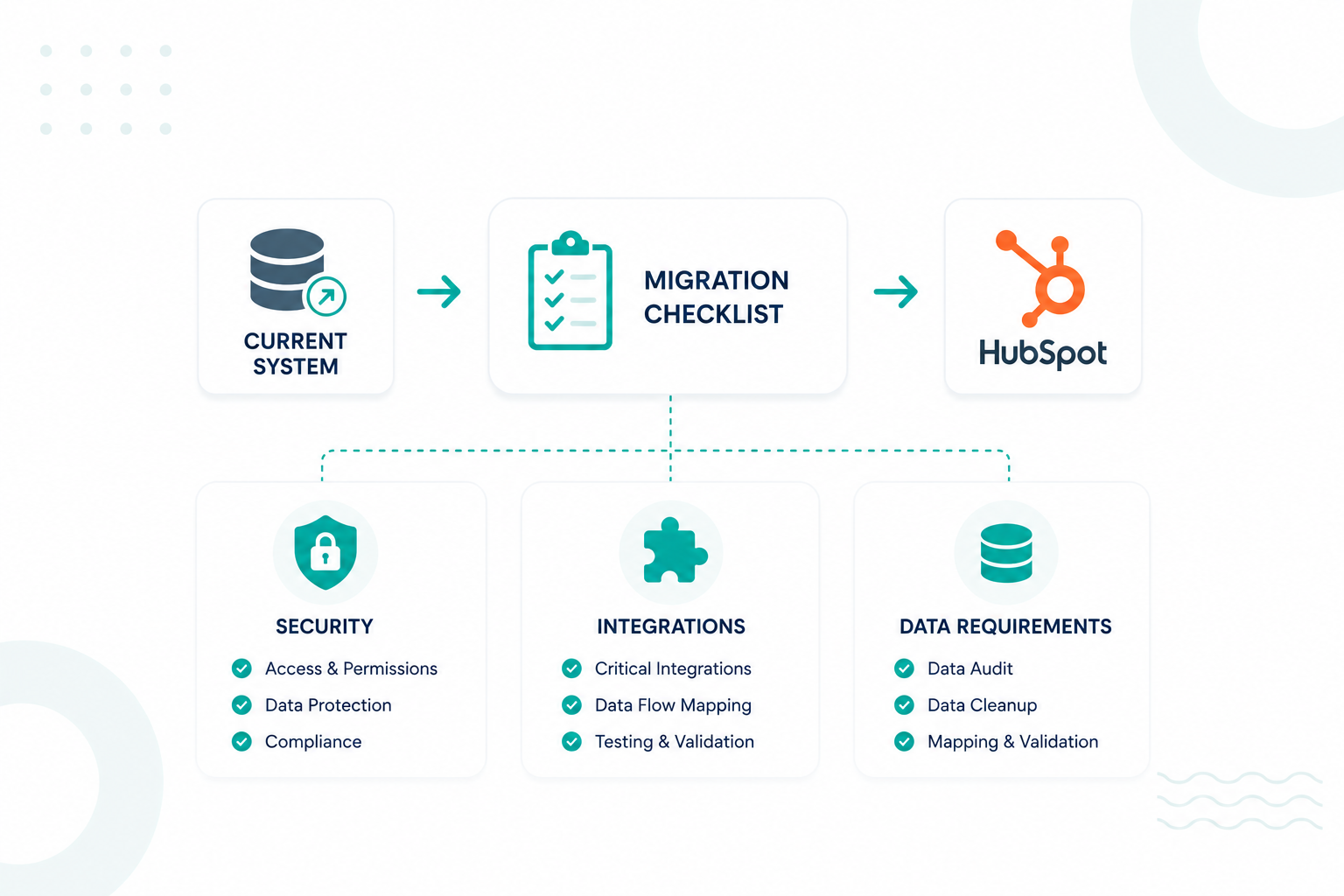
This checklist covers the key areas IT teams should address before, during, and after a HubSpot migration, including security, data preparation, integrations, testing, and governance.
Key Takeaways
- A successful HubSpot migration starts with clear planning, ownership, and defined success metrics.
- Clean and properly structured data helps prevent reporting, automation, and customer record issues after migration.
- Security reviews and integration testing help reduce risks before HubSpot goes live.
- Ongoing testing, governance, and monitoring help keep your HubSpot environment accurate and reliable long after launch.
How IT Teams Plan a HubSpot Migration Project

IT teams should establish migration scope, ownership, timelines, success criteria, and recovery procedures before any data is imported into HubSpot.
Software companies typically migrate contacts, companies, deals, support tickets, subscription records, customer success information, product data, marketing assets, and historical engagement records. Every category should be documented before work begins so teams understand exactly what will move into HubSpot and what will remain in legacy systems.
|
Planning Area
|
Questions to Answer
|
|
Migration Scope
|
Which records and assets will move?
|
|
Historical Data
|
How much history should be retained?
|
|
Ownership
|
Which teams approve the migration?
|
|
Reporting
|
Which reports must remain available?
|
|
Integrations
|
Which systems depend on HubSpot data?
|
|
Recovery
|
How will rollback procedures work?
|
Ownership is equally important. A migration often affects IT, RevOps, sales, marketing, customer success, finance, and support teams. Each department should have clearly defined responsibilities and approval authority throughout the project.
Success metrics should also be established before migration work begins. Examples include duplicate rates below a defined threshold, successful validation of integrations, accurate revenue reporting, and completion of user acceptance testing.
Every migration should include a documented rollback plan. Recovery procedures should identify backup locations, restoration processes, escalation contacts, and operational dependencies. Recovery planning helps reduce business disruption if unexpected issues arise during deployment.
The Security, Privacy, and Access Controls That Should Be Verified Before a HubSpot Migration
Review Authentication Requirements
Authentication controls establish the foundation for account security. This should include two-factor authentication settings, single sign-on configuration, identity provider integrations, password policies, account recovery procedures, and Super Admin assignments.
HubSpot currently requires two-factor authentication for users on Starter, Professional, and Enterprise accounts that log in with a username and password. As a result, authentication planning should be treated as a migration requirement rather than a post-launch enhancement.
Audit User Permissions
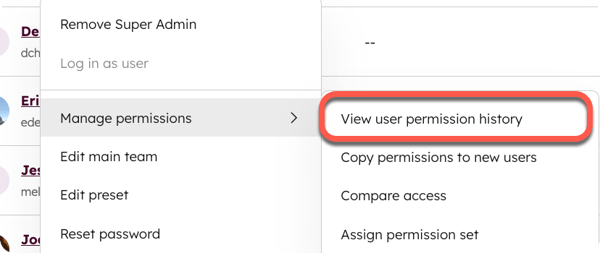
Permission reviews should confirm that users can access only the records, tools, and reports required for their responsibilities.
Role-based access controls should be reviewed across sales teams, customer success teams, support staff, marketing users, executives, contractors, and external partners. Administrative privileges deserve special attention because excessive access rights can increase operational and security risks.
Validate Integration Security
Many software companies connect HubSpot to platforms such as Stripe, Chargebee, Salesforce, Zendesk, Jira, Snowflake, product databases, customer success platforms, and internal applications. Every connection represents a potential security dependency.
The review should examine authentication methods, OAuth permissions, service accounts, API credentials, encryption requirements, token management processes, and access logging capabilities. Integration ownership should also be documented so accountability remains clear after launch.
Review Compliance and Privacy Requirements
Privacy requirements should be evaluated before customer data is transferred into HubSpot. This review typically includes GDPR, UK GDPR, CCPA, industry-specific regulations, customer contractual obligations, and internal governance policies.
Particular attention should be given to consent records, communication preferences, retention requirements, and customer rights requests. These controls help ensure that migrated data remains compliant after launch.
Verify Audit and Monitoring Controls
Migration projects should also validate account activity monitoring and audit visibility. IT teams should confirm that they can review login activity, permission changes, administrative actions, integration activity, and user access patterns.
How IT Teams Should Prepare and Structure Data Before Import
For most organizations, data preparation represents the most important phase of the migration process. Clean data supports reliable reporting, accurate automation, effective segmentation, and trustworthy revenue metrics.
1. Audit Existing Data
This review should identify missing values, duplicate records, invalid email addresses, inconsistent formatting, outdated fields, obsolete records, and conflicting property definitions.
Many software companies discover that years of CRM usage have created inconsistencies that affect reporting and automation. Identifying these issues before migration reduces the likelihood of carrying existing problems into HubSpot.
2. Remove Duplicate Records
Duplicate records create confusion across sales, support, marketing, and customer success teams. They can also affect attribution models, forecasting accuracy, customer communication, and reporting consistency.
Teams should establish duplicate detection rules and cleanup procedures before imports begin. Matching criteria may include email addresses, domains, customer identifiers, subscription IDs, or combinations of multiple fields.
3. Standardize Data Formats
Data standardization improves consistency throughout the CRM. Dates, currencies, country names, lifecycle stages, product plans, customer statuses, and industry classifications should follow approved formatting standards.
|
Field Type
|
Example Standard
|
|
Dates
|
YYYY-MM-DD
|
|
Revenue
|
Single currency format
|
|
Countries
|
ISO naming convention
|
|
Product Plans
|
Approved naming structure
|
|
Lifecycle Stages
|
Standardized values
|
4. Map Source Fields to HubSpot Properties
Every field in the source system should map to a corresponding HubSpot property. Documentation should define field names, data types, transformation rules, ownership requirements, and reporting dependencies.
|
Source Field
|
HubSpot Property
|
|
Customer ID
|
Customer ID
|
|
Subscription Tier
|
Plan Tier
|
|
ARR
|
Annual Recurring Revenue
|
|
Renewal Date
|
Renewal Date
|
|
Health Score
|
Customer Health Score
|
Field mapping reviews should include both technical stakeholders and business users to ensure the structure supports operational requirements.
5. Define Record Associations
Associations determine how records relate to one another inside HubSpot. Contacts may connect to companies, companies may connect to deals, subscriptions may connect to customer accounts, and support tickets may connect to active customers.
Incorrect associations often create reporting issues that remain hidden until users begin relying on dashboards and automation. Association validation should therefore be treated as a core migration requirement.
Here's a helpful article you can read: Enterprise HubSpot CRM Architecture Best Practices
How Software Companies Design Their HubSpot Data Model
Software companies should design HubSpot around recurring revenue, subscription management, customer lifecycle visibility, and product usage data.

1. Define Core Objects
Most companies rely on standard HubSpot objects such as contacts, companies, deals, and tickets. However, many organizations also require custom objects to represent subscriptions, licenses, environments, user seats, products, or customer accounts.
The objective is to create a structure that accurately reflects how the business operates rather than forcing complex relationships into inappropriate objects.
2. Design Revenue Tracking
Recurring revenue metrics often drive strategic decisions across software companies. ARR, MRR, renewal dates, contract values, expansion revenue, churn indicators, and subscription status fields should be incorporated into the CRM architecture early in the project.
Poor planning at this stage frequently creates reporting limitations that require extensive rework after implementation.
3. Create Lifecycle Definitions
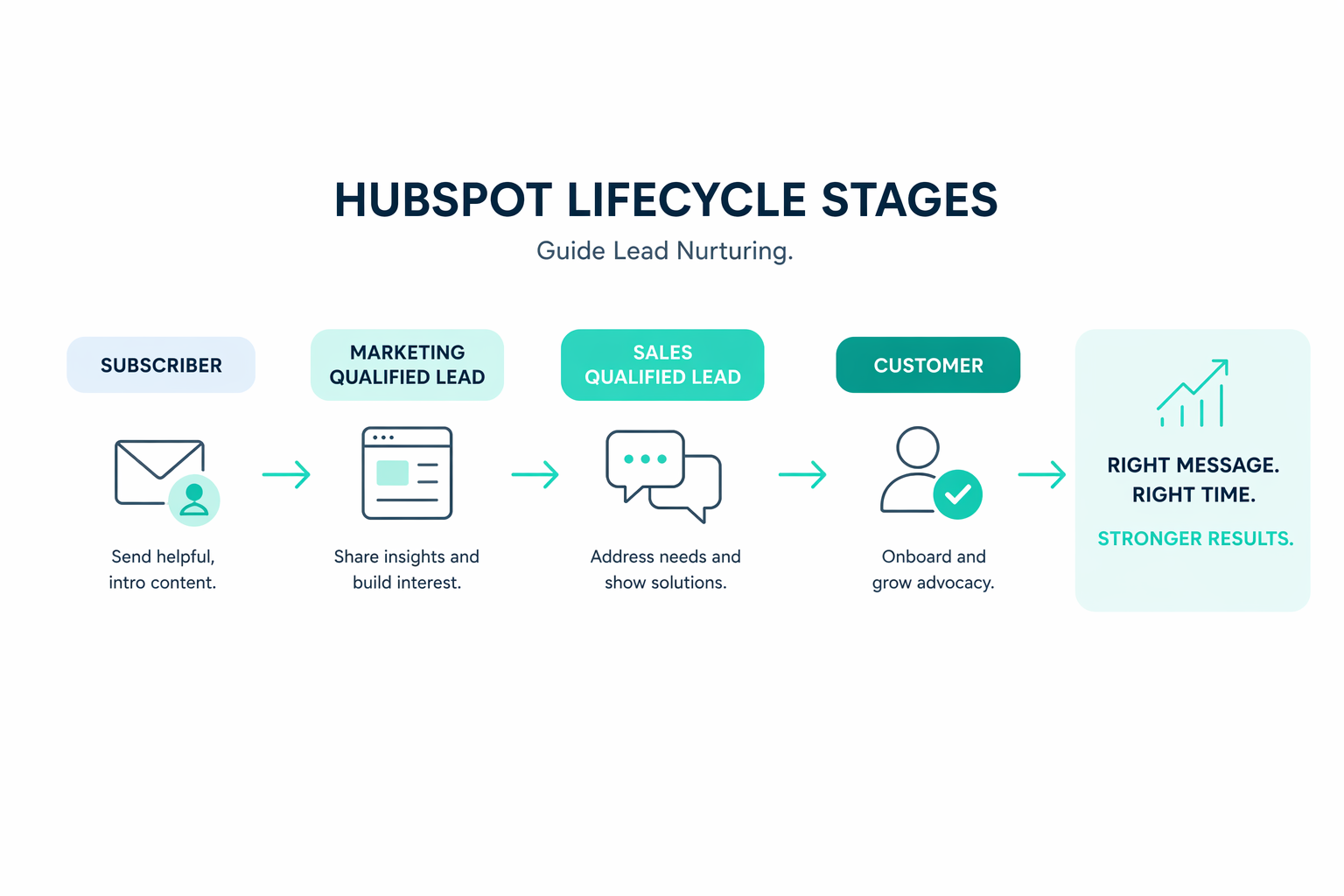
Customer lifecycle stages should support the entire customer journey. Many companies extend beyond traditional lead and customer stages to include trial users, active subscribers, renewal candidates, expansion opportunities, and churned accounts.
Consistent lifecycle definitions improve segmentation, automation, forecasting, and reporting accuracy.
4. Establish Governance Standards
CRM governance should be established before launch rather than after problems emerge. Governance policies should define naming conventions, property ownership, approval procedures, documentation standards, and data quality expectations.
Take a look at this article: How to Build a CRM Around Trials, Onboarding, Renewals, and Expansion
What Integrations, APIs, and Connected Systems Require Validation
A HubSpot migration affects every system that exchanges data with the platform. Before launch, IT teams should validate integrations, APIs, and connected applications to ensure data moves correctly across the technology stack.
- Create a complete integration inventory. Document every system connected to HubSpot, including ownership, purpose, authentication methods, and data flow.
- Review API dependencies. Validate endpoints, authentication requirements, rate limits, synchronization schedules, and data transformation rules.
- Test data synchronization logic. Confirm records are created, updated, associated, and synchronized correctly across systems using realistic test scenarios.
- Verify middleware platforms. Review logging, retry mechanisms, error handling, monitoring, and transformation rules for tools such as Zapier, Make, Workato, and MuleSoft.
Completing these validation activities before go-live helps reduce integration failures, data inconsistencies, and operational disruptions after the migration is complete.
What are the Most Common HubSpot Migration Failures
The most common migration failures involve data quality issues, integration problems, incomplete testing, weak governance, and inaccurate record relationships.
1. Duplicate Records
Duplicate records are one of the most common migration challenges because customer information often exists across multiple CRM systems, billing platforms, spreadsheets, support tools, and marketing databases.
Without carefully defined matching rules, the same customer can be imported into HubSpot multiple times during migration, creating inaccurate reporting, attribution errors, conflicting customer histories, and redundant communications. To reduce this risk, migration teams should establish unique identifiers, matching logic, and deduplication procedures before importing any records into HubSpot.
2. Broken Associations
A migration can successfully import records but still create reporting and operational issues if relationships between them are lost. Broken associations occur when contacts, companies, deals, subscriptions, or tickets are no longer linked correctly after migration.
For software companies, these relationships support revenue reporting, customer success workflows, renewal management, and account visibility. Even a single broken relationship can affect forecasting, automation, and reporting accuracy.
3. Property Mapping Errors
These errors commonly affect recurring revenue metrics, lifecycle stages, customer segmentation, subscription status fields, renewal forecasting, and automation logic. A single incorrectly mapped field can impact dozens of reports and workflows across multiple departments.
The risk increases in software companies because customer, subscription, billing, and product data frequently originate from different systems. Mapping reviews should include technical stakeholders, RevOps teams, finance leaders, and business users to ensure every field supports operational and reporting requirements.
4. Integration Failures
A migration can successfully move data into HubSpot, while critical business processes fail because integrations were not properly validated. Common issues include subscription updates failing to sync, customer health scores not updating, or support records losing their connection to customer accounts.
This risk is significant because HubSpot reports that 92% of organizations store valuable customer data outside their CRM, and 37% experience productivity losses from reconciling information across disconnected systems.
Testing should validate record synchronization, associations, API connections, middleware processes, error handling, and reporting across every integrated system before launch.
5. Weak Governance
Weak governance is often overlooked because its impact usually appears months after launch. A migration can be technically successful but still lose value over time if there are no standards for data management, permissions, workflows, reporting, and ownership.
Without governance controls, duplicate records increase, reporting becomes inconsistent, workflows grow more complex, and trust in CRM data declines.
To prevent these issues, organizations should establish clear ownership, approval processes, naming conventions, audit schedules, data quality reviews, and reporting standards before and after migration.
For additional context, check out this article.
How IT Teams Test and Approve a HubSpot Migration Before Go-Live
1. Conduct a Pilot Migration
A pilot migration provides an opportunity to identify issues before moving production data. Representative records should be imported and validated against source-system data.
The review should confirm property mappings, associations, ownership assignments, automation behavior, and reporting accuracy.
2. Test Business Workflows
Critical business processes should be tested using realistic scenarios. These tests may include lead routing, customer onboarding, subscription changes, renewal management, support ticket creation, and customer success workflows.
Workflow validation helps ensure that operational processes continue functioning after launch.
3. Test Security Controls
Security validation should confirm user permissions, authentication requirements, administrative access, integration permissions, and audit visibility. These controls should be tested before general user access is granted.
Complete Final Approval
Migration approval should include documented sign-off across every major category.
|
Area
|
Approval Requirement
|
|
Security
|
Authentication and permissions validated
|
|
Data
|
Cleanup and mapping approved
|
|
Integrations
|
Sync testing completed
|
|
Compliance
|
Regulatory review completed
|
|
Reporting
|
Revenue validation completed
|
|
Operations
|
User acceptance testing completed
|
What to Monitor After Your HubSpot Migration Launches
The work does not end when a HubSpot migration goes live. Ongoing monitoring helps teams identify issues early, maintain data quality, and ensure the platform continues to support business operations as intended.
- Conduct a 30-day review. Review duplicate rates, failed integrations, workflow performance, user feedback, and reporting discrepancies to identify issues that may have emerged after launch.
- Conduct a 90-day review. Evaluate adoption trends, reporting accuracy, governance effectiveness, and integration performance to identify opportunities for improvement.
- Monitor data quality. Regularly audit property usage, associations, duplicate rates, missing values, and lifecycle stages to maintain reliable CRM data.
- Monitor integrations. Track API failures, synchronization delays, middleware issues, and transformation errors to quickly detect operational disruptions.
Regular reviews and monitoring help ensure the migration delivers long-term value and continues to support accurate reporting, automation, and business processes.
What's Next for Your HubSpot Migration?
A successful HubSpot migration is about more than moving data. Clean records, secure access, reliable integrations, and accurate reporting all help create a CRM your team can trust long after launch.
If your organization needs help with a HubSpot migration, Campaign Creators is here to help. We work with software companies to migrate data, connect systems, improve reporting, and build HubSpot environments that support growth.
Whether you're moving from Salesforce, another CRM, or a mix of disconnected tools, our team can help you make the transition with confidence.
.png?width=420&height=121&name=cc-logo-color%20(2024).png "Campaign Creators - logo in dark blue and transparent background")


 Campaign Creators

 Campaign Creators : 04/16/26