I know what I am looking for, and would like to chat.

10 min read

Essential Data To Migrate For A Successful HubSpot CRM Implementation

Essential Data To Migrate For A Successful HubSpot CRM Implementation

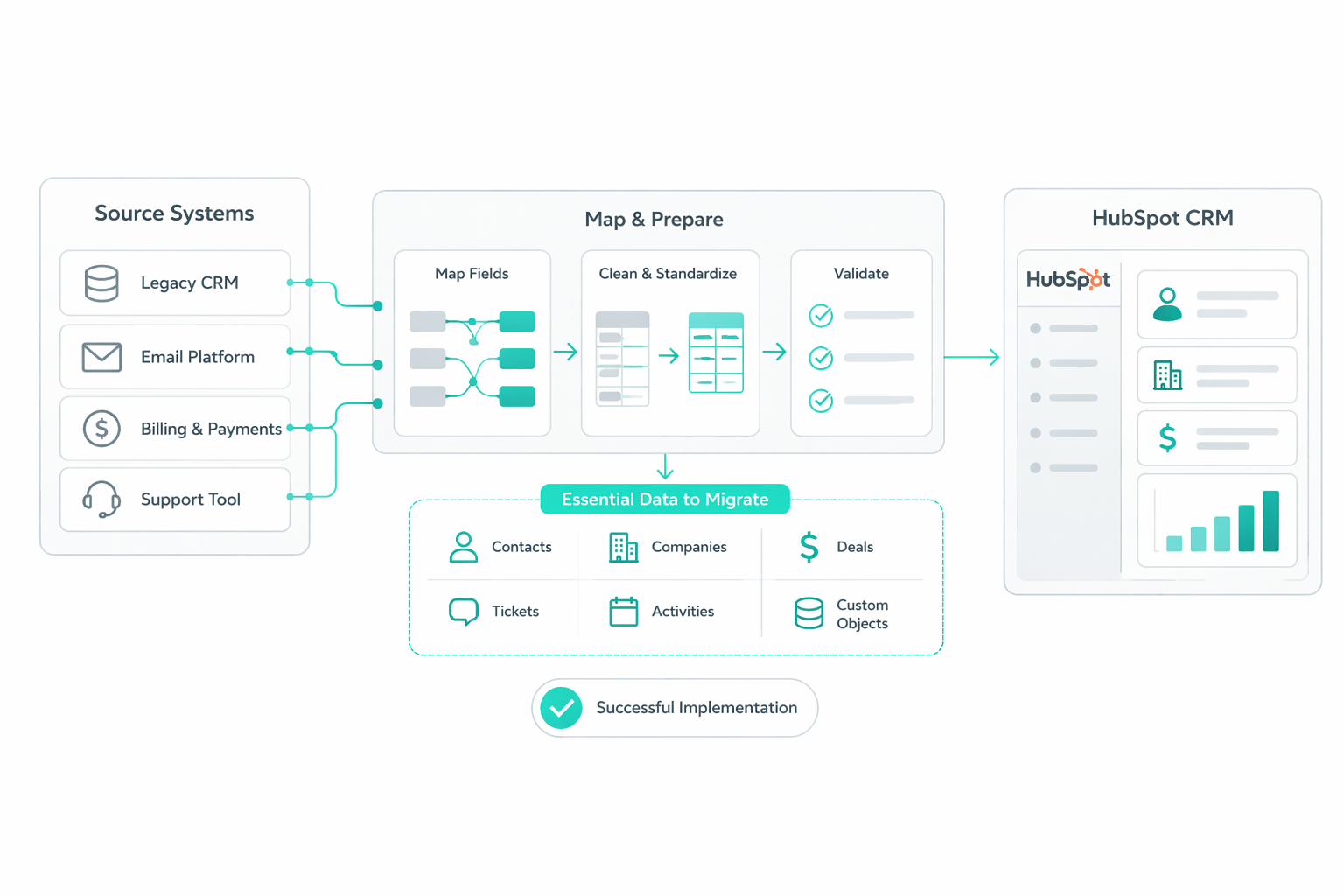
A HubSpot migration represents open-heart surgery on a company's revenue engine. It creates an opportunity to move away from decentralized, unreliable data and toward a single source of truth for every prospect interaction.

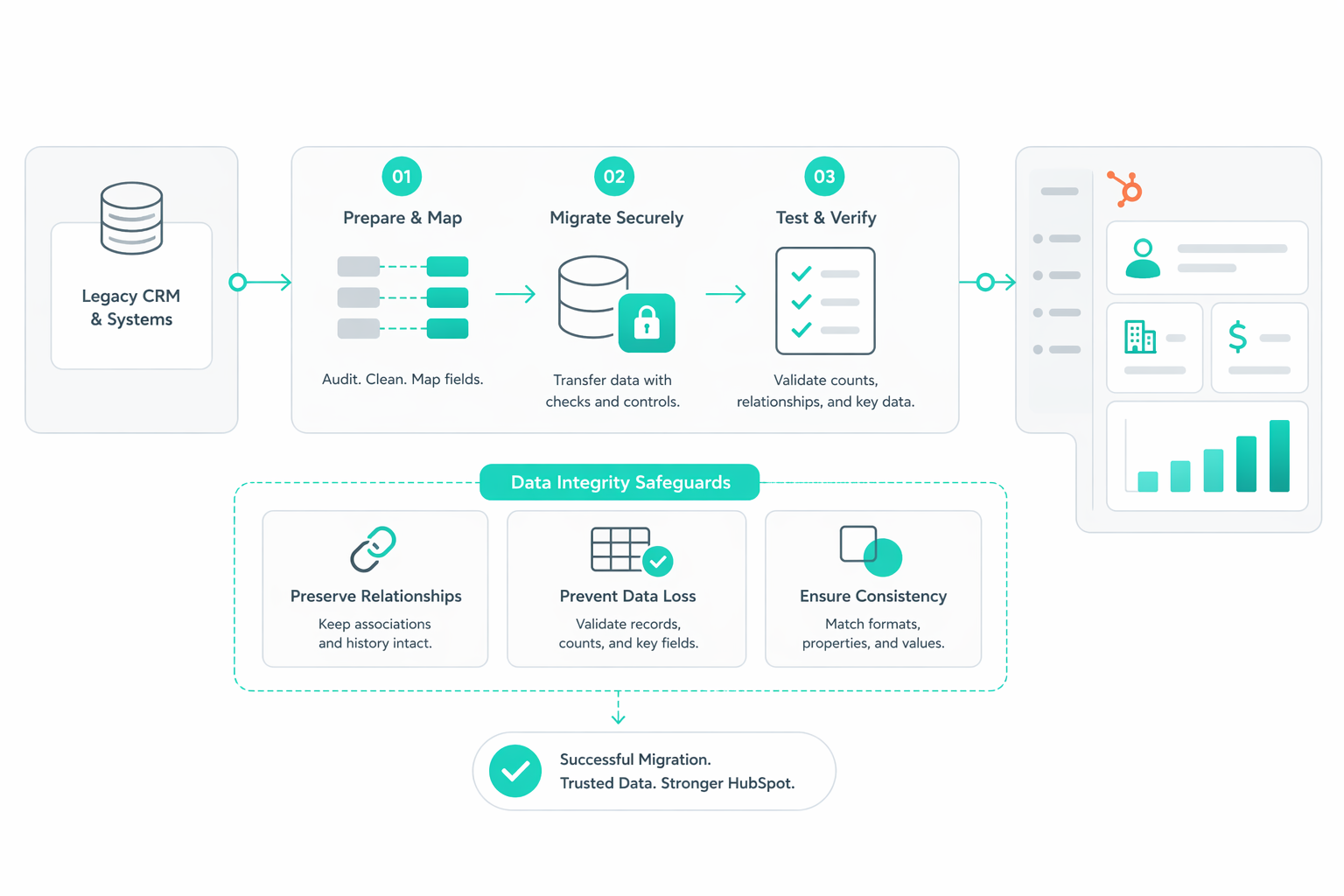
However, the complexity of this transition depends on factors such as data volume and the level of customization required. Without a structured approach, migrations often carry over the same data issues that existed before. Gartner reports that poor data quality costs organizations an average of $12.9 million annually, often driven by duplicates, inconsistencies, and incomplete records.

To avoid this, the focus should be on maintaining well-structured records and standardized formats from the start. This prevents the CRM from becoming cluttered and ensures the system remains usable across teams. This guide walks through the steps you can take to protect your revenue foundation and build a CRM that delivers reliable insights for long-term growth.

The Contact and Company Data You Should Migrate

Contact and company data form the core of your CRM. Every report, automation, and revenue insight depends on how clean and structured these records are.

Define What a High-Quality Record Looks Like

A large database often includes outdated contacts, duplicate entries, and incomplete profiles. Moving everything weakens segmentation and reporting. A strong dataset starts with clear inclusion criteria. Focus on contacts and companies that:

  • Show recent engagement or activity, such as email opens, meeting bookings, or deal participation, within the last 12 months
  • Match your target market or ideal customer profile
  • Contain complete and usable data that supports segmentation and routing

Older records, especially from trade shows or bulk imports, often inflate database size without adding value, which leads to weaker targeting and unreliable reporting.

Moreover, carrying unnecessary data increases complexity and reduces usability across teams. A smaller, more engaged dataset improves email performance, reporting clarity, and targeting precision from the start.

Clean, Deduplicate, and Standardize Before Migration

Legacy CRM data often contains inconsistencies that break automation and reporting. Common issues include:

  • Duplicate contacts created across systems
  • Free-text fields with inconsistent values
  • Missing key attributes such as industry or job role

HubSpot relies on structured data. Contacts are typically deduplicated using email, and companies use domain names as unique identifiers. Before migration, run a full deduplication process in a spreadsheet using tools such as VLOOKUP or conditional matching.

Your data cleaning should focus on removing duplicates and merging records correctly, retaining the earliest create date and the most recent activity during merges, filling missing critical fields, and standardizing formats such as job titles, industries, and lead sources

Map Properties to Match HubSpot’s Data Model

Every field in your legacy CRM needs to map correctly into HubSpot. Poor mapping leads to broken automation, unreliable reporting, and confusion across teams.

HubSpot’s import process depends on aligning spreadsheet columns with CRM properties, which define how records behave inside the system. Here is an example that you should follow:

hubspot-import-data-spreadsheet-header-column

You also need to audit every custom property before migration. Fields that have not been updated in the last 90 days or lack a clear purpose often add clutter without value and should be excluded.

Migration is a chance to simplify your data model. So removing redundant or unused properties reduces clutter and improves long-term maintainability.

Build Accurate Contact-to-Company Relationships

Each contact should link to the correct company, with company records holding shared attributes such as industry, size, and revenue. HubSpot can automatically associate contacts using company domains, but this logic does not always work for complex structures such as multi-brand organizations or subsidiaries.

Imports can include multiple objects in one file to preserve these associations, ensuring records stay connected rather than isolated.

Broken or missing associations create gaps in reporting and reduce trust in the CRM. Clean relationships provide:

  • Account-based reporting
  • Accurate deal attribution
  • Full visibility across stakeholders involved in a deal

Every contact should connect to a company to avoid orphaned records and give sales teams complete account context.

A clean foundation makes every future initiative easier to execute, from reporting to personalization. Instead of inheriting years of inconsistent data, your CRM starts as a system your team can trust and actually use.

Deal and Pipeline Data That Preserves Revenue Insight

Deal and pipeline data represent your revenue story. Every closed deal, lost opportunity, and active pipeline stage holds insight into how your business grows. Migration should protect that intelligence and not dilute it with outdated or irrelevant records.

Focus on High-Value Deal Data

Old, incomplete, or irrelevant deals create clutter and make pipeline analysis harder to trust. A strong migration strategy prioritizes:

  • Closed-won and closed-lost deals from the past 12 to 24 months
  • Active deals currently in progress
  • Deals with complete data such as amount, stage, and close date

Selective migration improves reporting accuracy and keeps your pipeline focused on what drives revenue today. Carrying excessive historical data increases noise and reduces clarity across dashboards and forecasts.

Match Your Current Sales Process with Your Pipeline

Your pipeline structure should reflect how your sales team operates today. Start by documenting your current pipeline, then map out your ideal future state before aligning legacy data to the new structure.

Effective deal stages should be tied to clear, trackable actions such as:

  • A scheduled demo
  • A completed qualification call
  • A sent proposal

Each stage should have defined criteria and property requirements that must be met before a deal can move forward. This maintains consistency across your team and protects reporting accuracy.

For businesses with multiple revenue streams, separate pipelines improve visibility and forecasting. For example:

  • New business vs expansion or upsell deals
  • Different pipelines for distinct product lines or regions

If your sales process involves quoting specific products, SKUs, or pricing tiers, set up products and line items before importing deals. This ensures revenue data connects correctly to what was actually sold.

Maintain Deal Associations for Full Context

Each deal connects to contacts and companies that shape the buying decision. These relationships provide the context needed for accurate reporting and sales alignment.

Every deal record should include:

  • The associated contact or decision-maker
  • The linked company account
  • Any additional stakeholders involved

To preserve these relationships during migration, ensure your data includes consistent identifiers across files. This often involves using shared columns such as deal ID, company name, or another common reference point to link records correctly.

Creating an external ID field for each deal adds another layer of reliability. This stores the unique identifier from your legacy system, which becomes a reference point for future updates, re-syncs, or data backfills.

Without these associations, deals become disconnected from the accounts and people behind them, weakening attribution and reducing visibility for your team.

Preserve Key Deal Properties That Drive Insight

Deal properties carry the details behind each opportunity. These fields turn raw data into actionable insights for forecasting and strategy. Focus on migrating properties that support analysis and decision-making, such as:

  • Deal amount and expected revenue
  • Close date and sales cycle length
  • Deal owner
  • Lead or deal source
  • Product or service interest
  • Close reason for won and lost deals
  • Notes from sales conversations

Certain fields should be treated as non-negotiable. Amount, close date, and deal owner must be populated to ensure dashboards and forecasts function immediately after migration.

Data formatting also plays a direct role in accuracy. Currency fields should use numeric values with decimals and no symbols to prevent calculation errors inside reports.

Prioritize Clarity Over Completeness

Migration should create a system that is easy to use and easy to trust. Moving every deal ever created often leads to confusion rather than clarity.

Technical limitations also play a role in how historical data is preserved. HubSpot does not support backdating system-generated deal stage timestamps. During import, stage changes are recorded at the time of migration, not at the original historical date.

To maintain visibility into historical progression, create custom date properties for each key stage milestone. These fields store the original stage entry dates and support accurate reporting on deal velocity and time in stage.

Preparation and validation strengthen the final result:

  • Ensure each deal exists on its own row in the import file to prevent duplication
  • Normalize all data formats before import
  • Run a test import with a small batch of around 100 records to validate mappings and uncover edge cases

A refined dataset helps your team track pipeline health with confidence, forecast revenue more accurately, and analyze deal progression without distorted timelines.

Lifecycle Stages and Activity Data for Accurate Attribution

Lifecycle stages and activity data define how every contact moves through your revenue system. These elements connect marketing efforts to sales outcomes and give your team a clear view of what drives conversions. Poor structure at this level leads to broken attribution, unreliable reporting, and misalignment across teams.

Map Lifecycle Stages to Your Actual Customer Journey

Aligning legacy lifecycle stages with HubSpot requires exact matches for picklist values. Even small inconsistencies in naming or structure can split your data into multiple versions of the same stage, which breaks reporting and segmentation.

Each stage should reflect a clearly defined point in your funnel, with criteria tied to real actions. In traditional sales-led environments, this might include qualification or opportunity creation. In product-led environments, lifecycle movement often depends on behavioral triggers such as:

  • Account creation
  • KYC or onboarding completion
  • Product usage or transaction thresholds

Clear definitions ensure lifecycle stages act as a shared language across marketing, sales, and operations, rather than a set of loosely interpreted labels.

Ensure Lifecycle Stages Move in a Controlled, Forward Path

Lifecycle stages should follow a structured progression that reflects real buyer movement across your funnel. Uncontrolled stage movement leads to inconsistent reporting and unreliable automation.

A controlled progression ensures:

  • Consistent handoffs between marketing and sales
  • Reliable conversion metrics between stages
  • Predictable automation triggers tied to stage changes

Automation plays a central role in maintaining this structure. Lifecycle stages can update based on defined actions such as form submissions, product activity, or deal creation, which reduces manual errors and keeps data consistent across the system.

Migrate Only High-Intent Activity Data

Migrating historical activity ensures your team has full visibility into past engagement. These records populate the contact timeline and give sales and marketing teams the context needed to understand each relationship.

Focus on high-intent activities such as:

  • Demo requests and meeting bookings
  • Sales calls and completed tasks
  • Notes tied to key interactions or decisions
  • Content downloads linked to conversion

Some limitations require additional handling. Primary email history can often transfer as notes through contact exports, but two-way sync history from Gmail or Outlook integrations typically remains in the original inbox. To maintain context, add a manual note in the contact record that directs users to archived communication sources.

Filtering out low-value or outdated activity prevents clutter and ensures your CRM reflects meaningful engagement rather than noise.

Build Attribution on Structured Lifecycle and Activity Data

Lifecycle stages and activity data form the foundation of attribution. Together, they explain how prospects move from initial engagement to revenue.

Accurate attribution depends on:

  • Clean and standardized lifecycle definitions
  • Preserved source properties tied to acquisition channels
  • Meaningful activity data that reflects real intent

Well-structured activity tracking also supports internal performance analysis. Managers can build reports on metrics such as demos delivered, calls logged, and conversion rates between stages. Using notes and activity records ensures every interaction contributes to a complete narrative on the contact timeline.

Establishing this structure early ensures every future interaction feeds into a reliable attribution model. Your team gains a system that shows exactly how and where conversions happen.

Integration Dependencies You Need to Map Before Migration

HubSpot connects marketing platforms, sales tools, support systems, billing software, and data warehouses. Migration without mapping these dependencies creates data conflicts, broken workflows, and inconsistent reporting across systems.

Identify Every System That Connects to Your CRM

Most organizations rely on multiple tools that send or receive CRM data. These systems extend beyond core sales and marketing platforms and often include communication, enrichment, and operational tools.

A complete audit should document every active integration, including:

  • Communication tools such as Slack, LinkedIn Sales Navigator, Gmail, or Outlook
  • Enrichment platforms like ZoomInfo, Clearbit, or Apollo
  • Marketing automation tools, ad platforms, and analytics systems
  • Internal databases or data warehouses

Each system should be reviewed to understand what data flows into HubSpot, to other systems, and which fields act as the source of truth. Sales and marketing teams depend heavily on these connections. A missing or broken integration can stop workflows immediately, whether that involves email syncing, lead enrichment, or deal updates.

Map Data Ownership Across Systems

Every field in your CRM should have a clearly defined system of record. Many data points originate outside of HubSpot, and without ownership rules, systems compete to overwrite each other.

Examples include: billing and payment data from platforms such as Stripe, product usage data from internal systems, and enrichment data from third-party tools.

Clear ownership becomes even more important during migration, as multiple systems may attempt to sync data at the same time.

Align Custom Fields With Integration Requirements

Integrations rely on specific fields to function correctly. Many legacy systems contain custom properties built over time, often without documentation or a consistent structure. Audit all custom fields and identify which ones are required for integrations such as enrichment tools or support platforms.

Each retained field should have a clear business purpose, the correct data type, and consistent naming conventions.

Some integrations, particularly enrichment tools like Clearbit or Apollo, depend on precise field mappings to route incoming data into the correct HubSpot properties. Misaligned fields result in incomplete or misplaced data, which reduces the value of those tools.

Validate Data Sync and API Connections Before Migration

Integrations rely on APIs and sync rules to move data between systems. These connections must be tested before full migration to prevent errors at scale.

Key validation steps include:

  • Testing sample data sync between systems
  • Confirming field mappings match across platforms
  • Verifying trigger-based updates operate correctly

Technical limits also need to be considered. APIs enforce rate limits, and high-volume migrations can trigger “429” errors when call thresholds are exceeded. To reduce this risk, use batch APIs for bulk operations, cache results where possible, and stagger large data transfers.

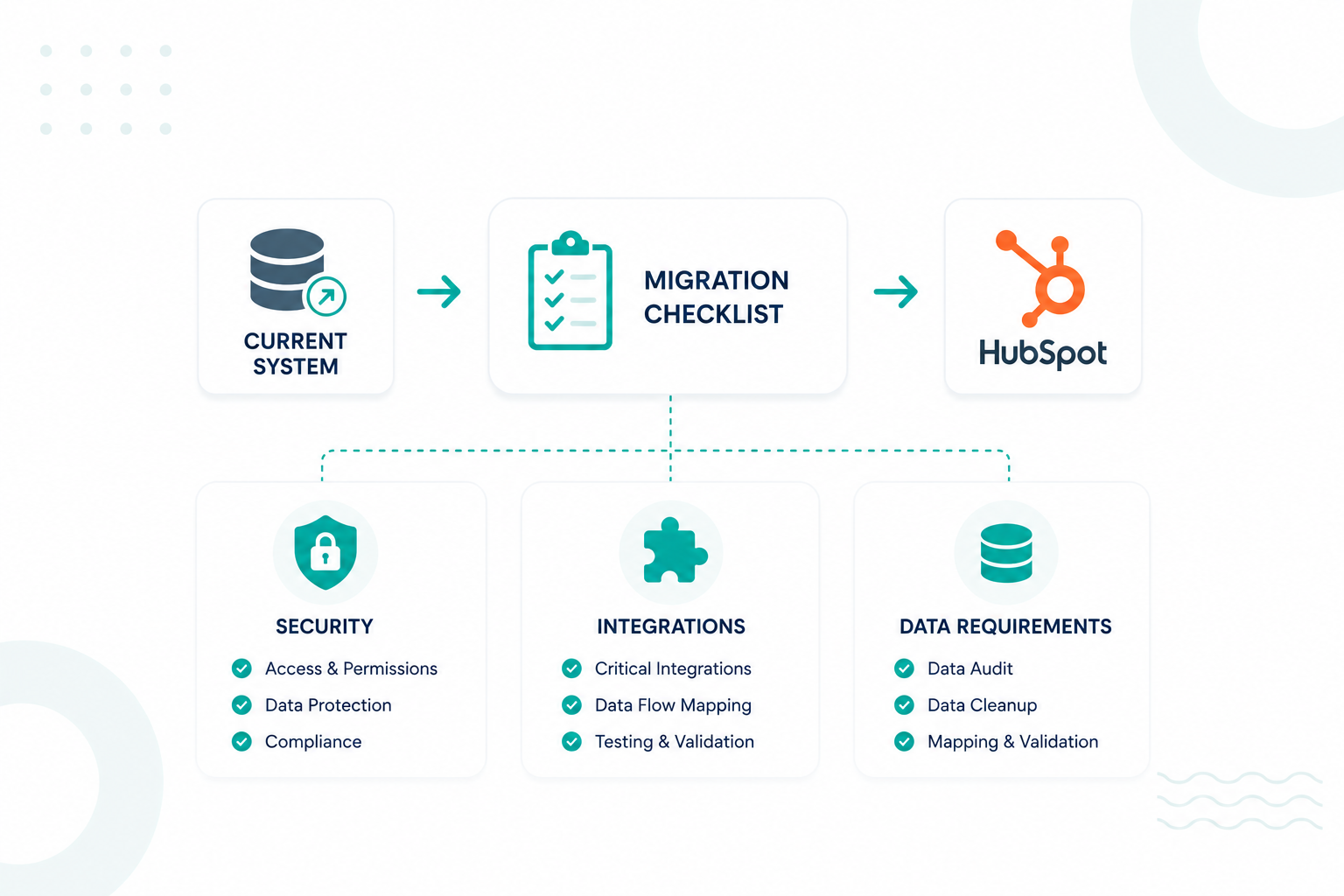
Pre-Migration Checklist to Avoid Costly Mistakes

1. Review Your Current Contract

Confirm the cancellation terms of your existing CRM. Many providers require a 30-day notice period before renewal. Missing this window can lock you into another billing cycle, even after migration is complete.

2. Secure a Complete Offline Backup

Export a full snapshot of your database before any changes begin. Use CSV exports or a dedicated backup tool to capture all objects and properties. This backup acts as your recovery point in case of import errors, data loss, and incorrect mappings.

3. Perform Rigorous Data Hygiene

Clean your data before it enters HubSpot. Remove test records, invalid or bounced email addresses, and outdated or irrelevant contacts. Avoid importing your entire historical database. Focus on engaged contacts with activity in the last 12 months, such as email engagement, meetings, or deal involvement.

4. Develop a Detailed Data Dictionary

Map every source field to its destination in HubSpot using a structured spreadsheet. For each property, document field name and internal name, business use case, and the owner responsible for maintaining it. Exclude properties with no clear purpose or low usage. Fields with near-zero fill rates or no updates in recent months add complexity without improving insight.

5. Lock Down Unique Identifiers

Define how records will be identified to prevent duplication during import. Standard identifiers include: “Contacts → primary email address” and “Companies → domain name.” For other objects, create an external ID field that stores the unique identifier from your legacy system.

6. Normalize All Technical Formats

Standardize your data to match HubSpot’s formatting requirements before import. Key formats include: “Dates → YYYY-MM-DD”, “Phone numbers → include “+” and country code”, “Country and state → ISO codes”, and “Emails and domains → lowercase only”

7. Execute a Pilot Test Import

Run a test import before moving your full dataset. Use a sample of around 100 records per object to validate your setup. A small batch helps surface edge cases early. Fixing issues at this stage prevents large-scale errors that are harder to correct later.

Build a CRM Your Team Can Trust From Day One!

A HubSpot migration shapes how your revenue engine runs long after the data transfer is complete. Every decision you make, from which records you include to how you structure pipelines and lifecycle stages, directly affects how your team sells, markets, and reports.

The effort you invest in cleaning, mapping, and validating your data now directly shapes how your CRM performs after migration. It determines whether your system becomes something your team relies on daily or one they avoid due to poor data and broken workflows.

To move in the right direction, you can start by assessing your current setup using a Portal Audit Checklist. From there, building a stronger foundation through our HubSpot Onboarding Services helps ensure your CRM is structured and ready to support long-term growth.

Frequently Asked Questions

What determines the complexity of a CRM migration project?

Complexity depends on data volume, number of objects (contacts, companies, deals), custom properties, integrations, and how much restructuring your pipeline and lifecycle stages require.

How long does a HubSpot migration typically take?

Most migrations take several weeks, depending on data size, cleanup effort, and the number of integrations and workflows that need to be rebuilt.

What data cannot be migrated into HubSpot or requires workarounds?

System-generated data like historical stage timestamps, certain activity logs (e.g., email sync history), and unsupported field types often require custom properties, notes, or manual reconstruction.

Do you need a certified HubSpot partner, or can you handle migration in-house?

You can handle migration in-house for simple setups, but complex migrations with heavy customization, integrations, or large datasets benefit from a certified partner to reduce risk.

Who should own the migration process internally across teams?

A single project owner, usually from RevOps or operations, should lead the migration with input from sales, marketing, and technical stakeholders to ensure alignment and accountability.

Are there file size limits or constraints during HubSpot imports?

Yes, HubSpot enforces file size and row limits during imports, so large datasets often need to be split into smaller batches to avoid errors and ensure successful processing.


Data Contracts in HubSpot: Fix Property Sprawl and CRM Data Drift

Data Contracts in HubSpot: Fix Property Sprawl and CRM Data Drift

Most CRM environments evolve without a defined schema strategy. Teams create properties to solve immediate problems, integrations introduce new...

Read More
HubSpot Integration Architecture for Payments, Billing, and Fulfillment Systems

HubSpot Integration Architecture for Payments, Billing, and Fulfillment Systems

The modern enterprise tech stack has shifted from a single system to a mix of specialized SaaS tools. That shift creates a problem: CRM, payments,...

Read More
How to Build an Engagement Data Layer for Reliable HubSpot Reporting

How to Build an Engagement Data Layer for Reliable HubSpot Reporting

How to Build an Engagement Data Layer for Reliable HubSpot Reporting Consistent and accurate HubSpot reporting starts with the structure behind the...

Read More