I know what I am looking for, and would like to chat.

A team of data-driven marketers obsessed with generating revenue for our clients.

Because the proof is in the pudding.

At Campaign Creators we live by three principles: Autonomy, Mastery, Purpose.

7 min read

How to Design HubSpot Automation for Clean Data and Better AI

How to Design HubSpot Automation for Clean Data and Better AI

Most teams do not struggle with automation tools because workflows, sequences, and triggers are already running inside HubSpot.

Problems tend to appear later, when reports stop matching and leads stall between stages. At that point, sales begins to question the data, and marketing begins to question the pipeline. These situations usually point to a system issue rather than a problem with the tools themselves.

Fragmented data and inconsistent processes are common reasons systems fail to deliver ROI, since automation that runs on disconnected logic often creates conflicts such as duplicate triggers, overlapping workflows, and unclear ownership. When AI is added on top of this kind of setup, it does not resolve the issue and instead amplifies it.

Automation performs more effectively when data remains consistent, and processes stay aligned, since this creates a stable foundation for AI to support better prioritization, surface useful insights, and help teams make decisions faster.

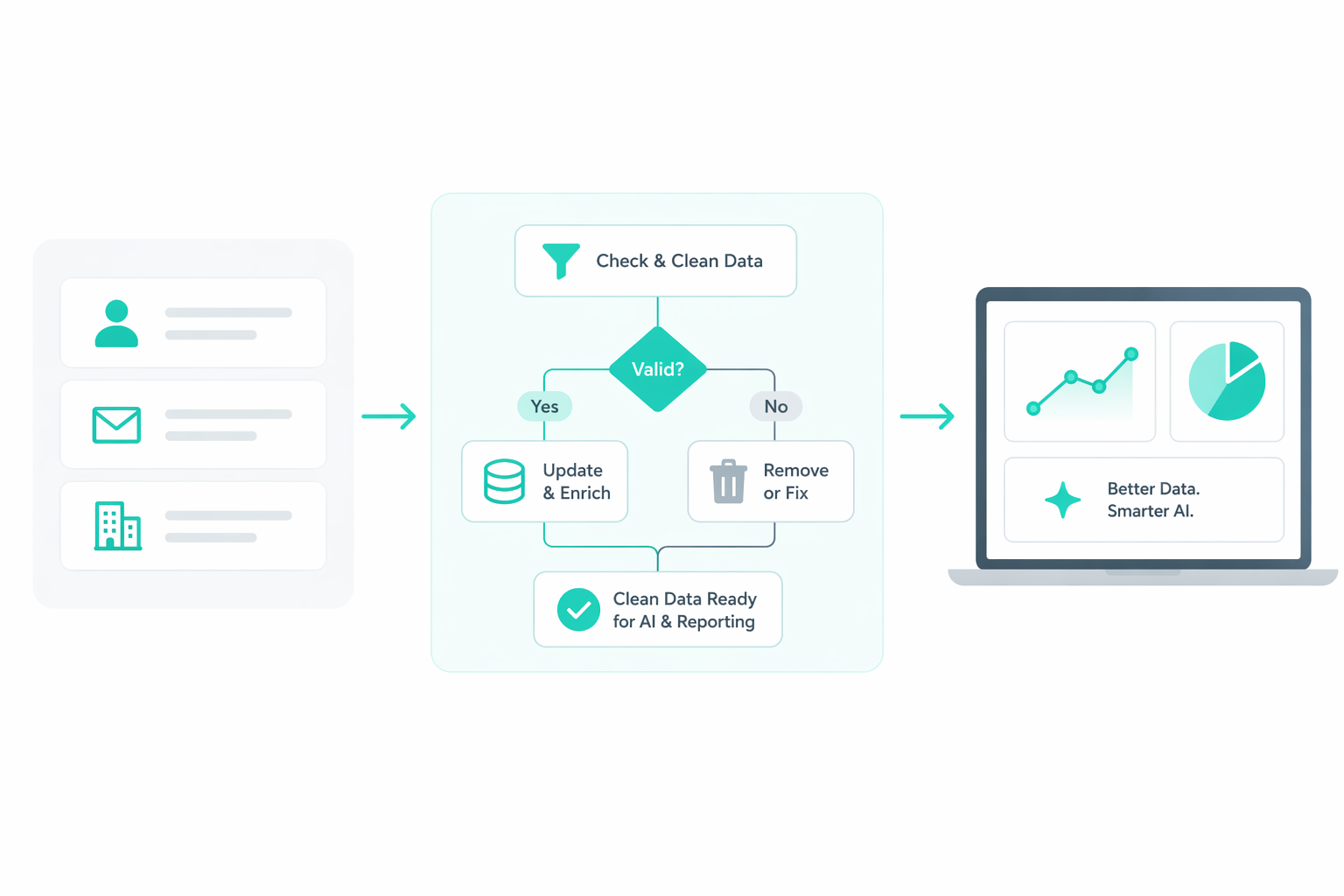
The Data Foundation for Automation

reports-summaries-automation-data-alignment

Automation depends on consistent data. Workflows behave inconsistently even if they are set up correctly when the data is unclear or duplicated.

One of the first signs of poor data structure is conflicting reporting. You might see different MQL counts across dashboards, or leads appearing in multiple lifecycle stages at the same time. Sales may also see duplicate companies in the pipeline, each with an incomplete activity history.

A common issue is the overlap between lifecycle stage and lead status. When these are not clearly separated, the same contact can appear qualified in one view and inactive in another. This affects routing, reporting, and scoring.

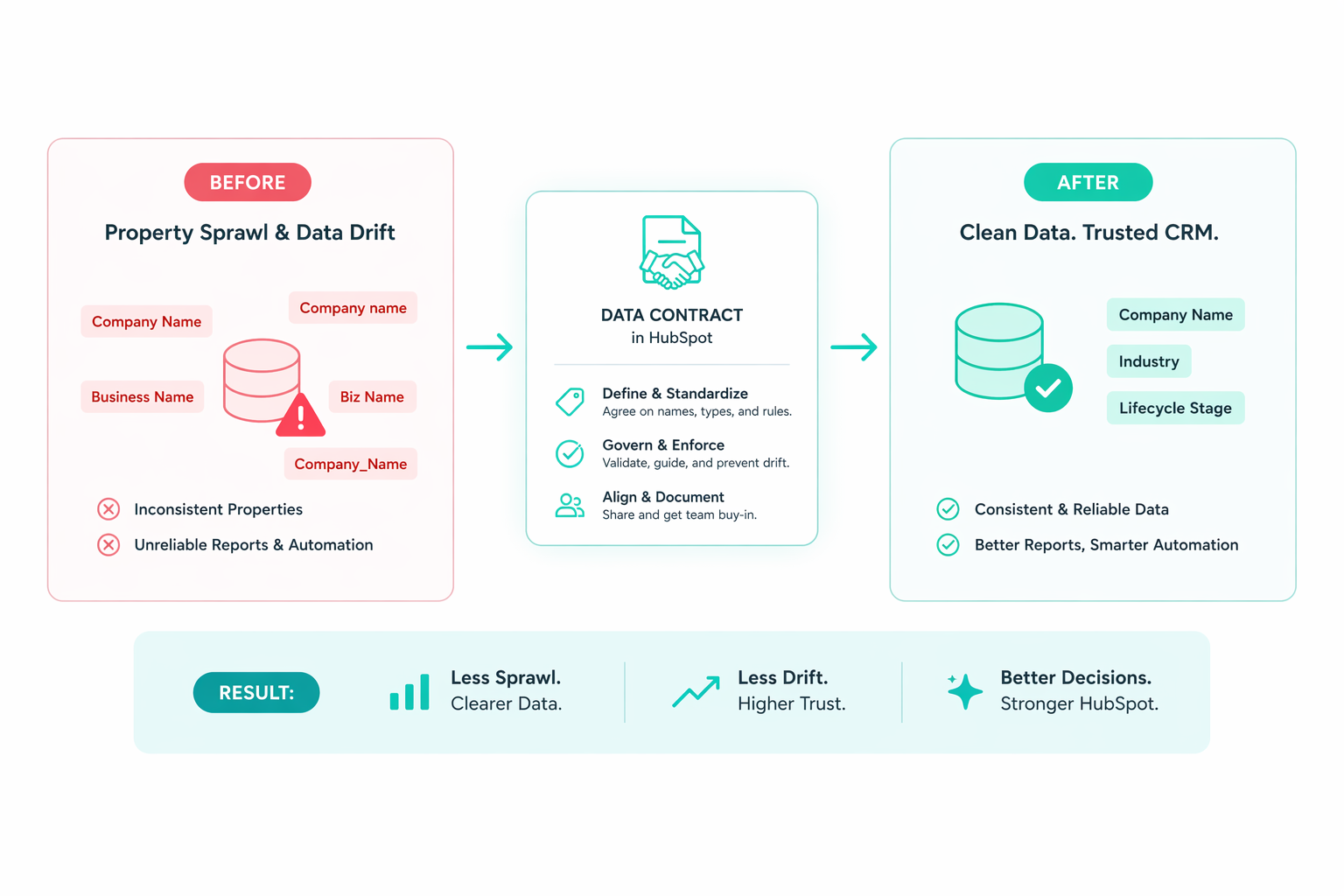
Property structure creates similar problems. If multiple fields represent the same concept, such as “Industry” and “Industry Type,” workflows may rely on different versions. Each workflow may function correctly on its own, but the system as a whole produces inconsistent outcomes.

Associations add another layer. When contacts are not consistently linked to companies or deals:

  • Sales loses visibility into full account activity
  • Attribution reports miss key touchpoints
  • AI summaries lack context about the relationship

These issues often connect. For example, if “Lead Source” is inconsistent across records:

  • AI scoring becomes less reliable because inputs vary
  • Attribution reports cannot group channels correctly
  • Routing logic sends leads to the wrong team

Fixing the data improves all of these at once. A simple example shows how this plays out. If lead source values include “Facebook,” “FB,” and “Meta Ads,” workflows that depend on this field will split logic across multiple paths. Once those values are standardized into one controlled option, routing, reporting, and scoring align immediately.

In practice, improving data quality means reducing variation and increasing clarity:

  • Use one clear definition per property
  • Assign ownership for each property
  • Use dropdown values instead of free text where possible
  • Require key fields before allowing stage changes

As this structure becomes consistent, automation begins to behave predictably. It operates on a shared and reliable dataset.

How Automation Architecture Is Designed

To organize your automation into a consistent structure, it needs three connected layers: signals, logic, and outcomes.

Signals: These are the inputs that trigger automation, such as lifecycle stage, lead source, or engagement activity. These inputs need to be reliable. If lifecycle stage changes are inconsistent, any workflow triggered by that stage becomes unreliable.

Logic: This is how the system processes those signals. This is where many teams create too many one-off workflows. For example, you might have separate workflows assigning leads based on territory, industry, and product interest. Each workflow handles a piece of the logic, but together they overlap and create conflicts.

You create one routing workflow that evaluates all conditions instead of five different workflows assigning owners. This reduces duplication and ensures consistent behavior.

Outcomes: This defines what the automation is meant to achieve. Each workflow should connect to a measurable result, such as:

  • Faster lead response time
  • Improved conversion between stages
  • Fewer manual updates

If a workflow does not support a clear outcome, it often adds complexity without improving performance. To see how these layers work together, consider a simple flow:

  • Signal: A lead reaches MQL
  • Logic: A centralized workflow assigns the lead based on territory and starts an SLA timer
  • Outcome: Sales is notified immediately and follows up within a defined timeframe

This connection ensures that automation supports a clear business result. Make the consistency more manageable by naming conventions, version tracking, and clear ownership make it easier to understand how workflows interact and how changes affect the system.

The Phased Implementation Model

Building everything at once often creates complexity without stability. A phased approach makes it possible for each part of the system to support the next.

Phase 1: Stabilize Your Data and System Structure

This is where data issues are resolved, and the system becomes stable. Duplicate records are removed, properties are standardized, and lifecycle transitions follow consistent rules.

This phase is working when new leads move through the system without manual correction, and reporting begins to align across dashboards.

A common mistake at this stage is moving too quickly into advanced automation or AI features before the data is stable. For example, you might set up predictive lead scoring, but because lifecycle stages and lead sources are inconsistent, high-quality leads are scored too low and low-quality leads are prioritized. As a result, sales focus on the wrong contacts and miss better opportunities.

Phase 2: Structure Engagement and Handoffs

The second phase focuses on engagement. With clean data in place, automation can guide how leads are handled and how teams interact.

At this stage, when a lead becomes qualified:

  • It is assigned immediately
  • Sales receives relevant context, such as recent activity
  • Follow-up timing is tracked against a defined expectation

A popular issue at this stage is overbuilding nurture workflows without aligning them to lifecycle stages, which creates unnecessary complexity. You might create multiple email sequences for different behaviors, but without tying them to lifecycle stages, a lead could receive early-stage educational content even after becoming sales-qualified. This creates a disconnected experience and makes it harder for sales to follow up effectively.

Phase 3: Layer in AI and Predictive Capabilities

The third phase introduces AI and predictive features. These tools rely on the structure built in earlier phases.

For example:

  • Predictive lead scoring becomes more accurate because inputs are consistent
  • AI summaries reflect real activity instead of partial data
  • Recommendations become more relevant to sales

Automation becomes easier to manage, scale, and make more reliable as your system grows when each phase builds on a stable foundation.

AI-Ready Automation Systems

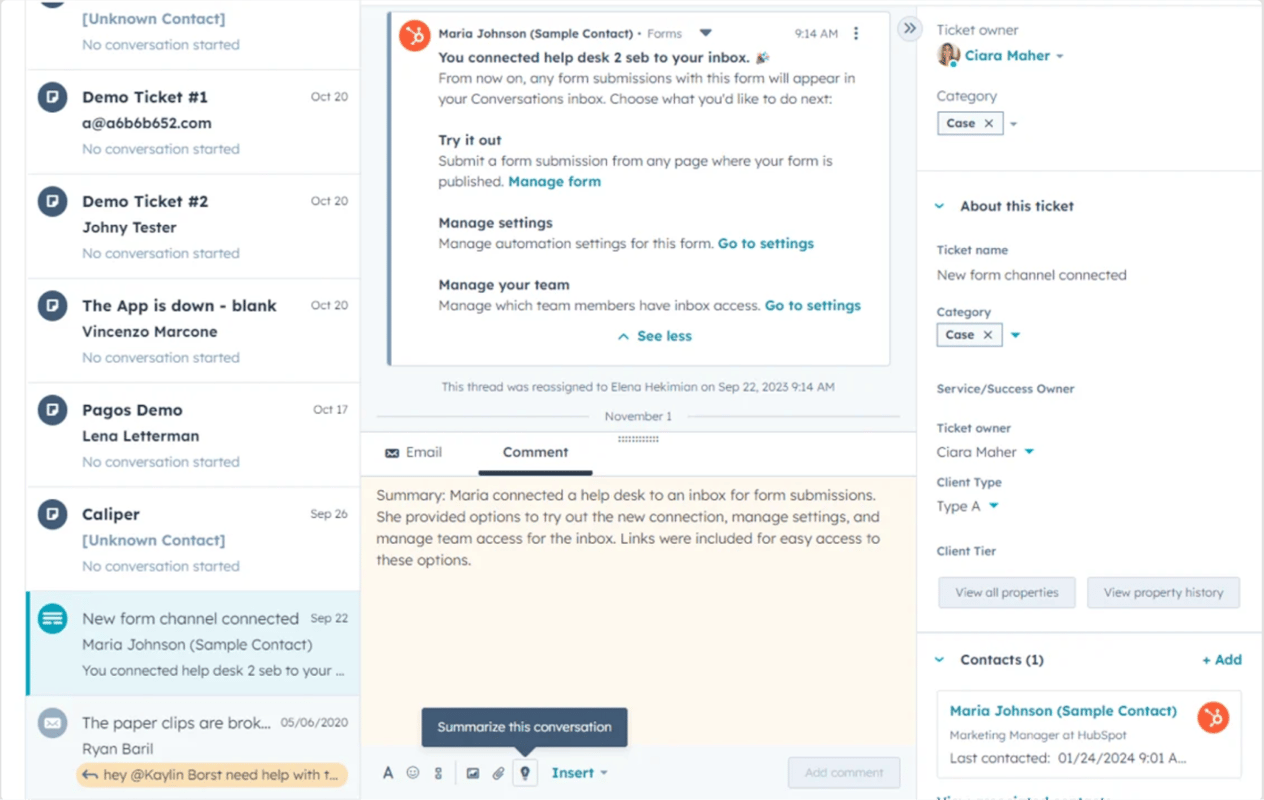
In a well-structured system, AI can support daily work in practical ways. For example, inside HubSpot, sales reps can see AI-generated summaries of contact activity, which helps them understand recent engagement without reviewing every interaction.

ai-summary-in-hubspot-sales

Predictive lead scoring can also rank leads based on patterns in historical data, helping teams prioritize outreach. These features depend on the quality of the data behind them. AI outputs become reliable when lifecycle stages are accurate, and activities are consistently logged.

In a system with inconsistent data, the same features behave differently:

  • Leads may be ranked highly despite low engagement
  • Summaries may miss key interactions or include irrelevant ones
  • Alerts may trigger without clear reasons

This is where the connection to the system structure becomes clear. Research from McKinsey shows that leading organizations improve sales productivity when AI is integrated into well-aligned data and processes. The gains come from how the system is designed, not from using AI tools on their own.

Inside HubSpot, this means using AI features as part of your existing structure, not as a replacement for it. Scoring should support lifecycle stages, not replace them. AI summaries should build on complete activity data. Inputs need to be validated before they are used.

What Keeps Automation Systems Reliable Over Time

A weekly review process helps maintain alignment. Teams can look at pipeline performance, conversion rates, and follow-up timing to identify where breakdowns occur. It becomes easier to trace issues back to either data quality or workflow logic when marketing, sales, and RevOps review the same data.

A typical review might start with pipeline movement, then look at where leads are slowing down, and finally trace those points back to specific workflows or data fields. Adjustments can then be made and monitored in the following week.

Ownership also plays a role in keeping the system stable. For example:

  • RevOps manages workflows and system structure
  • Marketing manages lifecycle definitions and lead qualification
  • Sales managers follow up and engage

Clear ownership helps ensure that changes are coordinated instead of isolated. Workflows themselves need ongoing maintenance. Over time, some become outdated or overlap with others. Regular cleanup keeps the system easier to manage.

This often includes:

  • Removing workflows that no longer run
  • Merging workflows with similar logic
  • Reviewing high-impact workflows for accuracy

To maintain this consistency over time, you can formalize governance through structured support, such as using a Modular Retainer to run quarterly schema reviews and monthly instrumentation sprints.

What Makes a HubSpot System Scalable

Scalability shows up in how a system handles growth across data, workflows, and usage. A well-defined setup assigns a clear role to each workflow, including what triggers it, what data it uses, and what outcome it controls. This makes changes easier to manage and limits unintended impact across the system.

As more data and processes are added, this clarity becomes more valuable. Without it, small updates can create inconsistencies, break reporting, or require manual fixes. When roles and rules are clearly defined, the system can grow without losing reliability, which is where scalability starts to influence performance.

You can recognize a system that is scaling well when:

  • Changes behave as expected and do not create downstream issues
  • Lifecycle stages, ownership, and source data stay aligned across reports
  • The reason behind a contact’s status change or automation trigger is easy to trace
  • Teams can rely on the system without needing to double-check or override it

These signals reflect a deeper outcome: the system produces data you can trust. As it grows, it continues to behave in a stable and understandable way. That stability helps teams to move faster, make decisions with confidence, and build on top of the system without introducing risk.

Make Your Data and Automation Work Together!

Automation becomes a real advantage when your system starts answering questions before your team asks them. You see where leads slow down, why deals move forward, and which actions actually drive results. That kind of visibility comes from a system that is clear enough to trust and structured enough to adapt as your team grows.

Every improvement compounds when your foundation is set up this way. Small fixes lead to cleaner data. Cleaner data leads to better automation. Better automation leads to stronger decisions across marketing and sales. Eventually, the system stops feeling like something you manage and starts working as something that guides you.

That shift only happens when you can clearly see how your current system behaves today and where it breaks under pressure.

For an actionable start, baseline your current portal using the Portal Audit Checklist and stand up guardrails through HubSpot Onboarding Services.

Explore how we turn HubSpot into a performance engine!

Frequently Asked Questions

1. How do you design workflows to avoid overlap and conflicts?

Centralize decision-making into a single workflow for each function (like routing or lifecycle changes) and avoid splitting logic across multiple workflows that act on the same property.

2. How do you identify which workflow is causing a conflict in your system?

Review the record’s workflow history and property change timeline to trace which workflow updated the same field or triggered overlapping actions.

3. What is the best way to standardize lead source across multiple channels?

Use a controlled dropdown property with predefined values and map all incoming sources (forms, ads, integrations) to those same options.

4. What data should be required before moving a lead to the next lifecycle stage?

Require fields that confirm qualification, such as lead source, contact details, and key intent signals, so each stage reflects a clear and consistent definition.

5. When does AI scoring become unreliable in HubSpot?

AI scoring becomes unreliable when inputs like lifecycle stage, lead source, or engagement data are inconsistent, incomplete, or duplicated across records.


How to Fix Lifecycle in HubSpot and Improve Pipeline Performance

How to Fix Lifecycle in HubSpot and Improve Pipeline Performance

How to Fix Lifecycle in HubSpot and Improve Pipeline Performance Friction arises from the system's structure. You start to notice it in small ways...

Read More
How to Build an Engagement Data Layer for Reliable HubSpot Reporting

How to Build an Engagement Data Layer for Reliable HubSpot Reporting

How to Build an Engagement Data Layer for Reliable HubSpot Reporting Consistent and accurate HubSpot reporting starts with the structure behind the...

Read More
Data Contracts in HubSpot: Fix Property Sprawl and CRM Data Drift

Data Contracts in HubSpot: Fix Property Sprawl and CRM Data Drift

Most CRM environments evolve without a defined schema strategy. Teams create properties to solve immediate problems, integrations introduce new...
Read More