A HubSpot Elite Solutions Partner built to help organizations unify strategy, systems, and execution. We design HubSpot systems that scale.

See how we've solved complex HubSpot challenges across migrations, integrations, CMS, automation, and optimization.

Join a team building smarter HubSpot systems. We value strategic thinkers who move proactively, care about quality, and want to do meaningful work.

10 min read

How to Optimize Conversion Rates in HubSpot for B2B SaaS

How to Optimize Conversion Rates in HubSpot for B2B SaaS
campaign_creators_unbound_party_rsvp_2026

Many B2B SaaS companies invest heavily in attracting website traffic, but traffic alone doesn't drive growth. If visitors don't request a demo, start a free trial, or become customers, you're missing opportunities to generate more revenue from the traffic you already have. That's where conversion rate optimization (CRO) in HubSpot can make a measurable difference.

HubSpot gives you the tools to analyze your entire customer journey, identify where prospects drop off, and optimize every step of the funnel. From landing pages and forms to workflows, personalization, reporting, and AI, you can use data to reduce friction and create a smoother path to conversion.

This guide explains how to optimize conversion rates in HubSpot for B2B SaaS. You'll learn which metrics to measure, where conversion opportunities are commonly lost, how to improve key conversion assets, when to use HubSpot's automation and AI tools, and how to build a repeatable CRO framework that supports long-term growth.

Key Takeaways

  • HubSpot CRO helps B2B SaaS companies convert more visitors into qualified leads and customers by optimizing the entire buyer journey.
  • Optimize landing pages, forms, CTAs, workflows, and sales handoffs as one connected conversion path to reduce friction and increase conversions.
  • Use HubSpot Smart CRM, Smart Content, Workflows, Breeze Intelligence, and Breeze AI to personalize experiences, automate follow-up, and improve lead quality.
  • Follow a repeatable process of measuring, optimizing, testing, and refining to improve conversion rates over time.

What Is Conversion Rate Optimization in HubSpot for B2B SaaS

Conversion rate optimization (CRO) in HubSpot for B2B SaaS uses HubSpot's CRM, marketing, sales, and reporting tools to increase the percentage of visitors, leads, and prospects who complete valuable actions like requesting a demo, starting a free trial, booking a meeting, or becoming paying customers.

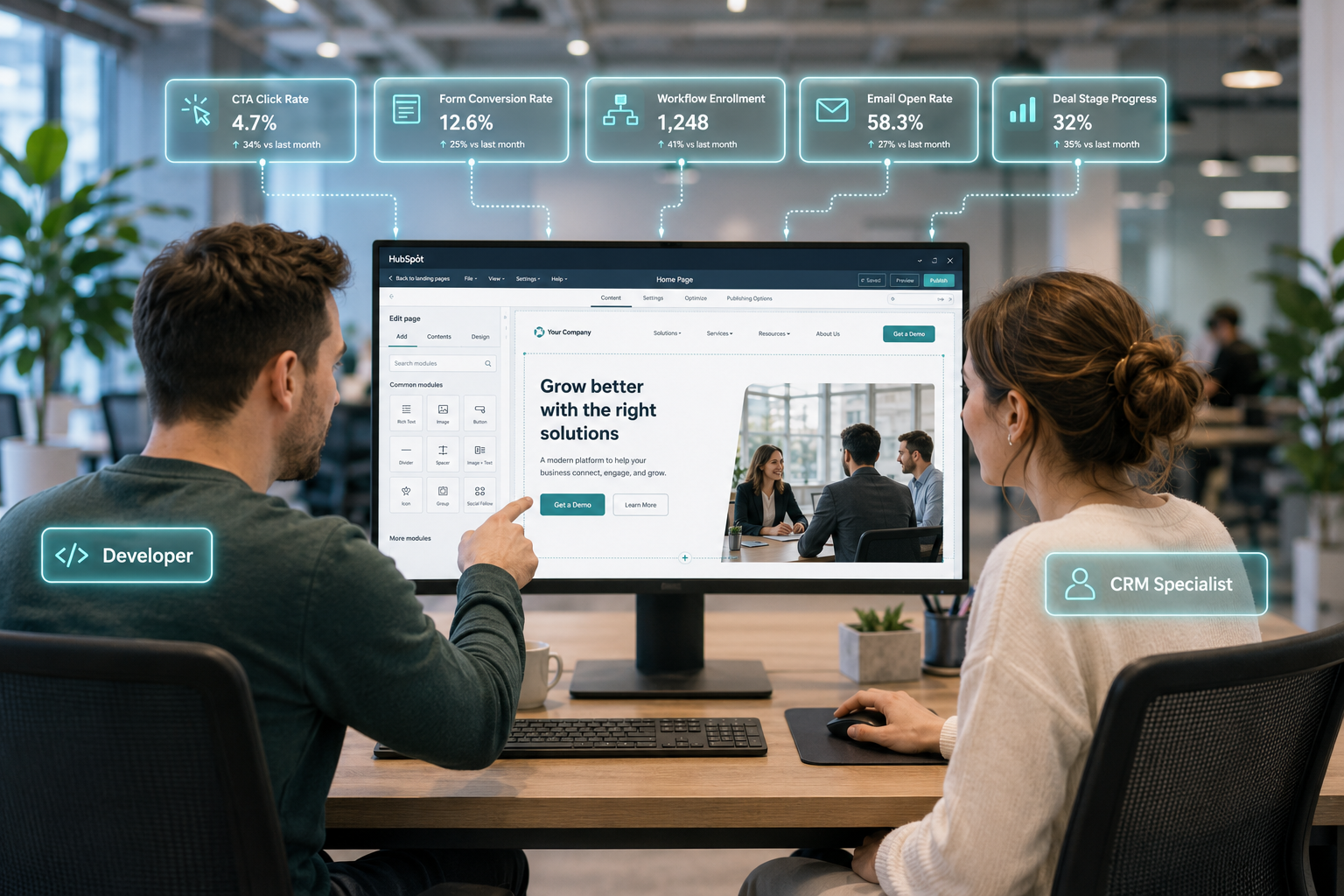
a website developer and crm specialist working together on a landing page in one monitor they are pointing and moving the mouse, find a way to labe they are developer and crm specialist, montior should have the webpage editor of hubspot and add pop-up of this process above the monitor they are working on in a glowing teal lines.

CRO helps you convert more of your existing traffic by removing friction throughout the customer journey. Baymard Institute found that improving checkout usability alone can increase ecommerce conversions by an average of 35.26%, showing how better user experiences lead to more conversions.

For B2B SaaS companies, CRO goes beyond optimizing landing pages. It involves analyzing the buyer journey to identify where prospects drop off and using HubSpot to improve forms, CTAs, lead nurturing, content personalization, and ongoing testing based on performance data.

HubSpot brings marketing, sales, and customer data together in one platform. This helps teams accurately attribute conversions, segment audiences, automate workflows based on buyer behavior, and optimize campaigns using real-time insights. HubSpot also highlights the growing role of AI in identifying optimization opportunities and delivering more personalized customer experiences.

The goal of HubSpot CRO is to create a repeatable, data-driven process that improves lead quality, increases demo and trial sign-ups, shortens sales cycles, and drives more revenue without proportionally increasing marketing spend.

Which Metrics You Should Measure Before Optimizing Conversion Rates

The most valuable metrics fall into four categories: conversion performance, funnel health, engagement, and revenue impact.

1. Conversion Performance Metrics

These metrics reveal how effectively visitors complete key actions and provide the baseline you'll use to measure future improvements.

  • Visitor-to-lead conversion rate
  • Lead-to-MQL conversion rate
  • MQL-to-SQL conversion rate
  • SQL-to-customer conversion rate
  • Landing page conversion rate
  • Form submission rate
  • CTA click-through rate (CTR)

Tracking conversion rates at every stage helps you identify exactly where prospects leave the buying journey.

2. Funnel Health Metrics

Overall conversion rates don't explain why prospects fail to convert. Funnel metrics help uncover friction throughout the customer journey.

Key metrics include:

  • Drop-off rate between lifecycle stages
  • Time spent in each lifecycle stage
  • Sales cycle length
  • Demo-to-opportunity conversion rate
  • Trial-to-paid conversion rate (for product-led SaaS)

For example, if your visitor-to-lead conversion rate is strong but only a small percentage of marketing-qualified leads become sales-qualified leads, the issue may lie in lead qualification, messaging, or sales handoff rather than your landing pages.

3. Engagement Metrics

User behavior often reveals conversion problems before your primary KPIs decline. HubSpot recommends analyzing how visitors interact with your content to identify friction and prioritize optimization efforts.

Monitor metrics such as:

  • Bounce rate
  • Average engagement time
  • Scroll depth
  • Exit rate
  • Returning visitor rate
  • Email click-through rate
  • Email conversion rate

Low engagement may indicate that your messaging, user experience, or content isn't aligned with visitor intent, making it less likely that users will convert.

4. Revenue and Lead Quality Metrics

Improving conversion rates only matters if it leads to better business outcomes. That's why B2B SaaS companies should pair conversion metrics with revenue-focused KPIs.

Important metrics include:

  • Marketing Qualified Leads (MQLs)
  • Sales Qualified Leads (SQLs)
  • Customer Acquisition Cost (CAC)
  • Customer Lifetime Value (LTV)
  • Monthly Recurring Revenue (MRR)
  • Revenue by acquisition channel

These metrics help determine whether higher conversion rates are producing more qualified customers and sustainable revenue and not just more leads.

Pro Tip: Bring your key conversion metrics into a single HubSpot reporting dashboard using Funnel Analytics and custom reports. Viewing performance across the entire buyer journey gives you a complete picture of how prospects move from first visit to customer.

Related reading: CRO Marketing Metrics: What to Track and Why

Where Are Conversion Opportunities Being Lost Across Your HubSpot Funnel?

Here are the key stages where B2B SaaS companies most often lose conversion opportunities in HubSpot.

Website Visitors Leave Without Taking Action

The first opportunity is often at the top of the funnel. Visitors may leave your website because your value proposition isn't immediately clear, your page loads slowly, or your calls to action don't match their intent.

Common indicators include:

  • High bounce rates
  • Low CTA click-through rates
  • Low visitor-to-lead conversion rates
  • Short engagement times

If a large percentage of visitors leave before clicking a CTA or viewing additional pages, review your messaging, page structure, and navigation to reduce friction and better align with user intent.

Leads Drop Off Before Becoming Qualified

Many SaaS companies see a significant decline between lead capture and marketing-qualified leads, often because forms attract low-intent visitors or lead nurturing isn't aligned with buyer readiness.

Watch for:

  • Low Lead-to-MQL conversion rates
  • High email unsubscribe rates
  • Low email engagement
  • Poor lead scores

HubSpot recommends combining behavioral data with demographic data to qualify leads more accurately and personalize nurturing based on engagement rather than sending identical campaigns to every contact.

Qualified Leads Stall Before Sales Conversations

One of the biggest conversion leaks occurs between marketing and sales. Prospects may download content or request information but never schedule a demo or respond to outreach.

Potential causes include:

  • Slow follow-up times
  • Weak lead routing
  • Generic sales messaging
  • Poor alignment between marketing and sales

Measure metrics such as MQL-to-SQL conversion rate, meeting booking rate, and average response time to identify handoff issues before they impact revenue.

Opportunities Fail to Become Customers

Not every sales opportunity results in a closed deal. If prospects consistently reach your pipeline but don't convert, the issue may lie in pricing, product positioning, sales enablement, or customer confidence.

Monitor:

  • SQL-to-customer conversion rate
  • Win rate
  • Sales cycle length
  • Lost deal reasons

Analyzing these metrics in HubSpot helps identify recurring objections and refine your messaging, pricing strategy, or sales process.

Related reading: Elevate your Lead Generation with CRO Marketing


How to Optimize Landing Pages, Forms, CTAs, and Workflows in HubSpot

1. Improve Landing Pages That Attract Clicks but Don't Convert

If your landing page gets traffic but few visitors convert, the problem is usually unclear messaging, too many distractions, or a weak offer.

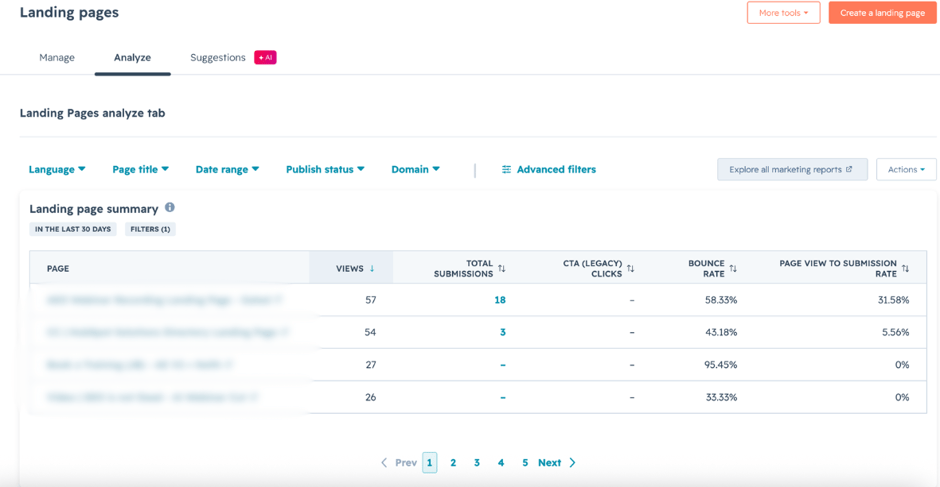
In HubSpot, review your landing page analytics to identify pages with high traffic but below-average conversion rates.

To access your landing page analytics in HubSpot, navigate to your landing page dashboard. Click Content > Landing Pages, then select the Analyze tab at the top of the page.

hubspot-landing-page-analytics-tab

Then you can optimize the page by:

  • Matching the headline to the promise made in your ad, email, or search result.
  • Focusing the page on one offer instead of presenting multiple choices.
  • Placing your primary CTA above the fold and repeating it further down longer pages.
  • Adding customer testimonials, case studies, or trust badges next to the form or CTA.
  • Removing unnecessary navigation links that encourage visitors to leave.
  • Improving page speed and checking the mobile experience before publishing.
  • Redirecting successful submissions to a thank-you page that encourages the next action, such as booking a meeting or downloading another resource.

Even small improvements to landing pages can significantly increase the percentage of visitors who become leads.

2. Reduce Form Abandonment

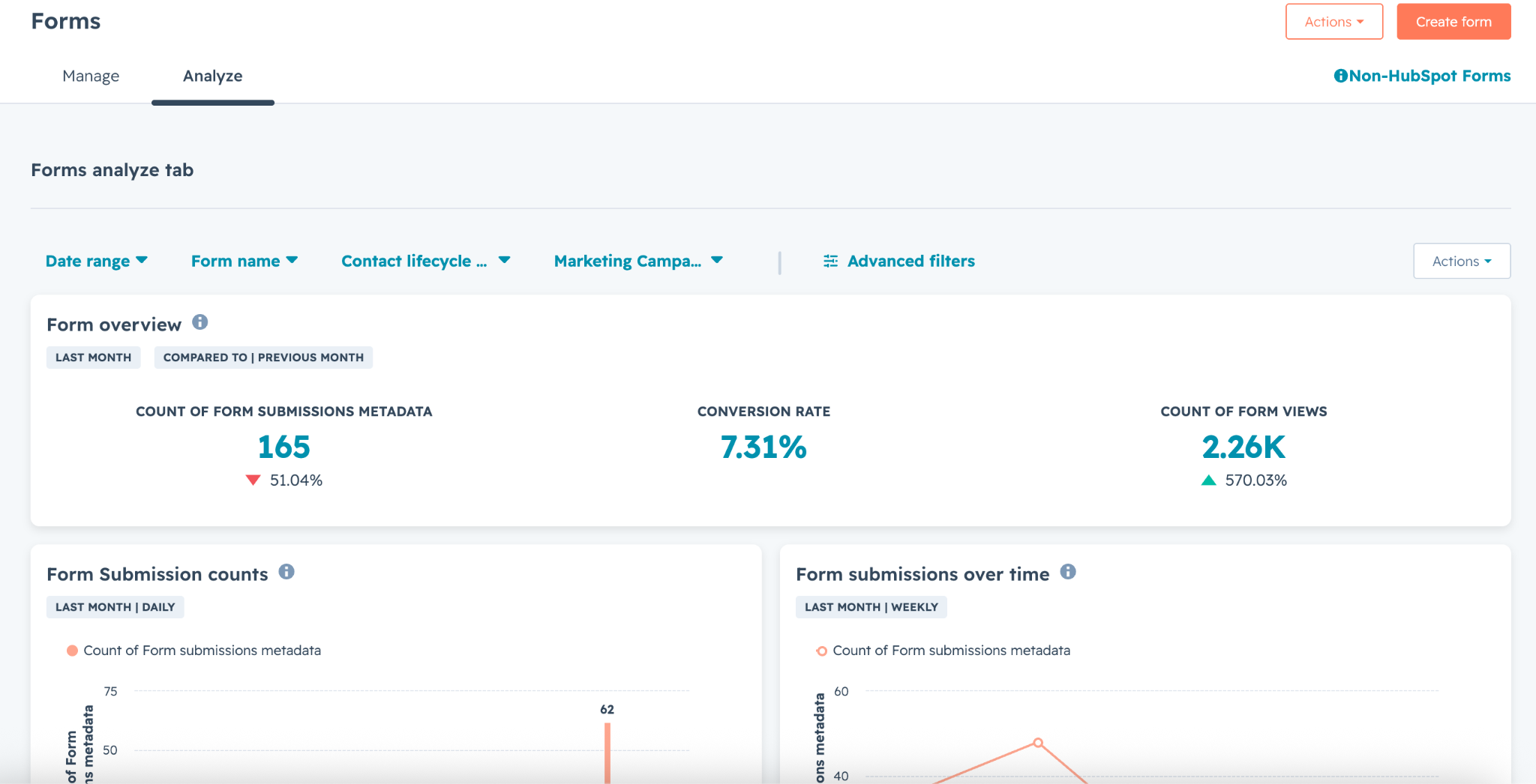
Use HubSpot Forms analytics to identify forms with low submission rates. In your HubSpot account, go to Marketing > Forms, select the form you want to review, and open the Analyze tab to view submission and conversion data.

hubspot-forms-analytics-tab

Based on your findings, simplify the experience by:

  • Reducing required fields to only the information needed for the current offer.
  • Using progressive profiling so returning contacts answer new questions instead of repeating existing information.
  • Showing additional questions only when they're relevant with conditional logic.
  • Writing clear labels and error messages so visitors know exactly what's required.
  • Explaining why you're requesting sensitive information, such as a phone number or company size.
  • Testing shorter forms against longer qualification forms to find the right balance between lead volume and lead quality.

If a visitor is downloading an ebook, asking for six business details may not be necessary. Save those questions for later in the buyer journey.

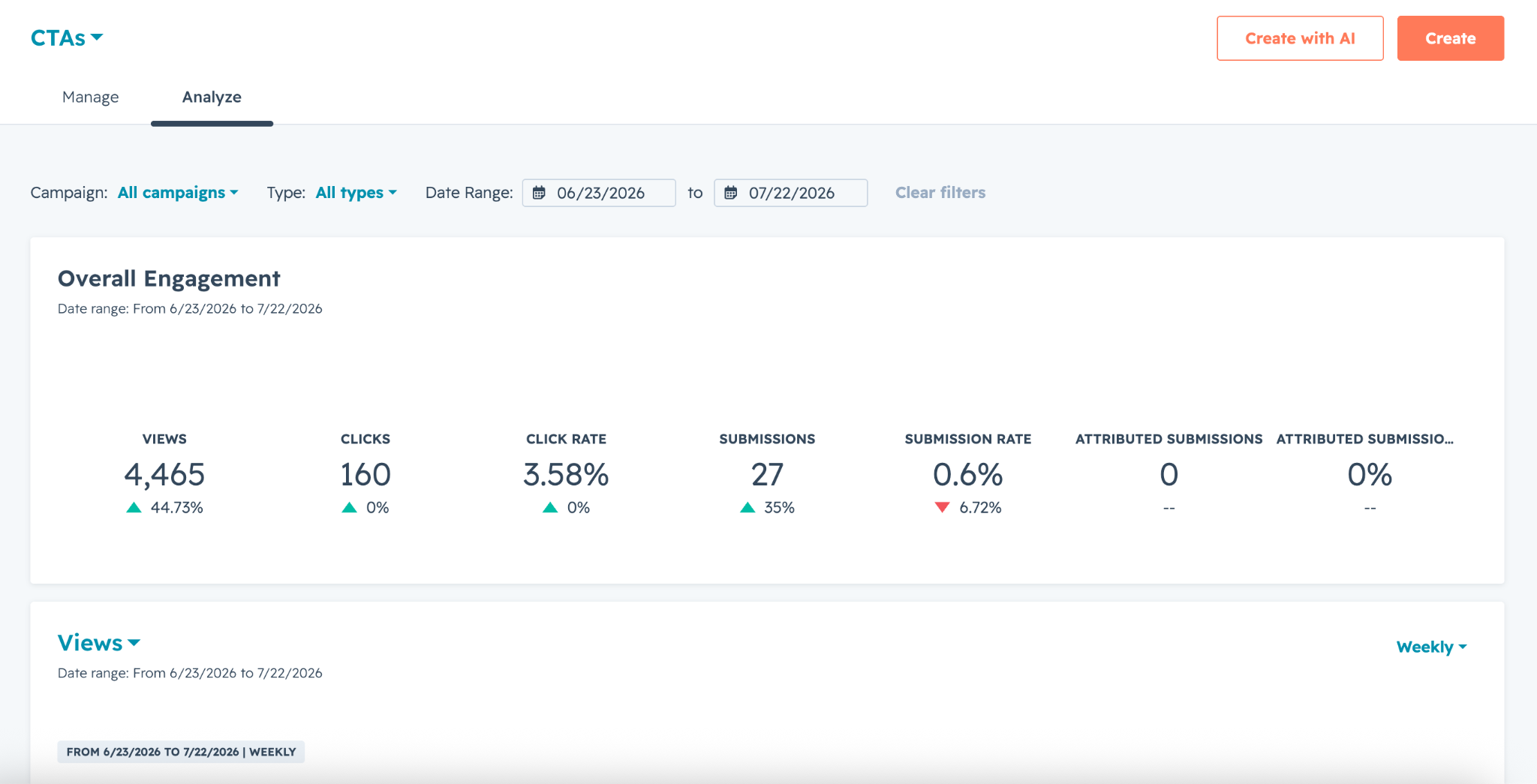
3. Test CTAs Where Visitors Are Already Engaging

A CTA can underperform simply because visitors don't notice it or don't understand the value of clicking. HubSpot's CTA reporting makes it easy to compare click-through rates across pages.

hubspot-ctas-analytics-tab

When optimizing CTAs:

  • Replace generic text like Submit or Learn More with benefit-focused language such as Get Your Free Assessment or Book a Demo.
  • Position CTAs near sections with the highest engagement instead of only at the bottom of the page.
  • Use contrasting colors that stand out without clashing with your brand.
  • Match the CTA to visitor intent—for example, educational offers for first-time visitors and demo requests for returning prospects.
  • A/B test CTA copy, placement, and design to identify the highest-performing version.

Often, changing CTA messaging delivers a larger improvement than redesigning the entire page.

4. Build Workflows That Respond to Visitor Behavior

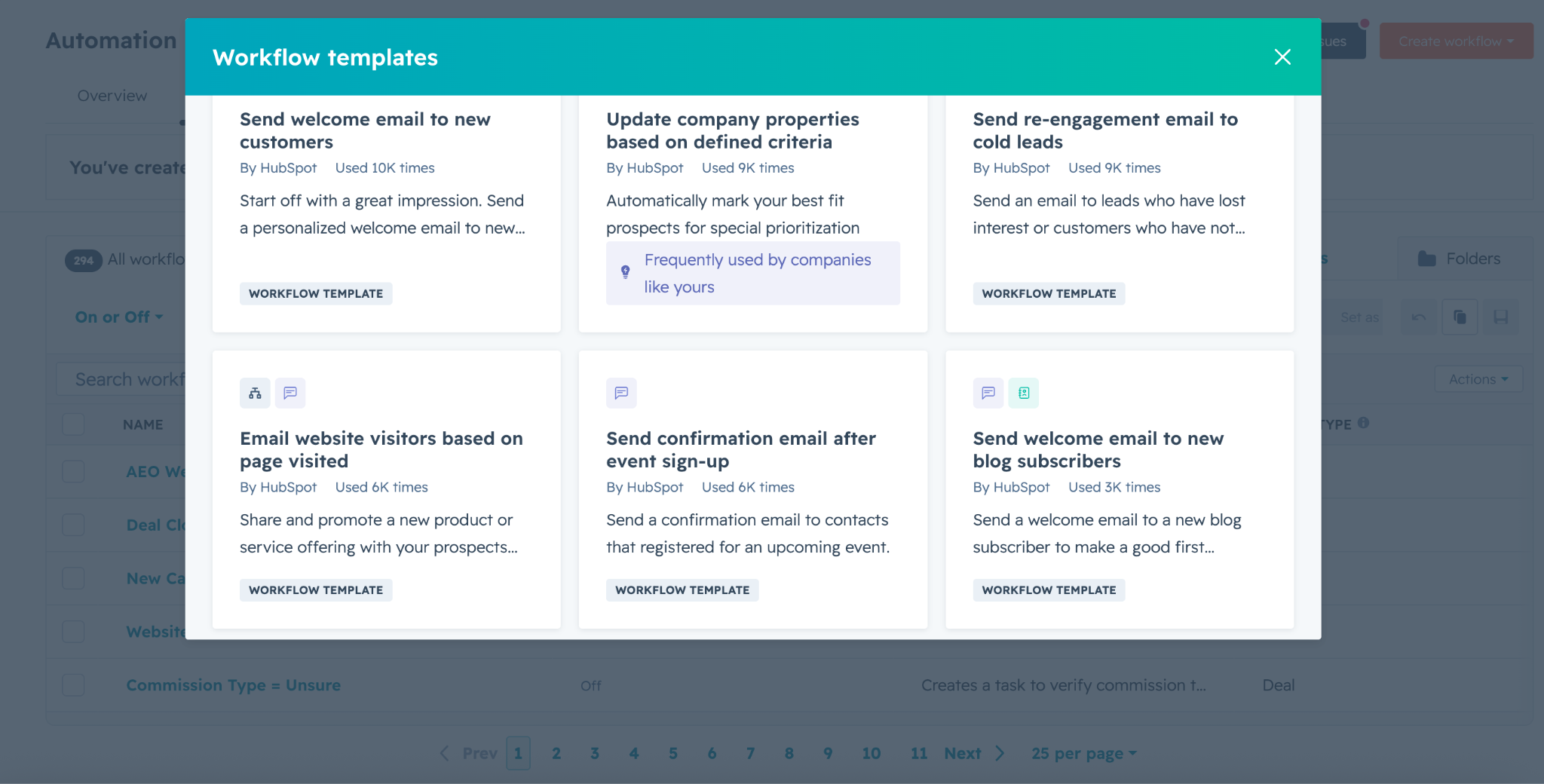
A conversion doesn't end when someone submits a form. What happens next often determines whether that lead becomes a sales opportunity. HubSpot workflows let you automate follow-up based on visitor behavior, helping you send timely responses and personalize communication using workflow templates.

To create a workflow in HubSpot, go to Automation > Workflows from the main navigation menu.

hubspot-workflow-templates

For example, you can:

  • Send different follow-up emails depending on which form or content offer someone completed.
  • Assign high-intent leads to sales automatically when they request a demo or pricing information.
  • Trigger reminder emails when prospects don't complete the next step, such as booking a meeting.
  • Update lifecycle stages and lead scores as contacts engage with your website, emails, or content.
  • Notify sales teams when contacts revisit pricing pages or repeatedly view product information.

Behavior-based workflows keep prospects moving through the funnel without requiring manual follow-up.

5. Review the Entire Conversion Journey

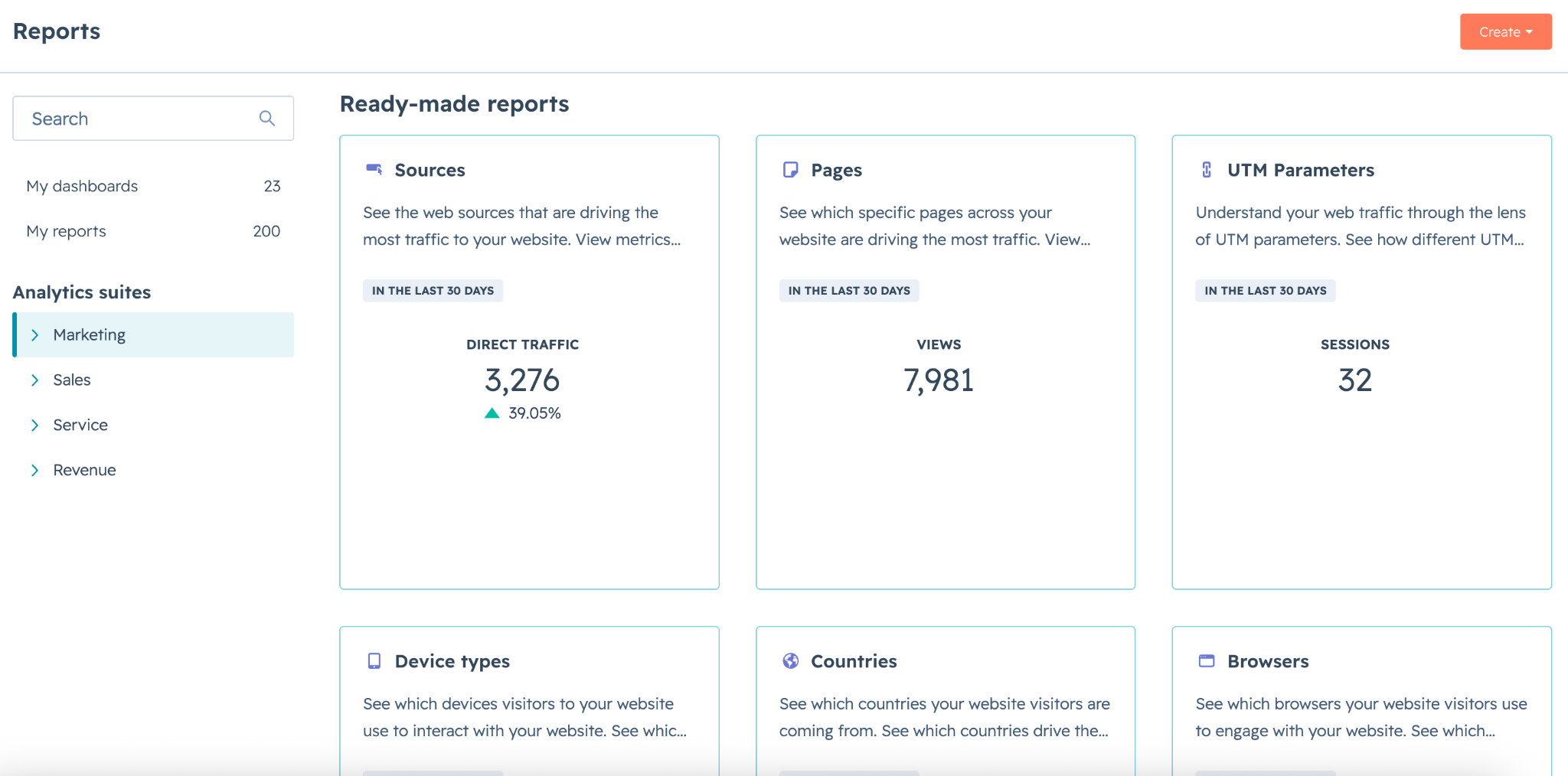
In HubSpot, review the full customer journey by tracking prospects from their traffic source to form submission, workflow enrollment, sales handoff, and closed deals.

You can analyze this information using reports and dashboards under Reporting > Reports and by reviewing contact timelines, workflows, and deal pipelines.

hubspot-reports-tab

Look for stages where prospects consistently drop off, then prioritize improvements based on their potential impact.

For example:

  • High landing page traffic but few form submissions usually points to page messaging or form friction.
  • High form completion but low meeting bookings may indicate weak follow-up emails or CTA placement.
  • Strong lead generation but low sales acceptance often suggests qualification criteria or routing workflows need refinement.

Treat landing pages, forms, CTAs, and workflows as one connected conversion system. Improving each handoff creates a smoother buyer experience and increases the likelihood that more visitors become qualified customers.

When You Should Use Personalization, Automation, and AI to Increase Conversions

Once you've optimized your landing pages, forms, and CTAs, the next opportunity is delivering the right experience to the right prospect at the right time.

HubSpot's personalization, automation, and AI tools help you scale these experiences across your funnel using CRM data and buyer behavior.

Use Smart CRM and Smart Content to Personalize the Buyer's Journey

HubSpot's Smart CRM stores every interaction across marketing, sales, and service. This makes it possible to personalize experiences based on lifecycle stage, industry, previous website activity, or deal status. You can use this data with Smart Content and Smart CTAs to display different messaging, offers, or calls to action for different audiences.

For example, you can:

  • Show "Book a Demo" to enterprise prospects and "Start a Free Trial" to SMB visitors.
  • Recommend resources based on previously viewed pages.
  • Display different landing page messaging for existing customers versus new visitors.
  • Personalize emails using CRM properties and behavioral data.

This relevance reduces friction and increases the likelihood that visitors will take the next step.

Automate Lead Nurturing with HubSpot Workflows

HubSpot Workflows automate repetitive tasks that keep prospects moving through your funnel. Workflows trigger actions based on contact behavior, lifecycle stage, or CRM updates.

High-impact automation examples include:

  • Sending nurture emails after content downloads.
  • Assigning qualified leads to sales automatically.
  • Updating lifecycle stages and lead scores.
  • Creating follow-up tasks for sales reps.
  • Triggering reminder emails for abandoned demo requests.
  • Enrolling contacts into campaigns based on website activity.

Well-designed workflows ensure prospects receive timely and relevant communications without requiring manual intervention.

Use Breeze Intelligence to Improve Lead Quality

Breeze Intelligence enriches contact and company records with firmographic and business data, helping your marketing and sales teams identify higher-quality prospects with less manual research.

As part of HubSpot's Breeze platform, it uses AI to surface CRM insights and reduce manual work across marketing, sales, and customer service. Examples include:

  • Breeze Assistant for drafting marketing emails, creating landing page copy, summarizing CRM records, and answering questions about customer data.
  • Prospecting Agent for identifying buying signals, researching accounts, and recommending personalized outreach.
  • Data Agent for analyzing CRM data and answering business questions.
  • Customer Agent for resolving common support requests.
  • Predictive Lead Scoring (Enterprise) for prioritizing contacts most likely to convert.

These tools help your team spend less time on administrative tasks and more time optimizing the activities that improve conversion rates.

What Is a Repeatable HubSpot CRO Framework for B2B SaaS?

The most effective HubSpot CRO strategies follow a continuous cycle of measuring performance, identifying opportunities, optimizing key assets, personalizing experiences, and testing improvements.  effective HubSpot CRO strategies follow a continuous cycle of measuring performance, identifying opportunities, optimizing key assets, personalizing experiences, and testing improvements.

1. Measure Your Current Performance

Start by understanding where you are today. Establishing a baseline makes it easier to identify opportunities and measure the impact of every optimization.

Use HubSpot dashboards and reports to track metrics such as:

  • Visitor-to-lead conversion rate
  • Landing page conversion rate
  • Form submission rate
  • CTA click-through rate
  • MQL-to-SQL conversion rate
  • SQL-to-customer conversion rate
  • Sales cycle length

2. Find Where Prospects Drop Off

Once you have your baseline, look for friction points across the buyer journey. HubSpot's funnel reports, lifecycle analytics, and customer journey reports help you identify where prospects stop progressing.

Look for patterns like:

  • High bounce rates
  • Form abandonment
  • Low CTA engagement
  • Lifecycle stage drop-offs
  • Low email engagement
  • Deals that remain stalled for long periods

3. Optimize Your Highest-Impact Assets

After you've identified the bottlenecks, improve the assets that influence conversions the most. Focus on optimizing:

  • Landing pages
  • Forms
  • CTAs
  • Marketing emails
  • Demo booking pages
  • Pricing pages

4. Scale with HubSpot's AI and Automation

Once your conversion path is working well, use HubSpot's built-in tools to personalize and automate the experience.

For example:

  • Workflows nurture leads and automate follow-ups.
  • Smart CRM gives you a complete view of every contact for better segmentation.
  • Smart Content and Smart CTAs tailor experiences based on visitor data.
  • Breeze Intelligence enriches contact and company records to improve targeting.
  • Breeze AI helps create emails, landing page copy, CTAs, and other marketing content more efficiently.

5. Test, Learn, and Improve

Every optimization is an opportunity to learn. Test one change at a time so you can clearly measure what drives better results. Experiment with elements like headlines, CTA copy, forms, page layouts, personalized messaging, and email subject lines.

Review the results, keep what works, and build on each successful test. As buyer behavior, campaigns, and your business evolve, continue refining your funnel with data-driven improvements that compound into higher conversion rates and sustainable revenue growth.

Build a Higher-Converting HubSpot Funnel!

If you want to improve lead quality, increase demo or trial bookings, or remove friction from your customer journey, working with an experienced HubSpot CRO partner can help you identify the highest-impact opportunities and implement changes that deliver measurable results.

Campaign Creators helps B2B SaaS companies optimize their HubSpot portals through funnel analysis, landing page optimization, workflow automation, personalization, and AI-powered strategies.

See how Campaign Creators can help you turn HubSpot into a high-performing revenue engine.

Frequently Asked Questions

Should you optimize one page at a time or your entire funnel?

Start with the pages or funnel stages that have the greatest impact on revenue. Then optimize the entire funnel so improvements at one stage aren't limited by bottlenecks elsewhere.

Can HubSpot help identify why visitors don't convert?

Yes. HubSpot's reporting, funnel analytics, and CRM data help you identify where visitors leave your funnel so you can prioritize improvements based on actual buyer behavior.

What should you test first in a HubSpot CRO strategy?

Start with high-impact assets such as landing page headlines, CTAs, forms, and offers. Even small improvements to these elements can produce measurable gains in conversion rates.

How does CRM Data improve conversion rates?

CRM data helps you segment audiences, personalize content, and automate follow-up based on customer behavior, making every interaction more relevant and increasing the likelihood of conversion.


Should every landing page have only one CTA?

In most cases, yes. A single primary CTA reduces distractions and helps visitors focus on one desired action, making it easier for them to convert.

Can HubSpot automate lead follow-up?

Yes. HubSpot workflows can automatically send emails, assign leads to sales reps, create follow-up tasks, and update CRM records based on customer actions.

Marketing Conversion: 10 Strategies to Increase Conversion Rates

Marketing Conversion: 10 Strategies to Increase Conversion Rates

Marketing conversion has become more important as digital competition increases and customer attention spans continue to shrink. Research shows the...
Read More
How HubSpot CRM Integrates With Your Website to Drive Conversions

How HubSpot CRM Integrates With Your Website to Drive Conversions

Every modern digital business depends on two connected systems: a Customer Relationship Management (CRM) platform and a Content Management System...

Read More
CRO KPIs & Metrics: 12 Key Metrics You Should Track to Improve Conversions

CRO KPIs & Metrics: 12 Key Metrics You Should Track to Improve Conversions

Driving traffic is only half the job in conversion rate optimization (CRO). Conversions often get treated as the end goal, but real progress comes...

Read More