A HubSpot Elite Solutions Partner built to help organizations unify strategy, systems, and execution. We design HubSpot systems that scale.

See how we've solved complex HubSpot challenges across migrations, integrations, CMS, automation, and optimization.

Join a team building smarter HubSpot systems. We value strategic thinkers who move proactively, care about quality, and want to do meaningful work.

7 min read

How to Conduct a HubSpot HIPAA Compliance Risk Assessment Before Storing PHI

How to Conduct a HubSpot HIPAA Compliance Risk Assessment Before Storing PHI

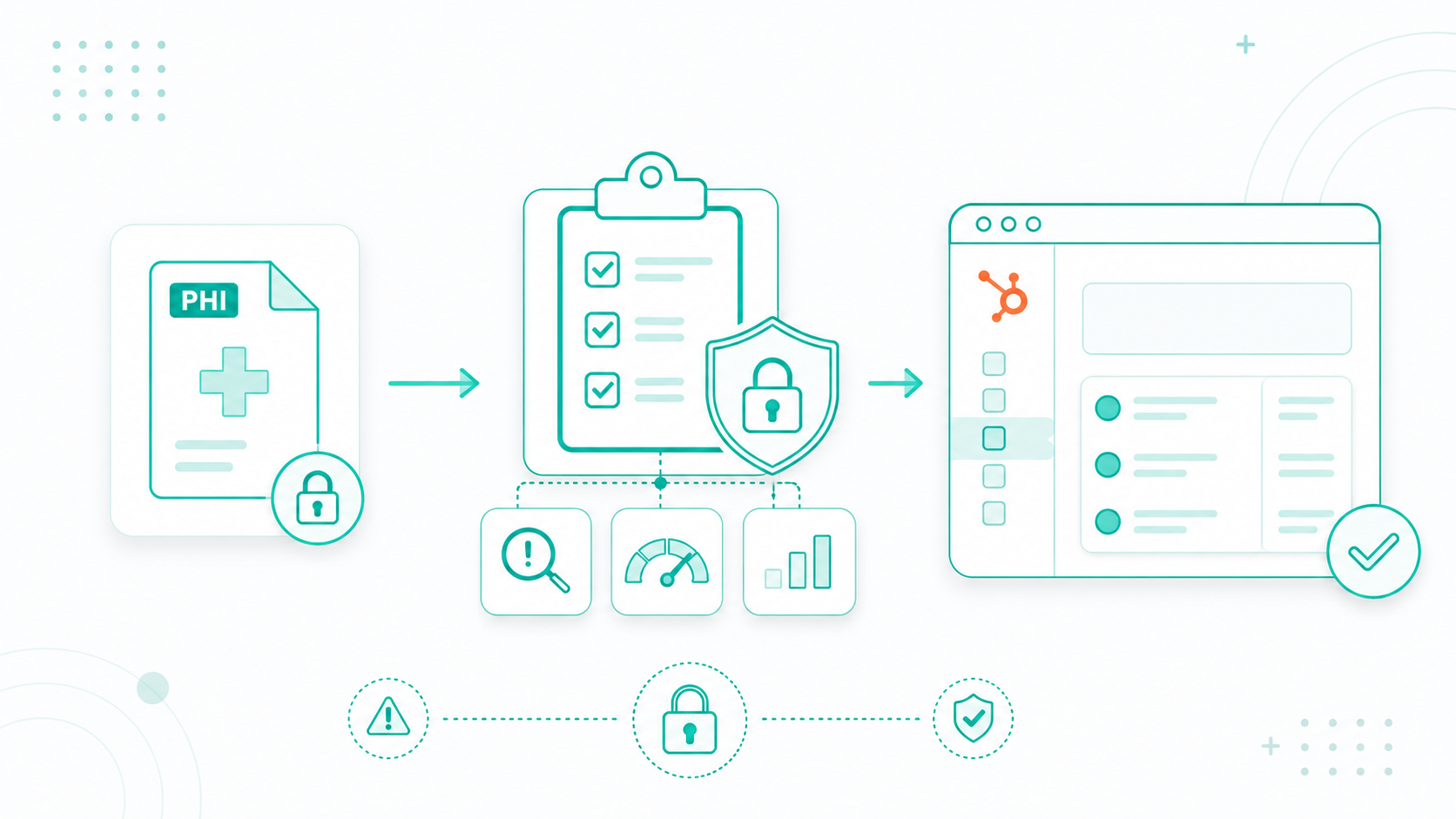
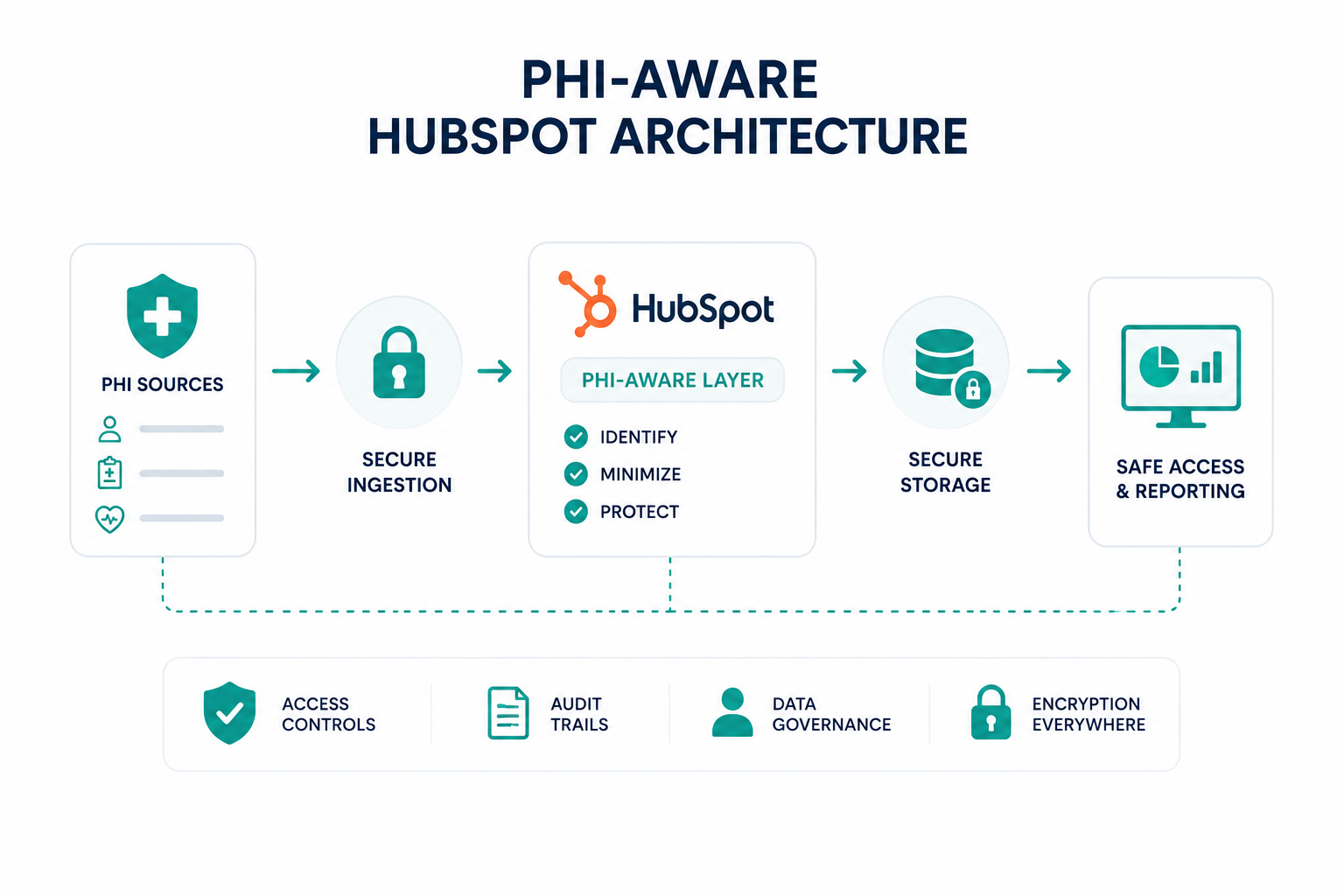
Before storing protected health information (PHI) in HubSpot, organizations need to understand where sensitive data will live, who can access it, and how information moves across connected systems.

A HubSpot HIPAA compliance risk assessment helps identify potential gaps before they create security or compliance issues. This process includes mapping PHI storage requirements, reviewing security settings, validating user permissions, and auditing integrations connected to your CRM.

The assessment should also define a remediation plan that documents risks, assigns corrective actions, and establishes ongoing reviews. As your HubSpot environment changes through new users, workflows, integrations, and data processes, regular assessments help maintain alignment with HIPAA requirements.

Key Takeaways

  • HubSpot HIPAA risk assessment should begin with a complete PHI inventory covering CRM properties, forms, files, tickets, integrations, and any location where health data could appear.
  • HubSpot Sensitive Data settings are just one part of compliance, alongside proper management of permissions, workflows, connected apps, APIs, and data movement.
  • PHI exposure risks often come from everyday CRM activity, including open text fields, unnecessary access permissions, exports, automated notifications, and third-party data syncing.

What to Prepare Before Starting a HubSpot HIPAA Risk Assessment

Before assessing HubSpot for HIPAA compliance, you need a clear picture of your current CRM setup, data flows, users, and security requirements. You should determine where PHI exists, who can access it, and whether your processes meet HIPAA requirements.

coworkers in a health office, not hospital, but the admin office of a clinic, 1 person is sitting on a desk preparing to wookrrkk theother person is handing thema  checklist that must be completed before starting a HubSpot HIPAA risk assessment. The checklist includes PHI Inventory, HubSpot Configuration Review, BAA Requirements, Data Flow Mapping, Security Policies, and Automation Review. Each item has simple icons representing patient data, CRM settings, legal agreements, integrations, access controls, and workflows. brightly lit cool tone

Key items to prepare:

1. Inventory of PHI Stored or Planned for HubSpot

  • Identify what protected health information will enter HubSpot
  • List where PHI appears, such as contact properties, forms, notes, files, tickets, or integrations
  • Separate required PHI from information that does not need to be stored

2. Current HubSpot Configuration Review

  • HubSpot subscription level and available HIPAA features
  • Sensitive Data settings status
  • Existing CRM properties and custom fields
  • User permissions, teams, and access controls
  • Active workflows and automation rules

3. Business Associate Agreement (BAA) Requirements

  • Confirm whether your organization qualifies as a HIPAA covered entity or business associate
  • Review HubSpot’s BAA requirements before storing PHI
  • Identify any other vendors or integrations that need BAAs

4. Data Flow and Integration Map

Document how information moves between HubSpot and systems like:

  • EHR platforms
  • Scheduling tools
  • Forms
  • Marketing platforms
  • Reporting tools
  • Third-party applications

Any connected system that receives PHI can affect your compliance responsibilities.

5. Internal Security Policies

Prepare documentation covering:

  • Employee access rules
  • User onboarding and removal
  • Data retention
  • Incident response process
  • PHI handling procedures

6. Automation and Communication Review

Check existing workflows before enabling PHI storage. Some HubSpot features and automation use cases have restrictions when handling sensitive health data, so teams need to confirm where PHI can safely appear.

How to Identify PHI Storage Needs and Data Exposure Risks in HubSpot

1. Map Where PHI Exists Across HubSpot

Review every location where protected health information may appear inside HubSpot, including:

  • Contact and company records
  • Custom properties
  • Forms and submissions
  • Emails, notes, and call records
  • Tickets and attachments
  • Connected integrations

PHI can appear outside dedicated fields when users enter patient information into open text areas or upload files.

2. Decide What PHI Actually Needs to Be Stored

After finding where PHI exists, determine whether each piece of information is necessary for your teams. Review:

  • What data supports marketing, sales, or service workflows
  • Which fields are required for reporting or automation
  • What information should remain in healthcare-specific systems

Limiting unnecessary PHI storage reduces the amount of sensitive information your organization needs to secure and monitor.

3. Review Access, Permissions, and Data Movement

Identify who can view, edit, export, or transfer PHI within HubSpot. This includes reviewing:

  • User roles and permissions
  • Team access settings
  • Connected applications
  • API connections
  • Automated workflows

Every user and system with access to PHI creates a potential point of exposure, so permissions should match actual business needs.

4. Categorize Risks and Required Security Controls

Use your findings to classify HubSpot data based on sensitivity:

  • Standard CRM data
  • Sensitive information requiring additional controls
  • PHI requiring HIPAA safeguards
  • Data that should be removed or relocated

This creates a clear inventory of PHI storage needs, exposure risks, and the HubSpot security settings required before handling healthcare data at scale.

How Can You Review Your HubSpot Security Settings and Access Controls

1. Verify Account Security Health and User Permissions

Start by checking HubSpot’s security recommendations and confirming that users have only the access required for their roles.

Navigation path: Settings ⚙️ → Account Management → Security → Permissions tab

Review:

  • Security Health recommendations
  • Super Admin users
  • Inactive users
  • Permission risks
  • Two-factor authentication status

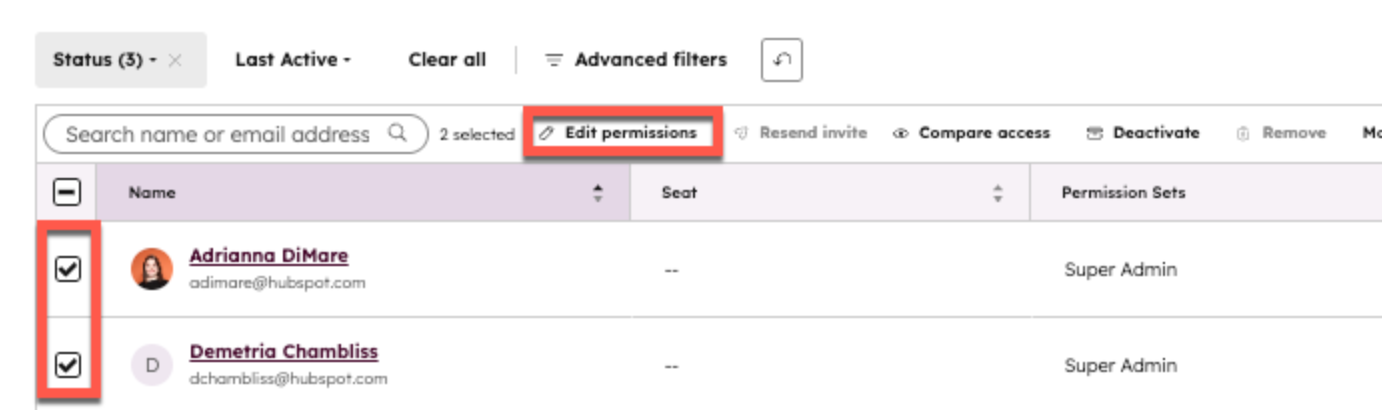
Then review individual user access:

Navigation path: Settings ⚙️ → Users & Teams → Select User → Permissions

edit-user-permissions-hubspot

Check:

  • CRM record access
  • View, edit, and delete permissions
  • Import/export access
  • Tool permissions
  • External users

This reduces unnecessary access to sensitive information and keeps PHI visibility limited to approved users.

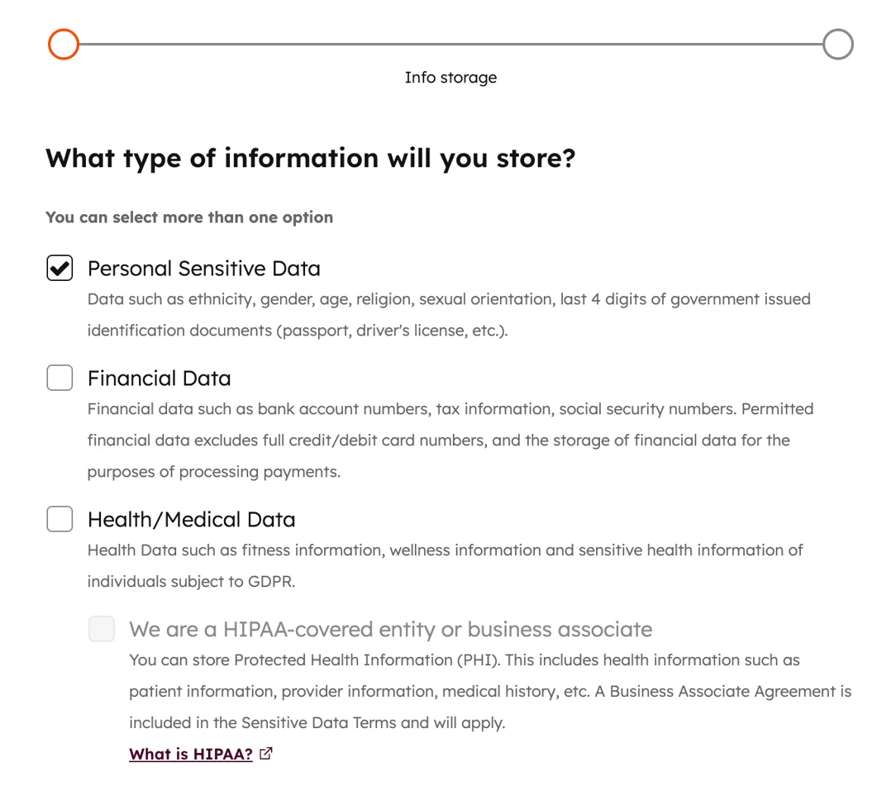
2. Configure Sensitive Data and PHI Protection Settings

Before storing PHI, confirm HubSpot’s Sensitive Data tools are enabled and configured correctly.

Navigation path: Settings ⚙️ → Security → Sensitive Data tab

sensitive-data-hubspot

Review:

  • Sensitive Data Protection status
  • Health and medical data categories
  • HIPAA-related configuration requirements
  • Sensitive Data recommendations

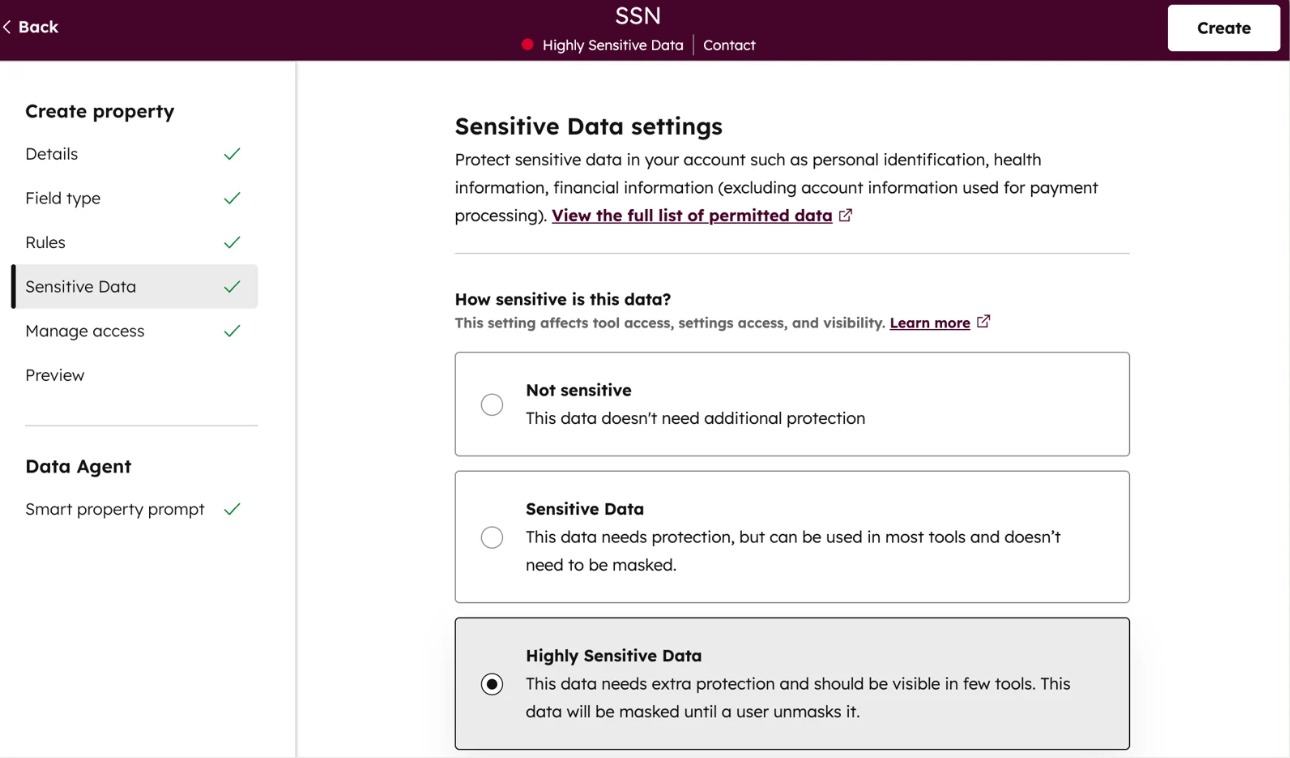
For individual PHI fields:

Navigation path: Settings ⚙️ → Properties → Select/Create Property → Sensitive Data tab

create-property-sensitive-data-hubspot

Confirm properties containing PHI are properly classified and protected with the right access controls.

3. Monitor Account Activity and Connected Access Points

After configuring security settings, review how users and connected systems interact with your HubSpot data.

Navigation path: Settings ⚙️ → Account Management → Security

Review:

  • Login activity
  • Security events
  • User access changes
  • Integration access
  • Account activity records

Ongoing monitoring helps identify permission changes, unusual activity, or new exposure risks as your HubSpot environment grows.

Which Workflows, Integrations, and Data Processes Should Be Audited for PHI Compliance

Workflows That Access Sensitive Data Properties

Review any HubSpot workflows that use properties containing PHI. Check:

  • Enrollment triggers based on sensitive properties
  • If/then branches that segment contacts using PHI
  • Property updates that copy or modify PHI
  • Internal notifications created by workflows
  • Workflow actions that send information outside HubSpot
  • Webhooks and custom-coded workflow actions

Pay close attention to actions that transfer information into other HubSpot tools or external applications. Avoid exposing PHI through automated emails, notifications, task descriptions, or copied fields unless those processes have been reviewed for HIPAA compliance.

Connected Apps, APIs, and Data Sync Processes

Go to: Settings → Integrations → Connected Apps

Review every third-party application connected to your HubSpot account. Check:

  • What data each application can access
  • Whether sensitive properties are included in sync rules
  • Which apps can create or update records containing PHI
  • Whether custom API integrations send PHI outside HubSpot
  • Whether connected vendors require a Business Associate Agreement (BAA)

Any external system that receives PHI from HubSpot should be included in your HIPAA compliance review.

Map How PHI Enters, Moves, and Leaves HubSpot

Create a data flow inventory showing:

  • Where PHI enters HubSpot:
    • Forms
    • Manual record creation
    • Imports
    • API submissions
    • Connected apps
  • Where PHI is stored:
    • Contact properties
    • Company properties
    • Ticket properties
    • Custom object properties
  • Where PHI leaves HubSpot:
    • Reports
    • Exports
    • Integrations
    • Workflow actions
    • API connections

Avoid placing PHI in areas that are harder to control or audit, such as general notes, comments, task descriptions, or unnecessary free-text fields. Keep PHI stored only in approved sensitive data properties with appropriate permissions.

Learn more from this article: Can You Use HubSpot Chatbots in Healthcare?

How to Document HIPAA Compliance Gaps and Create a Remediation Plan

After completing your HubSpot HIPAA compliance review, document every security, configuration, and data handling gap you discover. A remediation plan creates a clear record of what needs to change, who owns each action, and how your organization will reduce PHI-related risks over time.

1. Create a Compliance Gap Inventory

Record each issue found during your HubSpot audit and organize findings by risk area. Include:

  • Gap description
  • Location inside HubSpot
  • Type of PHI affected
  • Potential compliance risk
  • Current security controls
  • Required corrective action
  • Assigned owner
  • Target completion date

2. Prioritize Risks Based on PHI Exposure

Prioritize remediation based on how much the gap could affect the confidentiality, integrity, or availability of PHI.

High-priority fixes usually include:

  • Restricting unauthorized PHI access
  • Moving PHI into approved sensitive data properties
  • Removing unnecessary integrations
  • Updating workflow logic that exposes PHI
  • Configuring user permissions and access controls
  • Reviewing vendor requirements and BAAs

HubSpot provides controls such as sensitive data properties, audit logging, encryption, and field-level permissions, but these need to be configured correctly for your organization’s compliance requirements.

3. Build and Track Your Remediation Plan

Turn each identified gap into a documented action plan. Track:

  • What needs to be fixed
  • Who is responsible
  • Steps required to resolve the issue
  • Supporting evidence after completion
  • Date the correction was completed
  • Future review schedule

Keep records of completed fixes, security decisions, configuration changes, and ongoing reviews. HIPAA compliance is not a one-time HubSpot setup task. Your remediation plan should become part of a continuous review process as your CRM data, integrations, users, and workflows change.

Recommended reading: How to Structure HubSpot Data Without Storing PHI

When You Should Reassess Your HubSpot Portal for Ongoing HIPAA Compliance

a healthcare IT team reviewing a HubSpot compliance dashboard after system changes. The screen highlights three major review triggers: User & Permission Changes, New Workflows & Integrations, and Scheduled Compliance Reviews. Supporting visuals show new employees being added, connected applications syncing data, PHI fields being reviewed, and audit logs being checked.

Reassess your HubSpot portal whenever changes could affect how PHI is stored, accessed, or shared. HIPAA compliance is not a one-time setup because new users, workflows, integrations, and data processes can introduce new risks over time.

After Changes to Users, Permissions, or Security Settings

Review your HubSpot access controls when:

  • New users or teams are added
  • Employee roles change
  • Users leave the organization
  • Permission sets are updated
  • Sensitive Data property access changes

Confirm that only approved users can view or edit PHI and review audit logs for sensitive data activity.

After Adding New Workflows, Integrations, or Data Sources

Perform another review when you:

  • Create workflows using PHI fields
  • Add forms that collect sensitive information
  • Connect new third-party apps
  • Build API integrations
  • Change how data syncs between systems

Verify that PHI remains within approved tools and that external systems meet your compliance requirements.

During Scheduled Compliance Reviews

Set a recurring schedule to review:

  • Sensitive Data properties
  • User access
  • Connected apps
  • Data exports
  • Workflow activity
  • Audit logs

Regular reviews help keep your HubSpot configuration aligned with HIPAA requirements as your CRM setup evolves. Continue improving your HIPAA compliance efforts by learning the 10 PHI mistakes healthcare organizations should avoid.

Prepare Your HubSpot Portal for Secure PHI Management

A HubSpot HIPAA compliance risk assessment helps your organization understand where PHI exists, how it moves through your CRM, and what security gaps need to be resolved before storing sensitive health information. Reviewing your data processes, permissions, workflows, and integrations creates a stronger foundation for managing PHI responsibly.

If your organization needs support preparing HubSpot for HIPAA compliance, having the right technical and operational guidance can help you identify risks, configure security controls, and build processes that align with your compliance requirements.

Campaign Creators help organizations optimize and configure HubSpot portals for complex business needs, including healthcare teams that need stronger CRM structure, data management processes, and secure system workflows.

Frequently Asked Questions

Is HubSpot automatically HIPAA compliant once PHI storage is enabled?

No. HubSpot can support HIPAA compliance, but your organization must configure Sensitive Data settings, accept the required agreements, and manage PHI correctly.

Do you need a Business Associate Agreement before storing PHI in HubSpot?

Yes. Organizations handling HIPAA-covered data need the appropriate Business Associate Agreement requirements completed before storing PHI in HubSpot.

Can all HubSpot tools be used with protected health information?

No. HIPAA support depends on specific HubSpot features and configurations, so organizations should confirm where PHI can safely be stored and processed.

What happens if PHI was stored in HubSpot before completing a risk assessment?

Your organization should identify where the PHI exists, restrict access, document the issue, and determine the required corrective actions.

Does deleting unnecessary PHI reduce compliance risk?

Yes. Reducing unnecessary PHI storage limits the amount of sensitive information your organization needs to secure, monitor, and manage.


HubSpot HIPAA Compliance: How to Protect PHI Without Slowing Growth

HubSpot HIPAA Compliance: How to Protect PHI Without Slowing Growth

Healthcare companies need customer data to support marketing, sales, onboarding, customer success, and support. At the same time, they must protect...
Read More
How to Structure HubSpot Data Without Storing Protected Health Information

How to Structure HubSpot Data Without Storing Protected Health Information

Healthcare organizations can use HubSpot while maintaining HIPAA compliance, but only if the platform is configured correctly and Protected Health...

Read More
HubSpot HIPAA Compliance Risks: 10 PHI Mistakes Healthcare Organizations Should Avoid

HubSpot HIPAA Compliance Risks: 10 PHI Mistakes Healthcare Organizations Should Avoid

Protected health information (PHI) can become exposed in HubSpot in more ways than many healthcare organizations realize. Common mistakes, such as...

Read More