








Skip to the main content.

WEBSITE GROWTH & CONVERSION

• Web Design & Development


• SEO & AEO


• Conversion Rate Optimization


• Lead Generation Strategies


HUBSPOT SUPPORT & ENABLEMENT

• HubDesk


• HubSpot Training


• HubSpot Change Management

FREE TOOLS & ASSESSMENTS

• HubSpot Portal Audit


• HubSpot Al Readiness Scorecard


• HubSpot Al Solutions Design


LEARN & WATCH

• View All Resources


• Ebooks & Templates


• Webinars On-Demand


• Expert Videos

HUBSPOT INSIGHTS

• AEO & AI Search


• Automations


• HubSpot Software


• Migration & Replatforming

• Marketing & Content


• Lead Generation


• Integrations


INDUSTRY & PLATFORM GUIDES

• HubSpot for Healthcare


• HubSpot for IT Services


• HubSpot for Saas


• HubSpot for Franchises


• HubSpot for Consumer Products & Retail


• HubSpot for Financial Services


• HubSpot for Construction


• HubSpot for Real Estate


• HubSpot vs. Zendesk

8 min read

How Biopharma Teams Track HCP Engagement Across Every Touchpoint in HubSpot

How Biopharma Teams Track HCP Engagement Across Every Touchpoint in HubSpot

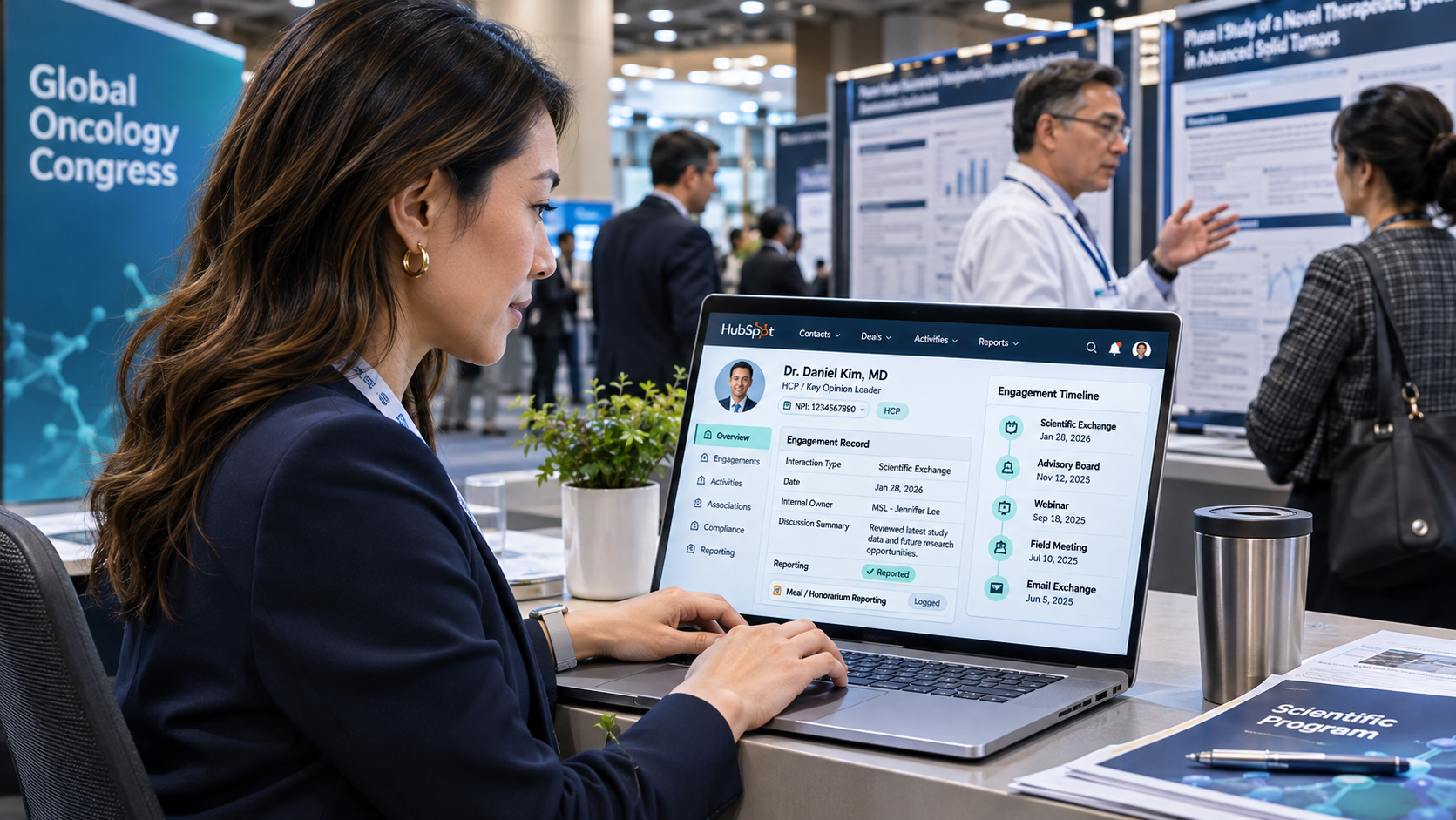
HCP engagement is every interaction a biopharma company has with a clinician. It spans field meetings, advisory boards, webinars, and emails. Biopharma teams track it in HubSpot with one contact record per HCP, keyed to their National Provider Identifier (NPI). Meetings and events log to that record's timeline, and Enterprise custom objects hold engagements with reporting duties.

Logging a meeting takes seconds. Months later, someone needs to know who met a physician, what they discussed, and if a meal or honorarium went with it. Field reps, medical science liaisons (MSLs), and marketing often keep separate lists. The answers then sit in three places, and none is complete.

If you're building that view for the first time, our HubSpot onboarding team sets up records, properties, and permissions before reps log a call.

Medical Conference CRM Engagement

Key Takeaways

  • Give every HCP one HubSpot contact record with their 10-digit NPI in a unique property, so imports and integrations update the same person.
  • Meetings, calls, and notes log to the timeline on every tier, and custom meeting types need Sales Hub or Service Hub Professional.
  • Custom objects for advisory boards, speaker programs, and other engagement records need at least one Enterprise subscription on the account.
  • Your aggregate spend system stays the system of record for Open Payments, and HubSpot passes structured engagement details to it.

Table of Contents

  1. What Is HCP Engagement, and Why Is It Hard to Track?
  2. What HCP Touchpoints Should Biopharma Teams Track in HubSpot?
  3. How Do You Set Up HCP Records in HubSpot?
  4. How Do You Log Meetings, Events, and Content Engagement on an HCP Record?
  5. How Do You Manage HCP Email Consent in HubSpot?
  6. When Do You Need Custom Objects for HCP Engagement Records?
  7. How Do Team Permissions Keep HCP Engagement Data Controlled?
  8. Should HubSpot Feed Your Open Payments Reporting?
  9. How Do State Laws Change HCP Engagement Tracking?
  10. How Do You Report on HCP Engagement in HubSpot?
  11. How Can Campaign Creators Help You Track HCP Engagement in HubSpot?

What Is HCP Engagement, and Why Is It Hard to Track?

HCP engagement covers every planned interaction between a life sciences company and a healthcare professional, from field visits to digital content. Tracking it is hard because each team logs its own touchpoints in its own tool, and HCPs now split their attention across many channels.

Access has changed too. In a ZoomRx study of 105 US physicians, 56% said the way they give reps access has changed for good since COVID. The changes range from more virtual visits to appointment-only scheduling.

When access is scheduled, reps need one history per HCP that shows what the physician responds to and when they last engaged.

What HCP Touchpoints Should Biopharma Teams Track in HubSpot?

Track every touchpoint that shapes the relationship or could carry a reporting duty. The table maps each one to its place in HubSpot and the team that usually owns it.

Touchpoint Where it lives in HubSpot Usual owner
Field rep meeting or call Meeting or call activity on the HCP contact Sales
MSL scientific exchange Meeting activity with a medical meeting type and restricted access Medical affairs
Webinar, symposium, or congress booth visit Marketing event with registration and attendance Marketing
Email click, content download, or page visit Email and web activity on the contact timeline Marketing
Advisory board or speaker program Engagement custom object (Enterprise) Commercial operations or medical affairs
Meal, honorarium, or travel Properties on the engagement record, synced to the aggregate spend tool Compliance
Sample request Ticket or custom object, with fulfillment in your sample management system Sales operations

Start with the first four rows on any tier. Add the last three once your data model and permissions are in place.

How Do You Set Up HCP Records in HubSpot?

Set up each HCP as a contact with a unique NPI property, a few professional fields, and links to their institutions. Follow these steps before you import anything.

  1. Create an NPI property and turn on require unique values when you create it, since the setting can't be added later. Imports and integrations then match on the number, not on an email address. The NPI is a 10-digit identifier that carries no other provider details. It stays stable when an HCP moves or changes specialty.
  2. Add dropdown properties for specialty, credential, HCP type (physician, nurse practitioner, or physician assistant), and prescriber status, so reports group cleanly.
  3. Associate each HCP with the hospitals, practices, and academic centers where they work. On Professional or Enterprise, create custom association labels such as "Attending physician" or "Department chair."
  4. Add a tier property, such as key opinion leader (KOL), high-value prescriber, or general, so field and marketing teams can prioritize the same people.
  5. Assign the HubSpot owner for sales, and add a separate owner property for the MSL, so each team can work its own book.
  6. Record each property's owner and valid values as data contracts in HubSpot. New fields then don't pile up as teams add their own.

Company types keep those institution links clean. Our client Torigen Pharmaceuticals, a veterinary pharma company, consolidated 40,000 to 50,000 records into HubSpot. We set up 4 company types (clinic, distributor, corporate owner, and group purchasing organization, or GPO) to organize those relationships. Human health HCPs need the same structure across health systems, group practices, and GPOs.

How Do You Log Meetings, Events, and Content Engagement on an HCP Record?

Meetings and calls go on the contact's timeline, and events go through the marketing events object. Content engagement tracks automatically once the HCP is a known contact.

Log Meetings and Calls

Reps can log meetings, calls, notes, and emails on any record, and each activity shows on the timeline for everyone with access. Custom meeting types and outcomes need Sales Hub or Service Hub Professional or Enterprise.

Create types such as "Detail visit," "Lunch and learn," and "MSL scientific exchange," so reports separate commercial and medical touches. Field teams that follow up by email can build the next steps into HubSpot sequences for medtech and pharma sales.

Track Events and Congresses

A marketing event is a customer relationship management (CRM) object that tracks who registered for and attended a webinar, symposium, or live event. Event platforms can sync attendance into it, and each attendee gets the event on their timeline.

For our client GTIA, we built a custom two-way integration between HubSpot and Cvent that syncs attendance into Marketing Events. It synced 230,000+ contacts and backfilled event data to January 2022.

Capture Content Engagement

Email clicks and form submissions are recorded on the timeline once the HCP is a known contact. Page views also need the HCP to accept tracking cookies. Tag clinical content by therapeutic area so you can report on interest by specialty. Keep each promotional asset tied to its medical, legal, and regulatory (MLR) approval status, so reps only send approved versions.

How Do You Manage HCP Email Consent in HubSpot?

Manage HCP email consent with subscription types. Turn on HubSpot's data privacy settings too if you email HCPs in places that require a recorded legal basis. Subscription types record the legal basis to email a contact, and HCPs can opt out of one type and keep the others.

  1. Create separate subscription types for scientific updates, medical education events, and promotional product news. An HCP who drops promotions can still get congress invitations.
  2. Use each type's "Opted out of email" property in segments and reports. HubSpot creates one for every subscription type you add.
  3. Turn on data privacy settings and the option to limit marketing emails to contacts with a subscription. HubSpot also skips open and click tracking for contacts with no legal basis recorded.
  4. Record consent where it happens. Add consent notices to forms, and set the legal basis on every booth scan or attendee list you import.

Custom subscription types need a paid HubSpot subscription. Your legal team should confirm the consent wording and legal basis for every audience you email.

When Do You Need Custom Objects for HCP Engagement Records?

You need custom objects when one engagement involves several HCPs, a payment, or its own lifecycle. Advisory boards, speaker programs, and consulting agreements all fit. Custom objects need an Enterprise subscription, and one Enterprise hub on the account is enough.

Need Contact properties and activities Engagement custom object
One HCP, one interaction Works well More than you need
Several HCPs at one advisory board Hard to report on One record associated with every attendee
Payment or transfer-of-value details Get lost in notes Structured fields per engagement
Status such as planned, held, or reported Hard to track Its own pipeline
HubSpot tier Any Enterprise

A typical engagement object holds the type, date, location, therapeutic area, payment type, and amount. A status shows if the record has gone to your reporting system. Start with the fields your reports need, since property types are hard to change once data is in them.

How Do Team Permissions Keep HCP Engagement Data Controlled?

Team permissions keep each group to the records and fields it needs. Field reps can't read MSL notes, and marketing can't edit payment details. Set them up before go-live.

  • On Professional or Enterprise, assign users to teams and limit record access by team. Reps then work their territory, and MSLs work medical affairs records.
  • Restrict view and edit access for properties such as payment amounts or medical notes. Only named users and teams can then view or change them. Property restrictions need Enterprise, and they don't apply to Super Admins, so keep those seats few.
  • Turn on Sensitive Data on an Enterprise subscription if any engagement record holds health or medical information. HCP records usually don't need it when patient details stay out of notes.

The settings follow the same pattern as permissions, consent, and sensitive data for IT teams. Put the result in a one-page access matrix, and have medical affairs and compliance sign it before launch.

Should HubSpot Feed Your Open Payments Reporting?

HubSpot should capture the engagement context and pass structured details to your aggregate spend tool. That tool stays the system of record for Open Payments, and the volume it handles is large. CMS published $14.67 billion in Program Year 2025 payments and ownership interests, across 17.07 million records, including payments to 667,898 physicians.

Build the handoff in four steps.

  1. Capture the recipient's NPI, engagement date, payment type, and amount on the engagement record.
  2. Set a status property to "Ready to report" once the engagement is held and the details are final.
  3. Sync ready records to the aggregate spend system through a scalable application programming interface (API) integration.
  4. Write the reporting system's confirmation back to HubSpot, so reps and managers can check what was reported.

Reporting rules, thresholds, and disputes are your compliance team's call. Confirm every field mapping with them and your reporting vendor before the first sync.

How Do State Laws Change HCP Engagement Tracking?

State laws add rules on top of federal Open Payments, so each HCP record needs the HCP's state. As of mid-2025, eight states have compliance certification, spending limits, or gift bans. They include Vermont's gift ban, Minnesota's $50 gift limit, and New Jersey's meal limits.

State rule Examples What to store in HubSpot
Gift bans and spending limits Vermont gift ban, Minnesota $50 gift limit, New Jersey meal limits HCP state and a running yearly total per HCP
State disclosure reports Massachusetts disclosure of sales and marketing activities over $50 Payment type, amount, and date on each engagement
Sales rep registration above set activity levels Chicago, Nevada, Oregon, and Washington, D.C. Rep territory, checked against your registration list

Each state enforces its own law. In Vermont, the Attorney General administers the gift ban and disclosure law for drug, biologic, and medical device makers.

Use a workflow to flag a planned meal or gift for an HCP in a gift-ban state before the event takes place. State rules and thresholds change, so your compliance team should own the list and review it every year.

How Do You Report on HCP Engagement in HubSpot?

Report on HCP engagement with dashboards that count touchpoints by HCP tier, specialty, channel, and team over time. Start with these four reports.

  • Touchpoints per HCP tier per month, to check that KOLs and high-value HCPs get the attention you planned.
  • Channel mix by specialty, comparing meetings, events, and email.
  • Days since last touch, to flag HCPs nobody has engaged in 90 days.
  • Event attendance by therapeutic area.

These reports only hold up when every team logs activity the same way. Teams with uneven logging usually fix it with an engagement data layer that standardizes activity types and outcomes before anyone builds a dashboard.

How Can Campaign Creators Help You Track HCP Engagement in HubSpot?

Many HCP tracking problems we fix start with a generic business-to-business (B2B) data model that has no place for NPIs, institutions, or regulated engagements. Our team designs the HCP record, the engagement object, and the permission model, then connects HubSpot to your event platform and aggregate spend tool.

As a HubSpot Elite Solutions Partner, we draw the line between HubSpot and your regulated systems before anything goes live. If your engagement data needs to reach a reporting tool, talk to our HubSpot integration development team.

Recap

Biopharma teams track HCP engagement in HubSpot by keying each HCP to an NPI and logging meetings and events on one timeline. Enterprise custom objects hold engagements with payments. Permissions keep each team to its own data, and the aggregate spend tool stays the system of record for Open Payments.

Get your HubSpot portal set up right the first time with our onboarding team. Before you build, use our custom object or custom property guide to plan your engagement model.

Frequently Asked Questions

What Is the Difference Between HCP Engagement and KOL Engagement?

HCP engagement covers every healthcare professional a company interacts with. KOL engagement is a smaller program for experts who shape practice in a field. Medical affairs usually leads it through advisory boards and scientific exchange.

Can You Store Patient Information on HCP Records?

No. HCP records should hold professional details and engagement history only. Train reps to log what was discussed without naming or describing patients, and keep patient data in the systems built for it.

Can HubSpot Hold GxP or Part 11 Records?

No. Keep good practice (GxP) records and records under the Food and Drug Administration's Part 11 rule, such as quality, safety, and clinical data, in validated systems. HubSpot works as the commercial layer around those systems and holds the relationship context your teams need.

How Long Does HCP Engagement Tracking Take to Set Up in HubSpot?

The HubSpot configuration is usually the quick part. The time goes into agreeing on permissions, cleaning HCP data, and building the sync to your aggregate spend system.

How Do You Keep HCP Data Accurate Over Time?

Refresh HCP details on a regular schedule from your master data source, and use the NPI to merge duplicates. Review inactive HCPs every quarter so territories and target lists stay current.

What KOL Mapping Data Should Biopharma Companies Keep in HubSpot?

What KOL Mapping Data Should Biopharma Companies Keep in HubSpot?

Biopharma companies should keep the results of KOL mapping in HubSpot and leave the underlying research in the mapping platform. The results are each...
Read More
How Medical Affairs Teams Organize KOL Engagement in HubSpot

How Medical Affairs Teams Organize KOL Engagement in HubSpot

Medical affairs teams organize key opinion leader (KOL) engagement in HubSpot by storing each KOL as a contact with KOL-specific properties....

Read More
Should HubSpot Be the Center of Your Tech Stack? It Depends

Should HubSpot Be the Center of Your Tech Stack? It Depends

HubSpot can be the center of your tech stack when it gives marketing, sales, service, and revenue teams one reliable view of the customer while...

Read More