A HubSpot Elite Solutions Partner built to help organizations unify strategy, systems, and execution. We design HubSpot systems that scale.

See how we've solved complex HubSpot challenges across migrations, integrations, CMS, automation, and optimization.

Join a team building smarter HubSpot systems. We value strategic thinkers who move proactively, care about quality, and want to do meaningful work.

7 min read

Enterprise HubSpot Marketing Hub Onboarding: Complete Implementation Guide

Enterprise HubSpot Marketing Hub Onboarding: Complete Implementation Guide

Many enterprise implementations encounter delays or require costly rework because teams prioritize technical configuration before defining business goals, governance, and data standards. 91% of technology leaders report challenges with CRM data governance, leaving organizations more likely to encounter inconsistent data after implementation.

Starting with a structured onboarding strategy helps your organization launch HubSpot with clean data, well-designed workflows, integrated systems, and reporting that marketing, sales, operations, and leadership can trust from day one.

This article explains what Enterprise HubSpot Marketing Hub onboarding involves, how to prepare your business before implementation, which features to configure first, when to migrate data and connect integrations, who should lead the onboarding process, and how to measure long-term success.

Key Takeaways

  • Enterprise HubSpot onboarding succeeds when you build your business processes before you configure the platform.
  • Configure your CRM structure and governance before migrating data to avoid cleanup and reporting issues later.
  • Successful onboarding depends on shared ownership across marketing, sales, IT, operations, and leadership.

What's Included in an Enterprise HubSpot Marketing Hub Onboarding

A typical Enterprise Marketing Hub onboarding includes the following workstreams:


Onboarding Area

What It Involves

Discovery & Planning

Define business goals, marketing objectives, KPIs, implementation roadmap, success metrics, stakeholder roles, and project timeline.

CRM & Data Architecture

Configure contact, company, deal, and custom objects. Create custom properties, lifecycle stages, lead statuses, data standards, and governance rules.

User Permissions

Set up teams, user roles, permission sets, approval processes, and access controls for marketing, operations, leadership, and agencies.

Domain & Technical Setup

Connect domains, authenticate email-sending domains, configure DNS records, tracking codes, cookies, consent settings, and website integrations.

Marketing Asset Migration

Import emails, landing pages, forms, CTAs, templates, files, blogs, and existing marketing assets from previous platforms.

Contact & Data Migration

Import contacts, companies, lists, historical engagement data, segmentation, subscriptions, and marketing preferences while maintaining data quality.

Marketing Automation

Build workflows for lead nurturing, lifecycle progression, internal notifications, lead routing, campaign automation, and customer journeys.

Lead Capture

Configure forms, pop-ups, embedded forms, meeting links, chatflows, CTAs, and conversion paths across websites and campaigns.

Email Marketing

Set up email templates, subscription types, suppression lists, personalization, branding, and deliverability best practices.

Campaign Management

Configure campaigns, UTM tracking, attribution settings, marketing calendars, and campaign reporting.

Integrations

Connect Salesforce or other CRMs, CMS platforms, webinar software, ad platforms, analytics tools, ecommerce systems, and other business applications.

Reporting & Dashboards

Build executive dashboards, campaign reports, attribution reports, funnel reporting, ROI tracking, and custom analytics for different teams.

AI & Enterprise Features

Configure Enterprise capabilities such as advanced reporting, partitioning, governance controls, and AI-powered tools that support large-scale marketing operations.

Testing & Quality Assurance

Test workflows, forms, automations, integrations, email delivery, reporting accuracy, and user permissions before launch.

Team Training & Adoption

Train marketing, operations, and leadership teams on platform usage, governance, reporting, and ongoing management.

Go-Live & Optimization

Launch the platform, monitor performance, resolve issues, review adoption, and prioritize future enhancements after implementation.

For enterprise organizations, onboarding also emphasizes operational governance. This includes defining naming conventions, property ownership, workflow documentation, approval processes, change management procedures, and data quality standards that keep the portal organized as more users, campaigns, and integrations are added.

Why You Should Prepare Your Business Before Implementation

an operations professional having a meeting with the business owner or ceo they are walking though the ff showing icons with minimal text Define business goals Align stakeholders Audit existing processes Clean your data Review your technology stack: Establish governance Prioritize implementation Prepare users . Each step uses simple business icons and clean labels.

Without adequate preparation, implementation teams often encounter inconsistent data, unclear ownership, misaligned objectives, and broken workflows. These issues delay implementation, create unnecessary rework, and reduce confidence in the platform after launch.

Preparation helps you:

  • Define business goals: Prioritize the Marketing Hub features, automations, and reports that support your business objectives.
  • Align stakeholders: Establish shared ownership, expectations, and success metrics across marketing, sales, operations, IT, and leadership.
  • Audit existing processes: Identify which marketing processes to improve, automate, or replace before migration.
  • Clean your data: Improve reporting, segmentation, and automation by removing duplicate, outdated, and inconsistent records.
  • Review your technology stack: Confirm how your CRM, website, advertising platforms, analytics tools, and other systems will integrate with HubSpot.
  • Establish governance: Keep your portal organized with defined naming conventions, user permissions, data ownership, and approval processes.
  • Prioritize implementation: Focus implementation on the features that deliver the greatest business impact first.
  • Prepare users: Improve adoption by training teams, defining user roles, and communicating implementation changes before launch.

Businesses that begin onboarding with documented goals, clean data, and defined processes typically complete implementation more efficiently than those resolving internal issues during the project. They can launch campaigns, build automations, and generate reliable reports sooner, leading to faster adoption and a stronger return on their HubSpot investment.

Which HubSpot Marketing Hub Features You Should Configure First

a marketer conducting the first steps of a HubSpot Marketing Hub implementation. show a pop-up beside of each step appears as a milestone along a path: Build CRM Foundation, Configure User Access, Connect Website & Tracking, Import Contacts, Capture Leads, Launch Email Marketing, Automate Workflows, Organize Campaigns, Connect Business Tools, and Measure Performance. Each stage uses simple business icons and clean labels.

Configure these features first to establish a reliable foundation before building campaigns, automations, and reports.

  1. CRM data structure: Set up contact properties, company properties, lifecycle stages, lead statuses, custom properties, and naming conventions to keep your data consistent.
  2. User roles and permissions: Define teams, permission sets, and access levels before users begin creating assets or editing data.
  3. Domain and tracking setup: Connect your website domain, authenticate email sending domains, install the HubSpot tracking code, and configure cookie consent to track marketing activity accurately.
  4. Contact import and segmentation: Import contacts, remove duplicates, standardize property values, and create active and static lists for audience segmentation.
  5. Forms and lead capture: Configure forms, CTAs, landing pages, pop-ups, and conversion paths so new leads enter the CRM with complete and consistent information.
  6. Email marketing: Set up subscription types, email templates, branding, sender authentication, suppression lists, and personalization settings before sending campaigns.
  7. Marketing automation: Build foundational workflows for lead nurturing, internal notifications, lifecycle progression, and lead assignment before creating advanced automations.
  8. Campaign management: Configure campaign tracking, UTM conventions, attribution settings, and campaign organization to measure marketing performance consistently.
  9. Integrations: Connect your CRM, website, advertising platforms, webinar tools, analytics solutions, and other business applications after your core data structure is in place.
  10. Dashboards and reporting: Build executive dashboards and marketing reports after your campaigns and automations begin generating reliable data.

Recommended Implementation Priority

Focus on capabilities that support your first marketing objective. For example, if lead generation is your primary goal, prioritize lead capture, contact segmentation, email marketing, and nurturing workflows before building advanced dashboards or custom reports. This helps your team become productive faster without becoming overwhelmed by the platform's extensive feature set.

Once these foundational features are configured and tested, you can expand into Enterprise capabilities such as advanced automation, custom reporting, attribution models, AI-powered tools, campaign optimization, and governance enhancements to support larger teams and more complex marketing operations.

When to Migrate Data and Connect Integrations in HubSpot

Migrate your data and connect integrations after your HubSpot portal is fully configured but before your team begins live marketing activities. At this stage, your CRM structure, custom properties, user permissions, and governance rules are already in place. This helps you to import clean, organized data into the correct fields and verify every connection before launch.

Data migration too early often creates unnecessary rework. Changes to custom properties, lifecycle stages, or naming conventions after data has been imported usually require records to be remapped or imported again. Complete your portal configuration first so every record has a defined destination and supports accurate segmentation, automation, and reporting.

This is especially important because more than 70% of CRM records become inaccurate within a year, making data cleanup and proper mapping essential before migration.

Complete a full validation before launch. Check imported records, field mappings, workflow triggers, and integration syncs to identify and resolve issues before users begin working in the platform. This helps maintain data quality and ensures your campaigns, reports, and automations work as expected from day one.

Continue reading with this article: How To Migrate To HubSpot Without Breaking Your Reporting

Who Should Be Responsible for Enterprise HubSpot Onboarding

Even if multiple departments are involved, the HubSpot Administrator or a dedicated Marketing Operations or Revenue Operations (RevOps) leader typically serves as the day-to-day owner of the implementation. This person manages portal configuration, coordinates with internal stakeholders, and works closely with any external implementation partner.

Executive leadership remains responsible for strategic decisions and business outcomes, but operational ownership usually sits with the team managing the platform after go-live.

Should You Work with a HubSpot Partner?

Many organizations choose to work with a certified HubSpot Solutions Partner alongside their internal team. A partner provides technical expertise, implementation frameworks, migration support, automation design, and user training, while internal stakeholders provide the business knowledge needed to configure HubSpot around existing processes and goals.

A qualified partner also helps reduce implementation risk. You can follow a proven implementation methodology based on HubSpot best practices. This helps prevent configuration issues, improve data quality, and accelerate user adoption.

Campaign Creators is a HubSpot Elite Solutions Partner with accredited expertise in data migration, CRM implementation, onboarding, and platform optimization. Our consultants work with your team to configure HubSpot around your business objectives, migrate and validate your data, connect your technology stack, build automations, establish governance, and train your users.

If your organization has complex marketing operations, multiple business units, custom integrations, or large volumes of customer data, working with an experienced HubSpot partner can reduce implementation time and help your team realize value from HubSpot sooner.

How to Measure and Improve Onboarding Success

You can measure Enterprise HubSpot Marketing Hub onboarding success through these KPIs below:

Metric

What It Measures

How to Improve It

Time to Value (TTV)

How quickly your team achieves its first meaningful business outcome, such as launching a campaign or generating qualified leads.

Prioritize high-impact features first, provide role-based training, and focus on core workflows before expanding to advanced capabilities.

User Adoption Rate

The percentage of users actively working in HubSpot and using the features relevant to their roles.

Deliver ongoing training, create internal documentation, and assign HubSpot champions to support adoption across departments.

Feature Adoption

How frequently teams use key capabilities such as email marketing, workflows, forms, campaigns, dashboards, and automation.

Introduce features in phases and align each rollout with a specific business objective rather than enabling everything at once.

Data Quality

The accuracy, completeness, and consistency of CRM records after migration.

Schedule regular data audits, merge duplicate records, standardize property values, and maintain governance policies.

Workflow Performance

Whether automations execute correctly without failures or unnecessary manual work.

Test workflows before launch, monitor enrollment and completion rates, and review automation logic regularly.

Reporting Accuracy

Whether dashboards reflect reliable campaign, attribution, and revenue data.

Validate integrations, confirm field mappings, and review reports with stakeholders after implementation.

Customer Satisfaction (CSAT)

How satisfied users are with the onboarding experience and the platform.

Collect feedback through surveys, resolve pain points quickly, and adjust training based on user needs.

Business Outcomes

Progress toward goals such as lead generation, conversion rates, marketing efficiency, or campaign performance.

Review KPIs regularly and refine campaigns, automations, and reporting based on performance data.

6 Ways to Improve Onboarding After Launch

Enterprise onboarding should continue well beyond the initial implementation. Regular optimization helps your HubSpot portal keep pace with new business priorities and evolving marketing strategies.

  1. Review onboarding KPIs monthly to identify adoption gaps, workflow issues, and reporting inconsistencies.
  2. Gather feedback from marketing, sales, operations, and leadership to identify opportunities for improvement and remove friction from day-to-day processes.
  3. Expand automation gradually after foundational workflows prove reliable, reducing unnecessary complexity during the early stages of adoption.
  4. Refresh user training as new HubSpot features are introduced and as employees change roles or join the organization.
  5. Conduct periodic CRM health checks to maintain data quality, review governance standards, and ensure integrations continue syncing correctly.
  6. Compare marketing performance against the original implementation goals and adjust campaigns, dashboards, and automation to improve results.

Getting HubSpot live is only the first step. Continue refining your portal as your business grows by tracking user adoption, data quality, automation performance, and business results.

Get More Value From HubSpot Marketing Hub

Enterprise HubSpot Marketing Hub onboarding establishes the foundation for consistent marketing operations, trusted data, connected technology, and meaningful reporting. This approach helps every team work toward shared business goals with greater clarity and confidence.

If your organization needs support with enterprise HubSpot onboarding, an experienced implementation partner can help you define priorities, build the right framework, and create a platform that fits your business requirements from the start.

Campaign Creators help organizations turn HubSpot Marketing Hub into a scalable marketing platform through strategic planning, thoughtful configuration, data governance, and practical guidance on adoption.

Frequently Asked Questions

How long does enterprise HubSpot Marketing Hub onboarding usually take?

Most enterprise onboarding projects take between 6 and 12 weeks. The timeline depends on your data quality, system complexity, integrations, and internal approval process.

Can you customize HubSpot Marketing Hub for different business units?

Yes. Enterprise subscriptions support features that help large organizations manage multiple teams, brands, and marketing operations within a single platform.

Should you import all of your existing contacts into HubSpot?

No. Review and clean your database before importing contacts. Removing outdated and duplicate records improves reporting and campaign performance.

Can HubSpot Marketing Hub connect with other business software?

Yes. HubSpot offers native integrations and APIs that connect with many CRM, ERP, analytics, customer support, and productivity platforms.

Should you create custom properties before importing data?

Yes. Creating custom properties first helps your imported data map correctly and supports accurate reporting from the start.


When Should Technology Companies Use HubSpot Custom Objects?

When Should Technology Companies Use HubSpot Custom Objects?

Technology companies can use HubSpot custom objects once standard CRM records can no longer support how the business operates. For SaaS companies,...
Read More
How to Build an Engagement Data Layer for Reliable HubSpot Reporting

How to Build an Engagement Data Layer for Reliable HubSpot Reporting

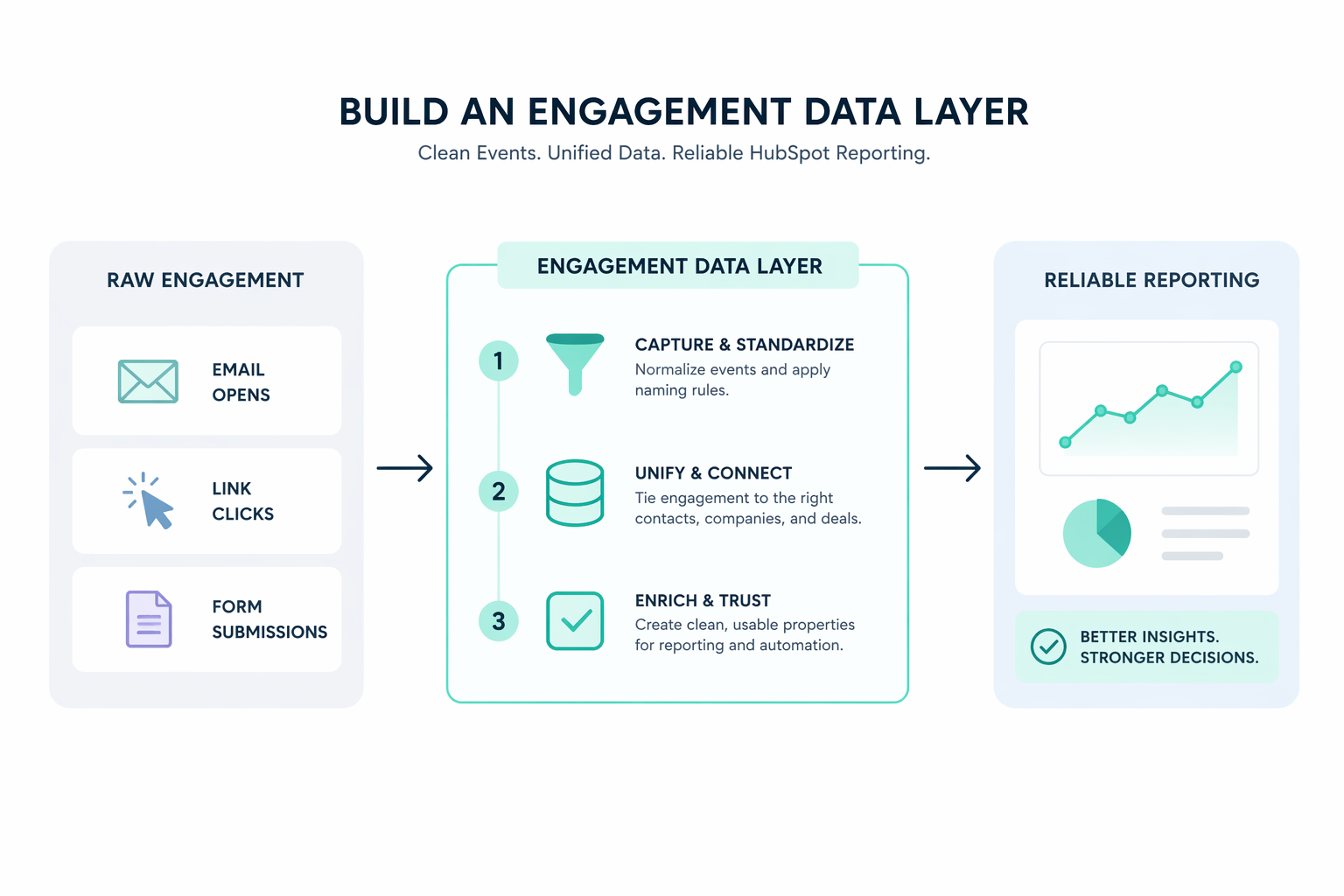
How to Build an Engagement Data Layer for Reliable HubSpot Reporting Consistent and accurate HubSpot reporting starts with the structure behind the...

Read More
HubSpot Implementation Cost: What You'll Actually Pay Beyond Subscription Fees

HubSpot Implementation Cost: What You'll Actually Pay Beyond Subscription Fees

HubSpot subscription fees are only part of the total cost of implementing the platform. Most businesses also need to budget for onboarding, CRM...

Read More