









 Campaign Creators
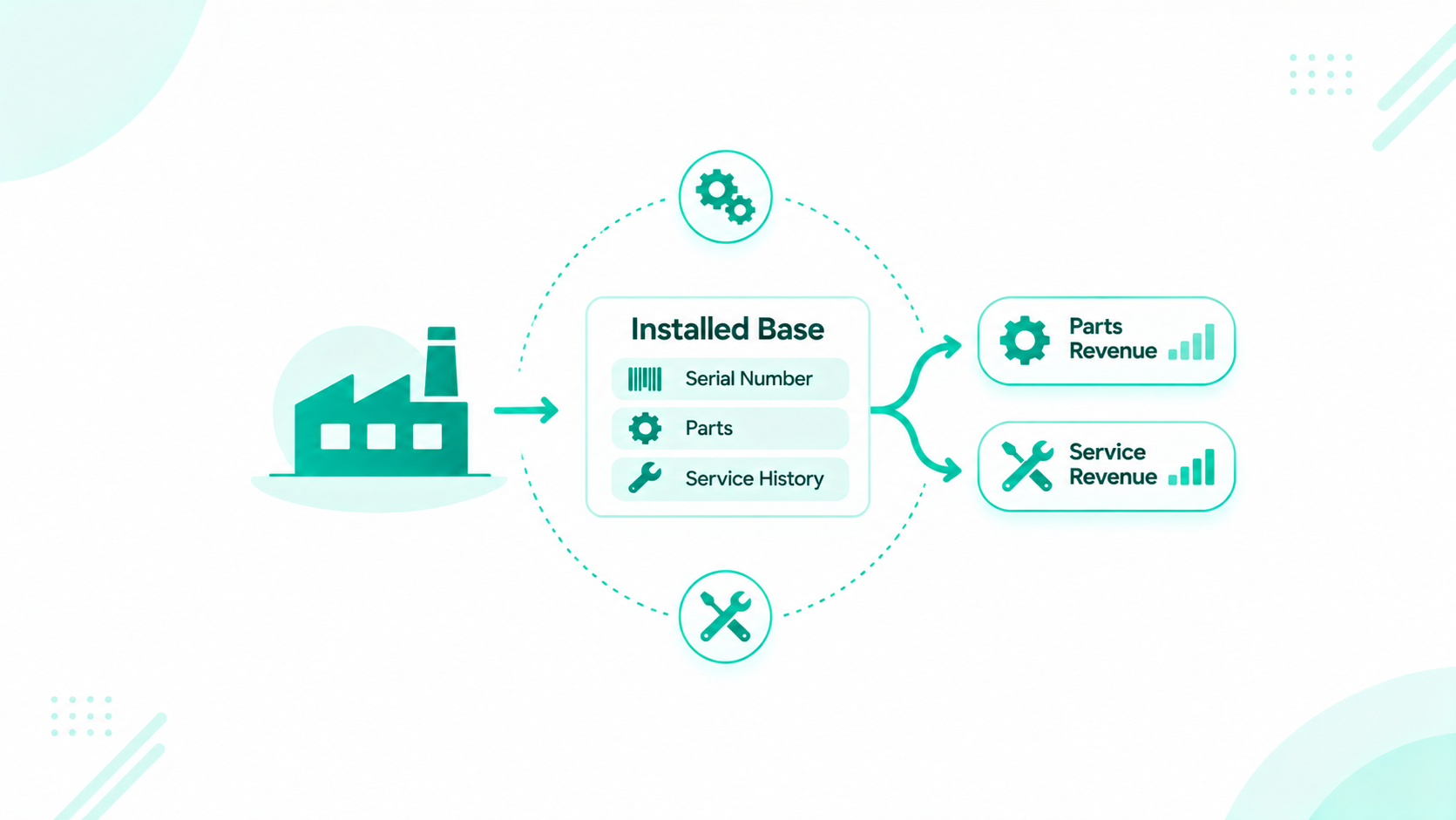
Manufacturers track an installed base in HubSpot by creating an equipment record for each serial number, associating it with the owning company, the site, the product, and the service contract, and calculating warranty and service dates on the record. Workflows then turn those dates into tasks and parts or service deals, while the ERP and any field service tool stay the systems of record for orders, serial numbers, and work orders.
A machine leaves the plant with a serial number and stays in service for years. The parts, service, and upgrade revenue it generates depends on knowing where it is, who owns it, and when it needs attention next. When serial numbers sit in systems the account team never opens, every parts or service conversation starts from scratch.
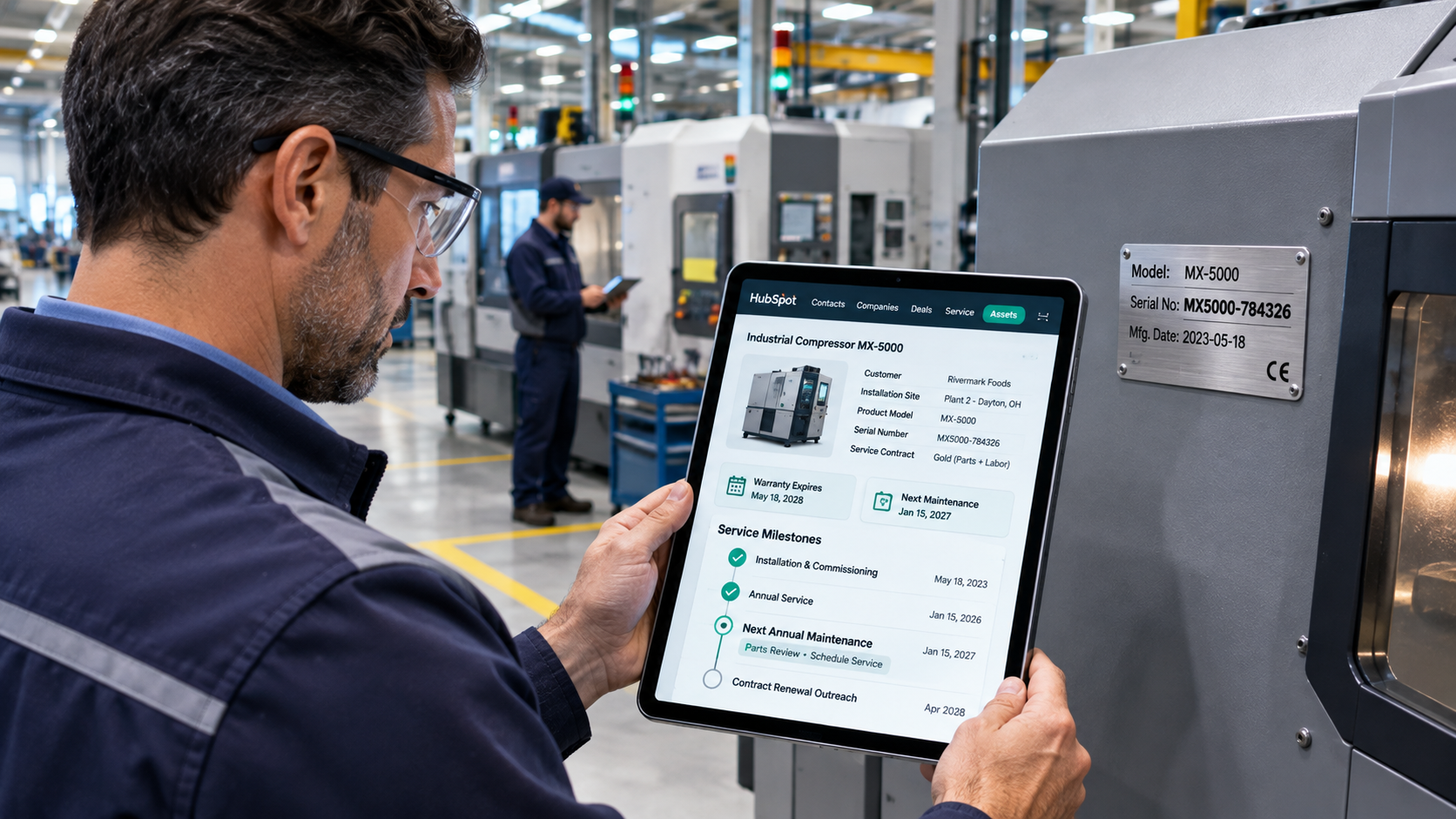
This guide covers what each equipment record holds, how units connect to owners and sites, where serial numbers come from, which dates drive outreach, and how service contracts and tickets attach to each unit.
Key Takeaways
- Create one equipment record per serial number, using a custom object on Enterprise, and associate it with the owner, site, product, selling dealer, and service contract.
- The ERP keeps products, BOMs, orders, and shipments, a field service tool keeps work orders, and HubSpot holds the account-facing view and the dates that drive outreach.
- Record who was invoiced, where the unit shipped, and who owns it now as separate associations, with an owner confidence property for units sold through distributors.
- Calculated properties on Professional and Enterprise can hold warranty end dates and days until service is due, and workflows turn those dates into tasks and deals.
- Service Hub Professional and Enterprise include a support portal where customers see their tickets, with fields such as serial number and model displayed on each ticket.
Table of Contents
- How Can Manufacturers Track an Installed Base in HubSpot?
- Why Does the Installed Base Drive Parts and Service Revenue?
- Which System Owns Which Installed Base Data?
- What Should an Equipment Record Hold?
- How Do You Connect Each Unit to Its Owner, Site, and Dealer?
- Equipment Record Data Model Table
- Where Do Serial Numbers Come From, and How Do They Reach HubSpot?
- How Do You Find the Owner of a Unit Sold Through a Distributor?
- What Happens When a Unit Changes Owners or Retires?
- Which Dates Should Trigger Parts and Service Outreach?
- How Should a CRM Track Field Service and Maintenance Contracts?
- Frequently Asked Questions
How Can Manufacturers Track an Installed Base in HubSpot?
Manufacturers track an installed base in HubSpot with an equipment record for every serial number, linked to the account, the site, and the service contract, with its key dates calculated on the record. Reps see every unit on the account page and act on the next date.
- Equipment record: holds the serial number, model, dates, and status for one unit.
- Associations: connect the unit to its owner, site, product, dealer, contacts, contracts, deals, and tickets.
- Dates: warranty end, next service due, contract renewal, and age windows.
- Workflows: turn each date into a task, a deal, or a ticket.
- Reports: show units by model, age, coverage, and revenue.
Why Does the Installed Base Drive Parts and Service Revenue?
The installed base drives parts and service revenue because every unit in the field needs maintenance, spares, and eventually an upgrade or replacement. Each of those sales starts with knowing the unit, its owner, and its next date.
BCG's 2025 research on aftermarket services for industrial manufacturers found that services carry gross margins about twice the 15% to 25% typical of equipment sales, and that spare parts and consumables average gross margins of 50%. It also notes that some manufacturers underperform in services because they lack information about installed equipment, including its condition, location, usage, and service history.
Which System Owns Which Installed Base Data?
The ERP owns products, BOMs, orders, and shipments, the field service tool owns work orders and technician history, and HubSpot owns the account-facing equipment view and the dates that drive outreach. Each system keeps the data it handles best.
| Data | System of record | What HubSpot holds |
|---|---|---|
| Products, BOMs, and parts catalogs | ERP | Model and SKU on the equipment record |
| Orders, invoices, and shipments | ERP | Ship date, bill-to, and ship-to on the unit |
| Work orders and technician notes | Field service tool | Last service date and a link to the work order |
| Equipment record and owner | HubSpot, seeded from the ERP | The full account-facing view |
| Warranty, service, and renewal dates | HubSpot, calculated from source dates | Dates that drive tasks and deals |
| Parts, service, and upgrade deals | HubSpot | Deals tied to the unit |
Our guide on when HubSpot should be your system of record covers this split in more depth.
What Should an Equipment Record Hold?
An equipment record should hold the serial number, model, key dates, status, configuration, and service timing for one unit. On Enterprise, a custom object holds one record per serial number, and company properties work for manufacturers with only a few units per account.
The core fields come from three places. From the ERP: serial number, model and SKU, ship date, and a configuration summary such as voltage and options. From commissioning or field service records: install date, firmware or revision, last service date, and run hours where available. HubSpot calculates or maintains the rest: warranty start and end dates, next service due, a status of In service, Transferred, or Decommissioned, and an owner confidence value of Confirmed, Likely, or Unknown.
Custom Object or Company Properties
An equipment custom object fits accounts with many units, units that move between sites, and per-unit reporting, with more setup and more records to maintain. Company properties work on any tier when each account has only a few units, though one set of values per company blurs the detail of individual units.
HubSpot's guide to creating custom objects notes they need an Enterprise subscription. Record and custom object limits depend on your subscription, and HubSpot's guide to tracking CRM data limits shows where to check usage. Start with the custom object when units carry their own dates. Our technology consulting team can help you size the model.
Who owns it: the aftermarket or service operations lead.
Sign it's working: every unit shipped in the last year has an equipment record with a serial number, model, and ship date.
How Do You Connect Each Unit to Its Owner, Site, and Dealer?
Associate each equipment record with the owning company, the site where it runs, the product, the selling dealer or distributor, and the contacts who maintain it, using labels that name each role. Reps then see every unit from the account and every relationship from the unit.
Use labels on the equipment-to-company association for Owner (who owns it today), Bill-to (who was invoiced), Site (where it runs), and Sold by (the dealer or distributor). Label contacts by role, such as Maintenance lead, Operator, and Purchasing. Associate each unit to its service contract, deals, and tickets as well.
Per HubSpot's guide to creating and using association labels, custom labels need a Professional or Enterprise subscription, and each object pair holds up to 50 labels. Model multi-site customers as a parent company with sites as child companies, or as a Site property on the equipment record when sites don't need their own records.
Bill-To, Ship-To, and Owner
The bill-to is the company invoiced for the unit, from the ERP invoice. The ship-to is where the unit was delivered, from the ERP shipment. The owner is who owns and operates the unit today, from a registration, dealer report, or commissioning record. These three often differ. A distributor may be invoiced, a job site may receive the unit, and an end customer may own it. Keep each as its own association so a later transfer changes only the owner.
Who owns it: sales operations, with owner updates from the aftermarket team.
Sign it's working: every active unit has an Owner and a Site association.
Equipment Record Data Model Table
The installed base connects nine kinds of records. Use this table as the build plan.
| Record | What it holds | Key associations | Example properties |
|---|---|---|---|
| Equipment (custom object) | One serial-numbered unit | Owner, site, selling dealer, contacts, service contract, deals, tickets | Serial number, model, ship and install dates, status, warranty dates, next service due, owner confidence |
| Owner company | The company that owns the unit | Equipment, contacts | Industry, region, account owner |
| Site (child company) | Where the unit runs | Parent owner, equipment | Address, site code |
| Dealer or distributor (company) | The partner that sold the unit | Equipment with a Sold by label | Territory, partner type |
| Contact | People who maintain, operate, or buy for the unit | Equipment with role labels | Role, email, phone |
| Service contract | Coverage terms | Covered units, owner company | Contract type, start date, renewal date |
| Product (product library) | The model | Matched by SKU | SKU, product line |
| Deal | A parts, service, or upgrade sale | Equipment, owner company | Deal type, amount |
| Ticket | A service request | Equipment, contact, order | Category, warranty status at open |
Want a second look at your installed base model? The Architecture Blueprint maps your current HubSpot setup against where it needs to be, including the equipment records and associations behind aftermarket reporting.
Where Do Serial Numbers Come From, and How Do They Reach HubSpot?
Serial numbers come from ERP shipments, field service tools, registration forms, dealer reports, and commissioning records, and they reach HubSpot through an ERP sync, scheduled imports, or form submissions. The serial number is the matching key for every route.
Which Source to Trust for Each Field
- ERP shipment and invoice records: serial number, model, ship date, bill-to, and ship-to.
- Commissioning or startup records: install date and site.
- Field service tools: last service date, firmware, and run hours.
- Product registration forms: owner and maintenance contacts.
- Dealer and distributor reports: the end customer for units sold through the channel.
Routes Into HubSpot
Six routes bring serial numbers in: a HubSpot-built ERP data sync (native integration), an app listed on the HubSpot App Marketplace for your ERP or field service tool (marketplace app), an integration platform that moves serial-level data on a schedule (middleware), a regular export of shipped serial numbers (scheduled import), a registration form owners fill in, and code that reads ERP or field service APIs (custom API connection).
HubSpot's guide to using its integration with NetSuite lists companies, invoices, orders, and products among the synced objects, so serial-level equipment records usually need their own route. Our NetSuite and HubSpot integration, powered by Commercient middleware, offers another route. Confirm any field service tool connection on the HubSpot App Marketplace and in the vendor's documentation before you plan around it.
Match on Serial Number
Store the serial number in a property that requires unique values, so a second load updates the existing unit. HubSpot's guide to setting validation rules for properties covers unique value properties, configured when the property is created. Send rows with missing or malformed serial numbers to an exceptions file with a named owner.
When historical units need cleanup before the first load, the same mapping and validation steps apply as a HubSpot data migration.
Who owns it: the ERP owner, with the HubSpot admin maintaining the load.
Sign it's working: each month's shipped serial numbers appear as equipment records within a day of shipment.
How Do You Find the Owner of a Unit Sold Through a Distributor?

Find the owner of a channel-sold unit through registration, dealer and distributor reports, commissioning visits, and service tickets, and record how sure you are with an owner confidence property. Units sold through distributors often start with an unknown end customer.
- Confirmed: the owner registered the unit, or a technician verified it on site.
- Likely: a dealer report or ship-to address points to an owner, so confirm at the first service or contact.
- Unknown: only the distributor is known, so the channel manager asks the distributor.
A workflow can create a task for the channel manager when a unit has stayed Unknown for 60 days after shipment. Every service ticket is a chance to confirm the owner, so add an Owner confirmed checkbox to the ticket form technicians use.
Who owns it: the channel manager for distributor-sold units.
Sign it's working: the share of Unknown units falls each quarter.
What Happens When a Unit Changes Owners or Retires?
When a unit changes owners, move the Owner association to the new company and keep the history. When a unit retires, set its status to Decommissioned so it leaves active reports and outreach.
Ownership Transfer
- Add the new owner with the Owner label, and relabel the previous owner as Previous owner.
- Record the transfer date and source on the equipment record.
- Update the Site association if the unit moved.
- Check that any service contract still applies, and flag it for review if not.
Decommissioning
Set the status to Decommissioned and record the date and reason. Keep the record, its tickets, and its deals, so lifetime revenue by unit stays intact.
Who owns it: the aftermarket team.
Sign it's working: decommissioned units drop out of service reminders, and transfers show both owners in the history.
Which Dates Should Trigger Parts and Service Outreach?
Five dates drive installed base outreach: warranty end, next service due, contract renewal, run-hours intervals, and age-based upgrade windows. Calculate each on the equipment record, and let workflows turn them into tasks and deals ahead of time.
HubSpot's guide to creating calculation properties notes that custom equations can return dates and that Time until properties count down to a date. Calculation properties need a Professional or Enterprise subscription. Per HubSpot's guide to creating workflows, workflows need a Professional or Enterprise subscription.
Trigger Table
These timings are examples to adapt to your products and contracts.
| Trigger | Date or interval | Action | Owner | HubSpot tool | Resulting deal or ticket |
|---|---|---|---|---|---|
| Warranty ending | 90 days before warranty end date | Offer a service contract | Aftermarket rep | Workflow, task | Service contract deal |
| Preventive maintenance due | 30 days before next service due | Email the maintenance lead and create a scheduling task | Service coordinator | Workflow, email, task | Service ticket |
| Contract renewal | 120 days before renewal date | Open a renewal | Account manager | Workflow | Renewal deal |
| Run-hours interval, where synced | Run hours pass the service interval | Offer a parts kit | Parts sales | Workflow, task | Parts deal |
| Upgrade window | Unit reaches its typical upgrade age | Start a replacement or upgrade conversation | Account manager | Workflow, task | Upgrade deal |
| Unknown owner | 60 days after shipment with no confirmed owner | Ask the distributor | Channel manager | Workflow, task | None |
Parts and Spares
Each model points to its recommended spares and consumables from the ERP's parts lists. Keep BOMs and parts catalogs in the ERP, and show a Recommended parts kit property on the equipment record so the rep knows what to offer when a trigger fires.
Who owns it: the aftermarket lead, with timings agreed with service.
Sign it's working: reps open parts and service deals before each date, with no spreadsheet lookups.
How Should a CRM Track Field Service and Maintenance Contracts?
A CRM should track field service and maintenance contracts as records tied to each covered unit, with tickets that carry the unit, the order, and the warranty status. The field service tool keeps the work orders, and HubSpot keeps the coverage, the renewal, and the customer conversation.
Service Contracts
Track each service contract as its own record, a custom object on Enterprise, with contract type, start date, renewal date, and covered units. Associate it to every equipment record it covers and to the owner company. A unit with no Covered unit association shows up in the uncovered units report.
Tickets With the Unit on Them
Associate every service ticket with the equipment record, the order, and the contact. Copy the warranty status and contract coverage onto the ticket when it opens, so agents see coverage at a glance. Teams building a full service process can use HubSpot Service Hub for routing, pipelines, and SLAs.
Support Portal
HubSpot's guide to setting up a support portal covers the support portal on Service Hub Professional and Enterprise, where customers log in to view and reply to their tickets. Per HubSpot's guide to managing support portal settings, you choose which ticket properties customers see, so serial number, model, and site can appear beside each ticket. Customers can view tickets associated with their contact, or with their company as well.
When It Becomes an Engineering Conversation
Custom objects, workflows, the support portal, and standard integrations cover installed base tracking for most manufacturers. When serial-level ERP sync needs unusual transformations, run hours stream in from IoT or meter data, or customers need an asset portal with its own interface and permissions, Brainstem Ventures by Campaign Creators adds custom capabilities that connect to your existing systems. It's a specialized software engineering capability within Campaign Creators, built to keep the systems that work and engineer what's missing.
Who owns it: customer service, with contracts owned by the aftermarket team.
Sign it's working: every covered unit links to an active contract, and agents never ask for a serial number already on file.
Reports for the Installed Base
Six reports show the health of an installed base: units in service by model, age, and region, units under contract, warranty expirations, aftermarket revenue by unit and account, and units with no known owner.
- Units in service by model, age, and region: where the fleet is, and how old it is.
- Units under contract: which units have no service contract.
- Warranty expirations by month: when contract offers should go out.
- Aftermarket revenue by unit: which units and models earn the most after the sale.
- Aftermarket revenue by account: which customers buy parts and service.
- Units with no known owner: where the channel needs follow-up.
Reports that combine equipment, companies, and deals use HubSpot's custom report builder, available on Professional and Enterprise subscriptions. When your team wants help keeping these reports current, ongoing HubSpot support covers report fixes and new views.
How Do You Keep the Installed Base Accurate?
Give the equipment record one owner, require key fields at creation, and check each month that shipped serial numbers match equipment records. Small gaps grow fast once reps rely on the data.
- Data owner: One aftermarket or service operations lead owns the equipment record.
- Required fields: Serial number, model, ship date, and status at creation, with owner and site required before a unit is marked In service.
- Monthly check: Shipped serial numbers in the ERP equal equipment records in HubSpot for the month.
- Property governance: Document each property's source and allowed values, following our approach to property governance with data contracts.
Recap
Manufacturers track an installed base in HubSpot with an equipment record for every serial number, associated with its owner, site, product, dealer, contacts, and service contract. Warranty and service dates calculate on the record, workflows turn them into tasks and parts or service deals, and tickets carry the unit for every service request. The ERP and field service tool keep orders, BOMs, and work orders, and HubSpot gives the account team a view of every unit they can sell against.
How Can Campaign Creators Help You Track Your Installed Base in HubSpot?
Campaign Creators designs HubSpot around accounts, products, orders, and installed assets for manufacturers that run on HubSpot and sell through reps, distributors, and dealers. As a HubSpot Elite Solutions Partner, we apply CRM architecture expertise to how equipment makers earn after the first sale.
We map your serial number sources, implement the equipment and service contract model in HubSpot, connect your ERP through our HubSpot integration library or HubSpot integration development, and build the triggers and reports your aftermarket team uses each week.
Before you add equipment records, a HubSpot Portal Audit shows where your current portal stands.
Ready to turn your installed base into parts and service revenue? Book a consultation with our team.
