11 min read
HubSpot Onboarding Services: What's Included, Cost, Process & How to Choose
Campaign Creators
:
09/10/26
A HubSpot subscription gives you the software. Onboarding is the work that turns it into a system your team can run, with data structured, processes mapped to pipelines and workflows, and users trained on what changed in their day.
On Professional and Enterprise plans for Marketing Hub, Sales Hub, and Service Hub, paid onboarding is required, so every new customer at those tiers picks a path. HubSpot builds a plan around up to three priority goals and guides your team through it. A HubSpot Solutions Partner can take on the configuration, migration, integration, and training work directly, and a certified partner can waive HubSpot's onboarding fee when it delivers those services.
This guide covers what onboarding includes, how the process runs stage by stage, realistic timelines, current costs, how onboarding differs from implementation, what to look for in a provider, and what to expect once the engagement ends.
Key Takeaways
- HubSpot onboarding is guided setup and enablement built around your goals, organization size, products purchased, and existing technology stack.
- Paid onboarding is required on Professional and Enterprise plans for Marketing Hub, Sales Hub, and Service Hub, at one-time fees from $1,500 to $7,000.
- HubSpot's service is advisory, so hands-on execution comes from your team or from a Solutions Partner.
- A certified Solutions Partner can waive HubSpot's onboarding fee and apply that budget to delivery.
- Onboarding ends where adoption starts, so plan a 30-, 60-, and 90-day review cycle.
What Are HubSpot Onboarding Services?

HubSpot onboarding services get your account, data, processes, and team configured so the platform supports how your business already runs. A new customer receives structured technical and strategic guidance in place of a blank portal and a link to the knowledge base.
HubSpot builds each plan around four inputs, which are your highest-priority goals, the size and complexity of your organization, the products you purchased, and how your current technology stack connects to HubSpot.
Which Plans Require Onboarding
Onboarding appears as a required one-time line item on Professional and Enterprise plans for Marketing Hub, Sales Hub, and Service Hub, billed alongside your first subscription invoice.
Starter plans carry no required fee. Content Hub and Data Hub have no separate onboarding charge either, though the setup behind them still needs an owner. HubSpot updates its packaging often, so confirm the current requirement for newer products with your rep before you budget.
Who Provides HubSpot Onboarding Services?
HubSpot onboarding typically comes from one of two sources: directly from HubSpot or through a HubSpot Solutions Partner.
HubSpot sells onboarding for the Customer Platform and for Marketing, Sales, and Service Hub individually, plus Advanced and Premier onboarding for enterprise environments and a lower-touch guided option through HubSpot Academy.
A HubSpot Solutions Partner sells onboarding as a service engagement, and a certified partner can waive HubSpot's standard onboarding requirement by delivering those services itself. HubSpot's own onboarding pages point customers with highly customized setups toward partners for hands-on execution, which is the clearest signal of where the line between the two sits.
What's Included in HubSpot Onboarding Services?
HubSpot onboarding services typically include the foundational setup, configuration, data work, process mapping, automation, integrations, reporting, and training needed to get your HubSpot portal ready for day-to-day use.
The exact scope depends on your HubSpot products, business requirements, existing technology stack, and onboarding provider.
1. Account And Portal Setup
Onboarding includes configuring the core HubSpot account settings, including users, teams, permissions, business settings, connected domains, tracking code, and email and calendar connections. This establishes the technical foundation for the rest of the portal and ensures users have the right access from the start.
2. CRM And Data Setup
Onboarding configures the CRM around how your business manages contacts, companies, deals, and tickets. This can include custom properties, lifecycle stages, pipelines, segmentation, record associations, and data organization. If you are moving from another CRM or spreadsheets, onboarding may also cover what data should be imported, how fields and records should map, and which information should not be carried over.
3. Process Mapping And Configuration
Documenting how leads enter the CRM, how they get qualified, when ownership changes hands, how deals move through stages, and how support requests are handled. Those documented processes then become properties, pipelines, stages, and assignment rules. Good onboarding also flags the processes that should change on the way in, since rebuilding a broken workflow in new software keeps it broken.
4. Workflow And Automation Setup
Lead routing, record updates, internal notifications, task creation, lifecycle changes, team handoffs, and customer communication. Strong onboarding automates the steps that gain real speed or consistency and leaves the rest manual, because every workflow you build is a workflow someone has to maintain.
5. Hub-Specific Configuration
Marketing Hub work centers on forms, lists, segmentation, email, campaigns, lead capture, and nurturing. Sales Hub work centers on pipelines, deal stages, sequences, lead management, forecasting, and sales reporting. Service Hub work centers on ticket pipelines, help desk setup, intake channels, live chat, knowledge base, and service reporting. Multi-hub setups add a layer for how those systems hand off to each other across the customer lifecycle.
6. Integrations And Data Migration
Planning or configuring the connections to other systems you run, including which platform is the source of truth for each object, what syncs in which direction, how fields map, and what happens when a sync fails. Migration planning belongs here too, since importing unclean data moves your old problems into a new portal.
7. Reporting And Dashboards
Baseline reports and dashboards tied to the questions leadership needs answered, such as pipeline health, funnel conversion, marketing performance, sales activity, and service metrics. Higher service levels extend into custom reporting built around specific KPIs. Start from the questions, not from the list of available report types.
8. User Training And Adoption
Live sessions, documentation, and role-based guidance so reps, marketers, and agents know how the new processes work in their daily routine. A technically correct portal that nobody uses consistently produces unreliable data within a quarter.
With Campaign Creators, you can get help with nearly all of these onboarding needs, backed by 15+ years of experience helping you set up, connect, and get the most out of your HubSpot system.
How the HubSpot Onboarding Process Works
HubSpot onboarding runs in nine stages, from setting goals to handing off a working system. HubSpot builds each engagement around up to three primary goals and works through them in order. Partner-led projects follow the same sequence with more of the build handled for you.
1. Define Goals And Priorities
Name the business outcomes HubSpot needs to produce, then cap the list. Three priorities delivered fully beat ten started. Common picks include converting more leads, automating lead assignment, tightening the sales pipeline, improving support response, or producing reporting leadership trusts. These goals become the success criteria for everything that follows.
2. Assess Current Processes And Systems
Review existing CRM data, sales and marketing processes, service workflows, integrations, team structures, and reporting needs. The output is a short list of what carries over, what gets rebuilt, and what connects to another platform. Advanced onboarding goes deeper here for organizations with legacy CRM migrations, multiple business units, or portals to merge.
3. Build The Portal Foundation
Invite users, set permissions and teams, connect domains and inboxes, install tracking code, create custom properties, configure deal currencies, and import core records. HubSpot's sample Sales Hub plan puts inbox connections, team invites, custom properties, record imports, and tracking code in this first phase. Everything built later sits on these decisions.
4. Translate Processes Into HubSpot
Turn documented processes into deal stages, lifecycle stages, qualification criteria, ticket pipelines, intake channels, and routing rules. Sales defines ownership, follow-up, and stage exit criteria. Marketing defines lifecycle definitions, segmentation, and nurture paths. Service defines pipelines, categories, and escalation.
5. Configure Automation And Priority Use Cases
Build the workflows, sequences, lead rotation, scoring, and nurturing that support the goals set in stage one. Each workflow gets a purpose, an owner, and a test before it goes live, which keeps the system understandable to the admin who inherits it.
6. Connect Integrations And Migrate Data
Set up native or custom integrations, run the import, and validate what landed. Field mapping, sync direction, source-of-truth rules, error handling, and post-migration checks get decided before data moves. Enterprise engagements often add technical advisory for website and data migrations, custom integrations, and portal consolidation.
7. Establish Reporting
Build the dashboards that answer the questions behind your goals, then confirm the underlying data supports them. Baseline reporting comes standard, and custom dashboards tied to named KPIs come at higher service levels. Reporting that connects back to the original goals gives you a way to judge the engagement.
8. Train The Team
Run role-based training on the processes people will follow, not a walkthrough of every tool. Document what was built so a new hire six months from now has something to read. Ask your provider up front what training is included, in what format, and for which roles.
9. Validate And Transition
Check the agreed goals against what was delivered, list what remains open, and name an owner for each item. A clean transition leaves you with a working system, documented processes, trained users, and a plan for what comes next.
Worth a read: Oops! Avoid These Common HubSpot Onboarding Mistakes
How Long Does HubSpot Onboarding Take?
Two to three months for a single Professional hub, and up to 120 days for enterprise setups. HubSpot's published plans put Sales Hub and Service Hub Professional at about two months and Marketing Hub Professional at about three, with some customers finishing faster. Its Professional Suite checklist is framed around six weeks, and Advanced and Premier onboarding covers your first 120 days.
|
Type of onboarding |
Typical timeframe |
What moves the timeline |
|
Straightforward single-hub setup |
A few weeks |
User count, basic CRM configuration, light automation |
|
Professional Suite onboarding |
About 6 weeks |
Cross-team handoffs, pipelines, shared reporting |
|
Sales Hub Professional |
About 2 months |
Sales process, CRM setup, automation, reporting, adoption |
|
Service Hub Professional |
About 2 months |
Ticketing, intake channels, automation, knowledge base |
|
Marketing Hub Professional |
About 3 months |
Lead capture, nurturing, segmentation, campaigns |
|
Advanced or Premier onboarding |
120 days |
Migrations, integrations, multiple teams, business units, rollout |
|
Complex partner-led implementation |
3 to 6+ months |
Multiple hubs, heavy migration, custom integrations, process redesign |
The first six rows come from HubSpot's published plans and service pages. The last row is a practical estimate for partner-led implementation work, which can run past the formal onboarding window depending on scope and dependencies.
How Much Do HubSpot Onboarding Services Cost?
HubSpot charges a required one-time fee on Professional and Enterprise plans, while if you hire a Solutions Partner, they charge their own professional services fee for the work performed and can waive HubSpot's fee when it delivers the onboarding.
What HubSpot Charges
|
HubSpot product |
Professional onboarding |
Enterprise onboarding |
|
Marketing Hub |
$3,000 one-time |
$7,000 one-time |
|
Sales Hub |
$1,500 one-time |
$3,500 one-time |
|
Service Hub |
$1,500 one-time |
$3,500 one-time |
Figures reflect HubSpot's published US pricing as of September 2026. These are onboarding fees only. Your subscription, seats, marketing contact tiers, credits, and add-ons are all billed separately.
What The HubSpot Fee Covers
A dedicated consultant, a customized plan built around up to three goals, and scheduled guidance sessions through the engagement. Your team supplies the hours inside the portal, which is why HubSpot directs customers needing hands-on execution to Solutions Partners. Budget internal capacity the same way you budget the fee, because an in-house admin with no time is the most common reason a paid onboarding stalls.
What Partner-Led Onboarding Costs
Partner pricing is quoted per project, per hub, or as a monthly engagement, and it scales with scope. A productized single-hub setup sits at the low end. A multi-hub build with data migration, custom integrations, and process redesign sits far above it. Ask every partner for a total fee, a fixed scope, the payment schedule, the change-request process, and rates for anything outside scope. Then compare that quote against HubSpot's fee plus the internal hours your team would otherwise spend.
If you’d like to understand what partner-led onboarding could cost for your specific setup, we can talk through your needs and options.
What's the Difference Between HubSpot Onboarding and Implementation?
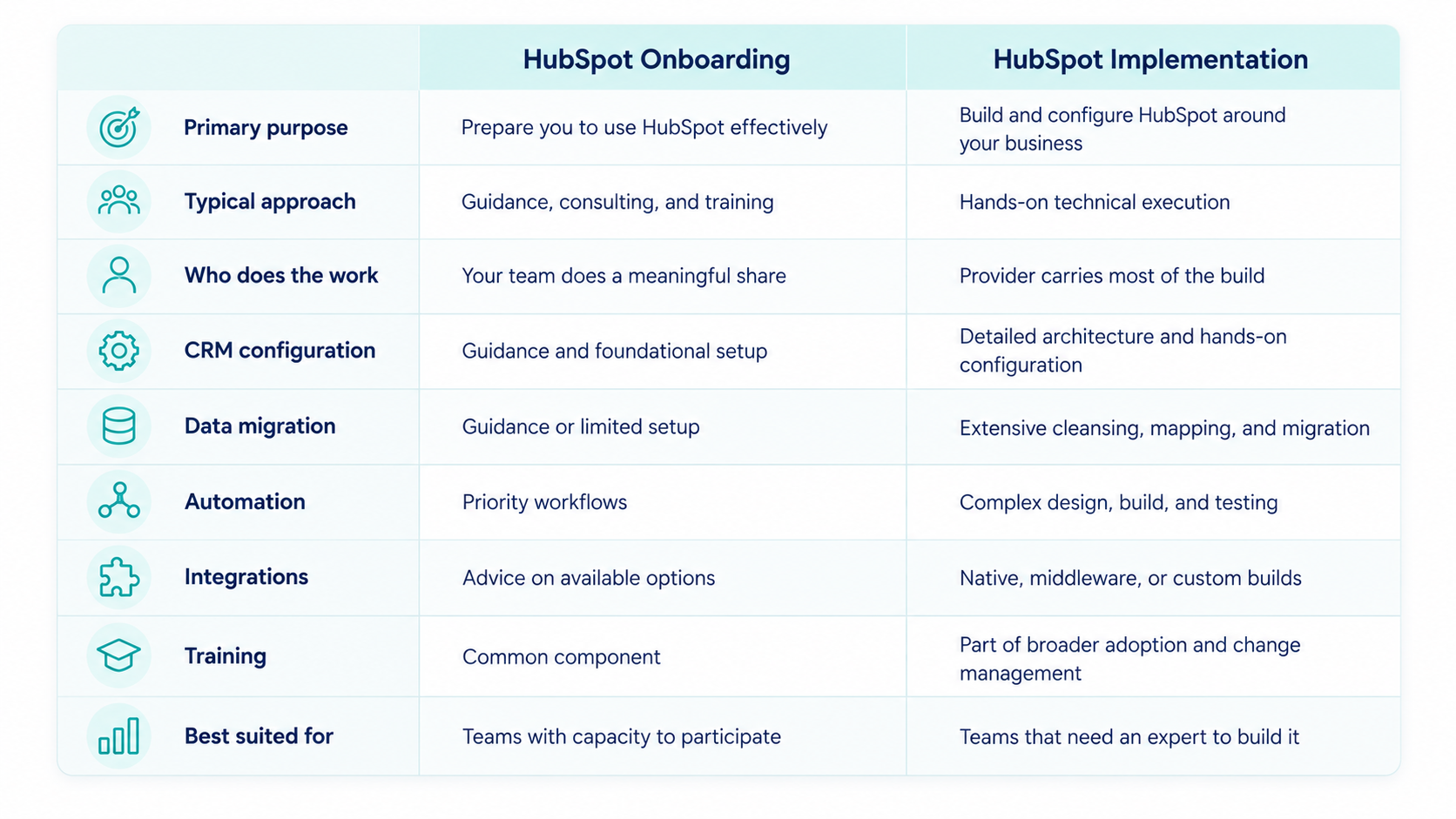
Onboarding prepares you to run HubSpot while implementation builds the system for you. Providers use the two words interchangeably, so pin the distinction down before you compare quotes.
What Onboarding Covers
Onboarding is a guided setup and enablement service. It establishes the foundation, shows how HubSpot should be configured for your objectives, and gets your team confident using it. Service Hub onboarding, for example, covers intake channels, a customized ticket pipeline, live chat, ticket automation, reporting, and a knowledge base, with your team doing much of the building.
What Implementation Covers
Implementation is a broader engagement where the system gets designed, built, tested, and prepared for live use, with the provider carrying most of the execution. Typical implementation work includes the following.
- Designing CRM architecture and custom objects
- Cleaning, mapping, and migrating data
- Building pipelines, properties, and lifecycle processes
- Creating complex workflows and lead routing
- Building custom dashboards and reports
- Connecting third-party, middleware, or custom applications
- Rebuilding sales, marketing, or service processes
- Testing before launch and supporting adoption after it

Scope varies by provider and service level, so use this as a general guide rather than a fixed definition of what every provider includes. For a deeper look at what to expect from a partner, see What to Know About Multi Hub CRM Implementation Partners.
How to Choose the Right HubSpot Onboarding Service Provider
1. Define The Scope You Need First
Before you request proposals, write down what needs configuring, what needs migrating, what needs integrating, what needs building or automating, who needs training, and what has to be working the day onboarding ends. The clearer that list, the faster you can tell a real fit from a generic package.
2. Look For Relevant Experience
Ask about previous work involving your specific hubs, a comparable company structure, a similar technology stack, migrations of the same shape, the integrations you need, and the business processes you plan to run. You may access HubSpot's Solutions Directory to filter partners by service, industry, country, language, budget, and credentials.
3. Check Credentials And Understand What They Signal
HubSpot separates certifications, which show individual knowledge, from badges, which show specialization, and accreditations, which are organization-level and evidence-based. For an onboarding project, the HubSpot Onboarding Accreditation is the relevant one. Applicants must be a Platinum, Diamond, or Elite Solutions Partner, have at least three full-time employees, have onboarded Professional or Enterprise customers within the last 12 months, and submit real project documentation and customer references.
4. Ask For A Detailed Deliverables List
Replace phrases like "full HubSpot onboarding" with counts and names. "Two deal pipelines, 25 custom properties, a lead routing workflow, lifecycle stage automation, three dashboards, and administrator training" can be checked at the end of the project. A real scope states what the provider will configure, build, migrate, integrate, test, document, and train, what your team owns, and what falls outside the agreement. That last part prevents the most common onboarding dispute.
5. Review Case Studies And References
Useful case studies show the starting situation, the systems involved, what the provider built, how long it took, and what changed as a result. Ask for references from projects that resemble yours in size and complexity. Reviews are helpful for spotting patterns in communication and project management, though review volume reflects deal count and not technical depth.
6. Compare Pricing On Outcomes, Not Hourly Rates
Get the total project fee, inclusions, exclusions, timeline, payment schedule, change-request process, and ongoing support costs from each provider, then compare them against the same scope. Watch for cheap packages that exclude migration, integrations, or training you will end up buying later.
7. Confirm Documentation And Post-Onboarding Support
Ask for documentation of CRM architecture, custom properties, pipeline structure, workflow logic, integrations, data mappings, user permissions, and reporting definitions. Then ask what support looks like after launch, such as a retainer, monthly optimization, ad hoc consulting, administrator training, or quarterly reviews. Undocumented builds leave you dependent on the provider for routine changes, which is the opposite of what good onboarding should produce.
Red Flags To Watch For
- Promises to build everything before understanding your processes
- No clear answer on what is in and out of scope
- No comparable case studies or references
- No names for the people who will do the work
- Migration treated as a simple import
- Heavy automation recommended with no maintenance plan
- No testing or quality-assurance step
- No answer on how users get trained
- Broad expertise claims with no evidence behind them
- A quote far below the others that quietly excludes core work
The version of this you’ll encounter most often is a provider who focuses heavily on HubSpot features but spends little time understanding your business goals. Knowing where a setting is in HubSpot doesn’t mean knowing whether it’s the right choice for your business.
Get Onboarding Built Around How Your Business Runs
Campaign Creators holds the HubSpot Onboarding Accreditation, which HubSpot grants after reviewing a partner’s real onboarding casework, project documentation, and customer references. As an Elite Solutions Partner, we have the experience to handle the work end to end—from CRM architecture and data migration to integrations, automation, reporting, and team training.
Send us your current setup and the outcomes you need from HubSpot in your first 90 days. We’ll turn that into a scoped onboarding plan with a clear fee, timeline, and the people who’ll do the work.
Frequently Asked Questions
Is HubSpot Onboarding Required?
Yes, paid onboarding is required on Professional and Enterprise plans for Marketing Hub, Sales Hub, and Service Hub.
Does HubSpot Build The Portal For You?
No, HubSpot's onboarding provides technical and strategic guidance while your team does the building, which is why HubSpot points customers needing hands-on execution toward Solutions Partners.
Do Starter Plans Include Onboarding?
Starter plans carry no required onboarding fee and rely on in-app guidance, HubSpot Academy, and the knowledge base.
Which Products Have No Onboarding Fee?
Content Hub and Data Hub carry no separate onboarding charge, but the configuration work behind them still needs an internal or partner owner.
What Should Be Ready Before Onboarding Starts?
Agree on your top three goals, clean the data you plan to migrate, document your core sales, marketing, and service processes, list the systems needing integration, and name the people who can make decisions.
What Happens After Onboarding Ends?
You move into adoption and optimization, which means monitoring usage, refining workflows and reporting, maintaining data quality, and reviewing outcomes at 30, 60, and 90 days.
.png?width=1920&height=553&name=cc-logo-color-horizontal%20(1).png)