Skip to the main content.

WEBSITE GROWTH & CONVERSION

Web Design & Development


SEO & AEO


Conversion Rate Optimization


Lead Generation Strategies


HUBSPOT SUPPORT & ENABLEMENT

HubDesk


HubSpot Training


HubSpot Change Management

FREE TOOLS & ASSESSMENTS

AEO Auditor


HubSpot Al Readiness Scorecard


LEARN & WATCH

View All Resources


Ebooks & Templates


Webinars On-Demand


Expert Videos

11 min read

Are AI Appointment Reminders HIPAA-Compliant? Requirements, Security, and Best Practices

Are AI Appointment Reminders HIPAA-Compliant? Requirements, Security, and Best Practices

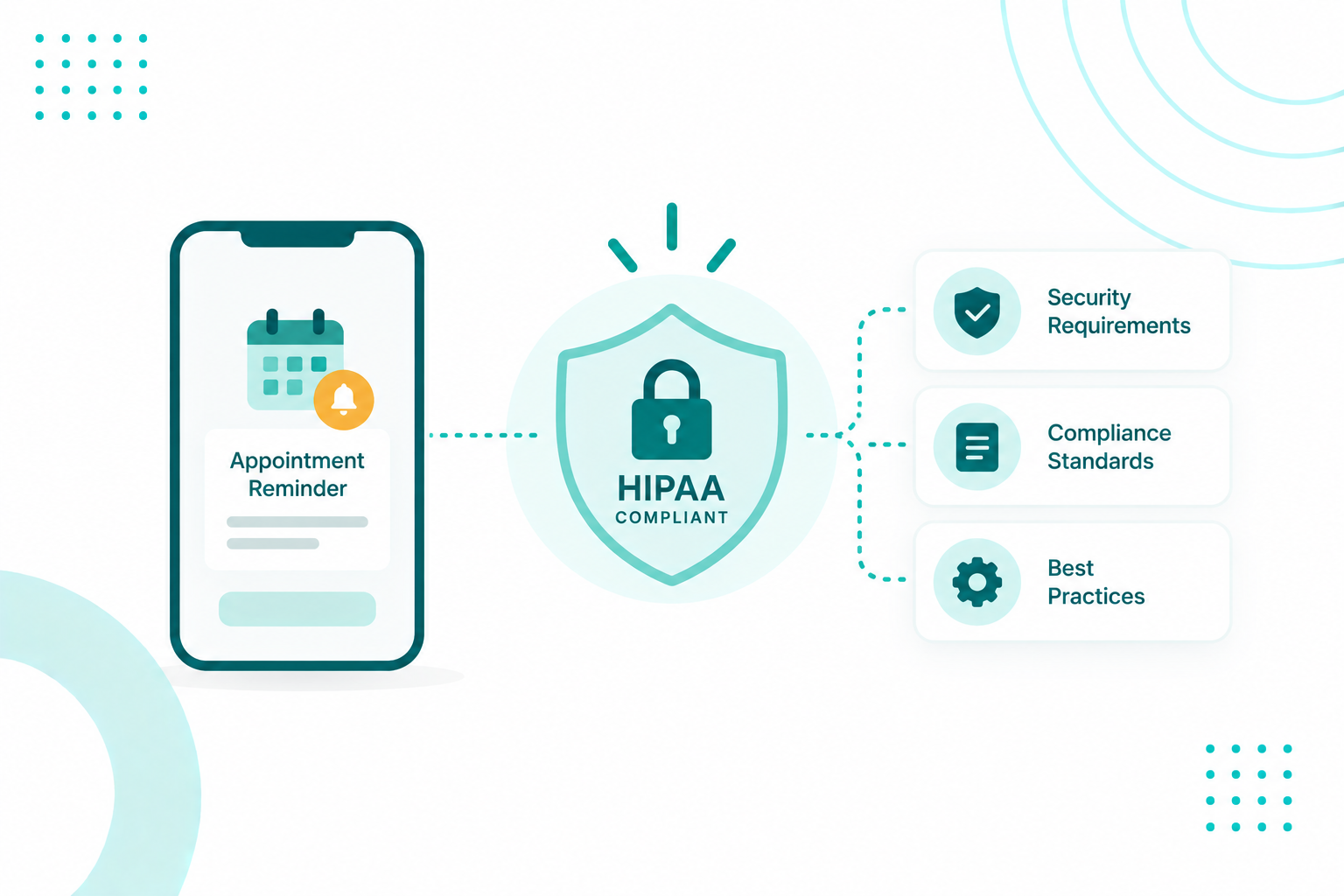
Healthcare organizations can use AI appointment reminders without automatically violating HIPAA. Appointment reminders are a permitted communication under HIPAA, and the use of AI does not by itself make them prohibited. What matters is how the system handles protected health information, whether vendors have access to it, and whether the required safeguards and agreements are in place.

That makes the data flow behind the reminder just as important as the message itself. An AI reminder workflow may connect an EHR or scheduling system with an AI platform, CRM, and data storage. Depending on what information each component receives, different HIPAA obligations may apply. Organizations therefore need to understand where PHI enters the workflow, where it moves, who can access it, and how each part of the system is protected.

In practice, compliance is both a legal and operational consideration. Campaign Creators has HubSpot's Health Care Industry accreditation and helps healthcare organizations manage CRM architecture, automated patient communication, data migration, and user adoption behind these systems. The sections below break down what HIPAA requires from an AI reminder system and what organizations should verify before putting one into use.

Key Takeaways

  • An AI vendor that creates, receives, maintains, or transmits PHI for a healthcare provider is generally a business associate and needs a signed BAA before handling patient data.
  • A BAA covers the contractual relationship, and the healthcare organization remains responsible for its Security Rule safeguards, risk analysis, and documentation.
  • Transcripts, recordings, and call logs created by the AI become part of the ePHI environment and need appropriate protection.
  • Cloud, speech, messaging, and other subprocessors may also handle PHI and can have their own business associate obligations.
  • HIPAA is not the only requirement. TCPA and FCC rules also apply, and the FCC treats AI-generated voices as artificial voices subject to applicable consent requirements.
  • For HubSpot, HIPAA-supported use requires Enterprise editions with Sensitive Data enabled. Sensitive Data properties also have limitations and cannot be used in personalization tokens, chatbots, playbooks, or sandboxes.

What Makes an AI Appointment Reminder HIPAA-Compliant?

Compliance depends on how the system handles protected health information. That means what it accesses, who can reach it, how data moves and is stored, and what contracts and safeguards sit behind it. Five conditions have to hold at once.

five-conditions-that-make-an-ai-appointment-reminder-hipaa-compliant

  1. The AI receives only the patient information the reminder requires. HIPAA's minimum necessary principle limits PHI used or disclosed to what the purpose needs, and a scheduling notification does not need a medical record.

  2. The vendor relationship is correctly classified and papered. HHS names a third-party AI chatbot performing services involving patient PHI, including medical reminders and appointment scheduling, as an example of a business associate. That triggers a Business Associate Agreement.

  3. Administrative, physical, and technical safeguards protect the ePHI. The Security Rule requires access control, authentication, audit controls, integrity protections, and transmission security, backed by a documented risk analysis.

  4. Protection covers the full workflow and not the final message. ePHI exists at every stage from the EHR pull through the AI processing, the voice or SMS channel, the patient response, and the write-back.

  5. The communication itself uses reasonable privacy safeguards. A message that only names the practice and appointment time reveals much less information than one that mentions a diagnosis or reason for the visit.

Are Appointment Reminders Protected Health Information?

Yes. An appointment reminder becomes PHI when it identifies an individual and connects that person to health care or the provision of health care. Information about when and where someone is receiving care falls inside that definition.

What in a Reminder Counts as PHI

The level of detail varies, but anything tying a named person to care is the concern. A reminder may carry the patient name, appointment date and time, provider or facility name, department or location, appointment type, contact information, and instructions for confirming, canceling, or rescheduling.

A basic reminder needs almost none of the clinical detail. "You have an appointment with ABC Medical on Tuesday at 2 p.m." communicates the scheduling information without stating why the patient is being treated.

Permission to Send Is Not the Same as Not Being PHI

HIPAA does not prohibit appointment reminders, and a provider does not need separate patient authorization to send one. HHS treats appointment reminders as part of treatment, which covers phone calls, voicemails, mail, and electronic communications, including messages left at a patient's home.

Two ideas get collapsed here constantly. "HIPAA permits this communication" and "this information is not PHI" are separate statements, and only the first one is true. The reminder still contains PHI while being a fully permissible use under the Privacy Rule, so reasonable safeguards still apply to it.

Patients can also request alternative methods or locations for confidential communications. Someone may ask to receive reminders by email in place of a phone call, and the provider accommodates that where the request is reasonable.

Worth a read: How to Conduct a HubSpot HIPAA Compliance Risk Assessment Before Storing PHI

When Does an AI Reminder Vendor Become a Business Associate?

An AI vendor becomes a business associate when it creates, receives, maintains, or transmits PHI on behalf of a covered healthcare organization. Artificial intelligence has nothing to do with the determination. The service performed and the data handled decide it.

When the Relationship Applies

Picture an AI reminder platform connected to a provider's scheduling or EHR system. It receives a patient's data, uses that to call or message the patient, captures the response, and sends confirmation or rescheduling information back. The vendor is performing a service involving PHI for the provider, which is a business associate relationship.

The same reasoning holds even when no clinical treatment is involved. HHS lists appointment scheduling and medical reminders as examples of AI services that can create the relationship.

When a Software Vendor Is Not a Business Associate

AI setup

Likely HIPAA relationship

Software installed or provided; vendor has no PHI access

Generally not a business associate

Platform receives patient appointment data to generate reminders

Business associate relationship may apply

Vendor hosts or stores ePHI

Business associate relationship applies

Vendor processes patient responses containing PHI

Business associate relationship may apply

Vendor handles PHI as a subcontractor to another business associate

Subcontractor business associate relationship may apply


Cloud Providers and Other Subprocessors

The relationship extends past the company selling the application. An AI reminder platform may depend on separate providers for cloud hosting, speech recognition, text messaging, voice infrastructure, or databases. A cloud service provider that creates, receives, maintains, or transmits ePHI for a covered entity or business associate is itself a business associate, and that holds true when the provider stores only encrypted ePHI and holds no decryption key.


Which HIPAA Security Rule Safeguards Apply to AI Reminder Systems?

Once appointment information is stored, processed, or transmitted electronically, the Security Rule governs the AI workflow. It requires administrative, physical, and technical safeguards protecting the confidentiality and availability of ePHI, plus protection against reasonably anticipated threats. The rule is deliberately technology-neutral, so it prescribes no particular AI architecture.

Technical Safeguards to Look For

Five technical safeguards carry the most weight in an AI reminder deployment.

  • Access controls. Only authorized people and systems can reach ePHI.
  • Audit controls. System activity involving ePHI is recorded and reviewable.
  • Authentication. The identity of people and systems seeking access is verified.
  • Integrity controls. ePHI is protected from improper alteration or destruction.
  • Transmission security. ePHI is protected while moving across networks.

These apply to the EHR integration, the AI processing environment, the calling and messaging infrastructure, and the storage holding conversation data.

Encryption Today and Under the Proposed Rule

Encryption is often treated as synonymous with HIPAA compliance, but the reality is more nuanced. Under the current Security Rule, encryption is an addressable implementation specification. Organizations assess whether it is reasonable and appropriate for their environment, and any decision not to encrypt requires documented justification and an equivalent safeguard. In practice, encryption at rest and in transit is the expected standard for modern cloud, remote, and mobile environments.

HHS proposed removing the "addressable" designation in a January 6, 2025 Notice of Proposed Rulemaking, which would make encryption of ePHI at rest and in transit mandatory. The proposal also includes requirements for multi-factor authentication, 72-hour incident reporting, and annual penetration testing. As of mid-2026, the rule has not been finalized.

For organizations evaluating AI reminder platforms, encryption at rest and in transit should be treated as a baseline security requirement.

Incident Response and Breach Notification

The Security Rule requires procedures for identifying, responding to, and documenting security incidents. The Breach Notification Rule applies separately when unsecured PHI is breached, requiring notification to affected individuals and, when applicable, HHS and the media. Business associates must notify the covered entity without unreasonable delay and within 60 days of discovery.

Documentation and Ongoing Review

Policies, procedures, required actions, activities, and assessments have to be documented and generally retained for six years from the later of creation or last effective date. Documentation gets reviewed and updated when environmental or organizational changes affect ePHI security.

AI systems evolve through new models, integrations, vendors, features, and data practices. A compliance review at launch may no longer reflect the system months later, making ongoing review essential.

What Data Should an AI Appointment Reminder Use and Share?

A basic AI appointment reminder runs on a small set of scheduling and contact fields.

Information

Why the AI needs it

Patient name

Identifies the intended recipient

Approved phone number or email

Delivers the reminder

Appointment date and time

The substance of the reminder

Provider or organization name

Identifies who is reaching out

Appointment location

Tells the patient where to go

Appointment status

Suppresses reminders for canceled appointments

Confirmation and rescheduling options

Supports the scheduling action

Communication preferences

Determines the appropriate channel


HIPAA prescribes no universal field list. The organization assesses what is reasonably necessary and writes policies around it.

Clinical information unrelated to scheduling generally stays outside the reminder system. That covers diagnoses, full medical histories, clinical notes, lab results, medication histories, imaging results, and unrelated billing information.

How Do AI Appointment Reminders Work With EHRs and Scheduling Systems?

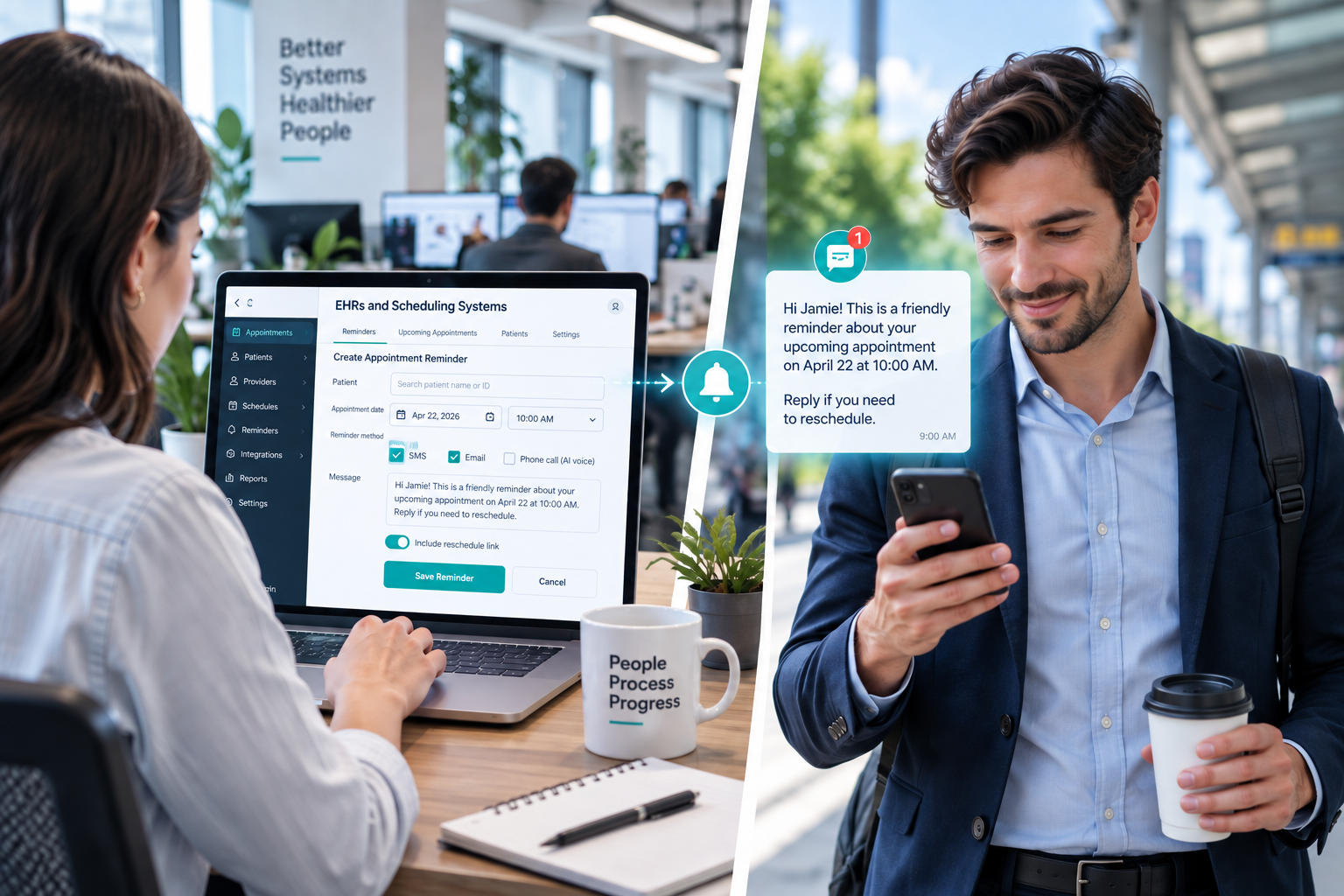
An AI reminder platform works alongside the scheduling system as an automation layer. A typical workflow looks like this:

how-ai-appointment-reminders-work-with-ehrs

1. Connection. The platform links to the system holding the schedule through APIs, integration middleware, webhooks, or healthcare interoperability standards. The integration needs a defined set of scheduling and contact fields, not the full patient record.

2. Selection. The platform identifies appointments meeting the practice's reminder criteria, using date and time, status, contact information, provider, appointment type, and reminder history.

3. Retrieval. It pulls the specific fields required for the interaction and nothing beyond them.

4. Outreach. It generates and delivers the reminder by call, SMS, or email. A voice workflow might open with "Hello, this is a reminder from ABC Medical about your appointment tomorrow at 10 a.m. Would you like to confirm or reschedule?"

5. Response. The patient confirms, cancels, asks to move the appointment, or states a preference, and the AI interprets the request inside the scheduling rules the organization defined.

6. Write-back. The outcome returns to the scheduling system as a confirmation, cancellation, reschedule request, or no-response status. Some environments support direct updates, while others route through an integration platform or staff review.

What separates a conversational system from a one-way notification is step five. The AI can interpret a response, but it should never invent appointment availability or make clinical decisions just because it happens to hold a conversation well.

Securing the Integration Itself

Connecting an AI system to an EHR opens another pathway for ePHI, and that pathway needs its own evaluation covering authentication between the systems, the records and fields the integration can reach, transmission protection, logging of what was accessed or changed, retention of appointment data and transcripts on the AI platform, and failure handling when any component goes down.

Interesting read: HubSpot & EHR Integration - What Healthcare Organizations Need to Know

Where Does a CRM Like HubSpot Fit in an AI Appointment Reminder Workflow?

The EHR manages the appointment schedule, and the AI vendor handles the reminder. A CRM like HubSpot can manage the patient record, communication history, and reporting. HubSpot introduced HIPAA support and Sensitive Data tools in late 2024, but using these features comes with specific requirements that affect how the reminder workflow is built.

HIPAA Support in HubSpot

Sensitive Data functionality runs on Enterprise editions only, covering Marketing Hub, Sales Hub, Service Hub, Data Hub, Content Hub, and Smart CRM Enterprise. A Super Admin turns it on under Settings, then Security, then the Sensitive Data tab.

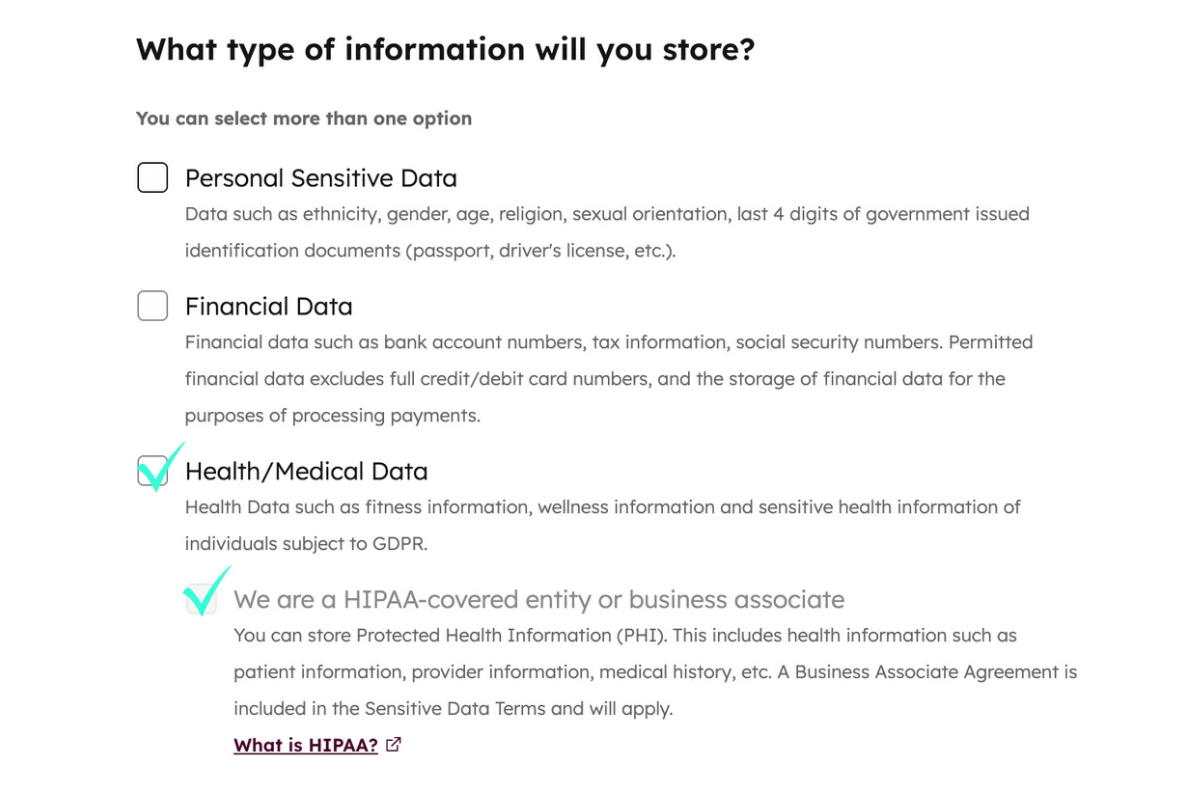
Storing HIPAA-covered data requires selecting both the Health/Medical Data checkbox and the "We are a HIPAA-covered entity or business associate" checkbox.

hipaa-information-to-store-in-hubspot

Two consequences are permanent and belong in the planning conversation. Turning Sensitive Data on cannot be undone, and selected categories cannot be removed afterward. Indicating HIPAA data storage also locks your data center, so an account holding HIPAA data cannot migrate between regions later.

What Turning It On Actually Changes

Flagging a property as Sensitive Data adds application-layer encryption on top of HubSpot's default encryption in transit and at rest, with a separate checkbox marking a property as containing PHI. Several protections switch on alongside it.

  • Field-level permissions restrict view and edit access property by property.
  • Super Admins can review actions on Sensitive Data property values in the audit log.
  • HubSpot employees lose access to Sensitive Data property values, including during support troubleshooting.
  • Sensitive Data properties are excluded from Breeze model training, and accounts with Sensitive Data turned on are automatically opted out of HubSpot AI model training with no path back in.
  • Notification previews are hidden by default, so a note body does not surface in an email alert.

The Personalization Token Problem

Sensitive Data properties cannot be used in personalization tokens. That creates a problem for appointment reminders because messages often need to include details such as the patient's name, provider, date, and time. When those fields contain PHI, HubSpot cannot use them as personalization tokens.

Sensitive Data is also not supported in chatbots, playbooks, or sandboxes. Workflows have some support, including enrollment based on filter criteria and AND/OR branching, but Sensitive Data properties cannot be used in personalization tokens, copy property actions, or event-based triggers.

This creates an architectural choice: keep HubSpot messages general and direct patients to a covered channel for appointment details, or have the AI platform and EHR deliver those details while HubSpot manages engagement records, consent, and reporting. The right approach should be decided before the workflow is built.

Breeze and Sensitive Data

Breeze Assistant products are compatible with accounts running Sensitive Data, but restrictions block custom Sensitive Data property values from being used, specifically to prevent exposure. HubSpot's guidance on prompts is blunt, advising against putting sensitive information into Breeze data inputs, and stating that organizations who do not want Breeze processing their Sensitive Data should avoid Breeze.

Breeze suits the work surrounding the reminder, including drafting non-PHI message templates, summarizing engagement patterns, and building the reporting view of reminder performance. It is not the component that should be handling an individual patient's appointment details. Our breakdown of what to automate and what to leave alone in a HIPAA-constrained portal goes deeper on where those lines fall.

HubSpot's BAA Does Not Cover Your AI Reminder Vendor

HubSpot's BAA covers HubSpot, not third-party apps connected to it. An AI voice platform handling PHI needs its own BAA with your organization. Third-party products also handle data under their own policies and agreements.

This matters when data is synced between systems. Sync can run in both directions, and fields that do not appear sensitive in a third-party app may still map to a HubSpot Sensitive Data property. In healthcare integrations, field mapping should therefore be treated as a compliance decision and reviewed as part of the organization's risk analysis.

What Other Laws Apply to AI Appointment Reminder Calls and Texts?

AI appointment reminders can also be subject to the Telephone Consumer Protection Act (TCPA) and FCC rules. HIPAA governs the use and disclosure of protected health information, while the TCPA regulates certain automated calls and texts.

  • AI-generated voices: The FCC has confirmed that AI-generated human voices qualify as artificial or prerecorded voices under the TCPA. [FCC 24-17, 2024]
  • Healthcare reminder exemption: Federal rules exempt certain healthcare calls and texts, including appointment and exam confirmations and reminders, when specific conditions are met. [47 CFR § 64.1200(a)(9)(iv)]
  • Frequency and content limits: The exemption applies to messages sent to a wireless number provided by the patient and limits healthcare providers to one message per day, with no more than three calls or texts combined per week. Messages must also be concise and cannot contain advertising, solicitation, billing, debt collection, or other financial content.
  • Opt-outs: Text messages must provide an option to opt out by replying "STOP." Voice calls must provide the opt-out mechanism required by the FCC rules, and opt-out requests must be honored.

The FCC's healthcare exemption originated from its broader TCPA rulemaking, including the 2015 TCPA Order (FCC 15-72).

How Should Healthcare Organizations Evaluate an AI Reminder Vendor?

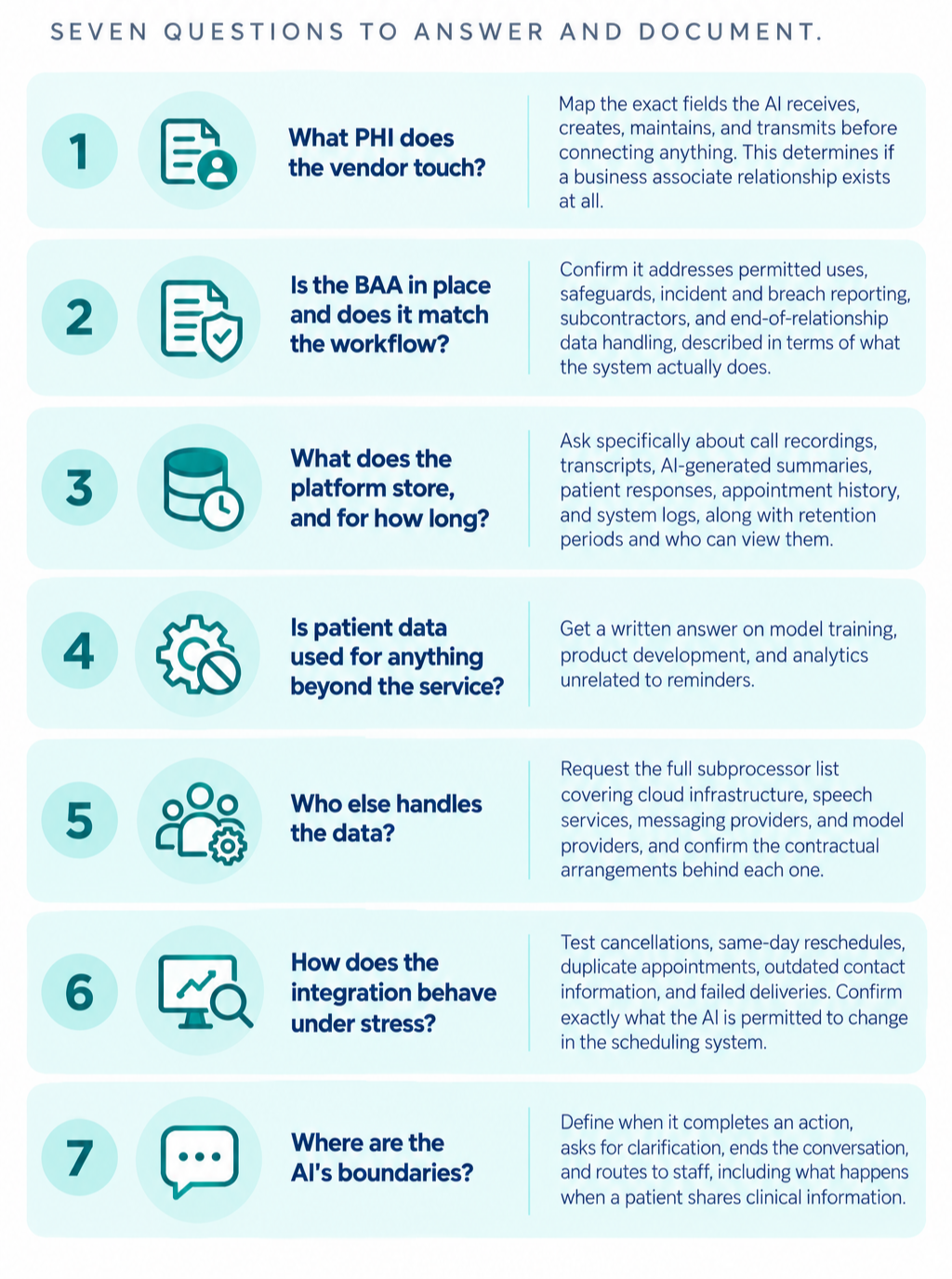
Healthcare organizations should evaluate an AI reminder vendor by answering and documenting these seven key questions.

seven-questions-to-evaluate-an-ai-reminder-vendor

A vendor's compliance page alone is not enough. Covered entities and business associates must conduct their own accurate and thorough risk analysis and understand their technology environment well enough to assess the risks themselves.

Get Your Patient Communication Stack Audited Before You Automate It

Knowing what HIPAA asks is one thing. Proving your systems do it is another, and that proof lives in your CRM architecture, your EHR integrations, and the governance around both.

Campaign Creators builds HIPAA-aligned HubSpot systems for healthcare organizations, from CRM architecture and EHR integrations to patient communication workflows and the reporting that keeps them auditable. If you are evaluating an AI reminder platform or trying to document what your current stack already does, let's map your patient data flows together.

Frequently Asked Questions

Can a Patient Opt Out of AI Appointment Reminders Specifically?

Patients can request reasonable alternative means or locations for confidential communications under HIPAA and can revoke consent to automated calls and texts in any reasonable manner under FCC rules.

Can We Use a General-Purpose AI Assistant for Patient Reminders?

Only if the provider will sign a BAA covering that specific use and the deployment meets Security Rule safeguards, which rules out consumer-tier AI tools with no business associate coverage.

How Long Should AI Call Recordings Containing PHI Be Kept?

HIPAA sets no universal retention period for recordings, so the timeframe comes from your organization's documented retention policy and applicable state medical records law, with the six-year requirement applying to HIPAA compliance documentation.

What Happens if an AI Reminder Reaches the Wrong Patient?

An impermissible disclosure of unsecured PHI triggers a breach risk assessment and potentially the Breach Notification Rule.

Is HubSpot HIPAA Compliant for Appointment Reminders?

HubSpot supports HIPAA use on Enterprise editions once a Super Admin enables Sensitive Data, identifies the organization as a covered entity or business associate, and accepts the BAA, but coverage applies only to the designated services and not to the platform as a whole.

Does Enabling HubSpot's Sensitive Data Settings Cover Our Connected AI Calling Platform?

No, HubSpot's BAA covers HubSpot's own services, and each connected third-party app handling PHI needs its own business associate agreement with your organization.

How to Structure HubSpot Data Without Storing Protected Health Information

How to Structure HubSpot Data Without Storing Protected Health Information

Healthcare organizations can use HubSpot while maintaining HIPAA compliance, but only if the platform is configured correctly and Protected Health...
Read More
Is It Safe to Use EHR Data in HubSpot? It Depends

Is It Safe to Use EHR Data in HubSpot? It Depends

The answer is yes in some situations, but only if strict HIPAA requirements, security controls, and governance processes are in place. HubSpot...

Read More
HubSpot HIPAA Compliance Risks: 10 PHI Mistakes Healthcare Organizations Should Avoid

HubSpot HIPAA Compliance Risks: 10 PHI Mistakes Healthcare Organizations Should Avoid

Protected health information (PHI) can become exposed in HubSpot in more ways than many healthcare organizations realize. Common mistakes, such as...

Read More