Skip to the main content.

WEBSITE GROWTH & CONVERSION

• Web Design & Development


• SEO & AEO


• Conversion Rate Optimization


• Lead Generation Strategies


HUBSPOT SUPPORT & ENABLEMENT

• HubDesk


• HubSpot Training


• HubSpot Change Management


• HubSpot AI Agent Implementation

IMPLEMENTATION & INTEGRATIONS

• Technology Consulting


• HubSpot Migration Services


• HubSpot Integration Development


• HubSpot Integration Library


• HubSpot & Aircall Integration


• HubSpot & Trustpilot Integration


• Klaviyo Onboarding and Setup


• Custom AI Agent Development

FREE TOOLS & ASSESSMENTS

• AEO Auditor


• HubSpot Al Readiness Scorecard


• HubSpot Al Solutions Design


LEARN & WATCH

• View All Resources


• Ebooks & Templates


• Webinars On-Demand


• Expert Videos

11 min read

What HubSpot Can Automate in Your Sales Process Today With Agents

What HubSpot Can Automate in Your Sales Process Today With Agents

HubSpot can now run a large share of the sales process without a rep starting it. Its Prospecting Agent spots accounts showing buying signals, maps the people involved, and drafts outreach. Once a conversation turns into a deal, HubSpot captures the call, drafts the record updates, and builds the quote from deal context. Revenue Hub then carries the signed deal through contracts, invoicing, and payment.

What it can't do is decide which accounts deserve a real conversation, read the politics inside a buying group, or judge when a discount protects a relationship. That line between coordination and judgment is where sales teams win or lose with an AI-native CRM. The software can carry the sequence from signal to revenue. Your team decides how that sequence is built and where people step in.

Designing that sequence is RevOps work, and it's where Campaign Creators comes in. As a HubSpot Elite Solutions Partner and one of the first 50 partners worldwide to earn HubSpot's Advanced Implementation Accreditation, we design the foundation these agents run on, including CRM architecture, data migration, integrations, and full HubSpot implementation for mid-market and enterprise teams.

Key Takeaways

  • HubSpot can now coordinate the path from first buying signal to collected payment, with people approving the steps that carry risk.
  • The Prospecting Agent watches 40+ buying signals, sources contacts by persona, and drafts outreach that reps can review or send automatically.
  • Smart Deal Progression turns call and meeting transcripts into suggested CRM updates, plus follow-up emails and next steps after meetings.
  • Revenue Hub, launched in June 2026, connects quotes, contracts, billing, and payments to the same record your agents read.

What Happens When a Target Account Starts Showing Buying Signals?

revops-reviews-a-target-account-buying-signals-in-hubspot

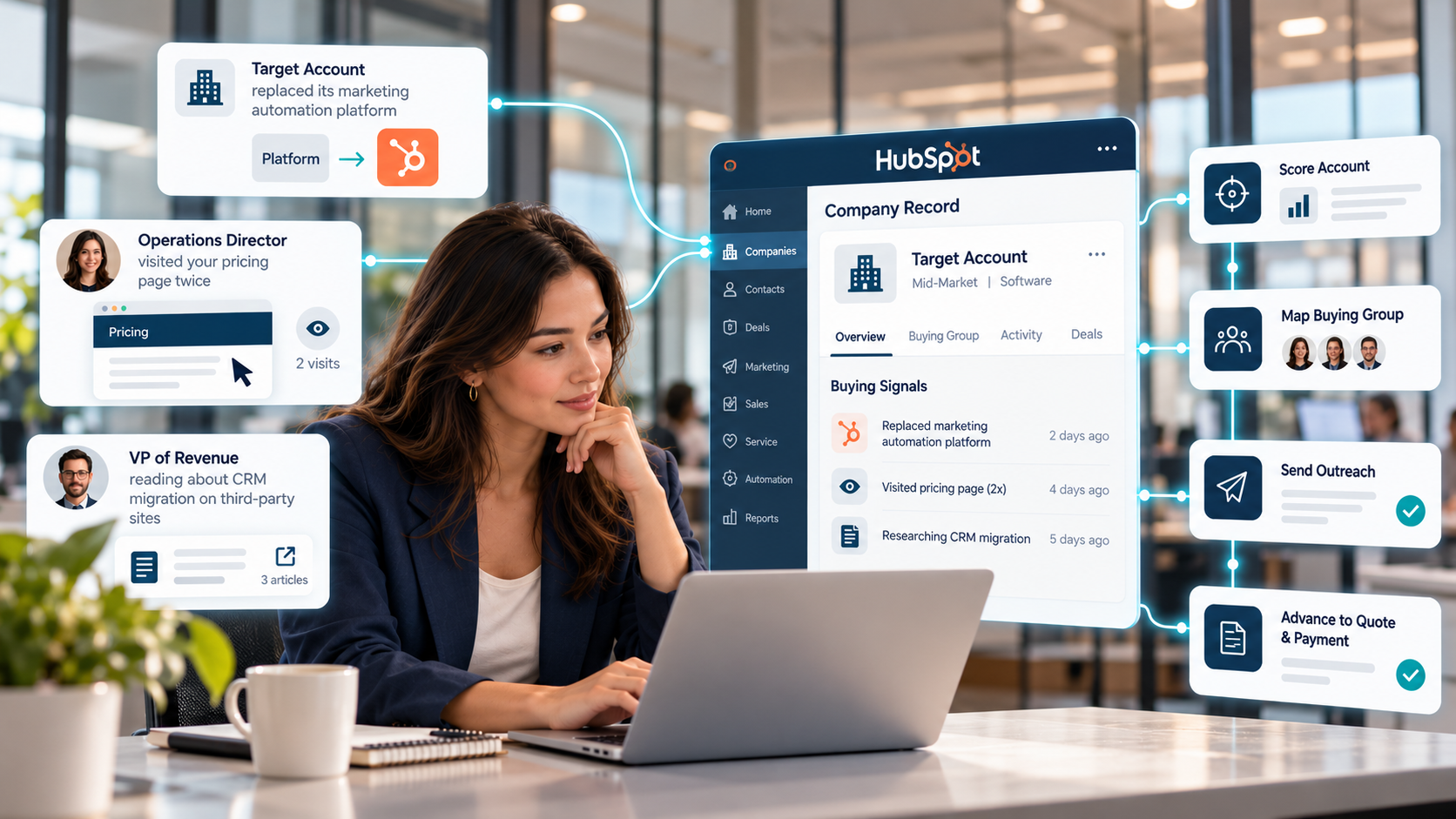
When a target account starts showing buying signals, HubSpot attaches each signal to the same company record and starts moving the account through a chain of automated handoffs. The agents score the account, map its buying group, and send outreach, and every later stage through quote and payment builds on that same record.

A target account replaces its marketing automation platform. The same week, its operations director visits your pricing page twice, and its VP of Revenue starts reading about CRM migration on third-party sites. Nobody fills out a form or replies to an email.

In a traditional setup, those signals land in three different places. The tech change sits in a data provider alert, the site visit sits in an analytics report, and the research activity never reaches sales. By the time a rep connects them, the buyer may have already built a shortlist.

That delay costs more every year because buyers do more of the work alone. In a Gartner survey, 67% of B2B buyers said they prefer a rep-free experience, and 45% had used AI during a recent purchase.

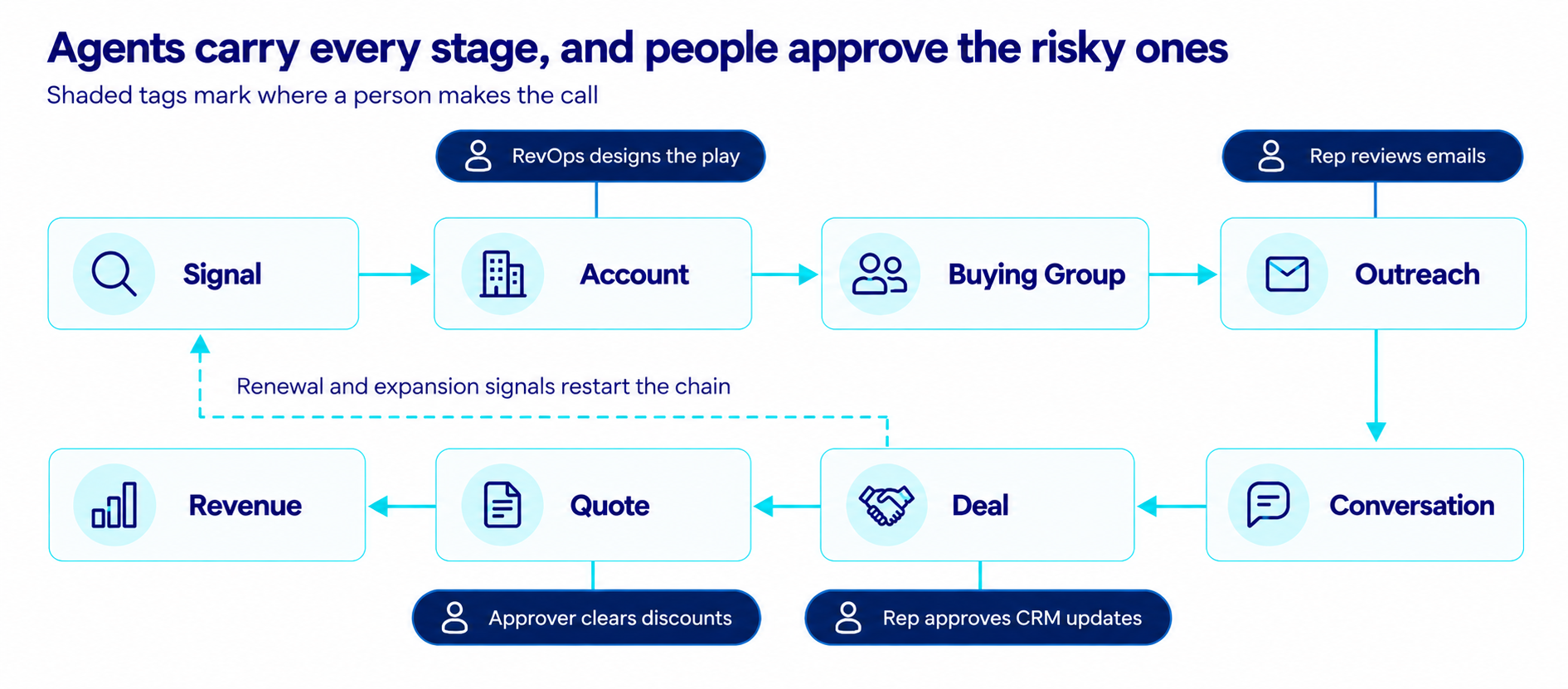
In HubSpot, the account moves through eight stages, and each handoff runs on an agent, a workflow, or a person's approval.

flow-diagram-of-hubspot-sales-automation-chain-from-signal-to-account

The account moves across the top row, drops into the conversation, and travels back across the bottom row to revenue. Revenue data then feeds renewal and expansion signals into the start of the chain.

Stage

What HubSpot Does

Tool Behind It

Signal

Detects site visits, research activity, company news, and job changes

Buyer intent, Prospecting Agent

Account

Scores the company against your ICP and explains why to reach out

Prospecting Agent

Buying Group

Finds contacts who match your personas, including people not yet in your CRM

Prospecting Agent, Breeze Assistant

Outreach

Drafts and sends personalized emails based on the play you set

Prospecting Agent

Conversation

Records meetings and turns transcripts into CRM updates and follow-ups

Meeting Notetaker, Smart Deal Progression

Deal

Keeps deal properties, next steps, and tasks current

Smart Deal Progression, workflows

Quote

Builds a quote from deal context and routes it for approval

Revenue Hub, Breeze Assistant

Revenue

Bills against the contract, collects payment, and follows up on overdue invoices

Revenue Hub, Revenue Agent

Each handoff can now start without a rep. The sections below follow the account through every stage and show where a person should take over.

How Do Signals Become a Priority Account?

Signals become a priority account when HubSpot attaches them to the company record and the Prospecting Agent scores that company against your ICP and the segments in your play. The agent then ranks the account and writes a reason for a rep to reach out.

HubSpot pulls four kinds of signals into the company record. Its buyer intent feature tracks visitor intent through reverse-IP lookup, research intent across 200,000+ third-party websites, company news such as funding rounds and executive hires, and contact-level changes such as job moves.

In our scenario, the tech-stack change can arrive as a company news signal. The pricing page visits arrive as visitor intent, and you can set which pages count as high intent. The VP's reading shows up as research intent on topics you choose to follow.

Reps see the ranking in the Recommended companies view, which shows a Max Recommendation Score, a suggested contact count, and a written Reason to Reach Out for each account.

This is where RevOps choices show up first. One pricing page visit from a company outside your ICP should rank low. Three signal types from a target account in the same week should rank high. HubSpot can apply that logic once someone defines it in the play.

How Does HubSpot Find the Buying Group?

HubSpot finds the buying group by matching people at a flagged account to the personas in your Prospecting Agent play. When someone who fits isn't in your CRM yet, the Prospecting Agent sources them from a connected provider such as ZoomInfo, Apollo, Surfe, or Seamless.

That coverage counts because one interested person rarely makes the decision. Forrester's State of Business Buying found that 13 internal stakeholders and nine external participants influence a typical B2B purchase.

Persona matching also closes a gap the signals leave open. Visitor intent tells you a company came to your site, and research intent tells you the topic, but neither names the person.

In our scenario, that means the operations leader and the revenue leader both become named contacts, along with any finance or IT stakeholder your persona list includes. For accounts with deal history, reps can also ask Breeze Assistant to help them break into the account, and it assembles a buying group from existing contacts, past emails, and team notes, a feature HubSpot has released in public beta.

The part HubSpot can't fill in is the role each person plays. Association labels you create, such as champion, economic buyer, and blocker, turn a list of names into a buying group the agents can work with. A rep who has spoken to the account usually knows those roles best, so labeling them is one of the highest-value minutes a rep can spend in the CRM.

What Does the Prospecting Agent Do?

The Prospecting Agent monitors target accounts for buying signals, finds the right contacts, and writes personalized outreach it can send on a rep's behalf, covering outbound from the first signal to the first reply. At its Fall 2026 Spotlight, HubSpot expanded the agent to watch 40+ buying signals and assemble a buying group for each account. Reps can now call it from Breeze Assistant by describing the prospecting work they need done.

Everything the agent does follows a play, a set of instructions for one segment, persona, or product. You can run several plays at once.

Play Setting

What You Define

Audience

Company segments to monitor, personas to target, signals to watch, and a daily cap on new contact suggestions

Context

What you sell, your value proposition, the pain points you solve, and which products to pitch

Outreach

Adaptive emails that change with each prospect's engagement, or a personalized sequence you configure

Guardrails

Writing tone, calls to action such as a meeting link, and the days and hours emails can go out

Automation

Review every email before it sends, or let the agent send without review

Contacts enter a play when the agent recommends them from monitored companies or when a trigger fires, such as a page view, a form submission, a list addition, or a set number of days without engagement. Reps can also enroll contacts manually or through Breeze Assistant.

Interesting read: Which Breeze Agent Should You Turn On First?

How Does a Reply Become a Deal?

A reply becomes a deal when the rep takes over the conversation, and HubSpot handles the admin around it. Notetaker records the meeting, Smart Deal Progression turns the transcript into CRM updates and follow-ups, and workflows move the deal through the pipeline.

When a prospect replies or books time through the meeting link in the agent's email, the record already holds the signals, the agent's emails, and the reason the account was flagged. The rep walks into the first call with full context.

HubSpot's new Mobile Notetaker captures the conversation on a call or in person. After the meeting, Smart Deal Progression reads the transcript next to the deal's emails and notes. It suggests updates to default and custom deal properties, drafts a follow-up email with a summary and next steps, and turns action items into tasks.

Reps approve, edit, or reject each suggestion. Teams can also mark individual properties as automated so those updates apply without review, which works well for low-risk fields and poorly for anything tied to forecasting.

Standard workflows handle the rest of the pipeline mechanics. They can create a deal when a lead qualifies, assign an owner, add stage-based tasks, and alert a manager when a deal stalls in one stage.

The result is a CRM that stays current without reps typing up notes after every call. It also gives the next stage, the quote, accurate data to work from.

How Does Revenue Hub Turn a Deal Into Revenue?

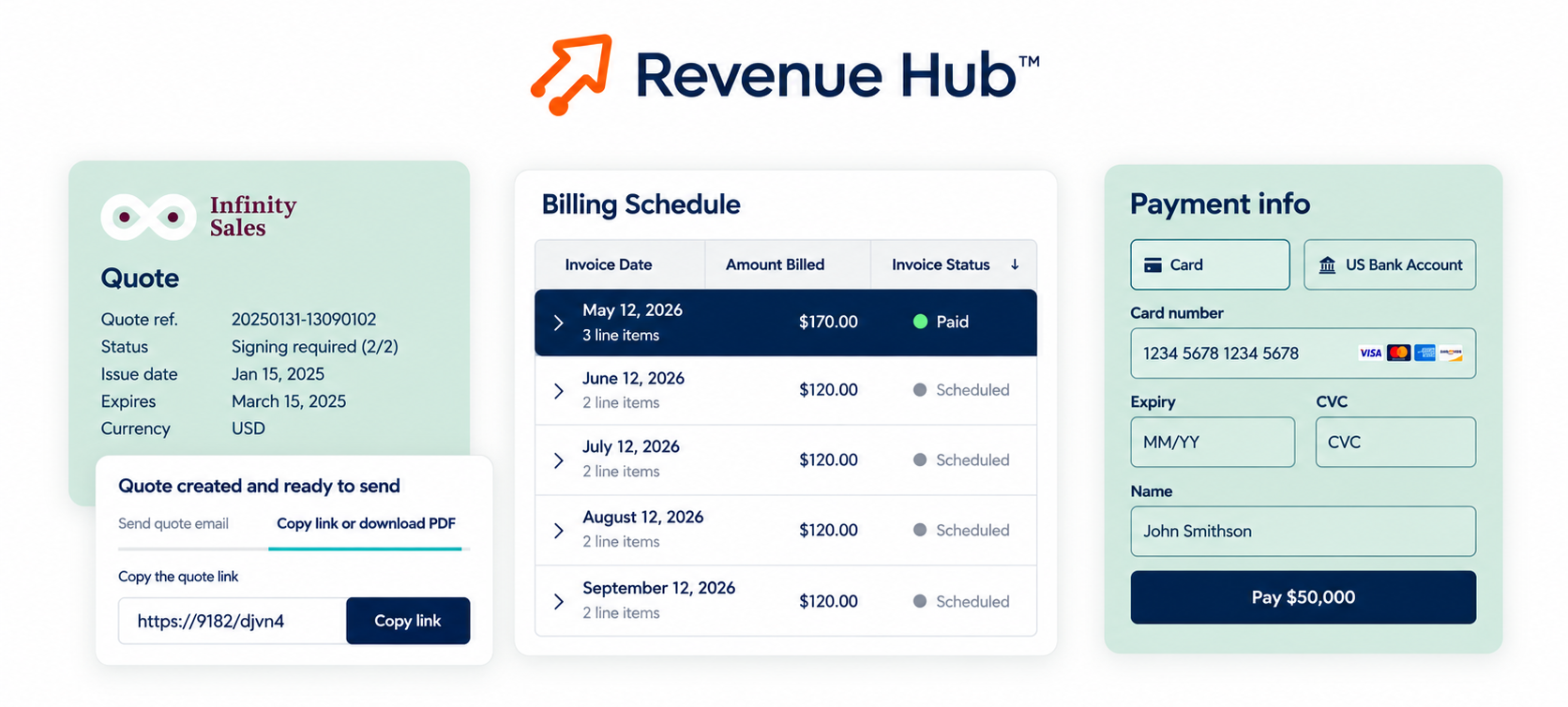
Revenue Hub turns a deal into revenue by building the quote from deal context, collecting the signature and payment in one place, and billing against the signed contract automatically.

hubspot-revenue-hub

Revenue Hub launched in June 2026 to bring quoting, contracts, billing, and payments into the CRM. In research HubSpot released with the launch, three out of four revenue leaders said deals stall or go cold at least sometimes because quoting can't keep up, and 76% said they miss renewals because revenue data sits outside their customer records.

Quotes and Approvals

Reps can build a quote from the deal record with a chat prompt in Breeze Assistant. HubSpot's Fall 2026 release went a step further, generating quotes automatically from deal context once a prospect is ready to move. Price books and quote rules keep discounts inside set limits, and approval workflows route anything outside them to an approver.

The buyer receives an interactive quote they can review, sign, and pay in one place. A Closing Agent answers their questions at any hour without pulling in a rep.

Contracts and Billing

Once the quote is signed, the contract becomes the record of what was sold. Upgrades, renewals, and amendments flow through to billing automatically, so finance and sales close the month from the same numbers.

Payments and Collections

Revenue Hub collects payments automatically, and Breeze Assistant ranks overdue invoices using customer context such as risk, account age, and value. Revenue Agent, HubSpot's collections agent now in beta, sends the follow-ups. Your team handles the exceptions.

Billing and payment data now sit on the same record the Prospecting Agent and Smart Deal Progression read. That's how renewal risks and expansion signals surface on their own and start the chain over again.

Which Sales Moments Still Need Human Judgment?

Choosing the plays, reading the buying group, running discovery, approving pricing exceptions, and saving at-risk accounts still need human judgment. Each one depends on context the CRM doesn't hold.

HubSpot draws a similar line. At the Revenue Hub launch, it named complex deals, at-risk renewals, and expansion conversations as the moments that still need a human touch.

Buyers draw it too. Gartner's buyer research found that buyers who prefer self-service still want seller input for tasks that need context, such as judging if a product fits their company.

Here's where each moment shows up in the chain.

  • Choosing the plays: Deciding which segments, signals, and personas deserve outreach is a strategy call. The agent runs a play well once someone has designed it.
  • Reading the buying group: Data can name the stakeholders. It can't tell you who holds veto power or which executive quietly prefers a competitor.
  • Running discovery: A transcript captures what the buyer said. The rep decides what it means for fit, timing, and scope.
  • Approving exceptions: Quote rules flag discounts outside policy. Someone with context decides when an exception protects a strategic relationship.
  • Saving at-risk accounts: Revenue Agent can chase a late invoice. A renewal at risk because of a service problem needs a conversation.

HubSpot builds a checkpoint into each handoff. Reps can review every agent email, approve each suggested CRM update, approve or deny enrollments from Breeze Assistant, and route quotes through approval. RevOps decides which checkpoints stay on and which ones the team can retire as trust in the agents grows.

What Can't HubSpot Automate Yet?

HubSpot's sales automation has five limits today. Some features are still in beta, the agent connects to one contact provider at a time, it reads a one-year engagement window, Revenue Agent can't chase invoices kept outside HubSpot, and sandbox testing is limited.

  • Beta features. Buying signals and contact sourcing in the Prospecting Agent, Smart Deal Progression, and Revenue Agent have all reached customers through beta programs, so features and availability can still change.
  • One contact provider at a time. The Prospecting Agent connects to one external data source at a time, so teams that use two providers have to pick one for the agent.
  • A one-year engagement window. The agent considers engagements from the past year, such as form submissions, page views, calls, meetings, notes, and email opens. Older relationship history doesn't shape its outreach.
  • Invoices outside HubSpot. Revenue Agent can only follow up on invoices that live in Revenue Hub. If billing runs in a separate system, the agent has nothing to chase.
  • Limited sandbox testing. Agent actions that use HubSpot Credits can't run in sandbox accounts. Teams test plays with the play editor's Test button and in production with review mode on.

These limits don't block a rollout. They shape which stage you automate first.

What RevOps Design Do the Agents Need?

The agents need a written ICP, signal rules for each segment, labeled buyer roles, exit criteria for every stage, a priced product library, connected contracts and billing, and a clear owner for every play and approval.

Every agent in this chain acts on what your CRM already holds. HubSpot report found that 72% of revenue leaders say their AI tools don't have access to complete, accurate revenue data. That gap shows up in agent output as the wrong accounts, generic emails, and quotes built on outdated pricing.

Design Layer

What to Define

What It Powers

ICP and segments

Firmographic fit, target account lists, and exclusions

Account scoring and play audiences

Signal rules

Which signals count for each segment and which pages show high intent

Account priority and outreach timing

Personas and roles

Target titles plus association labels such as champion and economic buyer

Contact sourcing and buying group mapping

Lead and deal stages

Exit criteria for every stage

Smart Deal Progression, forecasting, and handoffs

Products and pricing

Product library, price books, discount limits, and approval paths

Automatic quotes and approvals

Contracts and billing

Billing terms, renewal rules, and a collections policy

Revenue Hub billing and Revenue Agent follow-ups

Ownership

Who owns each play, sending inbox, and approval, plus a review cadence

Sender routing and human checkpoints

HubSpot's new Context Home scores how complete this foundation is and points to the gaps. Switching on the agents is the quick part. Designing the definitions they run on decides how well they perform, and that design work is the core of how Campaign Creators approaches HubSpot implementations.

What Is the Best Order to Turn On These Agents?

Turn on conversation capture first, then Smart Deal Progression, one Prospecting Agent play, and Revenue Hub quoting, with billing and collections last. That order starts where the data is cleanest and the risk is lowest, then works toward revenue.

  1. Capture conversations first. Connect every rep's inbox and calendar, turn on the notetaker, and confirm amounts, stages, and close dates on open deals. Every later agent reads this data.
  2. Run Smart Deal Progression on one pipeline. Track how often reps accept its suggestions before you mark any property as automated.
  3. Launch one Prospecting Agent play. Pick a narrow segment, a short list of signals, and review mode. Switch to sending without review once reps stop editing the drafts.
  4. Stand up quotes and contracts in Revenue Hub. Build the product library, price books, and approval rules before automatic quotes go live.
  5. Bring billing and collections in last. Once invoices live in Revenue Hub, Revenue Agent can take over routine follow-ups.

Measure each stage by its own number. Meeting booking rate shows if the Prospecting Agent is working. Suggestion acceptance rate shows if Smart Deal Progression is reading calls correctly. Quote-to-signature time and days to collect show if Revenue Hub is paying off.

Ready to Design a Sales Process Your Agents Can Run?

HubSpot can now coordinate the path from first signal to collected revenue. How well it performs depends on the ICP, signal rules, stage definitions, and pricing logic underneath it.

Campaign Creators has delivered 600+ HubSpot onboardings and implementations, and we help mid-market and enterprise teams design that RevOps foundation before the agents go live. Talk to our HubSpot team about which parts of your sales process are ready to automate and where your reps should stay in control.

Frequently Asked Questions

Which HubSpot Plans Include the Prospecting Agent?

The Prospecting Agent is available in the Starter, Professional, and Enterprise editions of HubSpot and runs on HubSpot Credits.

How Much Does the Prospecting Agent Cost?

HubSpot charges $1 in credits each time the agent generates personalized outreach for a lead, including leads you enroll manually, and some play settings use additional credits.


Can the Prospecting Agent Write Emails in Other Languages?

Yes, a play can write in each contact's preferred language with a fallback language, or in one specific language you choose.

What Happens to Enrolled Contacts When You Edit a Play?

Edits apply only to newly enrolled contacts, so anyone already in the play continues with the version that was live when they enrolled.

Can the Prospecting Agent Send From Each Rep's Own Inbox?

Yes, it can send from the contact owner's or company owner's connected inbox with a fallback sender, or from one user's inbox for every email.

Does Smart Deal Progression Work on Calls?

Yes, it suggests CRM updates after both calls and meetings, and it adds follow-up email drafts and next-step recommendations for meetings.

What Happened to HubSpot Commerce Hub?

HubSpot renamed and expanded Commerce Hub into Revenue Hub in June 2026, bringing quoting, contracts, billing, and payments into one quote-to-cash product.

Which Payment Processors Does Revenue Hub Support?

Revenue Hub collects payments through HubSpot Payments or a connected Stripe account.

How ChatGPT Ads in HubSpot Turn AI Search Into a Measurable Revenue Channel

How ChatGPT Ads in HubSpot Turn AI Search Into a Measurable Revenue Channel

If your buyers ask ChatGPT for vendor recommendations, you can now meet them there with an ad and track what happens next in HubSpot. In September...
Read More
HubSpot Integration Architecture for Payments, Billing, and Fulfillment Systems

HubSpot Integration Architecture for Payments, Billing, and Fulfillment Systems

The modern enterprise tech stack has shifted from a single system to a mix of specialized SaaS tools. That shift creates a problem: CRM, payments,...

Read More
HubSpot Work Projects: Managing Business Work With CRM Context

HubSpot Work Projects: Managing Business Work With CRM Context

Your contacts, deals, and tickets already live in HubSpot. The work around them often doesn't. Onboarding checklists sit in spreadsheets, webinar...

Read More