








Skip to the main content.

WEBSITE GROWTH & CONVERSION

• Web Design & Development


• SEO & AEO


• Conversion Rate Optimization


• Lead Generation Strategies


HUBSPOT SUPPORT & ENABLEMENT

• HubDesk


• HubSpot Training


• HubSpot Change Management

FREE TOOLS & ASSESSMENTS

• AEO Auditor


• HubSpot Al Readiness Scorecard


• HubSpot Al Solutions Design


LEARN & WATCH

• View All Resources


• Ebooks & Templates


• Webinars On-Demand


• Expert Videos

INDUSTRY & PLATFORM GUIDES

• HubSpot for Healthcare


• HubSpot for IT Services


• HubSpot for Saas


• HubSpot for Franchises


• HubSpot for Consumer Products & Retail


• HubSpot for Financial Services


• HubSpot for Construction


• HubSpot for Real Estate


• HubSpot vs. Zendesk

6 min read

Structured vs. Unstructured CRM Data and What AI Needs From Each in HubSpot

Structured vs. Unstructured CRM Data and What AI Needs From Each in HubSpot

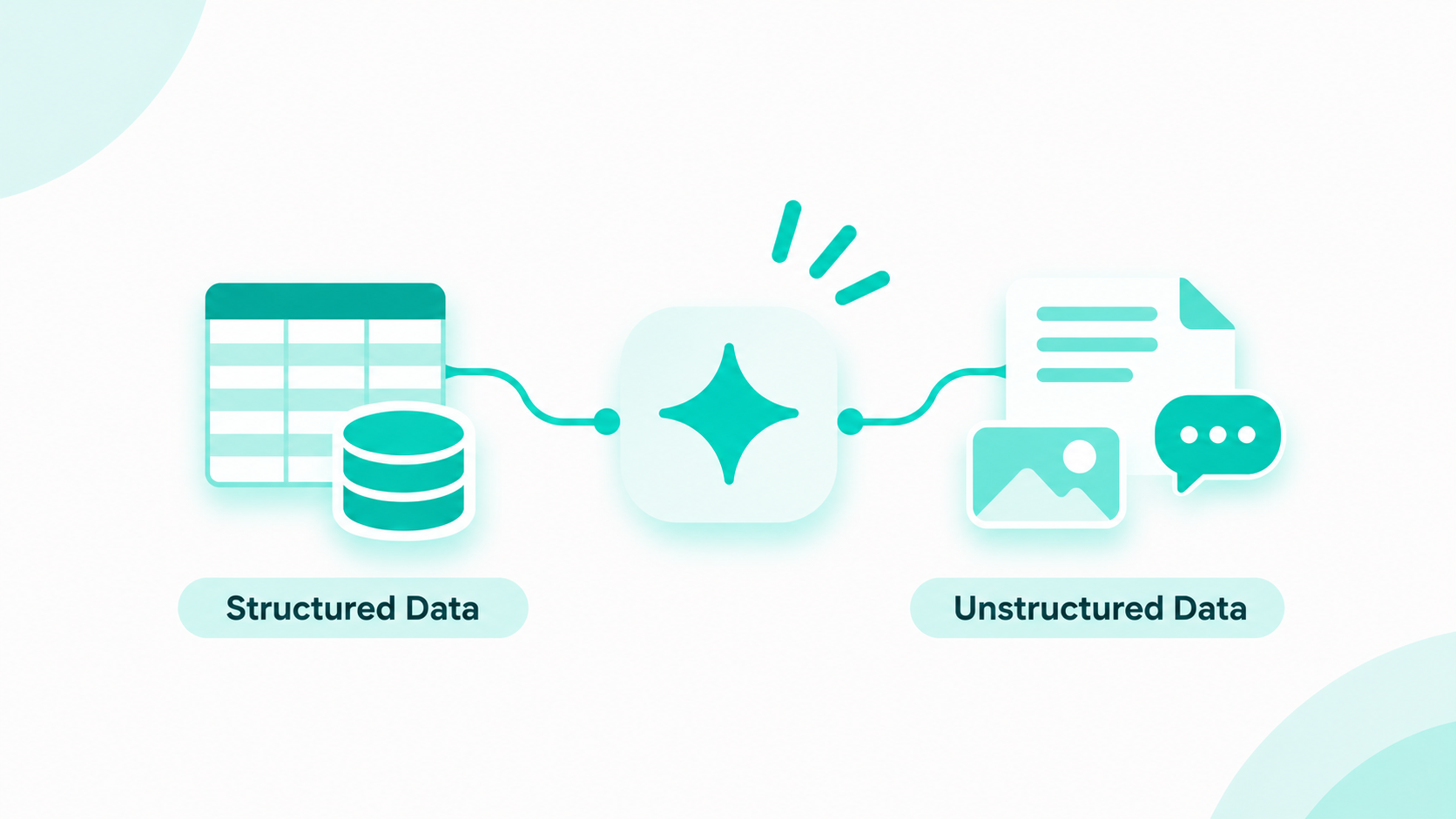
Structured CRM data lives in defined fields, like lifecycle stage, deal amount, or industry, so software can filter, count, and report on it. Unstructured CRM data is free-form content, like emails, call transcripts, notes, chats, and files. AI needs both. Structured fields tell it who a record is and where it stands, and unstructured content tells it why, in the customer's own words.

Breeze can only work with what your portal holds. It gives weak answers when key fields are blank, and it misses the real story when calls and emails never reach the record. If you're planning to roll out HubSpot agents, our HubSpot AI agent implementation team prepares the CRM data and knowledge sources each agent depends on.

Key Takeaways

  • Structured CRM data sits in defined properties, and unstructured CRM data is free-form content like emails, calls, notes, and files.
  • AI uses structured data to pick records to act on, and unstructured data to understand why.
  • Automatic call transcription needs a Sales Hub or Service Hub Professional or Enterprise seat, so other seats give AI less to read.
  • The Data Agent research action in workflows can read the 5 most recent call transcripts on a record and return a usable value.

Table of Contents

  • What Is the Difference Between Structured and Unstructured CRM Data?
  • What Counts as Unstructured Data in HubSpot?
  • Does AI Need Structured or Unstructured CRM Data?
  • How Does HubSpot AI Read Unstructured Data?
  • When Should You Turn Unstructured Data Into Structured Properties?
  • How Do You Prepare Both Types of CRM Data for AI in HubSpot?
  • How Can Campaign Creators Help Make Your CRM Data AI-Ready?
  • Recap
  • Frequently Asked Questions

What Is the Difference Between Structured and Unstructured CRM Data?

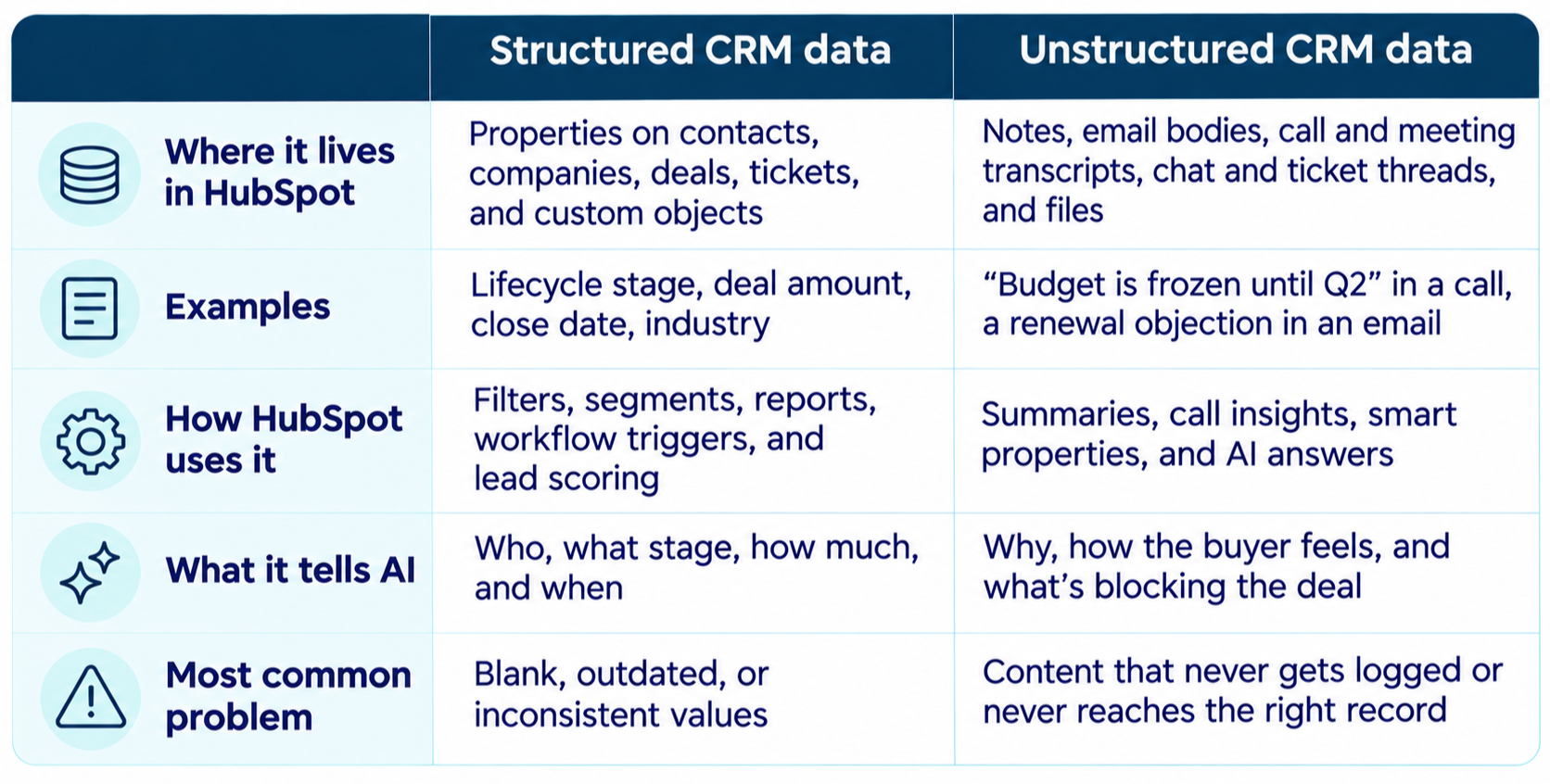
Structured CRM data follows a fixed format, and unstructured CRM data doesn't. A dropdown property holds one value from a set list, so HubSpot can segment, report, and trigger workflows on it. A call transcript holds whatever the customer said, so a person or an AI model has to read it before anyone can act on it.structured-vs-unstructured-crm-data

Some data is technically structured but has no standardized values. This includes single-line text properties, legacy tags, and email subject lines. Treat them as unstructured data because variations like "Healthcare," "Health care," and "Healthcare services" appear as separate values in reports.

What Counts as Unstructured Data in HubSpot?

Unstructured data in HubSpot is any content AI has to read before it can use it. Most portals hold seven kinds.

  • Notes reps type on contact, company, deal, and ticket records
  • Email bodies logged from the connected inbox or the sales email extension
  • Call recordings and transcripts from the HubSpot calling tool, Zoom, Google Meet, or a supported calling provider
  • Meeting recordings from video conferencing integrations
  • Chat, help desk, and ticket conversation threads
  • Files in the files tool, such as product sheets and sales playbooks
  • Open-ended form answers, like "Tell us about your project"

How much of it AI can use depends on two things. First, transcription analysis needs a Sales Hub or Service Hub Professional or Enterprise subscription, and only calls by users with those seats get transcribed automatically.

Second, a transcript only helps when it sits on the right contact, company, deal, or ticket. On those tiers, HubSpot AI can link calls to deals and tickets automatically, so agents can find the conversation.

Does AI Need Structured or Unstructured CRM Data?

AI needs both, and each type does a different job. Structured data tells AI what records to look at and how they compare. Unstructured data explains the reasons behind the numbers.

  • Structured data handles targeting, scoring, and reporting. An agent can't find open manufacturing deals over $50,000 if half your companies have no industry.
  • Unstructured data supplies objections, sentiment, and next steps. The deal stage shows Negotiation, but only the last call reveals a dispute over the liability cap.
  • The most useful answers use both. A smart property can flag high-growth companies from web research. A workflow can then have Data Agent summarize the biggest pain point from calls and emails into a property.

In 2025, HubSpot relaunched Operations Hub as Data Hub and updated Smart CRM to bring structured, unstructured, and external data together. Gartner predicts that 60% of AI projects will be abandoned by 2026 due to a lack of AI-ready data.

Start by fixing your structured data. AI agents use CRM properties to identify which records to work on. Missing or incorrect property values can send even well-informed agents to the wrong accounts.

How Does HubSpot AI Read Unstructured Data?

HubSpot AI reads unstructured data through four controls. These are your AI settings, Conversation Intelligence, Data Agent, and knowledge vaults.

Check Your AI Settings

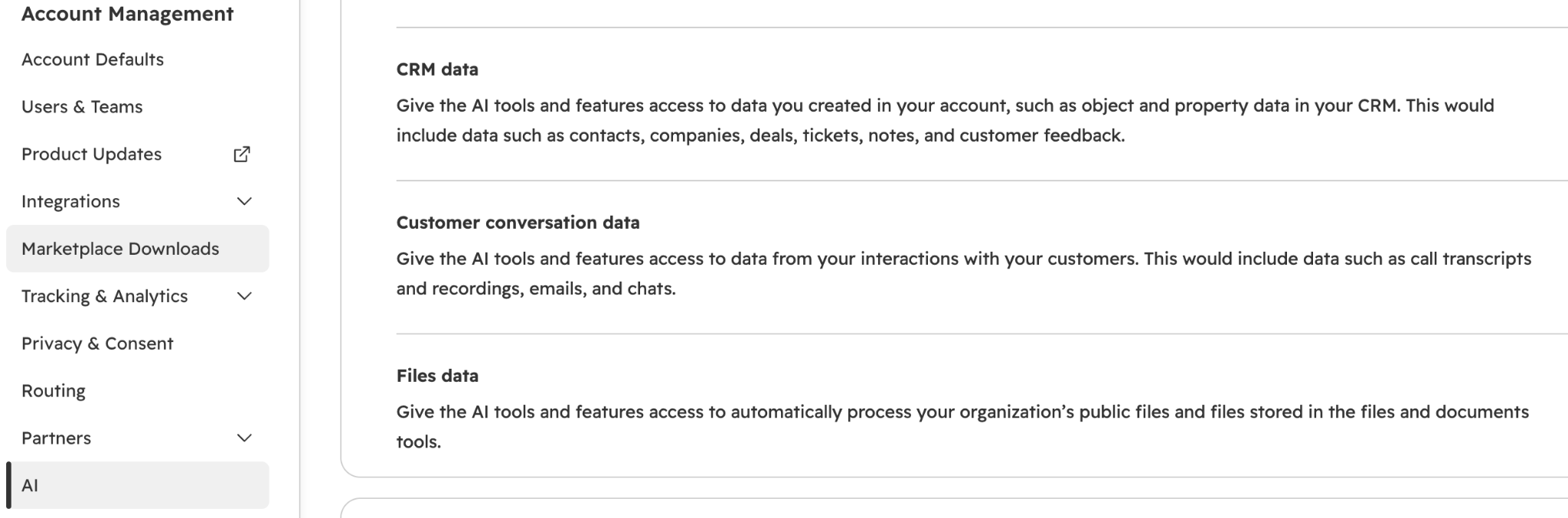
Under Settings > Account management > AI, CRM data and Customer conversation data are on by default, and Files data starts off.

hubspot-account-management-ai-settings

Customer conversation data covers call transcripts, emails, and similar conversations. With Files data off, Breeze can't use the playbooks and product sheets your team stored in the files tool.

Turn On Conversation Intelligence

Conversation Intelligence transcribes calls so AI can summarize them and extract details. Turn on call recording and transcription under Settings > Calling > Call Setup on the Call Configurations tab, and connect Zoom or Google Meet if your team runs meetings there.

Turn Conversations Into Fields With Data Agent

Data Agent fills smart properties. These are AI-generated fields that pull from web research, the company website, property data, or call transcripts. In workflows, the Data Agent research action can use the five most recent call transcripts on an enrolled record. It returns text, a number, or a true or false value.

Each run uses HubSpot Credits for every prompt on every record, so start with the properties your team will actually filter or report on. Smart properties can't use validation rules, so review a sample of filled values before you build workflows on them.

Add Documents and Segments With Knowledge Vaults

Knowledge vaults give specific agents extra context, such as PDFs and other documents, HubSpot content, or CRM segments. You can keep up to 50 knowledge vaults at once and attach each one to the agents that need it. Together with your CRM records, these sources build your HubSpot Growth Context, the business knowledge HubSpot's agents work from.

When Should You Turn Unstructured Data Into Structured Properties?

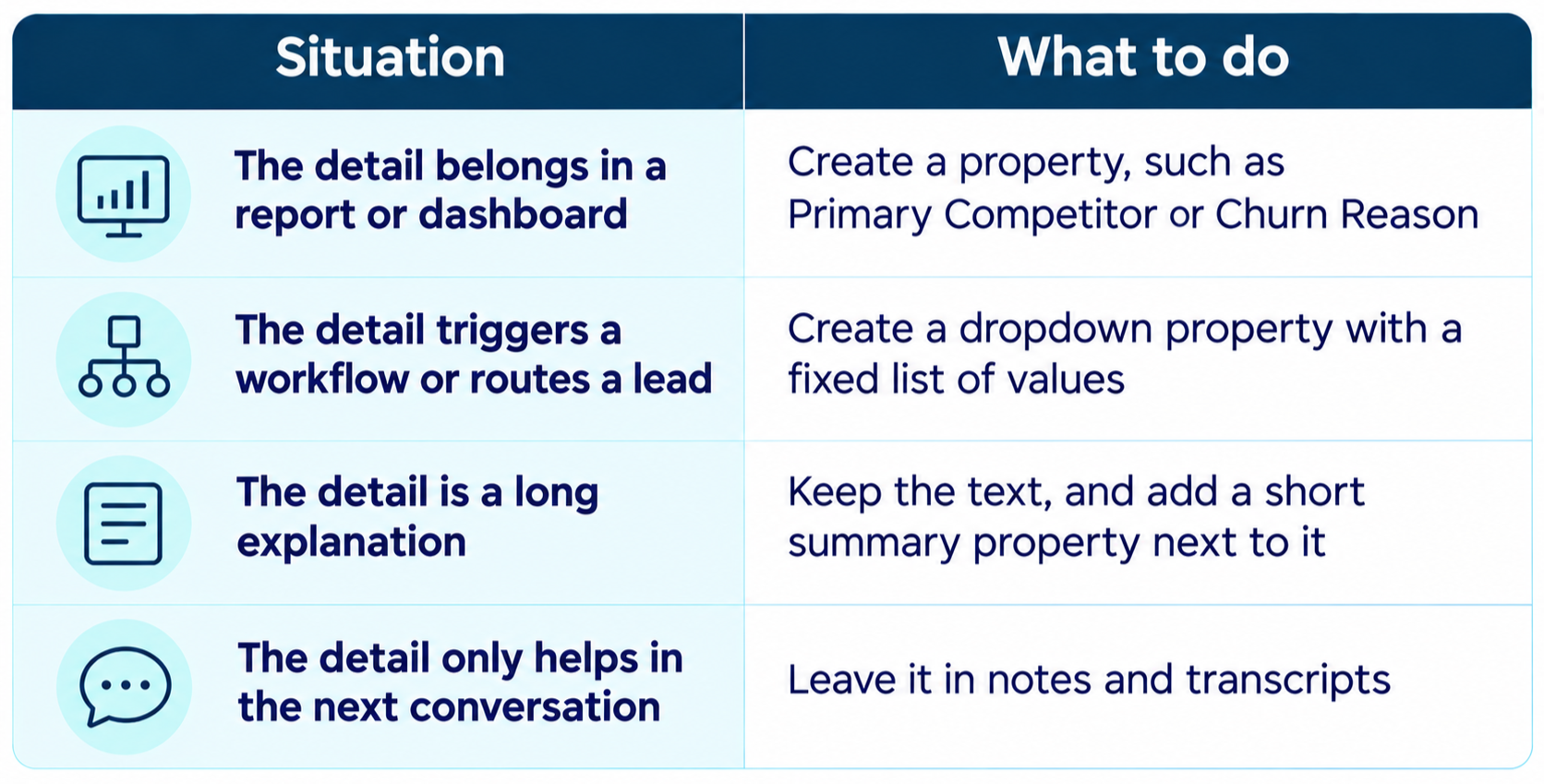
Turn unstructured data into a property when you need to filter, report, automate, or score on it. Leave it as text when people or AI only need to read it for background.

situations-to-consider-on-when-to-turn-unstructured-data-into-structured-properties

We used the same rule in the Fullstaq Keap to HubSpot migration. Fullstaq had more than 4,500 legacy Keap tags. We rebuilt them as HubSpot properties and lists, so three business units could segment and report from one shared set of fields.

Messy values cause trouble even inside structured fields. In our NETGEAR reseller data foundation project, legacy picklist values blocked routine Salesforce sync updates until we reconciled them. After the data foundation work, the reseller list's email block rate dropped from 80% to 4.6%.

How Do You Prepare Both Types of CRM Data for AI in HubSpot?

Prepare structured data by cleaning the properties AI filters on, and prepare unstructured data by making sure conversations get captured on the right records. Follow these steps.

  1. Audit your data quality. Find duplicates, formatting problems, and empty properties first, since dirty CRM data leads to wrong scores and missed follow-ups.
  2. Pick the properties your AI use case depends on. Fill the gaps, and switch free-text fields to dropdowns wherever the values repeat.
  3. Turn on the AI data settings you need. Switch on Files data if agents should use your uploaded documents.
  4. Capture conversations in HubSpot. Connect inboxes, turn on Conversation Intelligence, and ask reps to log notes on the deal, not in personal docs.
  5. Fix associations so calls, emails, and notes sit on the correct contact, company, and deal.
  6. Add two or three smart properties for insights you'll report on, such as main pain point, competitor, or churn reason.
  7. Test before you launch agents. Ask Breeze Assistant about five accounts your team knows well, and compare its answers with what the account owners say.

If your customer data lives in several systems, our HubSpot Data Hub guide walks through the sync and cleanup tools.

How Can Campaign Creators Help Make Your CRM Data AI-Ready?

An agent can only act on the properties and conversations it can read. Our AI agent process starts with a Prepare stage that organizes the knowledge sources and CRM data each agent needs. Then we configure and test each agent and train your team.

As a HubSpot Elite Solutions Partner with accreditations in CRM Implementation, Data Migration, and Solutions Architecture, we build the data foundation first. If you're getting ready to launch Breeze agents, talk to our HubSpot AI agent implementation team.

Recap

Structured CRM data tells AI who and what to act on, and unstructured data tells it why. HubSpot AI can read both, but only when properties are clean, conversations are captured, and the right AI settings are on.

Check how ready your portal is with the free HubSpot AI Readiness Index, a 12-question diagnostic that takes about 3 minutes.

Frequently Asked Questions

Is an Email Structured or Unstructured Data?

An email is mostly unstructured data. The sender, date, and subject line are structured details, but the body is free text that AI has to read to understand.

Should Reps Stop Writing Notes if AI Reads Call Transcripts?

No. Notes capture context transcripts miss, like an unrecorded conversation or a rep's read on a stakeholder. Keep them short and log them on the deal.

Do You Need Data Hub to Use Unstructured Data With HubSpot AI?

No. Breeze Assistant, call summaries, and Data Agent work across several Hubs. Data Hub adds syncing, cleanup, and transformation tools, and it helps most when customer data lives outside HubSpot.

Is Unstructured CRM Data a Privacy Risk for AI?

It can be, because emails and transcripts often hold personal details nobody meant to store. Limit what AI can access, keep sensitive information out of notes, and give each agent only the records it needs.

How Long Does It Take to Make HubSpot Data AI-Ready?

It depends on how messy the portal is. Cleaning the properties behind one AI use case can take a few weeks, while rebuilding a full data model takes longer.

How to Improve HubSpot AI Readiness Before AI Agents Go Live

How to Improve HubSpot AI Readiness Before AI Agents Go Live

HubSpot AI readiness means your CRM holds enough clean, complete context for Breeze Assistant and HubSpot's AI agents to give accurate answers and...
Read More
How Does HubSpot Work Use Your CRM Data?

How Does HubSpot Work Use Your CRM Data?

HubSpot Work uses CRM data in three ways. Its tables link rows to real CRM records, such as a client company and its key contacts. Its AI assistant...

Read More
What Is HubSpot Growth Context, and How Do You Improve Your Context Score?

What Is HubSpot Growth Context, and How Do You Improve Your Context Score?

HubSpot Growth Context is everything HubSpot knows about your business, your customers, and your team, and it's what Breeze Assistant and HubSpot's...

Read More