







 Campaign Creators
10 Compelling Reasons You Need Email Automation
 Tammy Duggan-Herd : 08/31/17
Anyone who has manually managed an email campaign, knows that staying on top of all of the related tasks like updating contact information and...
HubSpot is the better lead nurturing platform for teams that want to build and change campaigns without waiting on an admin, while Salesforce Account Engagement, which nearly everyone still calls Pardot, fits better when Salesforce is your system of record and sales needs to see marketing activity on the record they already work from. Both run solid branching programs, so the decision turns on who operates the thing every day and where your customer data lives.
Direction counts as much as the current feature set here. Salesforce has been steering new marketing investment toward Marketing Cloud Next, while HubSpot spent time rebuilding its marketing workspace around AI agents. A three-year plan deserves a look at where each product is heading and not only what it does today.
Work through the comparison first and decide on the merits. If HubSpot ends up being the better fit for your team, Campaign Creators can take it from there. We are a HubSpot Elite Solutions Partner, and our work covers onboarding, data migration, and building the nurture programs that run on top of it all.

Alt Text: woman-reviewing-two-marketing-technology-platforms-on-separate-monitors
The core difference is where your customer data lives. HubSpot Marketing Hub sits on top of HubSpot's own Smart CRM, so contacts, deals, form submissions, email engagement, and reporting all share one database from the first day, and a nurture program can trigger on any property or behavior without an integration in the middle.
Account Engagement is built to run with Salesforce, which keeps prospect activity and scoring data close to the records sales reps already work from, but that pairing typically means a Salesforce subscription sits alongside it and Sales Cloud licensing is worth counting separately when you budget.
Salesforce splits people across two separate objects, which shapes every nurture program you build and is the detail feature comparisons almost always skip. A Lead is an unqualified prospect floating on its own, while a Contact is someone attached to an Account, and a Lead converts into an Account plus a Contact plus an Opportunity once it qualifies. Account Engagement adds a third layer on top called the prospect, its own record that maps back to either a Salesforce Lead or a Salesforce Contact depending on where that person currently sits. Nurture programs run against prospects, and the score and grade live on the prospect record before syncing into Salesforce fields.
HubSpot folds all of that into one Contact object, using a property called Lifecycle Stage to carry the progression through Subscriber, Lead, Marketing Qualified Lead, Sales Qualified Lead, Opportunity, and Customer. Nothing converts, and nothing gets recreated along the way, so a workflow written against a contact keeps running as that person moves from blog subscriber to closed deal with the full engagement history on a single record. HubSpot later added an optional Leads object that works as a sub-layer beneath the Contact for sales prospecting, and it never duplicates the core record the way a Salesforce Lead does.
In Account Engagement, someone who converts from Lead to Contact mid-sequence changes which Salesforce object holds their data, and your segmentation has to survive that move. In HubSpot, the same person keeps one record and one ID throughout, so re-enrollment rules and suppression lists behave the way you expect. Account Engagement buys you a data model that mirrors how enterprise sales teams already work, and HubSpot buys you a model with fewer moving parts to break. That same mismatch is also the root of nearly every problem teams hit when running HubSpot alongside Salesforce, which the sync section below covers in detail.
Interesting read: 8 HubSpot-Salesforce Integration Problems Slowing Down RevOps Teams
Account Engagement expects a technical owner, since connector setup, field mappings, sync behavior, prospect profiles, and business unit structure all sit upstream of any campaign and quietly corrupt your scoring months later when configured wrong. Teams that run it well usually have a Salesforce admin on staff or a partner on retainer.
HubSpot is built for marketers to manage directly, with workflows, lists, forms, reporting, and scoring all editable without admin privileges or a deployment step. This gives small teams the flexibility to build and manage nurture programs without relying heavily on technical resources. The tradeoff shows up at the other end, because a platform this open to everyone needs internal governance to prevent workflow sprawl once twenty people have build access.
The two products also scope differently. HubSpot bundles blogging, SEO tooling, social publishing, ad management, landing pages, forms, and answer engine optimization into the same subscription, which suits nurture programs drawing on content the same team produces. Account Engagement concentrates on email, forms, landing pages, scoring, and nurture programs, leaving content and social work to separate tools that add vendors to manage while keeping the core platform lighter.
The review data reflects who each product was built for. HubSpot Marketing Hub holds roughly 4.4 out of 5 across more than 15,000 G2 reviews, with small businesses making up about half of reviewers, while Account Engagement sits near 4.0 out of 5 across more than 4,500 reviews that have a stronger mid-market representation, per G2's side-by-side comparison.
Both platforms build nurture programs on a visual canvas with branching logic, so the mechanics are closer than the marketing suggests. Account Engagement calls its builder Engagement Studio, and HubSpot calls its builder Workflows, and the real separation shows up in how fast you can change something once it is live.
Engagement Studio assembles programs from three element types working together, where triggers watch for prospect behavior like an email click or a file download, rules check conditions like tag membership or a score threshold, and actions fire the response by sending an email or notifying the assigned rep. The canvas handles deep multi-branch logic well, and program versioning lets operations teams see exactly how each edit changed performance on programs running for months.
Every email sent from an Engagement Studio program has to exist as a template first, which slows you down when you want to tweak one message inside a ten-step sequence. Automation rules also carry hard caps by edition at 50 on Growth+, 100 on Plus+, and 150 on both Advanced+ and Premium+.
HubSpot Workflows pull enrollment triggers from nearly any contact property, behavior, or lifecycle change and branch through if/then logic on the same canvas. Marketing Hub Professional supports up to 300 workflows across 10 teams, and Enterprise raises that to 1,000 workflows across 300 teams while adding behavioral event triggers and workflow health monitoring.
Engagement Studio handles intricate conditional paths and gives operations teams the version history they need for long-running programs, though practitioners consistently flag a steeper learning curve and an email builder that often needs developer help just to produce usable templates.
HubSpot workflows build faster and hand off cleanly to a generalist marketer while reaching past email into ads, chat, social, and internal task creation on Professional and above, but teams with unusually specific enterprise requirements sometimes find themselves bending a workflow to fit the tool.
Neither platform wins outright, because both separate interest from fit and simply use different data to get there. Account Engagement is more disciplined out of the box by keeping the two signals in visibly separate fields, and HubSpot draws on a wider set of engagement signals by default and is far quicker to tune without an admin. That separation pays off in real numbers, since companies that excel at lead nurturing generate 50% more sales-ready leads at 33% lower cost per lead according to Forrester Research.
Account Engagement gives each prospect a numeric score driven by activity alongside a letter grade driven by who they are. Grades run from F to A+, every prospect starts at D, and the grade moves up or down against a profile built from fields like industry, company size, and job title, per Salesforce Trailhead. Keeping fit as a letter stops it from being quietly folded into a behavioral number, so an A-graded account with no recorded activity stays visible to your outbound team.
Einstein Behavior Scoring adds a machine-learned 0 to 100 alternative with decay built in and becomes available from Plus+ upward, but it needs roughly a year of engagement data and at least 20 prospects linked to opportunities before producing reliable output. One real limitation applies to the manual model, since you can edit the point values on scoring rules while the rule names and criteria themselves stay locked.
HubSpot splits the same question into fit scores and engagement scores held as separate properties, then plots contacts on a fit-versus-engagement grid that makes triage visual. Professional supports up to 5 scores while Enterprise raises that to 50 and adds AI-generated scoring recommendations.
HubSpot's defaults also draw on a broader signal set covering page views, form submissions, email interactions, file access, social engagement, and list membership, and group limits cap any single activity type so a frequent blog reader cannot outrank someone who requested a demo.
HubSpot lands cheaper for a typical mid-market team once you count everything, mainly because Account Engagement's price does not include the Salesforce subscription it runs with. Published prices tell roughly half the story, so start with what each vendor actually lists.
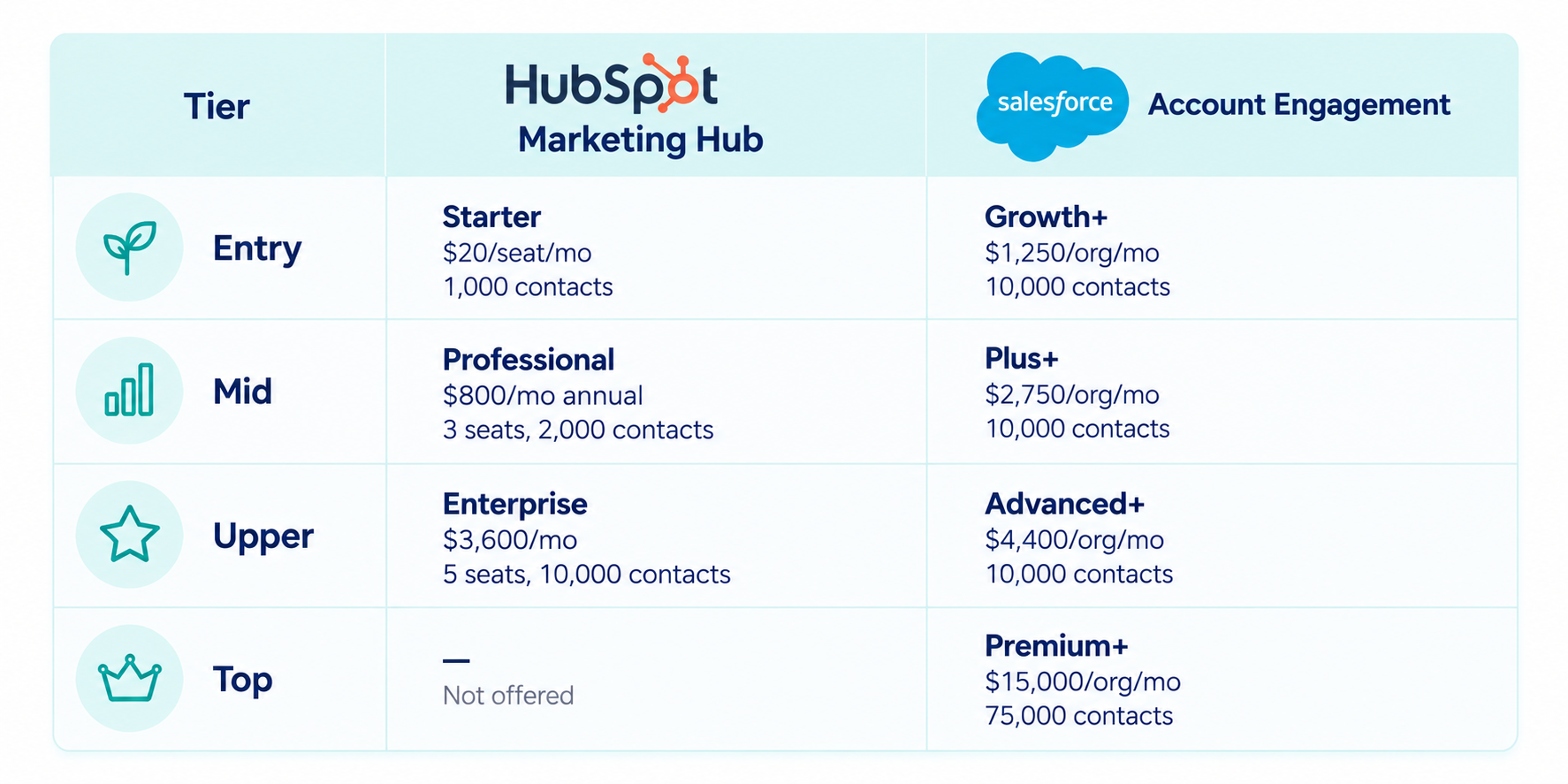
Alt Text: price-comparison-hubspot-marketing-hub-vs-salesforce-account-engagement
Both vendors charge annually for their higher-tier plans, but the biggest budget surprises often come from additional costs discussed below.
Professional carries a mandatory one-time onboarding fee of $3,000 and Enterprise carries $7,000, with extra core seats running $45 per month on Professional and $75 on Enterprise. HubSpot bills on marketing contacts, meaning anyone you actively email or target, and additional blocks of 5,000 contacts run roughly $250 per month on Professional, while non-marketing contacts are stored for free up to 15 million records. AI features consume HubSpot Credits at 3,000 included monthly on Professional and 5,000 on Enterprise, with overage at $0.010 per credit, which makes heavy agent usage a genuine forecasting exercise.
Growth+ caps forms, form handlers, and landing pages at 50 each, Advanced Dynamic Content costs an extra $400 per month at that tier, and SMS and WhatsApp stay paid add-ons at every edition. The bigger line item is Salesforce itself, since the platform needs an active org and Sales Cloud seats run from $25 to $550 per user monthly across five published tiers. Implementation through a certified partner may land between $5,000 and $20,000 depending on how messy your data is and how many business units need configuring.
Account Engagement has essentially none by design, and HubSpot has a handful that are manageable with planning. Prospect records, activity history, and scores all live inside Salesforce objects on the Account Engagement side, which removes sync intervals, field mapping drift, and duplicate resolution between marketing and sales entirely. Setup still demands Salesforce expertise to get the connector, field mappings, sync behavior, and business unit structure right, so treat that as a one-time cost paid in specialist hours during implementation.
HubSpot running alongside Salesforce is a common and workable setup with caveats worth budgeting for. The native connector needs a HubSpot Professional or Enterprise subscription plus a Salesforce edition with API access, and Salesforce recommends a full platform license for the integration user, per HubSpot's documentation. Records typically sync within 5 to 15 minutes, which is comfortable for nurture cadence and tight for same-day lead routing.
Custom objects and non-standard properties need individual mapping and will not carry across on their own, so audit them before scoping the project. Simultaneous edits in both systems can produce overwrites without clean conflict resolution, which makes ownership rules worth defining upfront. Syncing every Salesforce record into HubSpot without an inclusion list will inflate your marketing contact count and your invoice at the same time, so limiting the sync to contacts past a defined lifecycle stage protects both data quality and budget.
Our work with NETGEAR shows what this can look like in practice. During a complex CRM migration, the team needed to stabilize the HubSpot-Salesforce integration and establish a more reliable sync between the two platforms. Read the case study here.
HubSpot builds AI directly into the workspace marketers already use, while Salesforce offers AI through its broader Salesforce platform and related AI products.
HubSpot rebuilt its marketing workspace around AI agents at its Fall 2026 Spotlight on September 16, 2026. The centerpiece is a rebuilt Marketing Studio that opens on real signals from your portal, showing an underperforming campaign segment, an AI search visibility score, or leads that came in and never got a follow-up. Breeze Assistant sits inside that workspace and pulls in specialized agents once you describe what needs fixing.
Three agents handle the nurture chain end to end:
The smart design decision here is that Nurture Agent runs on top of the workflows you already built and does not replace them, and Agent Builder now offers one-click conversion of a legacy workflow into an agentic one. Your existing nurture logic survives, which lowers the cost of testing it.
Two related releases feed the same engine, since Buying Groups uses AI to map the full decision-making committee on a deal while expanded Buyer Intent signals track things like funding rounds, job postings, and tech stack changes. This gives nurture programs something to react to beyond email opens and page views.
Salesforce routes AI to Account Engagement customers through Account Engagement+, which grants access to Marketing Cloud Next. Growth+ customers receive Marketing Cloud Next Growth Edition while Plus+, Advanced+, and Premium+ customers receive Advanced Edition.
Inside Account Engagement itself, the Einstein feature set covers content creation for email and landing page copy, Send Time Optimization, Engagement Frequency, Campaign Insights, and the scoring models described earlier.
Marketing Cloud Next adds Agentforce Campaign Creation along with Agentforce Lead Generation and Management, which pushes leads into nurturing flows, scores them, suggests personalized content, and answers early product questions without a human in the loop.
Choose HubSpot if you want your CRM and marketing automation in one platform, a lean marketing team needs to build and manage nurture programs without heavy technical support, and your strategy relies on content, SEO, email, forms, and social engagement. HubSpot is particularly well suited to teams that want to launch campaigns quickly, connect marketing activity directly to CRM records, and use built-in reporting without relying on a separate BI layer.
Account Engagement makes sense if Salesforce is already your system of record, your marketing and sales processes are deeply dependent on Salesforce data and objects, or your organization has the technical resources to manage the additional platform complexity. Its value is more closely tied to how extensively your business already relies on the Salesforce ecosystem.
The better fit depends on your existing systems, team structure, and how your marketing and sales processes are managed.
Start with the nurture programs you already run. Look at the branches, data fields, workflows, and people involved in building and managing them. Then take your most complex program into a live demo and ask the vendor to show you how they’d build it. You’ll get a much better sense of whether the platform actually fits your needs.
For teams considering HubSpot, Campaign Creators can help with onboarding, data migration, and lead nurturing campaigns, so you can bring your existing processes into a new portal without starting from scratch.

Tammy Duggan-Herd : 08/31/17
Anyone who has manually managed an email campaign, knows that staying on top of all of the related tasks like updating contact information and...
 Campaign Creators : 09/21/17
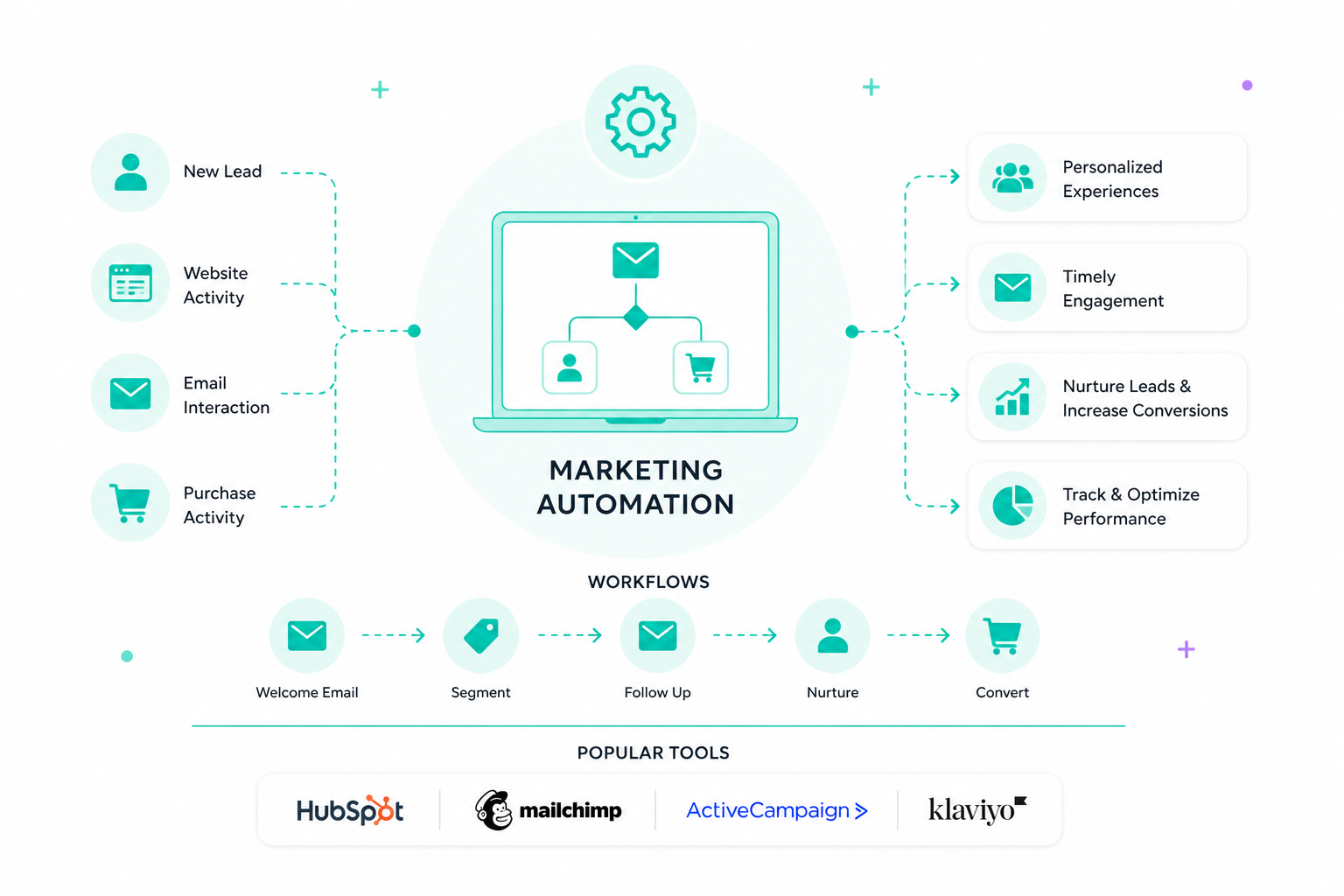
Marketing automation uses software to handle repetitive tasks like emails, social posts, and campaign management. It sets up workflows that respond...
Tammy Duggan-Herd : 06/30/17
In today’s digitally rooted marketing environment, some companies have expressed doubt in the relevance of email marketing campaigns based on their...