8 min read

HubSpot Governance for IT Teams: Permissions, Sandboxes, Sync Rules, and Documentation

HubSpot Governance for IT Teams: Permissions, Sandboxes, Sync Rules, and Documentation

HubSpot often serves as the central platform for managing customer data, marketing activities, sales processes, and business operations. As more teams rely on the platform, organizations need clear controls to manage access, protect data, and maintain consistency across the CRM.

Without proper governance, permission issues, workflow changes, integration errors, and inconsistent processes can create security risks and data quality problems. These challenges can affect reporting accuracy, operational efficiency, and the overall reliability of the platform.

This guide explains how IT teams can establish effective HubSpot governance through user permissions, sandbox testing, sync rules, and documentation practices that support security, accountability, and data quality across the organization.

Key Takeaways

  • Limit Super Admin access to a small group of trusted administrators to reduce security and configuration risks.
  • Use teams and permission sets to manage user access consistently across marketing, sales, service, and operations teams.
  • Test workflows, integrations, property changes, and pipeline updates in a HubSpot sandbox before deploying them to production.
  • Establish sync rules and maintain documentation to prevent duplicate records, data conflicts, and reporting inaccuracies.

Why HubSpot Governance Should Be an IT Priority

e a professional scene with an IT administrator monitoring a centralized HubSpot governance dashboard. The screen displays user permissions, data quality monitoring, integrations, system changes, and access controls all managed from one location. pop-up icons of Marketing, Sales, Customer Service, and Operations teams connect to the same platform while IT maintains oversight and consistency.

HubSpot governance helps IT teams maintain control over how the platform is managed, secured, and scaled across the organization. It provides a framework for managing user access, system changes, integrations, data quality, and administrative responsibilities within HubSpot.

As organizations expand their use of HubSpot across marketing, sales, customer service, and operations teams, the platform often becomes a central system for customer data and business processes. Without clear governance, different teams may create conflicting processes, inconsistent data standards, or unauthorized changes that affect reporting and operational efficiency.

Governance establishes policies and accountability for permissions, configuration management, data ownership, and change control. These standards help ensure that HubSpot remains aligned with business objectives while reducing the risk of errors, security issues, and compliance concerns.

The business impact of governance extends beyond system administration. Research cited by MIT Sloan shows that organizations lose between 15% and 25% of revenue due to poor data quality. Effective governance helps address common causes of CRM data issues, including duplicate records, inconsistent data standards, and unclear ownership, leading to more reliable reporting and decision-making.

HubSpot supports governance efforts through features such as granular permissions, sandbox environments, deployment tools, and data quality monitoring. These capabilities help administrators test changes safely, control access to sensitive information, and maintain cleaner, more consistent data across the platform.

Without governance, organizations can encounter excessive permissions, duplicate records, conflicting configuration changes, and undocumented processes.

How to Manage User Permissions and Access Controls

1. Start with Administrative Access

Access should follow the principle of least privilege, meaning users receive only the permissions required to perform their responsibilities. Not every employee needs access to account settings, user management, integrations, exports, or other administrative functions.

Only a small number of trusted administrators should have Super Admin access. This role provides unrestricted access to users, settings, data exports, integrations, and account configurations. Because Super Admins can make changes that affect the entire portal, limiting this permission helps reduce security and governance risks.

Common users who may require Super Admin access include:

  • CRM administrators
  • RevOps leaders
  • IT administrators
  • HubSpot administrators
  • Implementation partners, when necessary

Avoid assigning Super Admin access to department managers or users who simply need reporting visibility. Too many Super Admins can increase the risk of accidental configuration changes, unauthorized exports, and data governance issues.

2. Organize Users With Teams and Permission Sets

As your HubSpot portal grows, organizing users into teams makes permission management easier and helps control record visibility. Teams can reflect your organizational structure, such as:

  • Marketing
  • Sales
  • Customer Success
  • Operations
  • Leadership
  • Regional teams

Teams help determine which records and assets users can access when permissions are configured at the team level. Users can belong to a primary team and additional teams depending on organizational needs.

For larger organizations, permission sets allow administrators to create standardized access levels for groups of users instead of configuring permissions individually. Permission sets improve consistency, simplify onboarding, and reduce permission management errors.

Example Role Structure

Role

Recommended Access

Sales Representative

Contacts, companies, deals, tasks

Marketing Specialist

Marketing assets, campaigns, forms, emails

Customer Success Manager

Tickets, contacts, customer records

CRM Administrator

User management, workflows, integrations

Executive Leadership

Dashboards and reporting

This approach ensures users receive access based on their responsibilities rather than their seniority or department title.

3. Control Access to CRM Records and HubSpot Tools

Record-level permissions determine which contacts, companies, deals, tickets, and custom objects a user can view or edit.

Common access levels include:

  • All records
  • Team-owned records
  • Team and sub-team records
  • Owned records only

For example, a sales representative may only need access to their own deals, whereas a sales manager may require visibility across the entire sales team. Limiting record access helps reduce unnecessary exposure to customer data.

Permissions can also control which HubSpot tools users can access. Examples include:

  • Workflows
  • Marketing emails
  • Forms
  • Lists
  • Reports
  • Sequences
  • Knowledge Base
  • Integrations
  • Data exports
  • User management

Not every employee should have the ability to create workflows, modify integrations, manage users, or export large amounts of customer data. These permissions should generally be limited to administrators and designated power users.

4. Review and Audit Permissions Regularly

User permissions should not be treated as a one-time setup. As teams grow and responsibilities change, access requirements also change.

Review permissions when:

  • Employees change roles
  • New teams are created
  • Contractors or agencies leave
  • New HubSpot hubs are added
  • Integrations are implemented
  • Security audits are conducted

Regular audits help identify over-permissioned users, remove unnecessary access, and maintain stronger governance across the platform.

How to Update User Permissions

To modify a user's permissions:

  1. Navigate to Settings.
  2. Select Users & Teams.
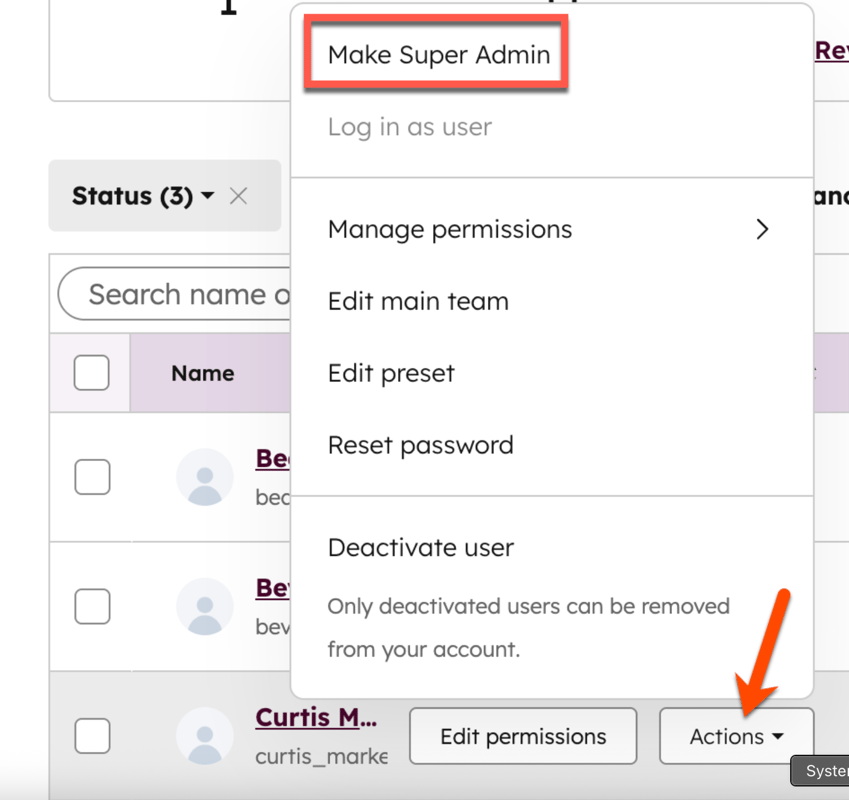
  3. Choose the user you want to update. For example, give the user Super Admin privileges.

update-user-permissions-hubspot

  1. Modify their permissions, team assignments, or permission set.
  2. Save the changes.

For organizations using permission sets, administrators can update the permission set once and automatically apply those changes to all assigned users.

When to Use Sandboxes to Test Changes Safely

Testing directly inside a live CRM environment creates unnecessary operational risk. A workflow error, property update, or integration issue can immediately affect customer records, reporting accuracy, and business processes.

HubSpot sandboxes provide a controlled environment that mirrors many aspects of your production portal, allowing teams to test changes before deployment without affecting live operations.

How to Create a Sandbox in HubSpot

  1. Navigate to Settings.
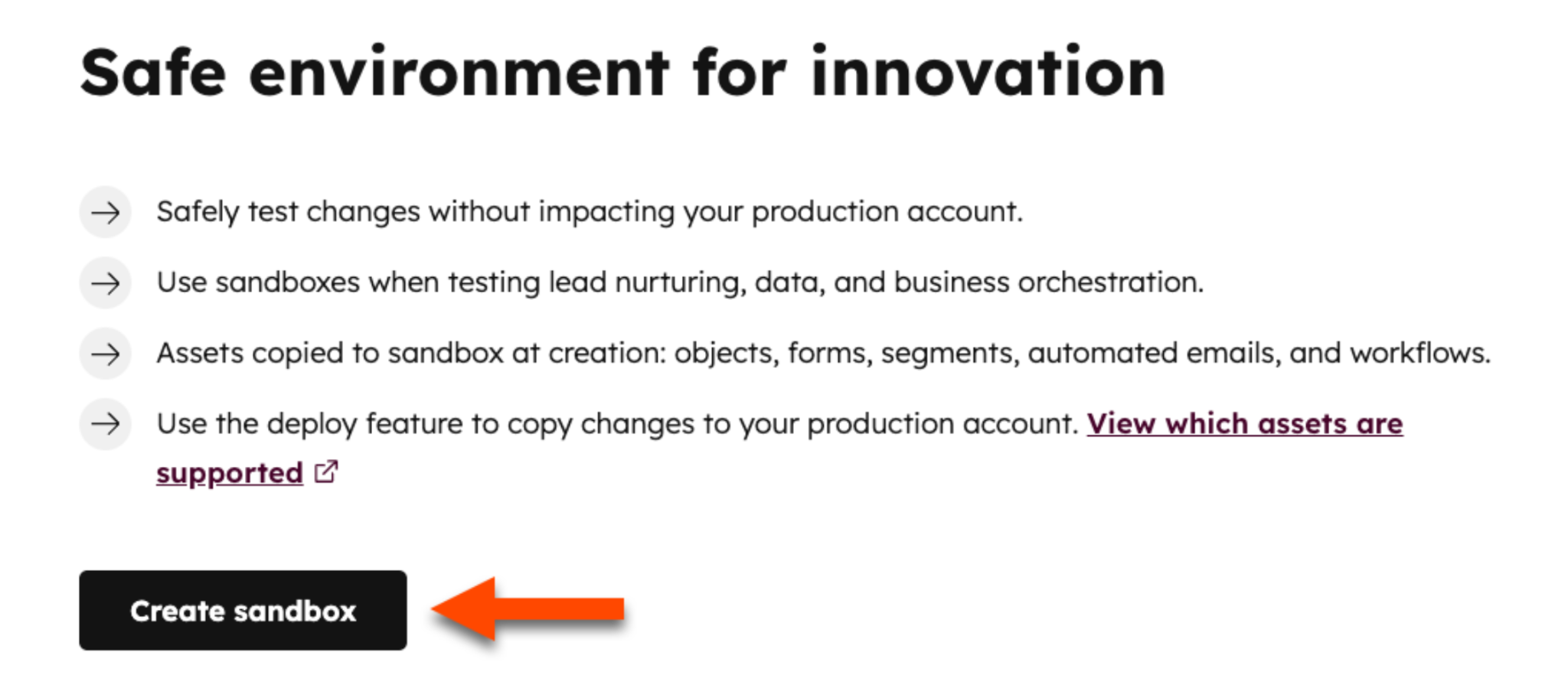
  2. Select Sandboxes from the left sidebar.

create-sandbox-in-hubspot

  1. Click Build Standard Sandbox or Build Developer Sandbox, depending on your subscription and testing needs.
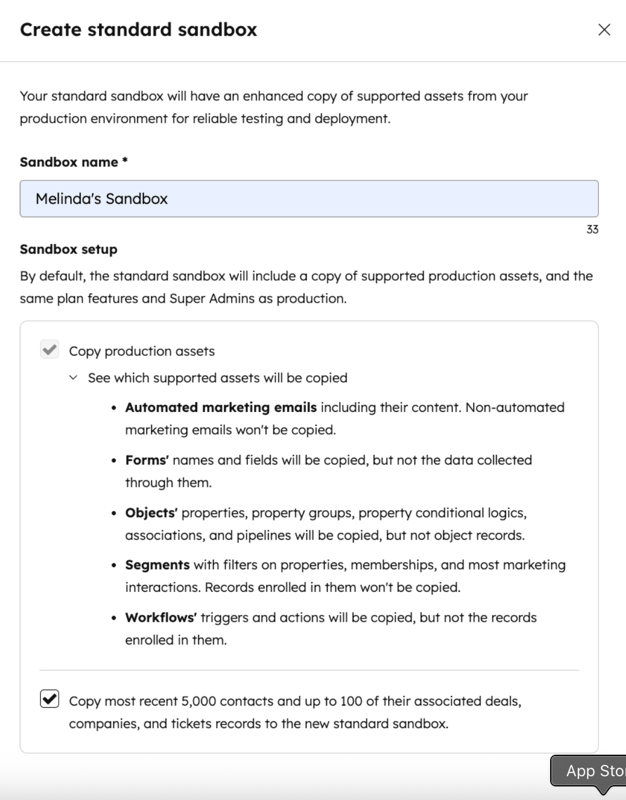
  2. Enter a name for the sandbox.

create-standard-sandbox-in-hubspot

  1. Choose whether to copy production assets and metadata into the sandbox.
  2. Click Create and allow HubSpot to build the environment.

Changes You Should Test in a Sandbox

Sandbox testing is particularly valuable for:

  • Workflow development
  • Property changes
  • Integration validation
  • Pipeline modifications
  • Data mapping reviews
  • User training exercises
  • Automation testing

For example, teams often use sandboxes to verify workflow logic, confirm integration data flows correctly, test pipeline changes before rollout, and train users on new processes without affecting production records.

What Sync Rules Help Maintain Data Integrity Across Systems

Some of the most important sync rules include:

  • Record matching rules identify the same record across systems using unique values such as email addresses, company domains, customer IDs, or product SKUs. This helps prevent duplicate records.
  • Field mapping rules determine which fields correspond between HubSpot and connected applications. For example, a "Customer Status" field in one system may map to a lifecycle stage property in HubSpot.
  • Source-of-truth rules specify which system controls a particular field. If a customer's billing information is managed in an ERP, that system should remain the authoritative source for billing-related properties.
  • Conflict resolution rules determine what happens when the same field is updated in multiple systems. These rules help prevent newer or more accurate information from being overwritten.
  • Sync direction rules control whether data flows in one direction or both directions. Sensitive fields are often configured for one-way sync to reduce the risk of accidental changes.
  • Sync filtering rules limit which records are eligible for synchronization. For example, only active customers or qualified leads may be synced between systems.

When configured correctly, these rules help prevent duplicate records, inconsistent field values, synchronization conflicts, and reporting inaccuracies across connected platforms.

How Can Documentation Reduce Risk and Improve Accountability

Without documentation, teams often struggle to understand why a workflow exists, which system owns a property, who approved an integration, or which administrator made a major configuration change.

Clear documentation preserves institutional knowledge and helps teams manage the CRM without relying on individual memory. An effective HubSpot documentation should answer specific operational questions, such as:

Question

Documentation Example

Who owns this workflow?

Workflow owner and business purpose

Why was this property created?

Property definition and usage guidelines

Which system controls this field?

Data ownership and sync rules

Who approved this integration?

Approval records and implementation notes

What changed in production?

Change logs and deployment history

If a workflow stops functioning correctly, administrators can identify the owner, review previous changes, and determine the intended business purpose. If reporting discrepancies appear, teams can review property definitions and data ownership rules before making corrections.

Documentation also helps standardize operations across teams. According to IDC research, employees spend 2.5 hours per day searching for information needed to perform their jobs, creating productivity challenges and increasing the likelihood of inconsistent execution. Having a centralized knowledge repository provides a single source of truth for CRM administration and operational procedures.

HubSpot governance and documentation typically cover user permissions, workflow inventories, integration architecture, property definitions, deployment procedures, approval records, and change histories. These records create transparency across the platform and make it easier to maintain security, data quality, and accountability across teams.

The Governance Challenges That Lead to Security and Data Quality Issues

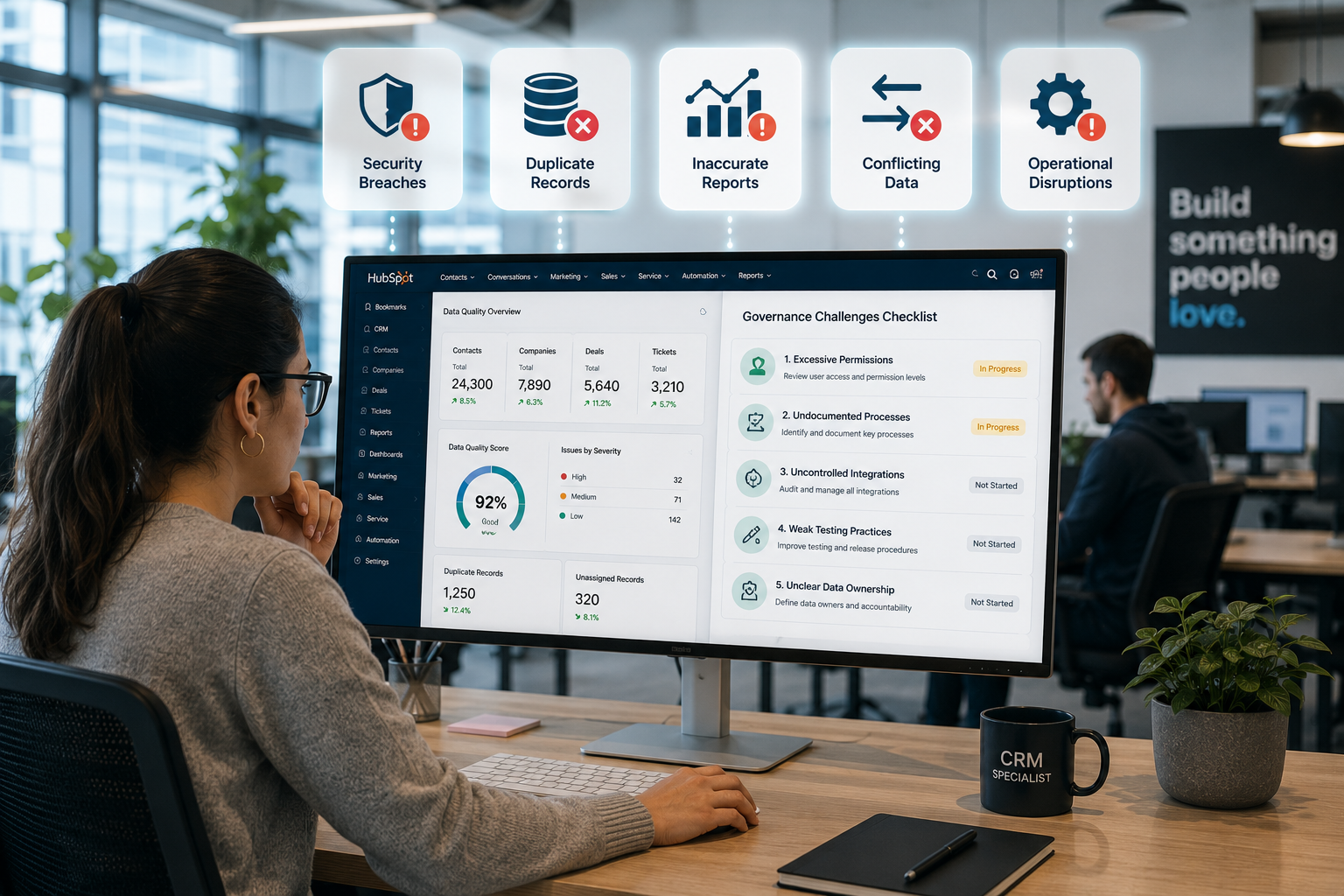
a crm specialist looking at hubspot checking for five governance challenges: Excessive Permissions, Undocumented Processes, Uncontrolled Integrations, Weak Testing Practices, and Unclear Data Ownership, she have a checklist in her monitor divided the screen wtih a hubspot interface browser. add icon pop-up security breaches, duplicate records, inaccurate reports, conflicting data, and operational disruptions.

The most common governance challenges include excessive permissions, undocumented processes, uncontrolled integrations, weak testing practices, and unclear data ownership. These issues increase the likelihood of security incidents, inaccurate reporting, and operational disruptions across the CRM environment.

According to IBM's Cost of a Data Breach Report 2025, the average global cost of a data breach reached $4.4 million, the highest amount recorded in the report's history. Security weaknesses related to access management and administrative controls continue to contribute to organizational risk.

Gartner estimates that poor data quality costs organizations an average of $12.9 million per year through operational inefficiencies, reporting errors, and poor decision-making. In HubSpot environments, duplicate records, conflicting sync rules, inconsistent property usage, and unclear data ownership can gradually reduce confidence in customer data and business reporting.

Research from Experian's 2022 Global Data Management Report also found that many organizations continue to face challenges related to data accuracy, consistency, and trust. These issues affect analytics, customer experiences, and business operations, making governance a critical part of CRM management.

Data quality problems often stem from:

  • Duplicate records
  • Conflicting sync rules
  • Inconsistent field usage
  • Poor integration governance
  • Missing validation standards

Addressing these challenges requires clear governance standards, defined ownership, documented procedures, and regular reviews that help maintain security, data quality, and operational consistency.

How to Create and Enforce HubSpot Governance Standards

Start by establishing standards for:

  • User access and permissions
  • Change approvals and deployment processes
  • Data management and quality
  • Integrations and connected systems
  • Process documentation

Document these standards in a governance playbook that serves as the primary reference for administrators and business teams.

Most governance frameworks focus on five key areas:

  • Access governance
  • Change management governance
  • Data governance
  • Integration governance
  • Documentation governance

A typical governance framework includes the following controls:

Governance Area

Primary Objective

Permissions

Protect sensitive data and administrative functions through role-based access

Change Management

Reduce deployment risk through testing, approvals, and sandbox validation

Data Standards

Maintain consistent property structures, naming conventions, and data quality

Integration Rules

Ensure accurate and consistent data across connected systems

Documentation

Preserve institutional knowledge and support onboarding

Reviews and Audits

Identify compliance issues and governance gaps

Governance standards are only effective when ownership is clearly defined. While IT often establishes governance policies, responsibility is typically shared across RevOps, marketing operations, CRM administrators, and business stakeholders. Each team should understand its role in managing data quality, system changes, and documented processes.

Role-based permissions, approval workflows, and change control procedures help prevent unauthorized changes, data inconsistencies, and operational disruptions.

Finally, there should be regular audits to review permissions, workflows, integrations, data quality, and documentation. These reviews help identify issues before they affect reporting, automation, security, or user adoption.

Continue reading with this article: HubSpot SSO and Governance Standards for Growing IT Teams


Reduce Risk Through Better HubSpot Governance!

HubSpot governance helps IT teams maintain control over permissions, testing, data synchronization, and documentation. A structured approach reduces risk, supports data quality, and creates greater accountability across the platform.

If your organization needs a more reliable way to manage HubSpot, clear governance standards can help establish consistent processes, stronger security controls, and better visibility across teams.

Campaign Creators help organizations develop HubSpot governance standards, manage CRM operations, and support scalable platform administration through structured processes and expert guidance.

Frequently Asked Questions

Can HubSpot track permission changes made by administrators?

Yes. HubSpot provides permission history and account activity records that help administrators review access-related changes and support audits.

What is the difference between a sandbox and a production account?

A sandbox is a separate testing environment used to validate changes before deployment. A production account contains live business data and active business processes.

What types of assets can be synced to a HubSpot sandbox?

Organizations can sync assets such as workflows, forms, lists, emails, object definitions, pipelines, themes, and templates.

Can integrations be connected to a sandbox environment?

Yes. HubSpot recommends connecting sandbox versions of integrations during testing to protect production data and workflows.

What documentation should be updated after a major CRM change?

Organizations should update workflow documentation, data definitions, integration maps, ownership records, and governance policies after significant changes.


HubSpot Data Sync for IT Teams: How to Keep Customer Data Clean Across Systems

HubSpot Data Sync for IT Teams: How to Keep Customer Data Clean Across Systems

IT teams use HubSpot alongside platforms like Salesforce, NetSuite, Zendesk, ERP systems, support tools, and internal databases. As customer data...

Read More
HubSpot SSO and CRM Governance: What IT Teams Should Require Before Scaling Access

HubSpot SSO and CRM Governance: What IT Teams Should Require Before Scaling Access

HubSpot access rarely stays limited to one department. As CRM adoption expands across sales, marketing, RevOps, customer support, leadership teams,...
Read More
When Should Technology Companies Use HubSpot Custom Objects?

When Should Technology Companies Use HubSpot Custom Objects?

Technology companies can use HubSpot custom objects once standard CRM records can no longer support how the business operates. For SaaS companies,...

Read More