.png?width=420&height=121&name=cc-logo-color%20(2024).png "Campaign Creators - logo in dark blue and transparent background")


 Campaign Creators
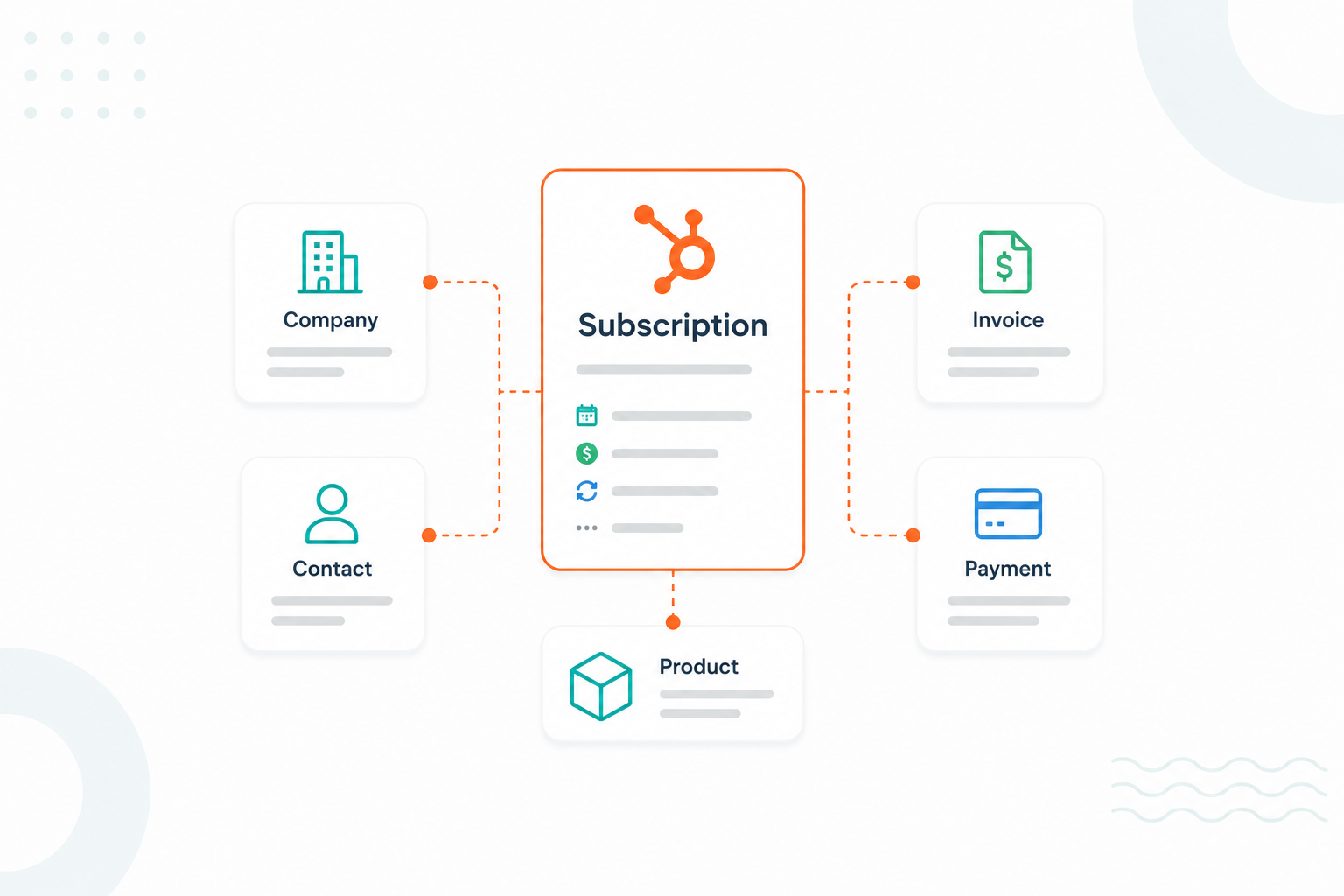
As more businesses adopt subscription-based revenue models, keeping subscription data organized becomes a bigger priority. Teams need accurate records for billing, renewals, reporting, customer retention, and revenue forecasting. Without a clear structure, subscription information can become scattered across multiple records, which makes it harder to manage recurring customer relationships.
HubSpot's Subscription object gives businesses a way to track recurring billing activity within the CRM. When subscription records are structured correctly and connected to the right contacts, companies, deals, and products, teams gain better visibility into customer activity and can automate many of the processes that support recurring revenue.
This guide explains how the HubSpot Subscription object works, how to manage subscription records for reporting and automation, what data should be stored on subscription records, and when custom objects may be needed to support more complex business requirements.
Key Takeaways
- HubSpot's Subscription object provides a dedicated place to manage recurring billing relationships, subscription status, payment activity, and recurring revenue data.
- Subscription records work best when they store subscription-specific information and connect to contacts, companies, deals, products, and other CRM records through associations.
- Custom objects become useful when businesses need to track information that falls outside the scope of subscription billing, such as contracts, assets, memberships, or service entitlements.
What is a HubSpot Subscription Object
The HubSpot Subscription Object is a native CRM object that stores and manages recurring customer subscriptions, such as SaaS licenses, memberships, retainers, maintenance contracts, and other recurring billing relationships. The example below shows how a subscription record is structured within HubSpot.
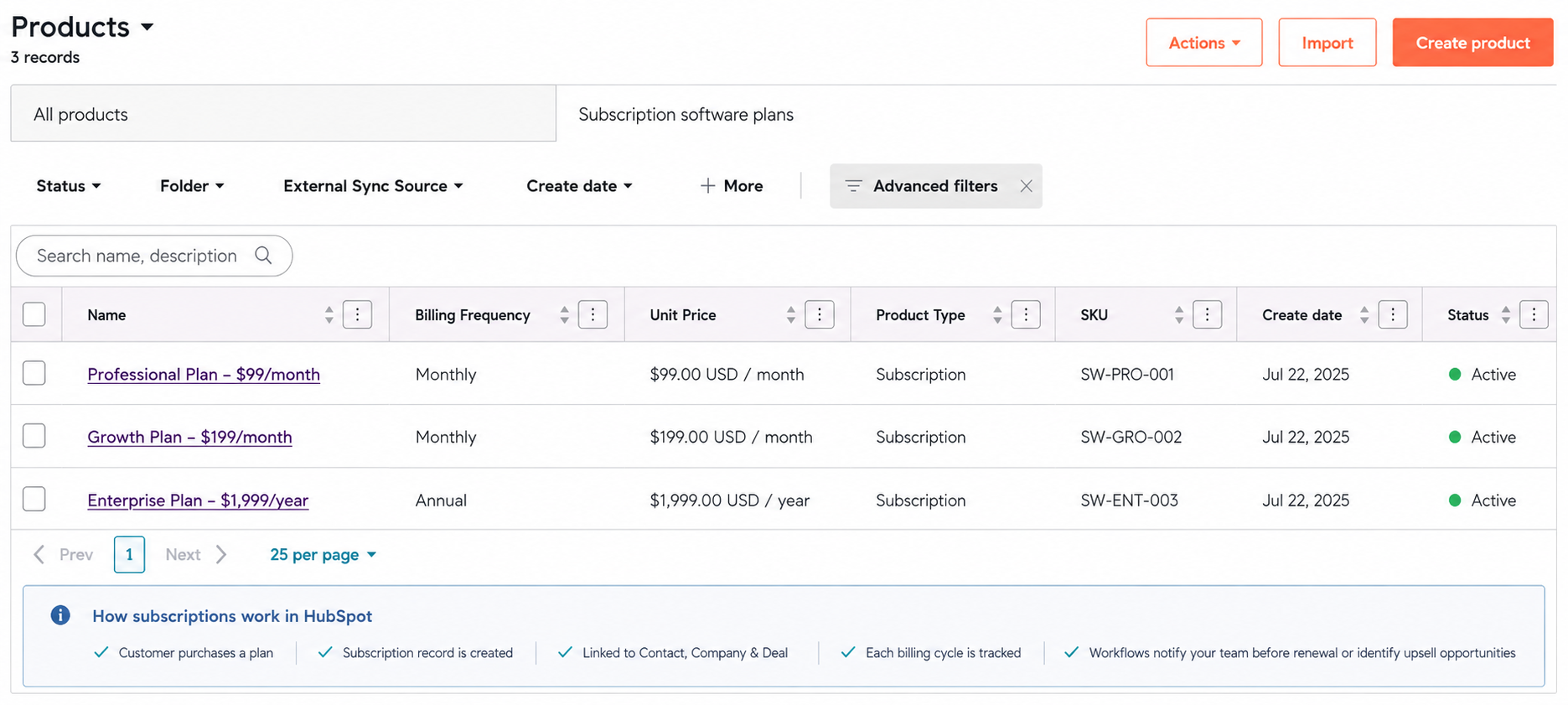
HubSpot provides a dedicated object designed specifically for recurring revenue management instead of tracking subscriptions through custom objects or spreadsheets.
A subscription record can contain details such as:
- Subscription status (active, canceled, expired, etc.)
- Start and renewal dates
- Billing frequency
- Recurring revenue amounts
- Payment history
- Associated products or services
- Customer information through linked contact and company records
Example: Suppose you sell a software plan for $99/month:
- A customer purchases the subscription.
- HubSpot creates a subscription record.
- The record is linked to the customer contact and company.
- Each billing cycle is tracked.
- Workflows can automatically notify your team before renewal dates or identify upsell opportunities.
These records can be associated with contacts, companies, deals, quotes, products, and line items, creating a connected view of customer and revenue data across the CRM.
By linking subscription information to related records, sales, customer success, and finance teams can access billing details, renewal dates, subscription status, and recurring revenue information directly within HubSpot.
Why Businesses Need a Subscription Data Model
Unlike traditional sales models that focus on one-time transactions, subscription businesses must track renewals, upgrades, cancellations, billing cycles, and customer engagement over time to maintain predictable revenue and support long-term growth.
Manage the Entire Customer Lifecycle
A subscription data model creates a single source of truth for every customer interaction. Businesses can track when a customer signs up, changes plans, upgrades, downgrades, pauses a subscription, or cancels altogether.
Without a dedicated subscription record, customer history often becomes fragmented across multiple systems, making it difficult to understand customer behavior and identify growth opportunities.
Improve Revenue Visibility and Forecasting
One of the biggest advantages of subscriptions is predictable revenue. A subscription data model helps businesses monitor recurring revenue, renewal schedules, and customer lifetime value in real time.
This visibility helps leadership teams to forecast future revenue more accurately, allocate resources effectively, and make better strategic decisions. Predictable recurring revenue is one of the primary reasons subscription-based companies often command higher valuations than businesses that rely solely on one-time sales.
Increase Customer Retention
For subscription businesses, customer retention directly impacts profitability. Research published by Harvard Business Review found that acquiring a new customer can cost anywhere from 5 to 25 times more than retaining an existing one. A subscription data model helps businesses identify customers who may be at risk of churning by tracking payment failures, product usage, engagement levels, and renewal activity.
Retention improvements can also produce significant financial results. Research from Bain & Company found that increasing customer retention rates by just 5% can increase profits by 25% to 95%. By centralizing subscription data and customer behavior signals, businesses can proactively intervene before cancellations occur and create more opportunities for long-term customer growth.
Power Automation and Analytics
Recurring billing, renewal reminders, payment recovery, customer notifications, and subscription reporting all depend on structured subscription data. A subscription data model enables businesses to automate these processes while providing the data needed for performance reporting and business intelligence.
The growing demand for subscription management tools reflects this need. In fact, the subscription and billing management market is expected to reach $10.5 billion, driven by businesses seeking more efficient ways to manage recurring revenue operations.
A subscription data model is not simply a database structure. It is the foundation that helps businesses to scale recurring revenue, improve customer retention, automate operations, and make data-driven decisions in an increasingly subscription-driven economy.
How to Structure Subscription Records in HubSpot
To get the most value from HubSpot's Subscription object, organize your records around three areas: subscription details, billing information, and customer associations.
1. Define the Subscription
Start by capturing the information that identifies the recurring agreement.
Core fields include:
- Subscription Name
- Subscription Status
- Start Date
- End Date
- Billing Frequency
- Number of Payments
- Subscription Amount
These properties help your team understand what the customer purchased and where the subscription currently stands in its lifecycle. HubSpot automatically creates and updates many of these properties when subscriptions are generated through its commerce tools.
2. Track Billing and Payment Activity
The Subscription object is primarily a billing-focused record, making it easy to monitor recurring payments throughout the customer lifecycle.
When a buyer purchases a recurring line item, HubSpot creates a subscription record and begins tracking the recurring billing relationship. The example below shows what the customer receives and what your team sees when the subscription is created.
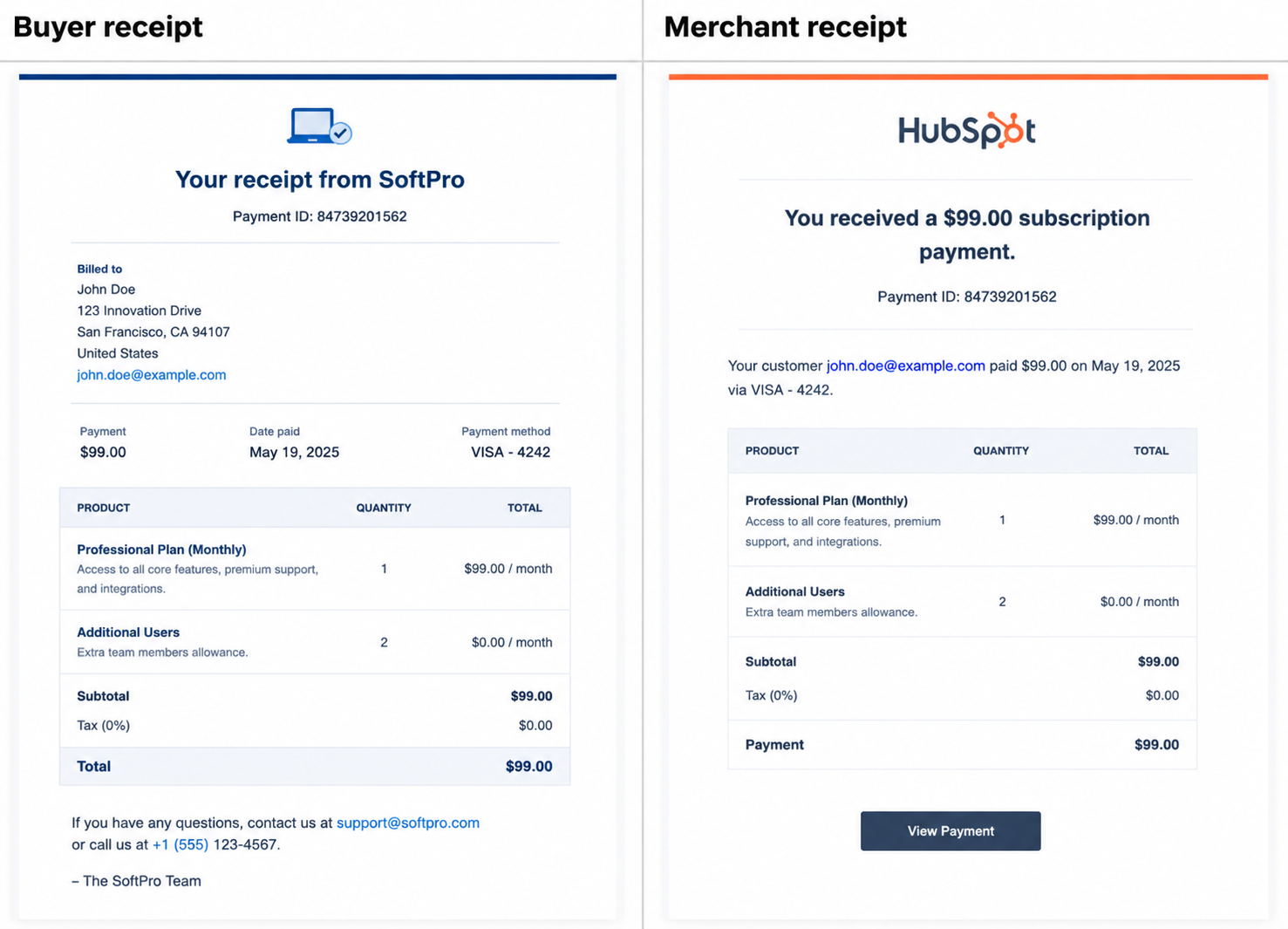
The subscription record automatically updates as payments are processed, renewals occur, billing dates change, and subscription statuses are updated. If a payment fails, expires, or becomes overdue, your team can quickly identify the issue and take action before it impacts customer retention or recurring revenue.
3. Associate Related CRM Records
A subscription becomes much more valuable when it's connected to the rest of your CRM. Associate each subscription with contacts, companies, deals, quotes, products, and line Items. These associations help sales, service, and finance teams to view subscription information within the broader customer context.
4. Use Custom Properties for Renewals and Retention
While HubSpot's native Subscription object focuses on recurring billing, many businesses extend it with custom properties to support subscription management.
Common additions include:
- Renewal Date
- Renewal Status
- Cancellation Reason
- Customer Segment
- Account Owner
These fields help teams manage renewals and customer retention without creating a separate object.
The best way to structure a HubSpot Subscription record is to use the native object for what it was built to do. Track recurring billing relationships, while adding custom properties only when they support specific business processes such as renewals, retention, or account management.
How Subscriptions Connect to Companies, Contacts, and Deals
Contact Associations
Every subscription is linked to a contact, which serves as the primary subscriber and billing recipient. The associated contact receives payment receipts, renewal notifications, failed payment alerts, and other subscription-related communications. HubSpot enables a subscription to be associated with one primary contact at a time, and that contact can be updated if the customer's point of contact changes.
Company Associations
Subscriptions can also be associated with a company record, giving teams a complete view of all recurring revenue tied to a customer account. This is especially useful in B2B environments where multiple contacts may belong to the same company but share a single subscription agreement. Company associations help account managers monitor active subscriptions alongside deals, tickets, and other customer interactions.
Deal Associations
When a subscription originates from a quote, payment link, or closed-won deal, HubSpot automatically associates the subscription with that deal. This connection creates a direct relationship between the initial sale and the ongoing recurring revenue generated from it. Instead of creating a new deal for every recurring payment, HubSpot records future payments on the subscription record while maintaining the association to the original deal.
How the Relationship Works
A common subscription relationship in HubSpot looks like this:
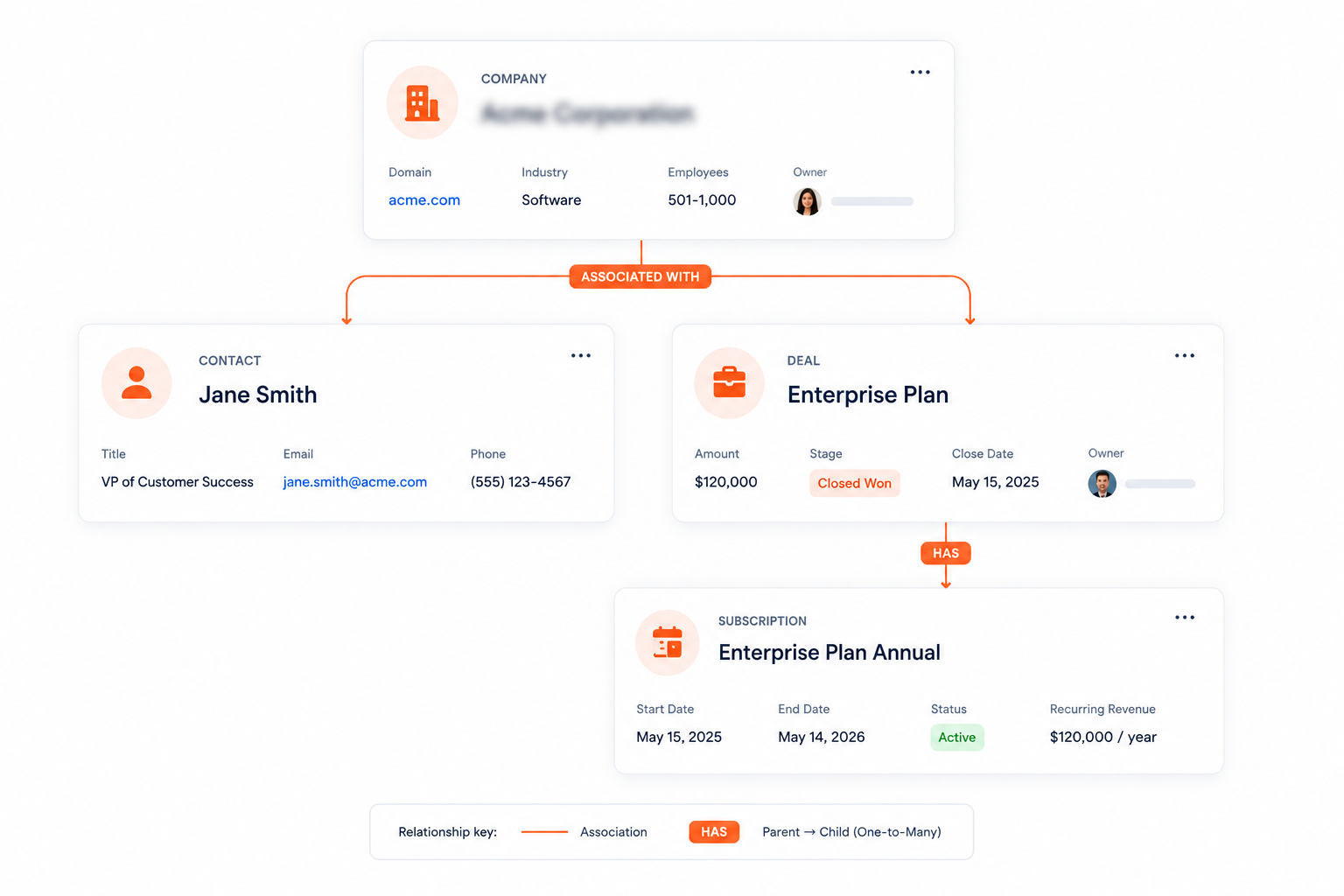
For example, a software company closes a $500/month contract with ABC Corporation. The deal is marked Closed Won, a subscription is created, and HubSpot associates that subscription with:
- The company (ABC Corporation)
- The primary contact (the subscriber)
- The original deal (the sale that generated the subscription)
As recurring payments are collected, the subscription record becomes the central source for billing and payment activity, while the company, contact, and deal records provide the customer and revenue context.
What Information Should Be Stored on Subscription Records
HubSpot subscription records focus on four categories of data: subscription details, billing information, product information, and renewal data.
Everything else can be accessed through record associations, keeping the Subscription object focused, organized, and easy to manage.

Subscription Details
Start with the core information that defines the recurring agreement. Key fields typically include the Subscription Name, Subscription Status, Start Date, End Date, Billing Frequency, Number of Payments, and Subscription Term.
Billing and Payment Information
Since subscriptions are primarily billing records, payment-related data should be stored directly on the subscription. Recommended custom fields include the Subscription Amount, Currency, Next Billing Date, Last Payment Date, Payment Status, Amount Collected, and Outstanding Balance.
Product and Plan Information
Subscription records should also identify what the customer is paying for. Key fields typically include Product Name, Plan Type, Service Tier, Add-ons or Included Services, and Associated Line Items.
Renewal and Lifecycle Data
Many businesses extend the Subscription object with custom properties to support retention and renewal processes. Recommended custom fields include the Renewal Date, Renewal Status, Cancellation Date, Cancellation Reason, and Auto-Renew Status.
What Not to Store on Subscription Records
To keep your data model clean, avoid duplicating information that already belongs elsewhere in the CRM.
For example:
- Contact information belongs on the Contact record.
- Company details belong on the Company record.
- Sales process information belongs on the Deal record.
- Support interactions belong on Ticket records.
Instead of duplicating this information, use HubSpot's associations to connect subscription records to contacts, companies, deals, and other CRM objects.
How to Manage Renewals, Upgrades, Downgrades, and Cancellations
Every subscription eventually reaches a decision point. Customers may renew their service, move to a different plan, reduce their subscription level, or cancel entirely. Managing these changes through the Subscription object helps maintain accurate billing records and a clear view of recurring revenue.
Renewals
HubSpot automatically renews subscriptions that are configured to renew on an ongoing basis. For subscriptions with a fixed number of payments, users can review the subscription record and determine whether a new subscription is needed once the current term ends.
Renewal management typically involves:
- Reviewing the subscription's billing schedule
- Confirming recurring charges and payment details
- Monitoring upcoming subscription end dates
- Updating subscription terms when necessary
Upgrades
When a customer moves to a higher-tier plan or purchases additional services, users can update the subscription's recurring line items and pricing.
Managing an upgrade usually includes:
- Editing products or line items
- Updating recurring charges
- Adjusting billing amounts
- Confirming the effective date of the change
Downgrades
A downgrade occurs when a customer switches to a lower-cost plan or removes part of their subscription. To manage a downgrade:
- Update the subscription's products or services
- Modify recurring billing amounts
- Review how the change affects future payments
- Maintain the subscription record as the source of current subscription terms
Cancellations
HubSpot helps users cancel active subscriptions from the subscription record. Once canceled, future billing stops, but the subscription record remains in the CRM.
When canceling a subscription:
- Change the subscription status to canceled
- Stop future recurring charges
- Retain payment and billing history
- Preserve associations with contacts, companies, and deals
Keeping canceled subscriptions in HubSpot provides historical revenue and customer data for future reporting and analysis.
Every subscription change should be reflected in the subscription record. Whether a customer renews, upgrades, downgrades, or cancels.
How Subscription Data Supports Reporting and Automation
Subscription properties can drive reports, customer segments, and automated workflows, helping teams manage recurring revenue more efficiently.
Powering Subscription Reporting
Because subscriptions are stored as their own object, businesses can build reports around recurring revenue, billing activity, and subscription performance.
For example, subscription data can help answer questions such as:
- How many active subscriptions do we have?
- Which subscriptions are scheduled to end soon?
- How much recurring revenue is tied to specific products or plans?
- How many subscriptions were canceled during a given period?
HubSpot helps users create reports using Subscriptions as a data source, making it possible to analyze subscription activity alongside other CRM data.
Creating Customer Segments
Subscription properties can also be used to filter and segment records. Teams can create lists based on criteria such as Active subscriptions, Canceled subscriptions, Subscription status, Billing frequency, Renewal dates, and Custom subscription properties.
This makes it easier to identify specific groups of customers and tailor outreach based on their subscription status.
Automating Subscription Workflows
Subscription properties can serve as workflow enrollment triggers. This enables HubSpot to take action when subscription data changes.
Common examples include:
- Sending reminders before a subscription ends
- Notifying account managers about upcoming renewals
- Creating follow-up tasks when a subscription is canceled
- Triggering internal alerts when subscription status changes
- Assigning subscriptions to specific teams based on plan type
These automations reduce manual work and help teams respond more quickly to important subscription events.
When HubSpot Custom Objects Make Sense to Use
Use a custom object when the information you need to track doesn't fit within HubSpot's standard objects, such as contacts, companies, deals, tickets, or subscriptions.
Common examples include:
- Memberships
- Contracts
- Real estate listings
- Courses and training programs
- Equipment and assets
- Projects
- Vendors
A common sign that you need a custom object is when teams create workarounds, such as:
- Using deals to manage contracts
- Creating contacts to represent assets
- Storing project information in the company records
- Adding numerous custom properties to simulate a separate record type
These workarounds often create reporting challenges, duplicate data, and inconsistent record management.
Custom objects provide a record structure that can be associated with other HubSpot records. For example, a contract can be linked to a contact, company, deal, and subscription without duplicating information.
The Subscription object manages recurring billing relationships, but businesses often need to track related information that falls outside the subscription record, including:
- Contract terms and amendments
- Service entitlements
- Licensing information
- Customer assets
- Membership benefits
In these situations, custom objects and subscriptions can work together, with each record serving a distinct purpose while remaining connected through HubSpot associations.
If the information you're tracking requires its own records, relationships, and reporting, a custom object is likely the right solution.
Build a Smarter HubSpot Subscription Framework!
HubSpot's Subscription object gives businesses a centralized way to manage recurring billing relationships, monitor subscription activity, track revenue, and support customer lifecycle management.
If your organization needs a scalable subscription management structure, use the Subscription object to store recurring billing data and connect it to contacts, companies, deals, products, and other relevant records.
Campaign Creators help businesses build HubSpot subscription frameworks that support recurring revenue operations, customer retention strategies, workflow automation, and CRM reporting. Our team can help create a structure that aligns with your processes and supports long-term growth.