How Torigen Pharmaceuticals Connected HubSpot Companies and QuickBooks Online Customers Through a Zapier Sync
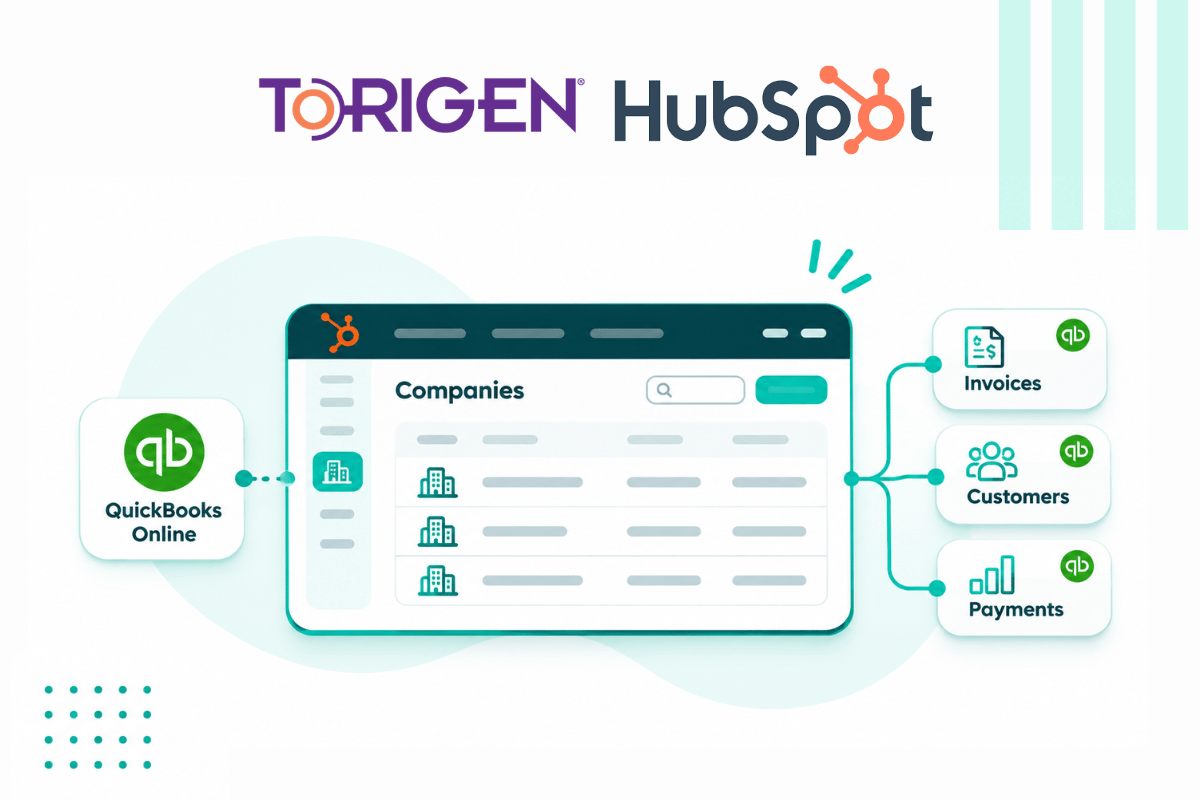
Torigen Pharmaceuticals needed its HubSpot company records and its QuickBooks Online customers to carry matching data and to update each other. Campaign Creators built 3 Zaps and 1 HubSpot workflow that created QuickBooks customers from HubSpot companies and passed updates in both directions, with the HubSpot Record ID in the company name as the shared identifier.
0
QuickBooks customers share a billing email.
0
automations in Zapier and HubSpot
0
platforms connected
Torigen Pharmaceuticals is a veterinary pharmaceutical company serving veterinary clinics across North America with tumor-collection-kit testing, sample analysis, and custom vaccine formulation. Its customers are the clinics themselves. A clinic requests a collection kit, collects a tumor sample from a patient, and submits it to Torigen for analysis, then receives a formulated treatment in return.
One kit request touches sales, outbound shipping, sample analysis, formulation, return shipping, and invoicing before it closes. A clinic becomes a billable customer when its deal reaches the Kit Sent stage, so each billing clinic needs a company record in HubSpot and a matching customer in QuickBooks Online. Company data serves the Sales, Marketing, Operations, and Service teams, and invoicing data is used to collect revenue and to avoid selling to customers who are not paying their invoices. Some clinics share a name across different states and cities, so each record has to point to the right customer in the other system. At the time of this work Torigen operated with 25 employees, and its HubSpot implementation supported 66 total users.
Industry
Healthcare
Tools Used
QuickBooks Online
Zapier
HubSpot
Services
Integration (Zapier iPaaS)
Workflow Automation
The Challenge
Torigen already ran the native HubSpot and QuickBooks Online integration, and it automated parts of invoicing through it. The friction sat between the two systems. A clinic existed as a company in HubSpot and as a customer in QuickBooks, and the two records had to agree before an invoice could go out.
Invoicing data tells Torigen whom to collect from and whom to stop selling to, which makes it worth keeping the two customer lists matched. The marketplace QuickBooks Online integrations available at the time did not meet all of Torigen’s technical requirements.
What Torigen's Invoicing and Customer Data Needed
1. Manual invoice preparation.
Torigen's administrative staff carried manual steps when preparing invoices. Reducing those steps was the goal of the project.
2. Customer creation tied to the invoice step.
The Add New Customer process ran when an invoice was created from a deal, and Torigen felt it was bulky and time-consuming. Torigen wanted the customer created once there was a valid reason to invoice.
3. Customer fields outside the in-app module.
Some QuickBooks customer fields were not accessible through the in-app integration module when an invoice was created. Torigen wanted to transfer data into those fields.
4. Clinics with the same name.
At kickoff the open question was how QuickBooks matched accounts in HubSpot. Clinics that share a name in different states or cities had to be told apart.
5. Duplicate customer records.
The 2022 interface plan called for merging duplicates in HubSpot and QuickBooks. For the QuickBooks merge, the plan gave the reason as billing history.
"We needed a unique identifier for every company, so we put the HubSpot Record ID in the company name and built the Zaps around it."
Nisha Wendelken, Campaign Creators
Why Torigen Chose Campaign Creators
Torigen's requirements for the integration included:
Reflect changes to company information in HubSpot, and updates to customer data in QuickBooks, in both systems
Populate the billing email and phone company properties correctly before they pushed to the QuickBooks customer
Campaign Creators is a HubSpot Elite Solutions Partner. Its Inside-Out Experience Framework is "Campaign Creators' model for building connected customer experiences from the core outward", and Data Foundation and Architecture are the first two of its five layers.
How Campaign Creators Built a Zapier Sync Between HubSpot Companies and QuickBooks Online Customers
The build had five parts: Zapier as the integration layer, an identifier scheme, a one-time update of existing company names, the HubSpot properties that fed QuickBooks, and the workflow and Zaps that carried changes between the systems.
Putting Zapier Between HubSpot Companies and QuickBooks Customers
At the time, the marketplace QuickBooks Online integrations did not meet all of Torigen's technical requirements. Campaign Creators used Zapier as the integration layer and mapped each HubSpot Company to a QuickBooks Customer. The QuickBooks customer was created before invoicing, so Torigen could transfer data into fields that the in-app integration module did not reach when creating the invoice.
Carrying the HubSpot Record ID in the Company Name as the QuickBooks Identifier
Campaign Creators set the Company Name to "Record ID - Company True Name" and kept the plain name, without the city, in a Company True Name property. Zapier transferred the Company Name to QuickBooks as the unique identifier. A company could then be identified programmatically when it was updated in either system.
Updating Existing Company Names to the Record ID Format With a .csv Import
Existing QuickBooks company names included the city, and HubSpot company names did not. The initial update of company names to the Record ID format was done through a .csv import.
Defining the HubSpot Properties That Feed QuickBooks Customers
The QuickBooks customer needed billing details from the HubSpot company. Campaign Creators defined a Sync to Quickbooks property and the Company True Name property, and pushed the billing email and phone company properties to the QuickBooks customer.
Building 1 HubSpot Workflow and 3 Zaps for Two-Way Customer Updates
The build produced these automations:
HubSpot workflow. Trigger: a company became a billable customer. Action: update the Company Name to include the HubSpot Record ID and set Sync to Quickbooks to TRUE. Recipient: that HubSpot company record.
Zap 1. Trigger: a company had Sync to Quickbooks set to TRUE. Action: create a customer in QuickBooks. Recipient: the new QuickBooks customer.
Zap 2. Trigger: a customer was updated in QuickBooks. Action: update the company in HubSpot. Recipient: the corresponding HubSpot company.
Zap 3. Trigger: a company was updated in HubSpot. Action: update the customer in QuickBooks. Recipient: the corresponding QuickBooks customer.
Each system had a defined path to update the matching record in the other.
The Results
The sync gave Torigen's HubSpot and QuickBooks Online records a record-level link in each direction.
Address updates were set up in each direction: Nisha Wendelken of Campaign Creators said on a 2024 call, "we had set up the zaps to update address in QuickBooks and vice versa"
Torigen staff were using the Record ID naming by September 2024: a Torigen speaker on a call said, "There have been a few mix ups, but we seem to have it under control"
Both statements come from calls held after the build.
Impact: The Record ID as the Link Between Two Systems
Each billable Torigen clinic carried one HubSpot company and one QuickBooks Online customer, tied by the HubSpot Record ID in the company name. The QuickBooks customer was created before the first invoice, with the billing email and phone from the HubSpot company already in place, and updates made in either system reached the other. Clinics that share a name in different states or cities stay distinct because the Record ID identifies each one, and a Torigen speaker called it the best way to separate them on a September 2024 call.
The design uses the standard HubSpot Company object and the QuickBooks Customer record, with two added properties, Sync to Quickbooks and Company True Name. The link is readable in the company name itself, so anyone on Torigen’s team can see which QuickBooks customer a company record maps to.
Solve HubSpot and QuickBooks Customer Sync Problems With Campaign Creators
A business that sells from HubSpot and bills from QuickBooks Online has two customer lists to keep matched.
Matching them takes a defined trigger for creating customers, an identifier that both systems recognize, and updates in each direction. Campaign Creators builds those pieces as workflows, Zaps and company properties on the standard HubSpot company record.
Talk to a HubSpot expert to see how Campaign Creators can build a HubSpot and QuickBooks Online customer sync around your existing tools.
Sync HubSpot Companies to QuickBooks Customers
Campaign Creators builds the sync end to end: a HubSpot workflow that flags billable companies, Zaps that create the QuickBooks customer and carry updates in each direction, and a shared identifier that keeps same-name customers on the right record. Integration development and workflow automation, scoped to the tools you already run.