6 min read

Salesforce to HubSpot Migration for SaaS: How to Prevent Data Loss, Duplicate Records, and Broken Reporting

Salesforce to HubSpot Migration for SaaS: How to Prevent Data Loss, Duplicate Records, and Broken Reporting

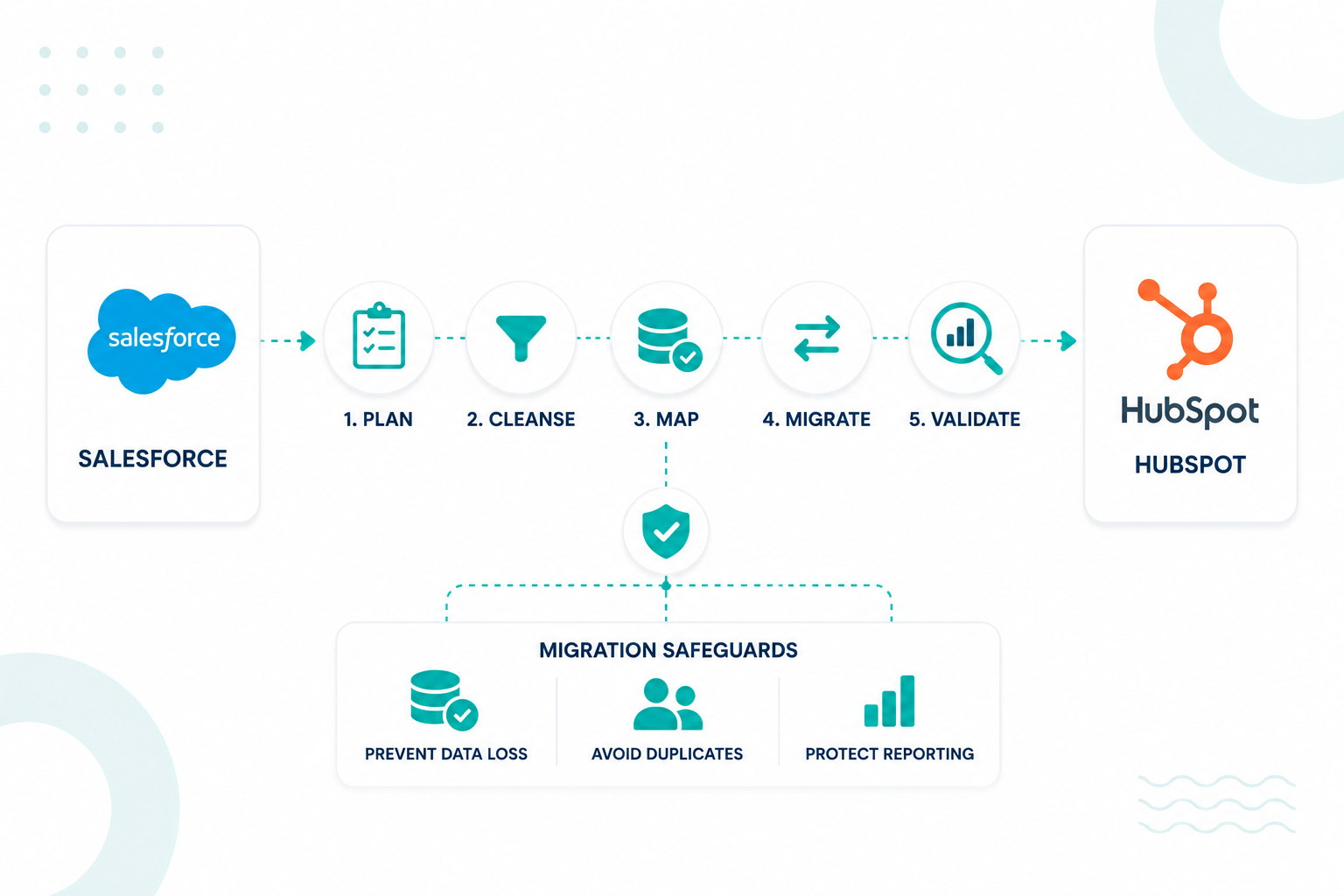
Many technology companies, such as SaaS, move from Salesforce to HubSpot to simplify CRM management, improve adoption, and create a more connected sales and marketing system. However, a successful migration involves more than transferring records between platforms.

SaaS companies often manage subscription data, product usage information, custom objects, and complex customer journeys. One of the biggest migration challenges is preserving data integrity. Contacts, companies, deals, custom properties, and historical activities must remain accurately connected after the move. If data is mapped incorrectly or relationships are lost, reporting can become unreliable.

In this guide, you'll learn how to prepare your CRM data, map records and relationships correctly, prevent duplicate records, and maintain data quality throughout the migration process.

Key Takeaways

  • Salesforce-to-HubSpot migrations require data audits, relationship mapping, and reporting validation before data transfer begins.
  • Duplicate contacts, orphaned records, and inconsistent field structures create the largest data quality risks during migration projects.
  • Auditing and cleaning your Salesforce data before migration helps reduce errors and improve data quality in HubSpot.

Why SaaS Companies are Moving From Salesforce to HubSpot

a professional saas operations manager checking HubSpot CRM platform she is in the center of an office showing busy daily business activities around her walking, or typing or in a call, employees blurring in the backhground while she is clear and confident in the center. with pop-up icons of Customer acquisition, onboarding, retention, renewals, and expansion metrics are displayed across sleek digital interfaces while teams work from a shared view of customer and revenue data.

As SaaS companies grow, their CRM requirements often become more difficult to manage. Years of custom objects, integrations, workflows, and reporting layers can make Salesforce harder to maintain and adapt to changing business needs.

HubSpot has become a popular alternative for companies looking to bring marketing, sales, customer success, and reporting into a single platform. According to HubSpot's 2025 financial results, the company grew to 288,706 customers worldwide, a 16% increase from the previous year. This growth reflects increasing demand for platforms that are easier to manage and use across multiple teams.

For many SaaS businesses, the decision to migrate is driven by the need for cleaner data, more reliable reporting, and a clearer view of the customer journey. A well-planned migration can help teams track pipeline performance, customer retention, expansion opportunities, and revenue from one connected system.

What to Audit and Clean Before Migrating CRM Data

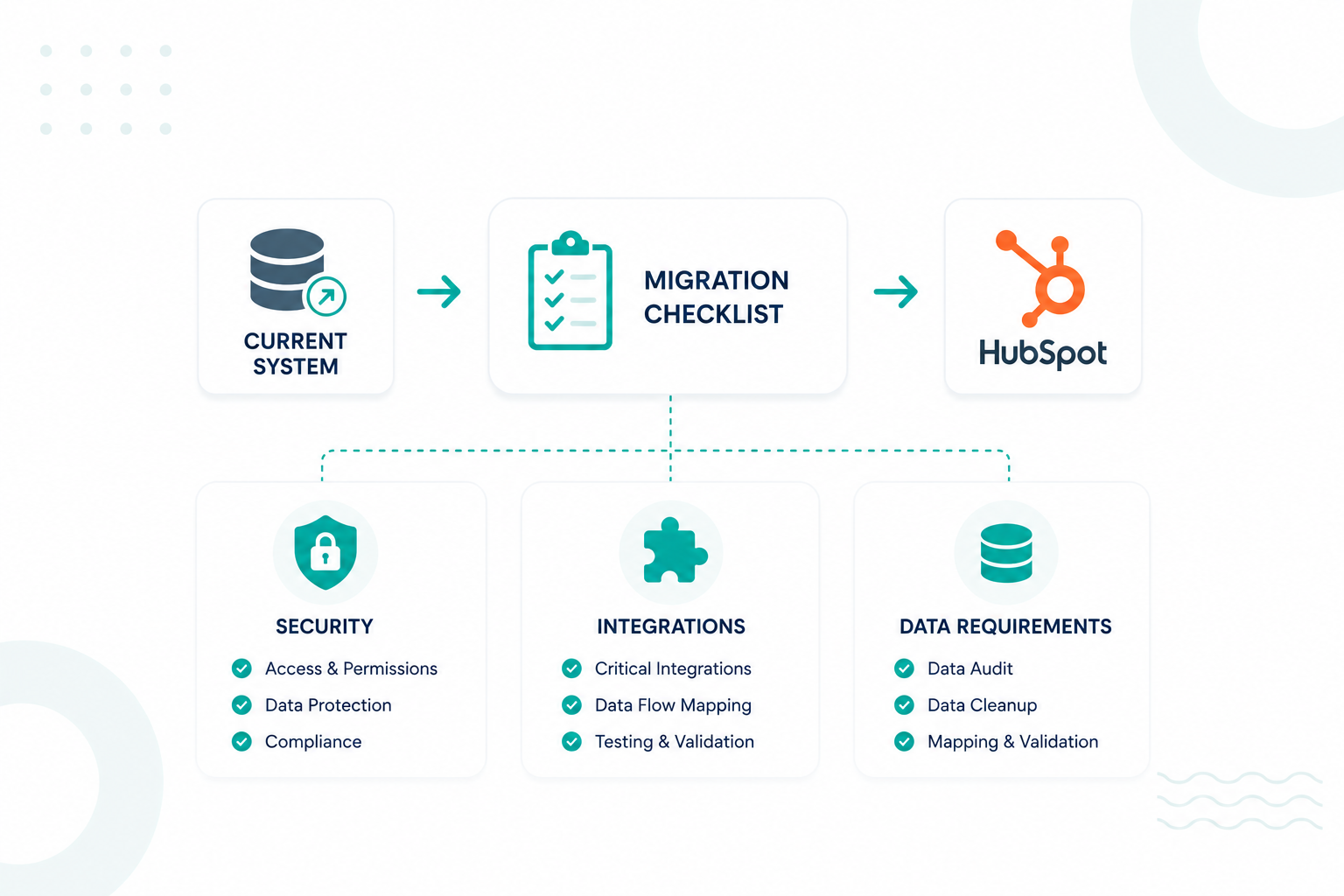
You need to identify if there are duplicate records, inactive fields, incomplete records, inconsistent formatting, broken relationships, and outdated business logic before any migration begins.

Many migration failures originate from poor source data rather than migration technology. Duplicate contacts, inconsistent naming conventions, outdated properties, and disconnected relationships create problems that transfer directly into the new CRM environment.

Software companies frequently maintain large datasets across leads, companies, opportunities, subscriptions, customer accounts, support records, and product usage data. These records often contain years of accumulated inconsistencies that affect reporting accuracy.

A complete audit typically includes:

Audit Area

Purpose

Duplicate contacts

Reduce contact fragmentation

Duplicate companies

Improve account reporting

Inactive properties

Remove unnecessary fields

Missing lifecycle data

Protect funnel reporting

Invalid email records

Improve marketing accuracy

Orphaned relationships

Preserve account structures

Custom object review

Protect business-specific data

Data cleansing is widely considered one of the most important phases of a CRM migration because duplicate, incomplete, and inconsistent records can transfer into the new platform and lead to inaccurate reporting, unreliable dashboards, and reduced confidence in business metrics after go-live.

Read more on CRM Data Migration in this guide.

How to Map Salesforce Records Without Losing Data or Relationships

Data mapping connects Salesforce records, fields, and object relationships to the correct HubSpot properties and associations so reporting, automation, and customer history remain accurate after migration.

Many software companies store far more than leads and opportunities inside Salesforce. CRM environments often include subscriptions, product licenses, onboarding projects, customer health scores, implementation milestones, support records, and renewal data. These records connect multiple teams across marketing, sales, customer success, support, and revenue operations.

A migration project needs to identify exactly how every Salesforce object connects to another record before any import begins.

For example:

Salesforce Object

HubSpot Object

Lead

Contact

Account

Company

Opportunity

Deal

Subscription Custom Object

Custom Object

Customer Success Manager

HubSpot Owner

Product License Record

Custom Object

The larger challenge involves preserving relationships between those records. A SaaS company may have:

  • One company
  • Multiple contacts
  • Several active subscriptions
  • Multiple closed-won deals
  • Product usage records
  • Customer success activities

If those associations break during migration, HubSpot may contain all the records but lose the connections between them. Revenue reports, renewal forecasts, customer health dashboards, and attribution reporting can then produce inaccurate results.

a close-up of a monitor showing hubspot during a large-scale migration, displaying 20,000 customer contact records and 5,000 company records successfully imported into a new system. While the records appear complete, many relationship links between contacts, companies, deals, subscriptions, and revenue records are visibly disconnected, creating broken customer journeys and reporting gaps. The professional working on the desk have notes about importance of preserving relationships between records during CRM migration, highlighting with pop-ups of icons of data integrity, reporting accuracy, and customer lifecycle visibility.

For example, a company may migrate 20,000 contacts and 5,000 companies successfully. If deal associations fail during import, HubSpot can no longer connect revenue back to the correct accounts. Sales pipeline reporting and customer expansion reporting immediately become unreliable.

Custom objects create another layer of complexity. Many technology companies use Salesforce custom objects to track subscriptions, product environments, implementation projects, service plans, or customer assets. These objects need equivalent structures inside HubSpot before migration begins.

Teams need to map Salesforce record IDs to HubSpot association IDs so contacts, companies, deals, and custom objects remain connected after migration. Missing associations frequently create reporting failures even though the records themselves transfer successfully.

A practical mapping process usually includes:

  1. Inventory every Salesforce object and custom object
  2. Document relationships between records
  3. Identify reporting dependencies
  4. Create HubSpot properties and custom objects
  5. Build field-to-property mappings
  6. Test associations in a sandbox environment
  7. Validate reporting outputs before production import

Enterprise migration teams also recommend testing custom object relationships before full deployment because reporting structures often depend on those associations.

For additional guidance, read The Data to Migrate for a Successful HubSpot CRM Implementation.

Where Duplicate Records and Reporting Errors Usually Start

Duplicate records and reporting errors often begin during data imports, integration configuration, lifecycle mapping, ownership assignment, and association transfers.

Many companies focus heavily on transferring records yet spend less attention on the operational rules that support reporting accuracy. This creates situations where records exist inside HubSpot, but reporting outputs no longer match historical Salesforce reporting.

Common causes include:

Issue

Business Impact

Duplicate contacts

Inflated lead reporting

Duplicate companies

Fragmented account visibility

Missing associations

Incomplete customer records

Lifecycle mismatches

Funnel reporting errors

Attribution gaps

Inaccurate campaign reporting

Ownership conflicts

Forecasting inconsistencies

Custom object failures

Broken operational reporting

Software companies with product-led growth models face additional complexity because reporting often depends on product usage data, free-to-paid conversion tracking, subscription metrics, and customer expansion analysis.

What Steps Help Preserve Reporting Accuracy After Go-Live

a manager creating a report in hubspot showing validation stages are organized in sequence, including record count reconciliation, property validation, relationship verification, attribution testing, dashboard validation, workflow testing, permission reviews, and revenue reporting checks, with a glowing teal line sending this report to a business analysts and implementation specialists in the same office.

Testing and validation confirm that records, relationships, reporting structures, and business processes function correctly before production deployment.

Validation frameworks typically include:

  1. Record count reconciliation
  2. Property-level accuracy checks
  3. Relationship validation
  4. Attribution verification
  5. Dashboard testing
  6. Workflow testing
  7. Permission reviews
  8. Revenue reporting validation

Technology companies should also test real operational scenarios across marketing, sales, customer success, onboarding, support, and revenue operations teams. For example:

  • Marketing teams can verify that form submissions create contacts, assign the correct lifecycle stage, and appear in campaign reporting.
  • Sales teams can confirm that leads move through pipeline stages, activities are logged correctly, and closed deals appear in revenue dashboards.
  • Customer success teams can test onboarding workflows, renewal tracking, and customer health reporting.
  • Support teams can validate ticket creation, ownership assignment, and service reporting.
  • Revenue operations teams can review attribution reports, forecast dashboards, and lifecycle conversion metrics to ensure data remains accurate across the customer journey.

A staged testing process helps identify reporting inconsistencies before teams begin operating inside the new environment.

How to Maintain Long-Term Data Accuracy and CRM Governance in HubSpot

Long-term data accuracy depends on creating clear ownership, standardised data rules, and regular quality reviews so HubSpot remains a reliable source of truth for every team.

Many companies complete a successful migration and then gradually recreate the same data problems that existed in the previous CRM. New properties appear without documentation, teams use different lifecycle definitions, duplicate records increase, and reporting becomes harder to trust.

A governance framework prevents these issues from affecting sales, marketing, customer success, and revenue operations. A practical starting point is assigning ownership for CRM data.

Area

Owner

Lifecycle stages

RevOps

Contact and company properties

CRM Administrator

Attribution reporting

Marketing Operations

Pipeline reporting

Sales Operations

Customer success data

Customer Success Operations

Integrations

RevOps or Systems Team

Clear ownership helps prevent multiple teams from changing critical properties, workflows, and reporting structures without oversight. Software companies should also create standard rules for data entry. For example:

  • One definition for every lifecycle stage
  • One naming convention for properties
  • Required fields for new contacts and companies
  • Standard rules for account ownership
  • Approved values for dropdown properties
  • Unique identifiers for customer records

Without these standards, different teams often record the same information in different ways, creating reporting inconsistencies across dashboards and revenue metrics.

Duplicate prevention should also become an ongoing process rather than a one-time cleanup project. HubSpot's data quality tools can identify duplicate contacts, duplicate companies, formatting issues, and property inconsistencies before they affect reporting.

For software companies, quarterly CRM audits are often more effective than waiting for major reporting issues to appear. A typical audit reviews:

  1. Duplicate records
  2. Unused properties
  3. Workflow performance
  4. Attribution accuracy
  5. Lifecycle progression
  6. Integration health
  7. Dashboard accuracy
  8. Data completeness

This helps identify problems before they affect forecasting, pipeline management, or customer reporting.

The goal is not simply to keep HubSpot organized but to maintain a CRM environment where every team works from the same customer data, every report reflects the same business definitions, and leadership can trust the numbers used for revenue decisions.

Start Planning Your Salesforce-to-HubSpot Migration Today!

A Salesforce-to-HubSpot migration is an opportunity to do more than just move data from one system to another. It helps you clean up outdated records, improve reporting accuracy, and create a clearer view of the customer journey across your business.

The strongest migration outcomes come from careful planning, accurate data mapping, and thorough testing before go-live. Taking the time to validate records, relationships, and reports helps prevent duplicate records, missing data, and reporting issues that can affect day-to-day operations.

At Campaign Creators, we help technology companies migrate from Salesforce to HubSpot with a focus on protecting data quality and maintaining reliable reporting.

Frequently Asked Questions

How Long Does a Salesforce to HubSpot Migration Take?

Most Salesforce-to-HubSpot migrations take between a few weeks and several months, depending on data volume, custom objects, integrations, and reporting requirements.

Can You Migrate Historical Activity Data From Salesforce to HubSpot?

Yes, historical activities such as emails, notes, tasks, meetings, and timeline events can be migrated into HubSpot. The amount of historical data preserved depends on the migration method, data structure, and any platform limitations.

Which Salesforce Integrations Need Review Before Migration?

Any integration that sends, receives, or transforms CRM data should be reviewed before migration. Common examples include marketing automation platforms, customer support tools, billing systems, product analytics platforms, data warehouses, and customer success software.

Can You Migrate Salesforce Custom Objects Into HubSpot?

Yes, HubSpot supports custom objects that can store business-specific data, such as subscriptions, product licenses, onboarding projects, or customer assets.

What Happens to Salesforce Reports After Moving to HubSpot?

Salesforce reports do not transfer directly into HubSpot because both platforms use different reporting frameworks and data models. Most companies rebuild dashboards and reports using HubSpot data structures after migration.

Should You Run Salesforce and HubSpot in Parallel During Migration?

Many software companies run both platforms simultaneously during testing and validation. This helps teams compare records, verify reporting accuracy, and identify data issues before fully transitioning to HubSpot.

When Should Technology Companies Use HubSpot Custom Objects?

When Should Technology Companies Use HubSpot Custom Objects?

Technology companies can use HubSpot custom objects once standard CRM records can no longer support how the business operates. For SaaS companies,...

Read More
HubSpot Replatforming Strategy for Unified Systems

HubSpot Replatforming Strategy for Unified Systems

Why HubSpot Replatforming Feels Risky The Migration Fear That Creates Stalemate Executives rarely reject HubSpot because they doubt the platform. The...

Read More
HubSpot Data Sync for IT Teams: How to Keep Customer Data Clean Across Systems

HubSpot Data Sync for IT Teams: How to Keep Customer Data Clean Across Systems

IT teams use HubSpot alongside platforms like Salesforce, NetSuite, Zendesk, ERP systems, support tools, and internal databases. As customer data...

Read More