






Skip to the main content.

WEBSITE GROWTH & CONVERSION

• Web Design & Development


• SEO & AEO


• Conversion Rate Optimization


• Lead Generation Strategies


HUBSPOT SUPPORT & ENABLEMENT

• HubDesk


• HubSpot Training


• HubSpot Change Management

FREE TOOLS & ASSESSMENTS

• AEO Auditor


• HubSpot Al Readiness Scorecard


• HubSpot Al Solutions Design


LEARN & WATCH

• View All Resources


• Ebooks & Templates


• Webinars On-Demand


• Expert Videos

6 min read

Should You Build a Custom Ticketing System With AI or Use HubSpot Service Hub?

Should You Build a Custom Ticketing System With AI or Use HubSpot Service Hub?

A custom ticketing system built with AI coding tools can go live in days, but it only works well when it can read and write your CRM data. Without contact, company, deal, and billing context, routing, reporting, and AI replies all get worse. Most teams get better results running tickets in HubSpot Service Hub and building custom tools on top of it.

The build is the easy part now. The hard part is keeping a support tool accurate once it's handling real customers, real escalations, and a sales team that needs to know about open issues before renewal calls. If you're deciding between building your own help desk and using Service Hub, our HubSpot Service Hub team can help you assess what each option needs to work with your CRM.

Key Takeaways

  • AI app builders can produce a working ticketing tool in just a few days.
  • Every ticket needs links to the contact, company, and deal it belongs to, or routing, reporting, and AI replies lose accuracy.
  • Ongoing maintenance, security, and integrations often cost more than the first build, and they fall on whoever wrote the code.
  • The safest setup for most HubSpot users is Service Hub for tickets, plus custom app cards or integrations for the few workflows it can't handle.

Table of Contents

  1. Can You Build a Ticketing System With AI Coding Tools?
  2. What Does a Ticketing System Need From Your CRM?
  3. What Breaks When a Custom Ticketing System Has No CRM Context?
  4. How Does a Custom Ticketing System Compare to HubSpot Service Hub?
  5. When Does a Custom Support Tool Make Sense?
  6. How Do You Connect a Custom Support Tool to HubSpot?
  7. How Can Campaign Creators Help With Service Hub?
  8. Frequently Asked Questions

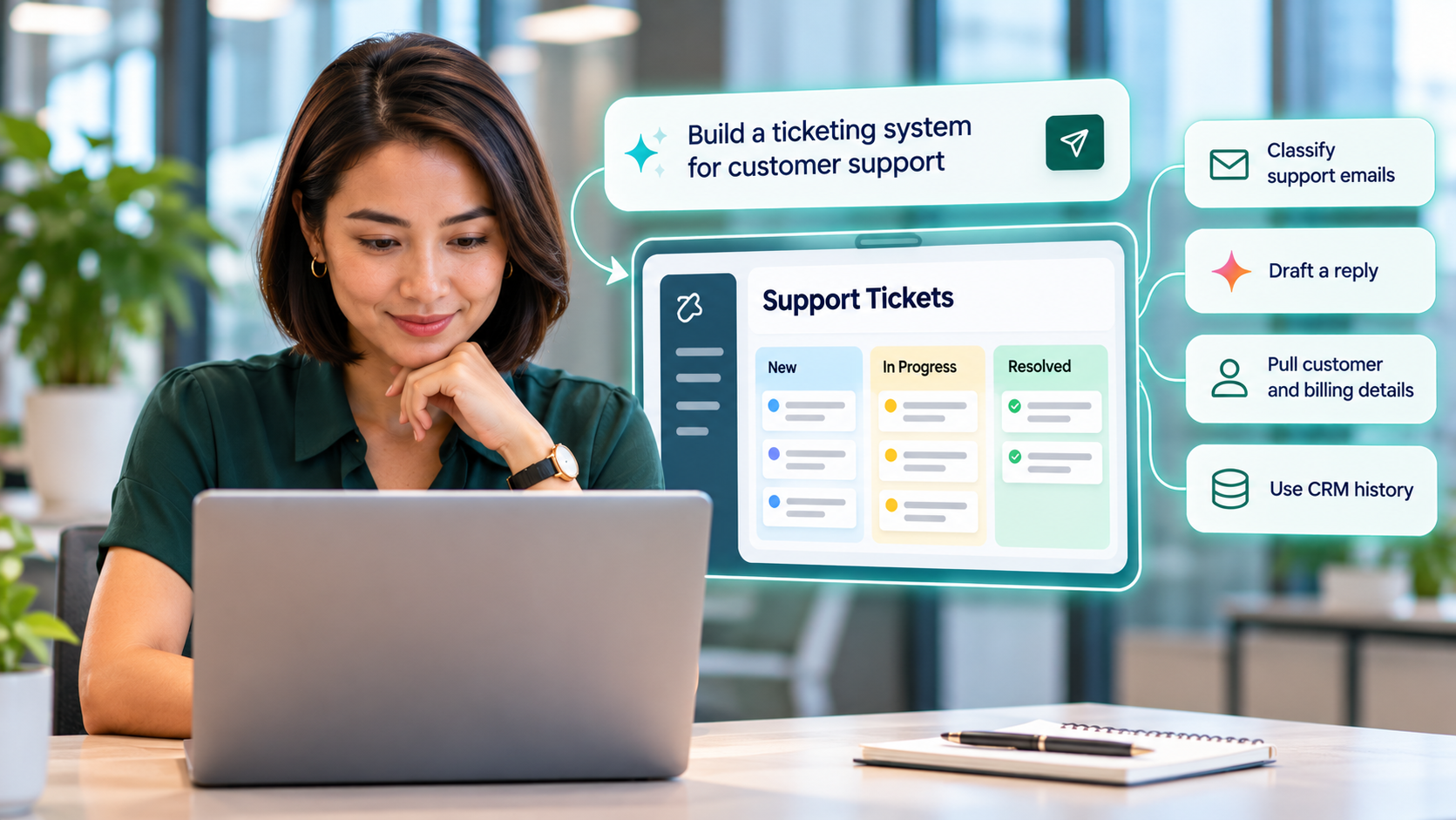
Can You Build a Ticketing System With AI Coding Tools?customer-service-officer-reviewing-ai-powered-customer-support-ticket-dashboard

Yes. Tools like Lovable, Replit, Cursor, and Claude can produce a ticket queue, an intake form, and a status pipeline from plain-language prompts. The first version is rarely the problem. The problem is everything the tool has to know and do once customers depend on it.

Vendasta is the clearest public example. The company built its internal support platform, vTicket, in just a few days and retired its Zendesk subscription. The tool classifies each support email, drafts a reply, and pulls in the customer's active products, billing status, and CRM history before a human reviews it. Launch still had gaps. Live chat went down for a while, the customer portal wasn't ready, and the team shipped more than 40 fixes in the first 48 hours.

The same pattern shows up with homegrown CRMs. The founder of Curative said he cancelled a $600,000 Salesforce contract after building a CRM in two months, and he admitted maintenance is one of the hardest parts.

vTicket worked because it ran on a platform that already held the customer data, so the Vendasta example supports the case for CRM context.

What Does a Ticketing System Need From Your CRM?

A ticketing system needs to know who the customer is, what they've bought, who owns the account, and what happened the last time they asked for help. Without that, every ticket starts from zero, and customers always notice. 81% of consumers want agents to pick up where the last conversation left off.

These are the CRM fields we check first on every support setup.

  • Contact and company: The person who wrote in and the account they belong to.
  • Deal or contract tier: The plan, renewal date, and SLA level that set the ticket's priority.
  • Account owner: The rep or CSM who needs to hear about escalations.
  • Past tickets and conversations: Earlier issues, replies, and notes on the same account.
  • Product, order, and billing data: Often stored in Shopify, an ERP, or a billing tool and synced into the CRM.

In HubSpot, these links are built in. Tickets can be associated with contacts, companies, and deals, so the full record sits next to the ticket.

When our client, Monetate, moved its external support off Zendesk, our team mapped Zendesk Organizations to HubSpot Companies and carried over ownership, notes, and attachments. That mapping is what kept agents working with full history after the switch, and it's the first thing to plan in any support tool you build or buy.

What Breaks When a Custom Ticketing System Has No CRM Context?

Routing, visibility, data quality, reporting, and AI replies all break when a ticketing tool can't see the CRM. The tool still logs requests, but every decision around those requests gets slower and less accurate.

Another client we have is Zippo, which shows what this looks like day-to-day. Before moving to Service Hub, a single inquiry could have order history in Shopify, repair status in an ERP, conversations in Salesforce, and instructions in Google Docs. Agents spent their time searching across tools. Around 3,500 to 4,000 customers a year contacted Zippo just to ask where their repair was.

Routing Ignores Account Value

A standalone tool can sort tickets by keyword, but it can't tell a trial user from your largest customer. High-value accounts end up in the same queue as everyone else.

Sales and Success Teams Lose Visibility

Reps walk into renewal calls without knowing about the three open tickets on the account. Customers notice this before you do.

Duplicate Records Pile Up

Every tool that creates its own contact list adds duplicates and placeholder companies. Zippo's old setup also produced empty tickets from missed calls, and those tickets inflated reported workload.

Reporting Splits in Two

Ticket data lives in one system and revenue data in another. Questions like "do customers with more tickets churn faster?" need a manual export to answer.

AI Replies Miss the History

An AI drafting replies from the help desk alone only knows the help desk. It can't factor in billing status, product tier, or a promise a rep made last month.

Maintenance Falls on One Person

The person who built the tool becomes its only support desk. Technical debt and security gaps are the main risks of homegrown CRM tools, and that's a vendor with an obvious stake. Still, the risk is real when no one else knows how the code works.

Each of these problems has the same fix. Tie every ticket record to the customer record. Build that link first, and the rest gets easier.

Worth a read: 15 Things That Can Go Wrong With a Vibe-Coded Business Tool

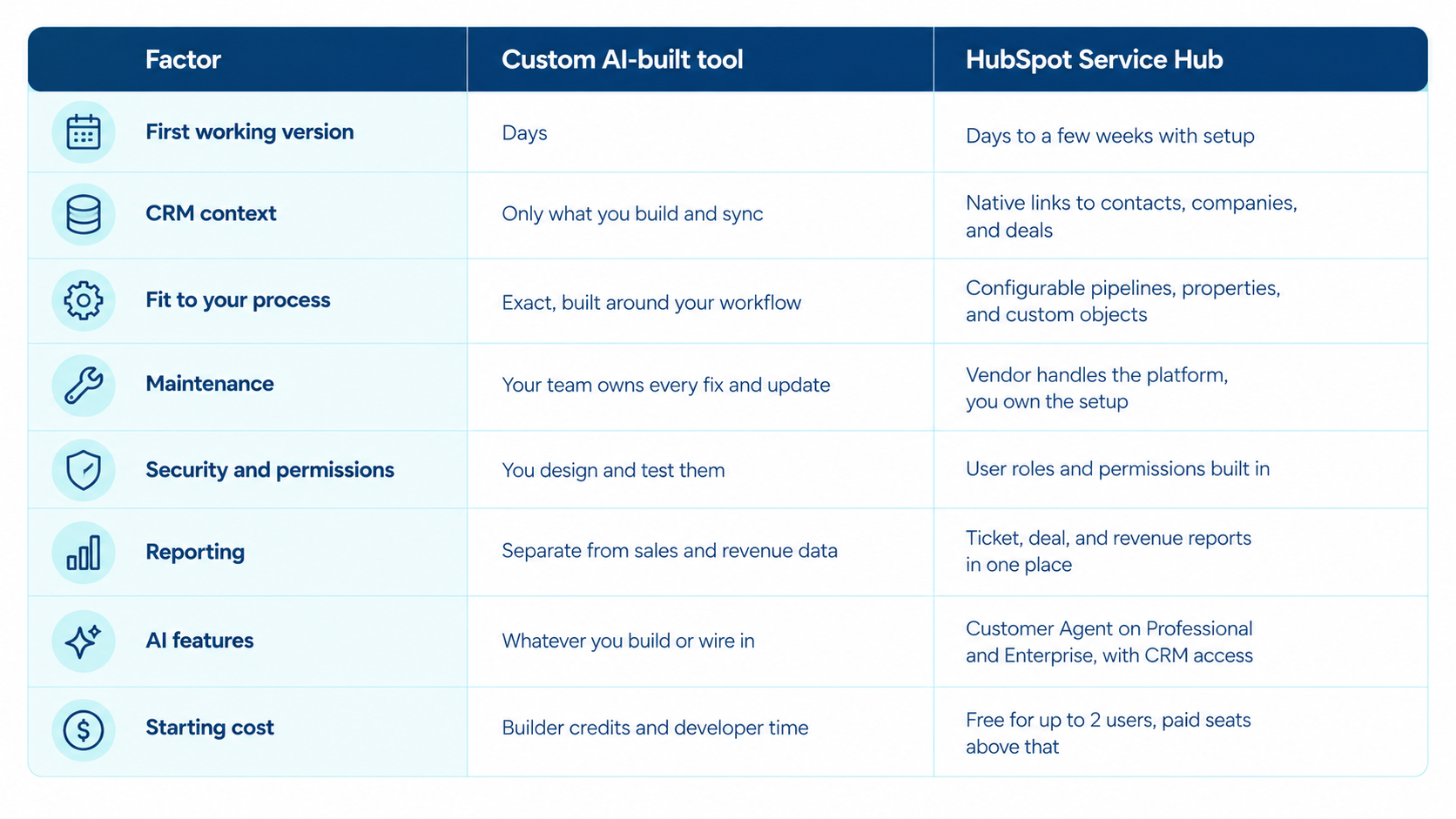
How Does a Custom Ticketing System Compare to HubSpot Service Hub?

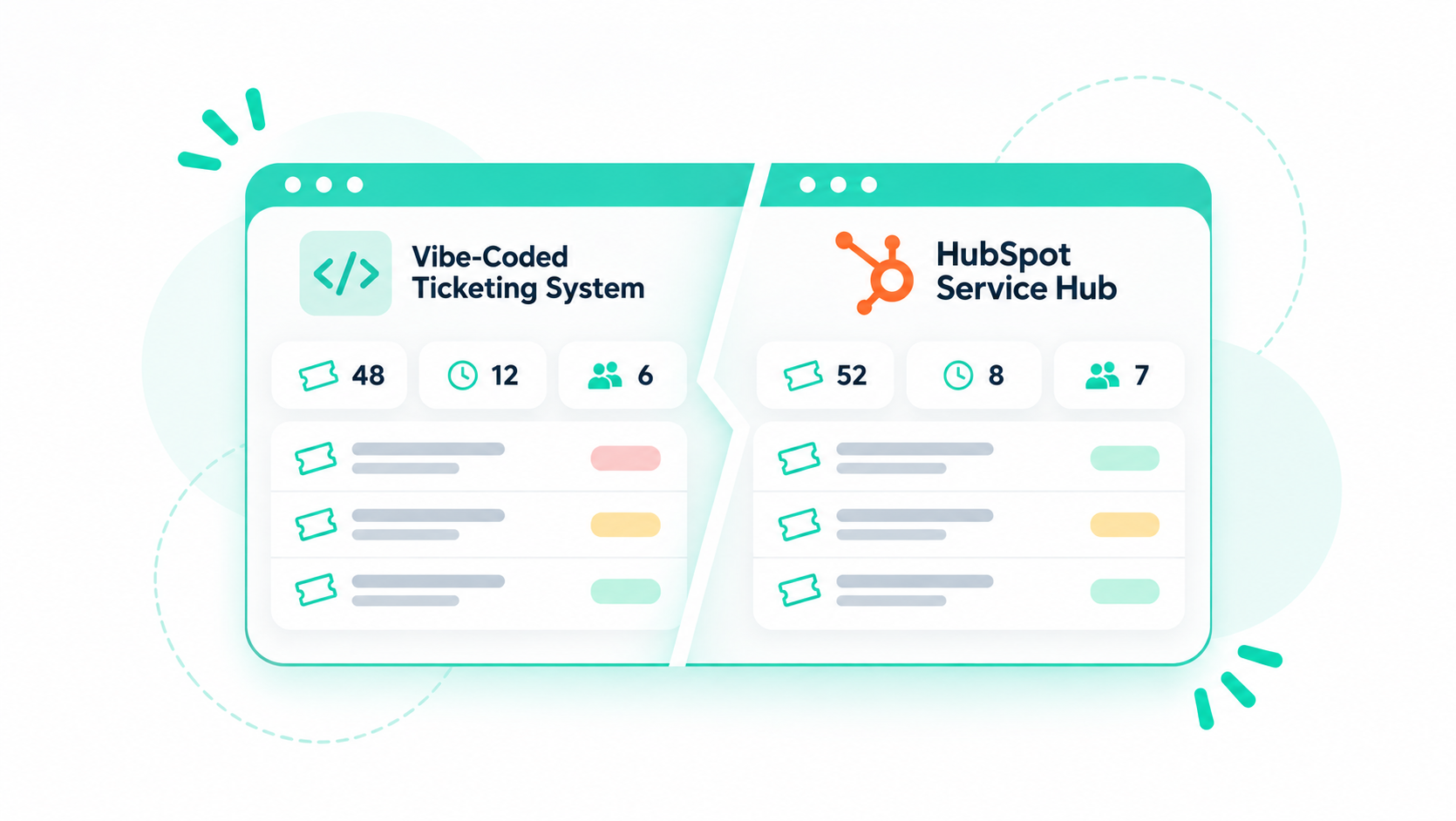
A custom ticketing system wins on fit and speed to a first version. HubSpot Service Hub wins on CRM context, upkeep, reporting, and security, because tickets live on the same records as your contacts, companies, and deals.

custom-ai-tool-vs-hubspot-service-hub

The help desk workspace in Service Hub Professional and Enterprise pulls chat, email, forms, calling, WhatsApp, and Facebook Messenger into one queue and creates tickets automatically. If your sales and marketing teams already work in HubSpot, the CRM link alone usually outweighs the fit advantage of a custom build.

When Does a Custom Support Tool Make Sense?

A custom support tool makes sense when it handles one narrow workflow that Service Hub can't model well, and when it reads and writes HubSpot data. A full replacement help desk is good for a team already running sales and marketing in HubSpot.

Good candidates for a custom build include the following.

  • Item-level repair or RMA tracking: Several physical items move through stages inside one customer request.
  • Internal intake forms: A request form for a single team with its own approval steps.
  • Field service checklists: Technicians log inspections on site and push results back to the ticket.
  • Custom agent views: A screen that pulls billing, usage, and ticket data together for one support role.

For support teams that mainly handle email and chat, start with Service Hub. Add custom-built features only when you need capabilities the platform doesn't offer.

How Do You Connect a Custom Support Tool to HubSpot?

Connect a custom support tool to HubSpot by writing tickets through the HubSpot API, associating each ticket with its CRM records, and showing your tool's data inside HubSpot with app cards. Plan the data model before any code gets written.

  1. Map the data model: Decide what each system owns, from tickets and contacts to orders and repair items, and set one source of truth for each field.
  2. Set up authentication: In-account integrations use Service Keys or an app built on the developer platform.
  3. Write tickets to HubSpot: Create and update tickets through the date-versioned APIs. The v1 to v3 APIs become unsupported in September 2027, so skip them for new builds.
  4. Associate every ticket: Use the Associations API to link each ticket to its contact, company, and deal.
  5. Show custom data with app cards: App cards can appear on CRM records, preview panels, and the help desk workspace, so agents never leave HubSpot.
  6. Test in a sandbox: Set sync rules and permissions before anything touches live tickets.
  7. Monitor and document: Log sync errors, write down who owns the code, and review the setup every quarter.

If you built a support view on HubSpot years ago, legacy CRM cards from older public apps reach their sunset on October 31, 2026, so any card built that way needs to move to app cards now. The same approach works for connecting billing, product, and support systems across a larger stack.

Interesting read: Where Does Customer Data Go in a Vibe-Coded Tool?

How Can Campaign Creators Help With Service Hub?

Most support problems we fix trace back to tickets that sit apart from the customer record. Our team sets up Service Hub pipelines, routing, and reporting around your CRM data, and we build custom objects or integrations for the workflows the platform can't cover out of the box.

If you're deciding between a homegrown tool and Service Hub, talk to our HubSpot Service Hub team before you build.

Recap

AI tools make a custom ticketing system fast to build, but speed isn't the deciding factor. A support tool is only as good as the customer context behind each ticket, and keeping that context in sync takes ongoing work.

For most HubSpot users, Service Hub plus targeted custom builds gives you the fit you want without a second system to maintain.

Frequently Asked Questions

Can Someone Without Coding Experience Build a Help Desk With AI?

Yes, a non-developer can build a basic help desk with AI app builders.

Who Maintains a Custom Ticketing System After Launch?

Your own team maintains it, usually the person who built it. Plan for a named owner, written documentation, and a backup person before launch, or support stalls the first time that builder is out.

Can You Move Tickets From a Custom Tool Into HubSpot Later?

Yes, tickets can be migrated into HubSpot later through the API or an import.

Is a Vibe-Coded Support Tool Safe for Customer Data?

It can be, but safety depends on who reviews the code. Access controls, data storage, and logging need a security review before real customer information goes in.

What Service Hub Tier Do You Need for the Help Desk Workspace?

You need Service Hub Professional or Enterprise for the help desk workspace and SLA goals. Free and Starter cover basic ticketing, but they don't include the full workspace.

HubSpot Workspace: How Teams Organize AI-Powered Work

HubSpot Workspace: How Teams Organize AI-Powered Work

Sales reps, customer success managers, and support agents spend much of their day jumping between inboxes, calendars, CRM records, and reports. Every...
Read More
How to Use HubSpot Work AI Agents in Your Projects

How to Use HubSpot Work AI Agents in Your Projects

HubSpot Work AI agents are automations you build inside a HubSpot Work project to handle recurring work on a trigger or a schedule. You can describe...

Read More
HubSpot Work Projects: Managing Business Work With CRM Context

HubSpot Work Projects: Managing Business Work With CRM Context

Your contacts, deals, and tickets already live in HubSpot. The work around them often doesn't. Onboarding checklists sit in spreadsheets, webinar...

Read More