Skip to the main content.

WEBSITE GROWTH & CONVERSION

• Web Design & Development


• SEO & AEO


• Conversion Rate Optimization


• Lead Generation Strategies


HUBSPOT SUPPORT & ENABLEMENT

• HubDesk


• HubSpot Training


• HubSpot Change Management


• HubSpot AI Agent Implementation

IMPLEMENTATION & INTEGRATIONS

• Technology Consulting


• HubSpot Migration Services


• HubSpot Integration Development


• HubSpot Integration Library


• HubSpot & Aircall Integration


• HubSpot & Trustpilot Integration


• Klaviyo Onboarding and Setup


• Custom AI Agent Development

FREE TOOLS & ASSESSMENTS

• AEO Auditor


• HubSpot Al Readiness Scorecard


• HubSpot Al Solutions Design


LEARN & WATCH

• View All Resources


• Ebooks & Templates


• Webinars On-Demand


• Expert Videos

8 min read

How Does HubSpot Work Use Your CRM Data?

How Does HubSpot Work Use Your CRM Data?

HubSpot Work uses CRM data in three ways. Its tables link rows to real CRM records, such as a client company and its key contacts. Its AI assistant pulls CRM data when it builds a project. Its agents read that data before they act, such as routing a request by deal properties. HubSpot Work is in public beta as of October 2026 and needs a Core, Sales, or Service seat.

If your client onboarding, deal desk requests, or campaign launches still run in spreadsheets, HubSpot Work is HubSpot's answer for bringing that work next to your customer records. It only pays off when those records are accurate. Before you move that work over, learn below how it connects to the CRM and how its agents use properties. Compare it to the projects object and tools like Asana, then clean up the data your agents will read.

Key Takeaways

  • HubSpot Work tables can hold CRM reference fields, so each row can point to real contacts, companies, and deals.
  • HubSpot Work agents read table and CRM data on a trigger or schedule, then update tables, create tasks, and notify owners.
  • AI actions inside a HubSpot Work agent use HubSpot Credits, while rule-based actions like updating a table value don't.
  • Projects in HubSpot Work are a separate feature from the CRM projects object, even though they share a name.
  • HubSpot's own data shows customers using AI with high-quality context resolve 6.8x more tickets and close 4.7x more deals than those with low-quality context.

Table of Contents

  1. How Does HubSpot Work Use CRM Data?
  2. What CRM Records Can You Connect to HubSpot Work?
  3. How Do HubSpot Work Agents Use CRM Properties?
  4. How Are HubSpot Work Projects Different From the Projects Object?
  5. How Is HubSpot Work Different From Asana or Monday?
  6. What Should You Clean Up in Your CRM Before Using HubSpot Work?
  7. Who Can Use HubSpot Work During the Beta?
  8. How Can Campaign Creators Help You Set Up HubSpot Work?
  9. Frequently Asked Questions

How Does HubSpot Work Use CRM Data?

professional-marketer-reviewing-hubspot-work-data-and-workflows

HubSpot Work uses CRM data in three places. Tables link rows to CRM records, the AI assistant pulls CRM data when it builds a project, and agents read CRM context before they act. That's the core difference from a blank project tool.

CRM Reference Fields in Tables

Tables are the main building block of every HubSpot Work project. In a table, you can link CRM records and add a CRM reference field as a column, next to status dropdowns, dates, and document links. One row in a client onboarding tracker can point to the actual client company and its key contacts.

The AI Assistant Builds From Your Data

You can set up a project from a custom prompt, a template prompt, or from scratch. The assistant drafts a plan, waits for your approval, then builds the tables, documents, forms, and agents. Documents can use a table as their source, so a playbook or status summary can reflect the live project data.

Forms feed one table each. That keeps intake requests in the same place as the CRM-linked rows they belong to.

Agents Act on CRM Context

HubSpot describes the payoff in two examples. When a deal closes, the onboarding tracker updates, and when a request comes in, an agent routes it using real deal properties. Work's automation reads the same records your sales and service teams update every day, so the quality of those records decides the quality of the output.

What CRM Records Can You Connect to HubSpot Work?

HubSpot Work connects to contacts, companies, and deals, along with their interaction history.

CRM Data

What HubSpot Documents

What to Check in Your Portal

Contacts

Named on the product page and used as CRM lookups in HubSpot's onboarding example

The contact properties that show in a reference column

Companies

Named on the product page and used as the client lookup in HubSpot's example

That company associations to contacts are complete

Deals

Named on the product page, and agents can route requests using deal properties

The deal properties an agent can read

Interaction history

Named on the product page as context Work starts from

How much history an agent uses in a summary or handoff doc

Tickets

Listed as CRM data that already lives in HubSpot, with no linking steps documented yet

If a ticket can be a reference column

Custom objects

Not documented for HubSpot Work

If your custom objects appear as reference options

Your AI settings also control what reaches Work. You can manage AI feature access and configure what data is shared in your AI settings. If a Super Admin has restricted data sharing for AI, agents in Work may see less, so check those settings before you judge the results.

How Do HubSpot Work Agents Use CRM Properties?

HubSpot Work agents read table data and CRM data on a trigger or schedule, then take actions you define. You may use one agent per goal. Its onboarding status agent example reviews new records right away and active onboardings every weekday at 9 AM. It uses table and CRM data to check owners, dates, services, and blockers, then creates subtasks, flags at-risk rows, and notifies the owner.

What HubSpot Work Agents Can Do

The documented actions run inside the Work project.

  • Update a table value, such as setting an onboarding to At Risk
  • Create standard subitems with due dates and assign them to the owner
  • Add internal notes and create follow-up tasks
  • Send email notifications to owners before deadlines slip
  • Keep running in the background on a schedule while your team is away

AI steps and rule-based steps are billed differently. AI workflow actions inside a Work agent use HubSpot Credits, while rule-based actions like updating a table value or sending an email notification don't. An agent that runs every weekday will use credits every weekday, so watch usage after launch.

How to Write a HubSpot Work Agent Prompt

  1. State one goal, such as keeping onboarding requests moving.
  2. Set the trigger and frequency, such as new records immediately and open records every weekday morning.
  3. Name the context the agent should check, such as the onboarding table plus deal and company properties.
  4. List what it must never change, such as client-submitted answers, completed rows, or deleted records.
  5. Define what it creates or edits, such as subtasks, status values, notes, and notifications.
  6. Tell it what to do when data is missing, such as flagging the row and not guessing an owner.

Step 6 is the easiest one to skip. HubSpot's own example tells the agent not to guess when an owner or required field is missing. Our recommendation is to keep that rule in every agent, because a blank owner field quietly breaks any routing logic. The same logic applies to Customer Agent, and our HubSpot Customer Agent setup guide walks through handoff rules in more depth.

How Are HubSpot Work Projects Different From the Projects Object?

HubSpot Work projects and the projects object are two separate features that share a name. HubSpot states plainly that projects in HubSpot Work aren't related to the projects object or Breeze Assistant projects. A Work project is a container for tables, documents, forms, and agents. The projects object is a CRM record type with pipelines, properties, and associations.


HubSpot Work Project

Projects Object

What it is

A container inside a Work workspace

A standard CRM object you activate in the data model

What it holds

Tables, documents, forms, and AI agents

Project records with properties, pipelines, and tags

CRM connection

Rows link to CRM records through reference fields

Records associate with tasks, deals, contacts, and other objects

Views

Table, board, and calendar views inside a table

Index views, including a Gantt view

Automation

Work agents built from a prompt

HubSpot workflows and pipeline rules

Reporting

Status summaries generated from table data

Single-object and custom reports

Setup

Super Admin enrolls in the public beta

Super Admin activates the object, available on all plans

Status

Public beta

Generally available

Use the projects object when you need reporting and pipeline stages tied to deals. HubSpot's own service delivery example creates a project record from a closed-won deal, so the deal pipeline stays focused on sales.

Use HubSpot Work when the job is coordinating a cross-team process with playbooks, intake forms, and an agent that chases owners.

Many teams will end up using both. A project record can track delivery for reporting, while a Work project holds the onboarding playbook, questionnaire, and status agent around it. Pick one place for each type of data so your team doesn't update the same status twice.

How Is HubSpot Work Different From Asana or Monday?

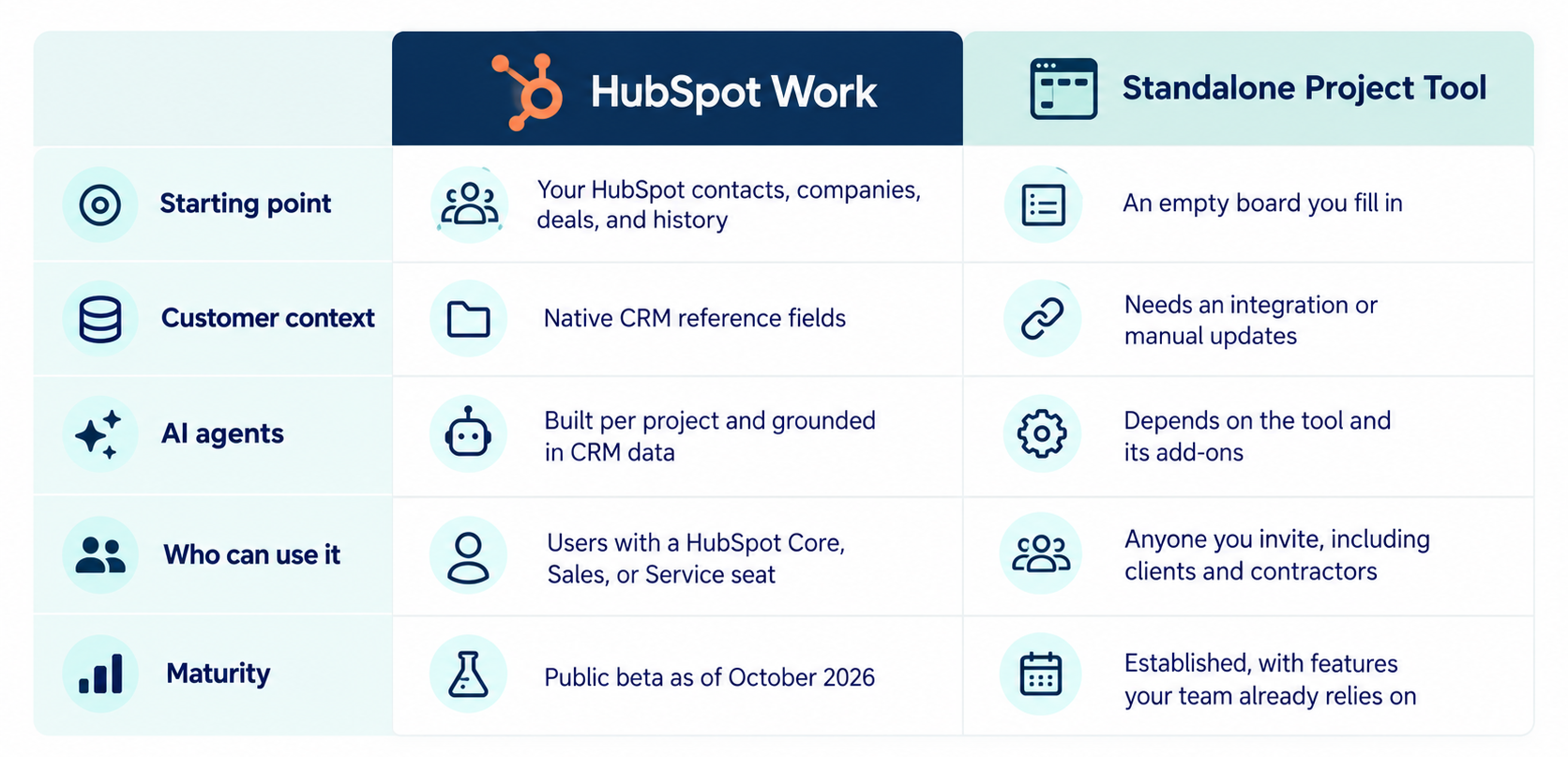
HubSpot Work starts with your CRM data, while standalone tools like Asana and Monday start blank and need an integration to see customer records.

hubspot-work-vs-other-project-management-tools

You don't have to pick a side today. HubSpot added Breeze Assistant connectors for tools like Asana, so your team can pull insights and coordinate across both while you test Work. Teams are already adopting HubSpot AI agents for 24/7 support, and Work brings that same agent model to internal operations.

What Should You Clean Up in Your CRM Before Using HubSpot Work?

Clean up duplicates, owners, associations, and the properties your agents will read before you turn on HubSpot Work. Every Work agent acts on CRM data, so gaps in that data turn into wrong routes, missed deadlines, and noisy alerts. HubSpot's own numbers show the gap, with customers using AI on high-quality context generating 5x more MQLs than those working from low-quality context.

  1. Merge duplicate contacts and companies. A row that links to the wrong duplicate sends the agent to a stale record. HubSpot's Fall 2026 update added merge previews and duplicate similarity scores to speed up this step.
  2. Assign an owner to every active record. Agents route work and send alerts by owner. A blank owner field means nobody gets the notification.
  3. Fix associations between contacts, companies, and deals. An onboarding row that links to a company with no associated deal can't pull the services the client bought.
  4. Standardize the properties agents will read. Swap free-text fields for dropdowns where you can, so "Closed Won," "closed-won," and "Won" don't count as three different values.
  5. Review Context Home. This new screen lets you view and manage what HubSpot knows about your business, so every team and agent starts from the same shared context.
  6. Run the data model health check. HubSpot now offers automated health checks with recommended fixes for your data model.

This is the same lesson we see across onboarding projects. One of the biggest factors that can delay onboarding is having data that isn't ready for migration or implementation. HubSpot Work raises the stakes, because an agent will act on bad data. If your portal needs a reset before you add agents, our HubSpot onboarding and implementation process includes data import, custom properties, and record associations.

Who Can Use HubSpot Work During the Beta?

Any user with an assigned Core, Sales, or Service seat can use HubSpot Work once a Super Admin opts the account into the public beta. HubSpot lists Work as available on Starter, Professional, and Enterprise tiers of Marketing Hub, Sales Hub, Service Hub, Data Hub, and Content Hub, plus Professional and Enterprise tiers of Smart CRM and Revenue Hub.

Turn On HubSpot Work

  1. Confirm the users who need Work have a Core, Sales, or Service seat.
  2. Have a Super Admin enroll the account in the HubSpot Work public beta from the product updates page.
  3. Turn on the setting that gives users access to generative AI tools and features in your AI settings.
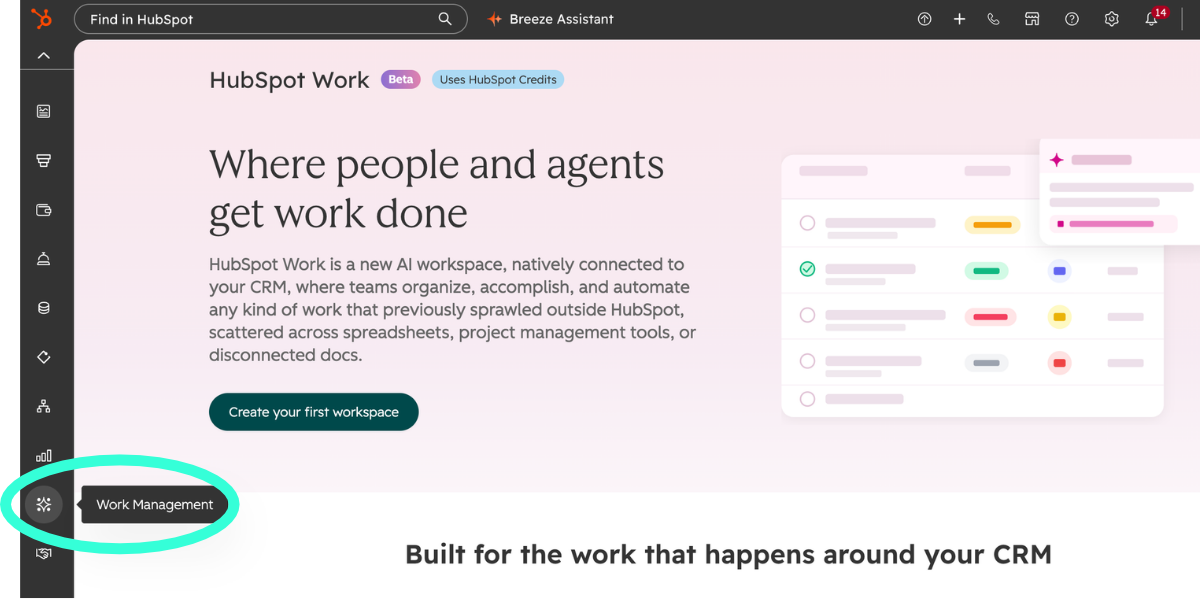
  4. Open Work Management from the main navigation and create your first workspace.


  1. Choose a custom prompt, a template prompt, or a blank workspace to build your first project.

Set Access Before You Invite the Team

Access flows down from the workspace by default. Workspace admins can change anything, and members can view and contribute. Inside a project, owners control the setup, contributors can create and edit assets including agents, and viewers can only look. You can also make a single project or asset invite-only.

Our recommendation is to keep agent creation with a small group of contributors at first. An agent can change table values and message owners on a schedule, so treat contributor access like workflow edit access.

How Can Campaign Creators Help You Set Up HubSpot Work?

Campaign Creators helps you prepare the CRM data, guardrails, and handoff rules that HubSpot Work agents depend on. The risk with Work isn't the setup wizard. It's an agent acting every morning on duplicate records, missing owners, and loose properties. Our team audits that data first, then scopes the use case, configures the agent, tests real scenarios, and trains the people who review its output.

We've been a HubSpot Elite Solutions Partner since 2022, and we follow the same discover, plan, prepare, configure, prove, and scale framework for every agent launch. If you're planning your first Work agent, see how our HubSpot AI agent implementation service works.

Recap

HubSpot Work links its tables to your contacts, companies, and deals, then lets its assistant and agents act on that CRM data. The feature is still a public beta, and it's separate from the projects object. Its results depend on the records underneath, so duplicates, missing owners, and loose properties should be fixed before any agent goes live.

Want to know if your portal is ready for agents that act on CRM data? Check how ready your portal is with the free HubSpot AI Readiness Scorecard.

Frequently Asked Questions

Can HubSpot Work Update CRM Records Directly?

HubSpot's current documentation shows Work agents updating table values, creating subtasks, and sending notifications, but it doesn't show them editing CRM properties. Test the agent actions available in your portal before you plan a process around CRM write-back.

Will HubSpot Work Replace the Projects Object?

HubSpot hasn't announced any plan to replace the projects object with HubSpot Work. Both features exist side by side today, so you can keep building on the projects object without worrying it will disappear.

Can You Export Data Out of HubSpot Work?

Yes, you can export HubSpot Work documents as Markdown files to share with people outside the workspace or outside HubSpot.


Can You Turn Off HubSpot Work for Specific Users?

Yes. An admin can switch the Work Management permission on or off for each user in the Users and Teams settings.

Does HubSpot Work Keep Version History?

Yes, HubSpot Work documents keep a line-by-line version history.

HubSpot Work Projects: Managing Business Work With CRM Context

HubSpot Work Projects: Managing Business Work With CRM Context

Your contacts, deals, and tickets already live in HubSpot. The work around them often doesn't. Onboarding checklists sit in spreadsheets, webinar...


Read More
What Is HubSpot Work and How AI Is Changing Where Business Work Happens

What Is HubSpot Work and How AI Is Changing Where Business Work Happens

HubSpot Work is HubSpot’s new AI-powered workspace for managing business work alongside your CRM. It connects everyday business workflows to the data...

Read More
HubSpot Work Documents: How AI and CRM Context Work Together

HubSpot Work Documents: How AI and CRM Context Work Together

A client handoff doc usually starts the same way. Someone opens a blank page, copies deal notes out of the CRM, pastes in contact names, and hopes...

Read More